country-info for czech republic

Hi,
thank you for latest feature for wireless /interface wireless info country-info
My device is hAP ac with firmware 6.43.11.
I have tried the command and it returned follwing:

[user@router] /interface wireless info> country-info                              
country: czech republic
  ranges: 2402-2482/b,g,gn20,gn40(20dBm)
          2417-2457/g-turbo(20dBm)
          5170-5250/a,an20,an40,ac20,ac40,ac80,ac160,ac80+80(23dBm)/passive,indoor
          5250-5330/a,an20,an40,ac20,ac40,ac80,ac160,ac80+80(20dBm)/dfs,passive
          5490-5710/a,an20,an40,ac20,ac40,ac80,ac160,ac80+80(27dBm)/dfs,passive
          5190-5310/a-turbo(20dBm)/dfs
          5180-5300/a-turbo(20dBm)/dfs
          5520-5680/a-turbo(27dBm)/dfs,passive
          5510-5670/a-turbo(27dBm)/dfs,passive
          902-927/b,g,g-turbo,gn20,gn40(30dBm)

Recently I was digging into spectrum legislation in Czech and I think it is little different than result.
I get the source from here, heading “Zařízení v pásmu 2,4 GHz a 5 GHz” (Devices in 2,4 GHz and 5 GHz band).
My understeanding is
a) 2,4 GHz
2400–2483,5 MHz, 100 mW e.i.r.p.
b) 5 GHz
5150–5350 MHz, 200 mW medium e.i.r.p. (inside building only)
5470–5725 MHz, 1 W medium e.i.r.p.
5725–5875 MHz, 25 mW low e.i.r.p.

I hope this helps and I would ask you if you can update it.

Also I have feature suggestion for Winbox:

  • Mark somehow indoor frequencies in Frequency dropdown(if Country is selected)
  • Default scan-list frequencies are bold, so I suggest to mark indoor frequencies:
    a) with house icon (5180 house_icon/picture/emoji)
    b) with “indoor only” text (5180 indoor only)
    c) with bold and red/orange text (5180)
  • Use any of these or your own idea, depending on fix complexity.

This is important when you are building longer wireless links. It may save money for penalties and communication with officials.

Thank you

The rules and regulations are taken from the chip manufacturer, so they are the same as all Wireless devices use. Even if we fix them, your laptop and other brand router use the above limits, so maybe your document is outdated, not our database.

There is already a setting “installation=any/indoor/outdoor” which will hide the inappropriate frequencies.

Even if we fix them, your laptop and other brand router use the above limits, > so maybe your document is outdated> , not our database.

Sorry, but this answer is not helpful at all.

The document mentioned is an official regulation published by the Czech Telecommunication Office, i.e. the regulator agency in the Czech Republic.

They publish information also in English: https://www.ctu.eu/radio-frequencies-utilization

Operation is possible in the 5 GHz band according to regulation VO-R/12/09.2010-12 and VO-R/10/11.2016-13.:
in the 5.15–5.35 GHz band (only inside buildings),
in the 5.470–5.725 GHz band (IEEE 802.11a standard)
in the 5.725–5.875 GHz band with low power (25 mW e.i.r.p.).

So it seems that Mikrotik database deprives us of 5.725–5.875 GHz part of the spectrum usable in Czech Republic. :frowning:

Do you know how much is 25mW EIRP? That’s 13.98 dBm and substract all antenna gain, which is around 2 dBi for built-in omni antenna or up to 20 dBi (or more) for dish antennae. While I agree that Mikrotik should allow use of all available spectrum allowed by country regulations … but, how many will actually use these low-power frequencies?
Before anybody shouts … if one doesn’t care about EIRP limitations, then they are welcome to use superchannel or whatever they deem fit, just don’t bitch around about low power … because it’s probably still too high as almost nobody enters correct antenna gain …

Our devices are not certfied to use 5.725–5.875 GHz in Czech Republic. The fact that your country allows to use it, doesn’t mean the hardware is capable or is certified.

I mainly wanted to point that as indroor is marked only 5170-5250, but it should be 5150–5350.

Anyway the best feature would be to indicate indoor/outdoor frequencies, because there are penalties when you use indoor frequency for 1 Km hop.

Of course the responsibility is on the admin to configure it correctly, but it would be good to make life easier :wink:

Hi,
apologies for reopening year old thread, but IMHO it makes sense to have the information in one thread.

Yesterday I stuck several hours fixing something what wasn’t broken.
I have configured CAPsMAN on my friends HapAClite and experienced quite strange behavior at least for me, because it have never occurred to me before.

/caps-man configuration
add name="CAPconfig_AP" mode=ap ssid="AP" hide-ssid=no country="czech republic" \
 installation=indoor security=guests-SecConf datapath=guests-DataPathConf
/

The 2.4 GHz was always configured correctly and I could use it right after the router booted up.
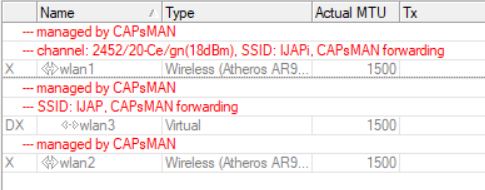
CapsmanConfiguredWLAN5GHznot configured.JPG
But the 5 GHz interface was up just occasionally.


Today I have got the idea to add the CAPs logging and was surprised with following lines. :slight_smile:
CapsmanConfiguredWLANpickingWrongChannel.JPG
Yesterday I was always quick enough to change some config and reboot before it finished the DFS procedure.
And only 2 times I saw the router to pick a channel, where the scan is not 10 minutes long.

I have tried to catch up and read something about the DFS, but I have still some questions.
I could also find over an year old thread discussing the indoor/outdoor option from which I have understood, that router will filter out the channels based on the selection.
Why is than the router picking automatically a channel which is supposed to be used for outdoor?
In most of the cases the router chose the 5640 channel. And guess what? The two czech meteo radars are operating on 5630 MHz and 5645 MHz.
If I am wrong and the 5640 can be used also for indoor, than why the router isn’t always starting on the indoor “only” channels or some other channel outside of 5600-5650MHz, where it could do the less intervening 1 minute CAC phase scan?

thanks for clarifying it

the router is running both RouterOS and routerboard FW on 6.46.4

And I have one idea which might help with the transparency.
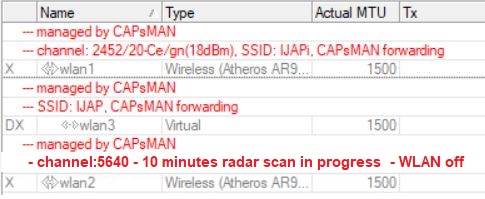
What about showing the information about a running CAC scan in the WiFi interfaces table?
In a way similar to my mspaint artwork :slight_smile:
CapsmanConfiguredWLAN_scan in progress.jpg
take care!

@normis
any chance you or someone from your company could find time to answer my questions?