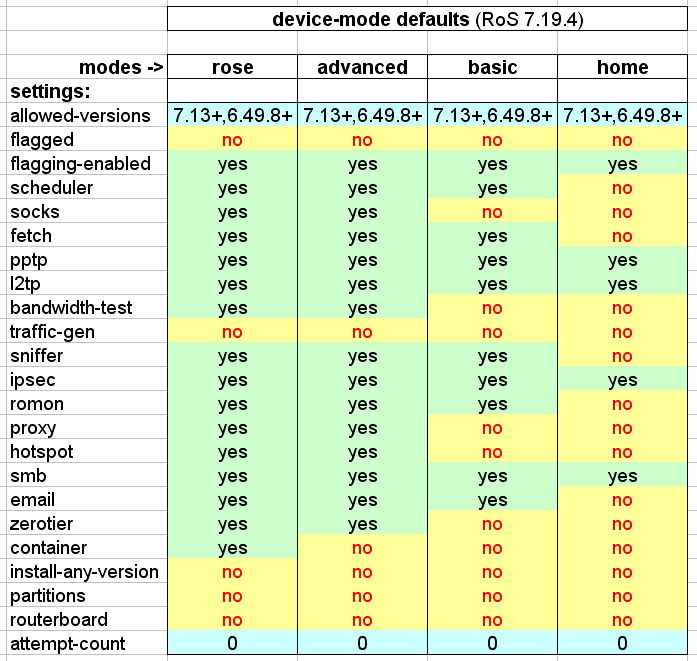
To avoid any hassle, everyone sets everything to unlocked, just in case, to avoid having to go there in person or spend money on gadgets to enable what they need.
So device-mode does worse than it should.
Same thing with protected-routerboot, it does more harm than good...
I had also thought about using a small servo or actuator directly on the button. using the “usr led” is a great idea and keeps it somewhat simple. But when it comes to sorting our something that in my honest opinon is not only a really bad idea, but overly complex then it requires an overly complex solution.
Actually, its almost worthy of a competition, Who can create the most overly complex, outlandish but reliable reset option for this purpose.
LOL. Double points for a software hack to trick device-mode. Not my cup-of-tea, but imagine with the less restricted container modes in newer RouterOS, there might be some way to "trick" RouterOS to think a hard reboot happened. Also IDK but imagine if RouterOS panics, imagine that also triggers device-mode's check, so any DoS might trigger it too.
Only for the record, the good thing of using usr led Is that the whole stuff needs not any modification on the "target" device, you only need to apply externally a photo sensor and everything Is opto-isolated.
As well the servo Is externally applied.
Now there Is an issue as the user led blinks during boot (or re-boot).
Not wanting to use what probably would be commonly used today (an Arduino or ESP32 or other microprocessor), I used old school technology, NE555's.
In the current test circuit (on protoboard) I have 3 of them, the first as a delay switch (the usr led needs to be lighted continuously for a few seconds before triggering), the second as a timer to command the third which acts as pwm generatore and actually commands the servo.
The whole stuff can very probably be simplified and made easily reproducible [1] using pre-made modules, I have found el-cheapo photo electric ones and something called a "trawler" to command the servo, but I am struggling to find something suitable as the delay switch.
[1] at the most I could do a more robust than protoboard "dead bug" circuit, I can only Imagine how kids today would consider such an approach
something real cheap like a Attiny85 or even an attiny1616 would work a treat, If you wanted to get real funky skip the LED and wire it in to the console port, send a specific command to it and you are in business.
If you used the LED then for an added bit of security make it respond to a pulse train versus just a single pulse.
Yep, but (again in production) I would use a pre-made board and solution, I doubt that prices of things like the one I linked to before can be beaten, right now 15-20 Euro, including shipping.
The (amateur) idea of the usr led remains good because of the inherent (opto-)isolation of grounds between the devices, likely lost with a console or ethernet connection.
very disruptive, we use tool/email to send SSL attachments of mt ROS export and .rsc backup files to a vpn (only) reachable email server. now this does not work, and we cant send a person to every site to press a button , In coordination with a second person at a remote site running the command within five minutes. (on new mts being deployed).
i was shocked at the number of features that are now disabled by default when i ran system/device-mode/print. I understand a few of the restrictions, but why not put sane limits on the services, (and then require a button press to bypass the limits) instead of fully turning them off.
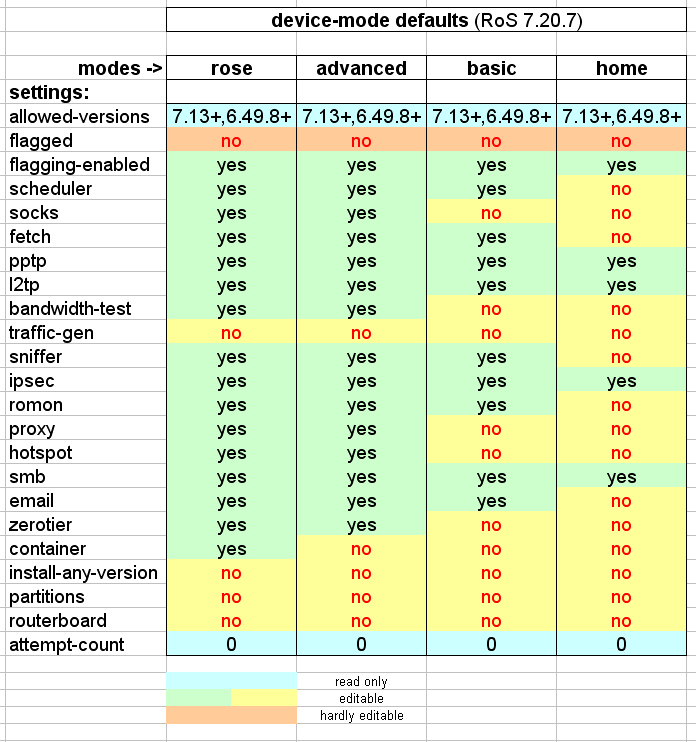
Just altered some second before your post for align to 7.20.7 (no change from 7.19) the post to remove "flagged" and "attempt-count" that are out of context, and moved allowed-version under "install-any-version"...
I can make them another colour, but removing them from the list would make a difference between what the user sees when issueing /system/device-mode/print Device-mode - RouterOS - MikroTik Documentation
and the coloured table.
@Amm0
So one colour (lght blue) for read-only items.
Two colours (light green and light yellow) for settable items.
Another colour (light orange) for settable (but hard to set) item(s)?
for example attempt-count is NOT settable, but indicates the number of attempts made, so it is out of context from the list of what can be enabled or disabled...
If you want me to picky, group the "special ones" together so you can see the list of actual device-mode more clear.
If we're follow from doc's table and including the read-only. There is also @rextended "special", activation-timeout=5m, and we know does have a default, so if we're showing all attributes (with styling), might as well actually show all attributes.
A typical user (not so typical, one of the few users that actually reads the docs) would run in terminal:
/system/device-mode/print
and the table should (IMHO) reflect exactly that output, everything else would only (IMNSHO) confuse the matter.
I was more commenting on @jaclaz graphics, than the print.
Only thought was as a "device-mode quick reference", having a few extra line highlighted in wierd colors isn't going to hurt. And gives someone less familiar a clue they might want to look at the doc if they didn't understand the colors