sorry, almost all
Do you know what CGNAT is ?
And to determine what you can do to see if that is the what causes the problem.
Are exactly 1000 tcp port, less than 2%. For almost, at least I expect 90%...
Nmap for default scan exactly 1000 "random" ports?
The #9 is still valid, till now...
No, I dont know what is CGNAT. I am not very familiar with networking.
Agree.
I took another IP range from provider and did same nmap scan. And result was same - a lot of ports shows as opened.
As well, I shut down my router, and nmap still showed ports are opened.
Even if MNO doesn’t use CGNAT (which is becoming a rarity), it still might run a FW before their customers. So unless a torch session (as suggested by @ammo) shows the probe packets from nmap to actually arrive at your router, it’s certain that your MNO/ISP does some firewalling.
Does WAN IP address, shown on your RB, by any chance fall into range between 100.64.0.0 and 100.127.255.255? This is CGNAT address range and is not universally routable.
Here are nmap towards my router and log from router:
nmap x.x.x.x -p 1-5
Starting Nmap 7.80 ( https://nmap.org ) at 2025-04-23 20:42 EEST
Nmap scan report for x.x.x.x
Host is up (0.0017s latency).

PORT  STATE SERVICE
1/tcp open  tcpmux
2/tcp open  compressnet
3/tcp open  compressnet
4/tcp open  unknown
5/tcp open  rje
2025-04-23 20:42:50 firewall,info fw-2-drop-invalid input: in:lte1 out:(unknown 0), connection-state:invalid src-mac cx.x.x.x, proto TCP (ACK,RST), 7x.x.x.x:45368->x.x.x.x:80, len 40
2025-04-23 20:42:50 firewall,info fw-2-drop-invalid input: in:lte1 out:(unknown 0), connection-state:invalid src-mac cx.x.x.x, proto TCP (ACK,RST), 7x.x.x.x:59998->x.x.x.x:443, len 40
2025-04-23 20:42:50 firewall,info fw-2-drop-invalid input: in:lte1 out:(unknown 0), connection-state:invalid src-mac cx.x.x.x, proto TCP (ACK,RST), 7x.x.x.x:35702->x.x.x.x:4, len 40
2025-04-23 20:42:50 firewall,info fw-2-drop-invalid input: in:lte1 out:(unknown 0), connection-state:invalid src-mac cx.x.x.x, proto TCP (ACK,RST), 7x.x.x.x:40852->x.x.x.x:5, len 40
2025-04-23 20:42:50 firewall,info fw-2-drop-invalid input: in:lte1 out:(unknown 0), connection-state:invalid src-mac cx.x.x.x, proto TCP (ACK,RST), 7x.x.x.x:47542->x.x.x.x:1, len 40
2025-04-23 20:42:50 firewall,info fw-2-drop-invalid input: in:lte1 out:(unknown 0), connection-state:invalid src-mac cx.x.x.x, proto TCP (ACK,RST), 7x.x.x.x:34236->x.x.x.x:3, len 40
2025-04-23 20:42:50 firewall,info fw-2-drop-invalid input: in:lte1 out:(unknown 0), connection-state:invalid src-mac cx.x.x.x, proto TCP (ACK,RST), 7x.x.x.x:45980->x.x.x.x:2, len 40
… thanks …
sorry for bothering, removed.
It is public information, not sure why you think I am delinquent.
I wrote “Maybe”, not that you are, you just appeared on the forum.
I have been here longer, and maybe I really am…  …

No, it doesnt.
I appeared in this forum only because this is first time I obtained Mikrotik router. Believe me, its configuration differs much comparing to consumer LTE routers e.g. Huawei.
Look at your first filter rule (IP > Firewall > Filter). I’m not sure why you’re accepting “untracked” in the first rule (i.e. connection-state=established,related**,untracked**)… that is actually all traffic if it’s first rule, I’m not sure why that is there…
This is default rule. I dont even know what established,related,untracked mean.
Is this an LMT-provided Chateau? Those do have some different default configuration, so if you haven’t changed this stuff… That means it comes from LMT, and since LMT is likely running a CGNAT, they may be opting out of the Mikrotik firewall in their defaults. IDK but the LMT do have some guides on help.mikroitk.com:
https://help.mikrotik.com/docs/spaces/RKB/pages/36470790/LMT+LTE18+LV
But you’re right the default includes “untracked” — that is not in the normal default configuration, but LMT models seem to use that…
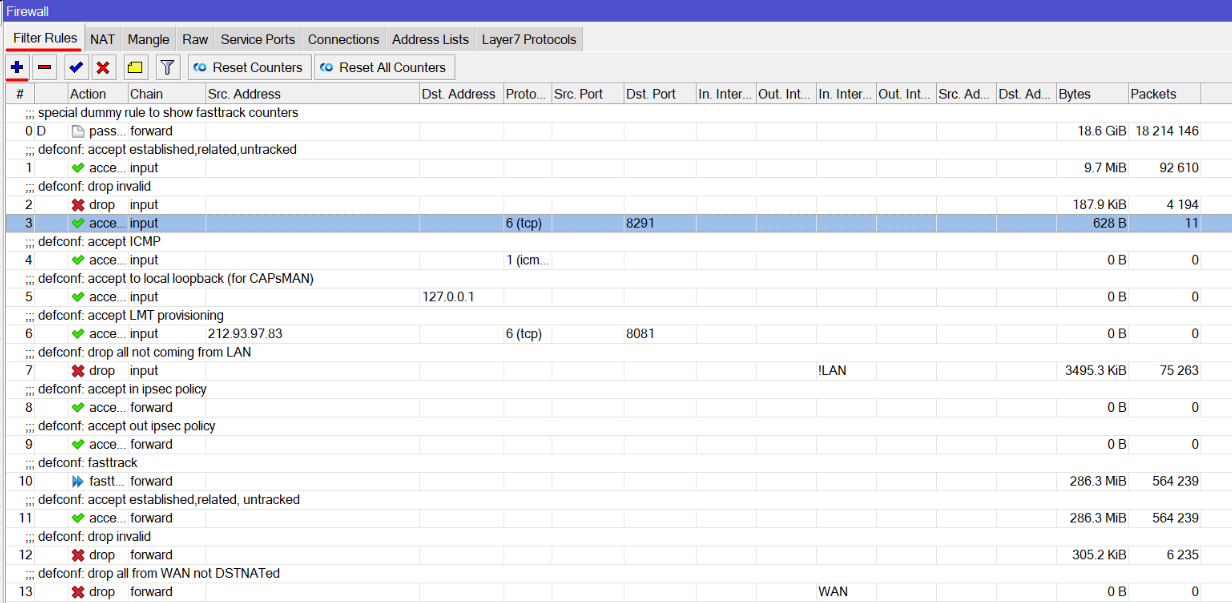
IMO that looks like a bug in their defaults, but there is no view of the /ip/firewall/raw. Perhaps LMT blocks on the internet side (uses CGNAT and/or employs other tricks) is why they allow untracked traffic.
Perhaps you can do an “:export file=config.rsc” at terminal, and use Files to download to PC, then cut-and-paste the config it’s using here… Since the default are not the usual default in this case…
yes, this is LMT provided one
It is in normal default configuration, just checked my hAP ac2 running 7.18.2. “untracked” is accepted both for chain=input and chain=forward (the later by the non-fasttracked rule) and for both IPv4 and IPv6.
This doesn’t have any effect unless raw filters disable connection tracking for certain packets (and in normal default configuration there are no raw filters).
Please see below:
# 2025-04-23 22:13:52 by RouterOS 7.18.2
# software id = Vxxx
#
# model = RBD53G-5HacD2HnD&EG18-EA
# serial number = Hxxx
/interface bridge
add admin-mac=Dx.x.x.x auto-mac=no comment=defconf name=bridge
/interface wireless
set [ find default-name=wlan1 ] band=2ghz-b/g/n channel-width=20/40mhz-XX \
    country=latvia disabled=no distance=indoors frequency=auto installation=\
    indoor mode=ap-bridge name=wlan1-2GHz ssid=x.x.x.x11_3G wireless-protocol=\
    802.11 wps-mode=disabled
set [ find default-name=wlan2 ] band=5ghz-a/n/ac channel-width=\
    20/40/80mhz-XXXX country=latvia disabled=no distance=indoors frequency=\
    auto installation=indoor mode=ap-bridge name=wlan2-5GHz \
    skip-dfs-channels=10min-cac ssid=x.x.x.x11_5G wireless-protocol=802.11 \
    wps-mode=disabled
/interface list
add comment=defconf name=WAN
add comment=defconf name=LAN
/interface lte apn
set [ find default=yes ] apn=internet.lmt.lv ipv6-interface=bridge name=\
    "LMT Internet" use-network-apn=no
add apn=static1.lmt.lv ip-type=ipv4 name=LMT-static1.lmt.lv
add apn=static2.lmt.lv ip-type=ipv4 name=LMT-static2.lmt.lv
add apn=internet1.lmt.lv ip-type=ipv4 name=LMT-internet1.lmt.lv
add apn=static61.lmt.lv ipv6-interface=bridge name=LMT-static61.lmt.lv
add apn=static62.lmt.lv ipv6-interface=bridge name=LMT-static62.lmt.lv
/interface lte
set [ find default-name=lte1 ] allow-roaming=no apn-profiles=\
    LMT-static1.lmt.lv band=""
/interface wireless security-profiles
set [ find default=yes ] authentication-types=wpa-psk,wpa2-psk mode=\
    dynamic-keys supplicant-identity=LMT
/ip pool
add name=dhcp ranges=192.168.8.200-192.168.8.254
/ip dhcp-server
add address-pool=dhcp interface=bridge lease-time=3h name=defconf
/snmp community
set [ find default=yes ] disabled=yes
add addresses=::/0 name="{\$public}" security=private
/disk
set usb1 media-interface=*2000000 media-sharing=yes
/interface bridge port
add bridge=bridge comment=defconf interface=ether1
add bridge=bridge comment=defconf interface=ether2
add bridge=bridge comment=defconf interface=ether3
add bridge=bridge comment=defconf interface=ether4
add bridge=bridge comment=defconf interface=ether5
add bridge=bridge comment=defconf interface=wlan1-2GHz
add bridge=bridge comment=defconf interface=wlan2-5GHz
add bridge=bridge comment=defconf interface=*1
/ip neighbor discovery-settings
set discover-interface-list=LAN
/ipv6 settings
set disable-ipv6=yes
/interface list member
add comment=defconf interface=bridge list=LAN
add comment=defconf interface=lte1 list=WAN
/interface wireless access-list
add comment=x.x.x.x interface=wlan2-5GHz mac-address=Dx.x.x.x
add comment="mx.x.x. Ax.x.x.x" interface=wlan2-5GHz \
    mac-address=Ax.x.x.x
add comment="zx.x.x.x 7x.x.x.x" interface=wlan2-5GHz \
    mac-address=7x.x.x.x
/ip address
add address=192.168.8.1/24 comment=defconf interface=bridge network=\
    192.168.8.0
/ip arp
add address=192.168.8.251 comment=zx.x.x.x interface=bridge \
    mac-address=7x.x.x.x
add address=192.168.8.250 comment=x.x.x.x interface=bridge mac-address=\
    Dx.x.x.x
add address=192.168.8.247 comment=mx.x.x.x interface=bridge mac-address=\
    Ax.x.x.x
add address=192.168.8.246 comment=apple-watch-se2 interface=bridge \
    mac-address=DE:86:1F:5D:C6:62
/ip dhcp-server network
add address=192.168.8.0/24 comment=defconf gateway=192.168.8.1
/ip dns
set allow-remote-requests=yes servers=x.x.x.x4.14,x.x.x.x5.15
/ip dns static
add address=192.168.8.1 comment=defconf name=router.lan type=A
/ip firewall filter
add action=accept chain=input comment=\
    "defconf: accept established,related,untracked" connection-state=\
    established,related,untracked log=yes log-prefix=fw-1-accept-defconf
add action=drop chain=input comment="defconf: drop invalid" connection-state=\
    invalid log=yes log-prefix=fw-2-drop-invalid
add action=drop chain=input comment="defconf: accept ICMP" log=yes \
    log-prefix=fw-3-drop-icmp protocol=icmp
add action=accept chain=input comment=\
    "defconf: accept to local loopback (for CAPsMAN)" dst-address=127.0.0.1 \
    log=yes log-prefix=fw-4-accept-loopback
add action=accept chain=input comment="defconf: accept LMT provisioning" \
    dst-port=8081 log=yes log-prefix=fw-5-lmt-provisioning protocol=tcp \
    src-address=212.93.97.83
add action=drop chain=input comment="defconf: drop all not coming from LAN" \
    in-interface-list=!LAN log=yes log-prefix=fw-6-drop-not-from-lan
add action=accept chain=forward comment="defconf: accept in ipsec policy" \
    ipsec-policy=in,ipsec log-prefix=fw-7-ipsec-in
add action=accept chain=forward comment="defconf: accept out ipsec policy" \
    ipsec-policy=out,ipsec log=yes log-prefix=fw-8-ipsec-out
add action=fasttrack-connection chain=forward comment="defconf: fasttrack" \
    connection-state=established,related hw-offload=yes
add action=accept chain=forward comment=\
    "defconf: accept established,related, untracked" connection-state=\
    established,related,untracked
add action=drop chain=forward comment="defconf: drop invalid" \
    connection-state=invalid log=yes log-prefix=fw-11-drop-invalid
add action=drop chain=forward comment=\
    "defconf: drop all from WAN not DSTNATed" connection-nat-state=!dstnat \
    connection-state=new in-interface-list=WAN log=yes log-prefix=\
    fw-12-drop-not-dstnat
/ip firewall nat
add action=masquerade chain=srcnat comment="defconf: masquerade" \
    ipsec-policy=out,none out-interface-list=WAN
add action=dst-nat chain=dstnat comment="zabbix-agent" \
    disabled=yes dst-port=10650 in-interface-list=WAN log=yes log-prefix=\
    nat-zbx-agent-zabbix-win-hp protocol=tcp src-address=x.x.x.x \
    to-addresses=192.168.8.251 to-ports=10050
/ip hotspot profile
set [ find default=yes ] html-directory=hotspot
/ip service
set www-ssl certificate=router.lan disabled=no
/ipv6 firewall address-list
add address=::/128 comment="defconf: unspecified address" list=bad_ipv6
add address=::1/128 comment="defconf: lo" list=bad_ipv6
add address=fec0::/10 comment="defconf: site-local" list=bad_ipv6
add address=::ffff:0.0.0.0/96 comment="defconf: ipv4-mapped" list=bad_ipv6
add address=::/96 comment="defconf: ipv4 compat" list=bad_ipv6
add address=100::/64 comment="defconf: discard only " list=bad_ipv6
add address=2001:db8::/32 comment="defconf: documentation" list=bad_ipv6
add address=2001:10::/28 comment="defconf: ORCHID" list=bad_ipv6
add address=3ffe::/16 comment="defconf: 6bone" list=bad_ipv6
add address=::224.0.0.0/100 comment="defconf: other" list=bad_ipv6
add address=::127.0.0.0/104 comment="defconf: other" list=bad_ipv6
add address=::/104 comment="defconf: other" list=bad_ipv6
add address=::255.0.0.0/104 comment="defconf: other" list=bad_ipv6
/ipv6 firewall filter
add action=accept chain=input comment=\
    "defconf: accept established,related,untracked" connection-state=\
    established,related,untracked
add action=drop chain=input comment="defconf: drop invalid" connection-state=\
    invalid
add action=accept chain=input comment="defconf: accept ICMPv6" protocol=\
    icmpv6
add action=accept chain=input comment="defconf: accept UDP traceroute" port=\
    33434-33534 protocol=udp
add action=accept chain=input comment=\
    "defconf: accept DHCPv6-Client prefix delegation." dst-port=546 protocol=\
    udp src-address=fe80::/10
add action=accept chain=input comment="defconf: accept IKE" dst-port=500,4500 \
    protocol=udp
add action=accept chain=input comment="defconf: accept ipsec AH" protocol=\
    ipsec-ah
add action=accept chain=input comment="defconf: accept ipsec ESP" protocol=\
    ipsec-esp
add action=accept chain=input comment=\
    "defconf: accept all that matches ipsec policy" ipsec-policy=in,ipsec
add action=drop chain=input comment=\
    "defconf: drop everything else not coming from LAN" in-interface-list=\
    !LAN
add action=accept chain=forward comment=\
    "defconf: accept established,related,untracked" connection-state=\
    established,related,untracked
add action=drop chain=forward comment="defconf: drop invalid" \
    connection-state=invalid
add action=drop chain=forward comment=\
    "defconf: drop packets with bad src ipv6" src-address-list=bad_ipv6
add action=drop chain=forward comment=\
    "defconf: drop packets with bad dst ipv6" dst-address-list=bad_ipv6
add action=drop chain=forward comment="defconf: rfc4890 drop hop-limit=1" \
    hop-limit=equal:1 protocol=icmpv6
add action=accept chain=forward comment="defconf: accept ICMPv6" protocol=\
    icmpv6
add action=accept chain=forward comment="defconf: accept HIP" protocol=139
add action=accept chain=forward comment="defconf: accept IKE" dst-port=\
    500,4500 protocol=udp
add action=accept chain=forward comment="defconf: accept ipsec AH" protocol=\
    ipsec-ah
add action=accept chain=forward comment="defconf: accept ipsec ESP" protocol=\
    ipsec-esp
add action=accept chain=forward comment=\
    "defconf: accept all that matches ipsec policy" ipsec-policy=in,ipsec
add action=drop chain=forward comment=\
    "defconf: drop everything else not coming from LAN" in-interface-list=\
    !LAN
/snmp
set trap-community="{\$public}"
/system clock
set time-zone-name=Europe/Riga
/system identity
set name="LMT LTE18"
/system note
set show-at-login=no
/system routerboard reset-button
set enabled=yes hold-time=5s..10s on-event=reset-configuration
/system routerboard settings
set auto-upgrade=yes
/system script
add dont-require-permissions=yes name=reset-configuration owner=admin policy=\
    ftp,reboot,read,write,policy,test,password,sniff,sensitive,romon source=\
    "/system reset-configuration"
/tool mac-server
set allowed-interface-list=LAN
/tool mac-server mac-winbox
set allowed-interface-list=LAN
/tr069-client
set acs-url=https://xxx check-certificate=no \
    connection-request-port=xxx connection-request-username=xxx \
    enabled=yes periodic-inform-interval=12h username=xxx