Thanks! Have been tried all sorts of combinations. I am unable to get “Secure DNS” to green.
Will be following this thread to see if there are any with the same situation.
And will be try to configure on brand new RB4011.
Is your client really using your router as DNS?
dns,error DoH server connection error: remote disconnected while in HTTP exchange
any solution ?
Yes.
You need the certificate, check by type: /certificate print detail
Flags: K - private-key, L - crl, C - smart-card-key, A - authority, I - issued, R - revoked, E - expired, T - trusted
 0       T name="DigiCertGlobalRootCA.crt.pem_0" issuer=C=US,O=DigiCert Inc,OU=www.digicert.com,CN=DigiCert Global Root CA digest-algorithm=sha1
           key-type=rsa country="US" organization="DigiCert Inc" unit="www.digicert.com" common-name="DigiCert Global Root CA" key-size=2048
           subject-alt-name="" days-valid=9131 trusted=yes key-usage=digital-signature,key-cert-sign,crl-sign
           serial-number="083BE056904246B1A1756AC95991C74A" fingerprint="4348a0e9444c78cb265e058d5e8944b4d84f9662bd26db257f8934a443c70161"
           akid=03de503556d14cbb66f0a3e21b1bc397b23dd155 skid=03de503556d14cbb66f0a3e21b1bc397b23dd155 invalid-before=nov/10/2006 02:00:00
           invalid-after=nov/10/2031 02:00:00 expires-after=595w3d18h49m37s
Then set the DNS on your router to:
/ip dns set servers="" use-doh-server=https://1.1.1.1/dns-query verify-doh-cert=yes
DCHP should point DNS to your router. So on your PC ipconfig /all
DNS Servers . . . . . . . . . . . : 192.168.88.1
None of my Apple gear works when DoH is enabled … All apple gear is wireless … all windows gear works with DoH.
I have not determined why the Apple Gear is not working with DoH … will do that on another day …
Maybe that apple use a fixed IP like Chrome cast use 8.8.8.8 and not the DNS it gets from the DHCP.
This can be fixed by redirect all request to port 53 to your DNS server. Then Chrome Cast and other stupid devices that does not follow normal regulation will still work.
so ?
/ip firewall nat
add chain=dstnat action=dst-nat to-addresses=192.168.88.1 to-ports=53 protocol=tcp dst-port=53
add chain=dstnat action=dst-nat to-addresses=192.168.88.1 to-ports=53 protocol=udp dst-port=53
put in front of all the rules ?
192.168.88.1 is ip of router mikrotik
sometimes after a few hours i got this log " DoH server conncetion error iddle timeout" any clue for this ?
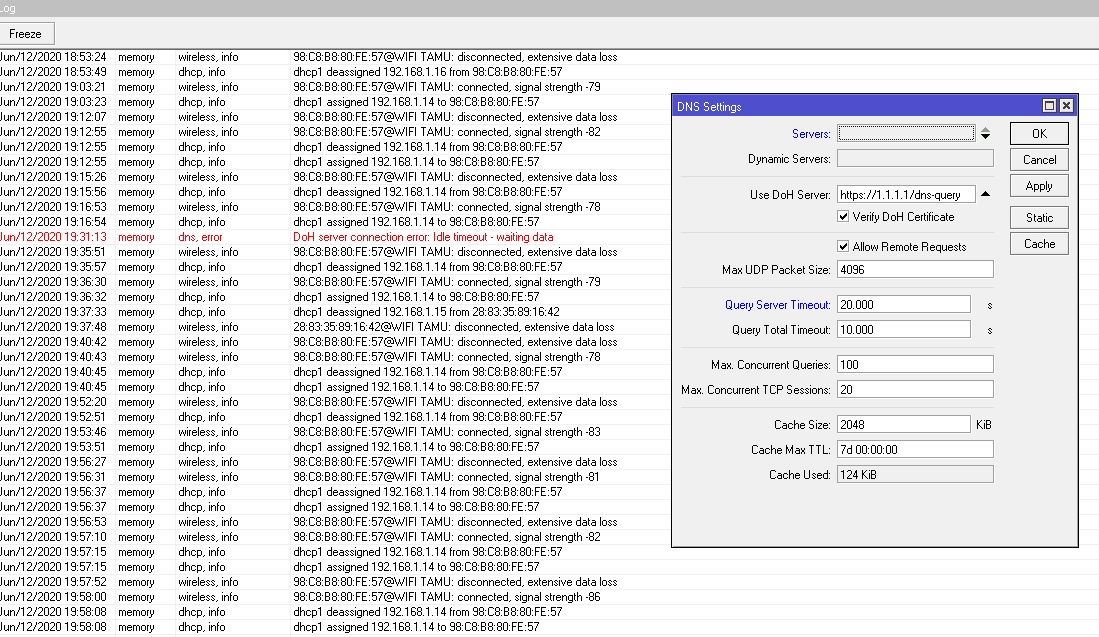
I don’t know but have a look at the first posting in this thread.
Is it normal to have lots of RAM consumption by using this?
any clue for this “DoH Server connection error : ssl handshake timeout” ?
Hi all,
Does anyone know the URL to download the certificate for opendns? I am getting dns resolution errors.
I tried
https://support.opendns.com/hc/en-us/articles/360038463251-Querying-OpenDNS-using-DoH-for-developers-
No go though the certificate was imported successfully.
slimprize.
that’s what I do . in the PEM download section.

You click.
@BlackFate
Leave DoH for the browsers is 100% on the mark !
@Jotne
All my Apple devices use DHCP and get their DNS from ‘either’ based on appropriateness. Safari just hangs. Chrome is fine.
I’ll just forget DoH on the Router and use DoH enabled on the Chromium Browser – works great.
PL] frank333, your screen shot is not clear. Could you please describe the procedure from the commandline interface? Do all certificates need to be in pem format? I seemed to have imported the one correctly from opendns.
[pranav1@ConShield] /certificate> print
Flags: K - private-key, L - crl, C - smart-card-key, A - authority,
I - issued, R - revoked, E - expired, T - trusted
0 T Cis.. Cis.. 203..
Pranav
Not all internet traffic is from the browser. Not all devices have browsers.
Then why is TCP port 443 used and not a specific port for this kind of traffic? DoT is using TCP/853 and can be blocked without having to bring long lists of addresses to block.
DoH is a aggressive way of resolving and not at home in network that is administered in a normal way. And should be used in situation where a normal network administration is not present.
Exactly!
DoH can be used in countries where governments enforce filtering of news and such. This is why it’s popular, I guess.