use /tool fetch url=https://curl.se/ca/cacert.pem and it should work
what is the difference between
1 certificate
https://cacerts.digicert.com/DigiCertGlobalRootCA.crt.pem
100000 certificate 
https://curl.haxx.se/ca/cacert.pem
I have 3 router using only 1
but 1 other is not working so I have to use 100+ cert
Yes 
and Thanks Dude its great and worked for me
does https://8.8.8.8/dns-query or https://8.8.4.4/dns-query work as a direct doh server?
yas
Okay… has anything been done about the total instability of DoH ?
My DNS completely disappears every 15-20 minutes. Tried everything I could think of - nothing helped…
Have you tried another DoH provider?
Please post your DOH config
you can upload imager or
configuration script in text …
Created account just to tell how pathetic MikroTik looks. Please look at ASUS routers how it should be done. RouterOS is not OS it’s a notepad…where you have to do all the programming and scripting… It’s sad to see how people strugiling to get shit done in Mikrotik. I was looking for new router..was thinking about Mikrotik, im from Lithuania, Latvia is neighbor… it’s good to support neighbor but god damn.. this os SUCKS! People spending their LIFE on looking for fixed, hacks and pathes to get such BASIC features!
Very crappy implementation! Stupid to download certificates, stupid to not have few DNS options if one fails (thei never fail, routerOS only fails)… RouterOS is a mess. I was reading many many forums and post and i dont want to hve anything to do with it. If os dont have BASIC features..how can anyone trust anything more complicated?
ASUS  lol
lol
Did you set an NTP Client?
RouterOS 7.1.1
## copy Certificate from Internet
/tool fetch url=https://cacerts.digicert.com/DigiCertGlobalRootCA.crt.pem
## add Certificate to Mikrotik
/certificate import file-name=DigiCertGlobalRootCA.crt.pem passphrase=””
## verify [optional] *winbox gui >> System/Certificate
/certificate print
## Add Cloudflare DoH
/ip dns set use-doh-server=https://1.0.0.1/dns-query verify-doh-cert=yes
## disable static DNS servers
/ip dns set servers=“”
## delete DNS cache [optional]
/ip dns/ cache/ flush
— [Check what have you done] ----
https://1.1.1.1/help (Using DNS over HTTPS (DoH) - Yes)
*winbox gui >> Log (Verify for errors…)
DoH working for me in 7.2rc4. Things I discovered troubleshooting what may or may not have been issues:
Cloudflare’s test at https://1.1.1.1/help only tells you if you are using Cloudflare’s own DoH, same with NextDNS test at https://test.nextdns.io.
Simplest way to test is torch your wan interface to see if requests are going via https to relevant 4 or 6 dns IPs, eg 1.1.1.1, 8.8.8.8 etc
I believe I had better luck importing the certificates I needed individually rather than the whole mozilla bundle, although I wasn’t scientific about this and I don’t see why it would make a difference. The ones I used for testing different providers were:
https://pki.goog/repo/certs/gtsr1.pem #google (all 4 required)
https://pki.goog/repo/certs/gtsr2.pem
https://pki.goog/repo/certs/gtsr3.pem
https://pki.goog/repo/certs/gtsr4.pem
https://cacerts.digicert.com/DigiCertGlobalRootCA.crt.pem # cloudflare / quad9
https://search.censys.io/certificates/4ff460d54b9c86dabfbcfc5712e0400d2bed3fbc4d4fbdaa86e06adcd2a9ad7a/pem #nextdns
Not sure why but I think sntp helps, or at least I seemed to have less issues after adding the client? In Ros7 the command is different to what is listed earlier in this thread.
Make sure to disable any peer DNS on DHCP clients.
Eg working config for cloudflare:
/tool fetch url=https://cacerts.digicert.com/DigiCertGlobalRootCA.crt.pem
/certificate import file-name=DigiCertGlobalRootCA.crt.pem passphrase=""

/system ntp client set enabled=yes servers=time.cloudflare.com

/ip dns set servers=""

/ip dns static add name=cloudflare-dns.com address=1.1.1.1
/ip dns static add name=cloudflare-dns.com address=1.0.0.1
/ip dns static add name=cloudflare-dns.com address=2606:4700:4700::1111
/ip dns static add name=cloudflare-dns.com address=2606:4700:4700::1001

/ip dns set verify-doh-cert=yes use-doh-server=https://cloudflare-dns.com/dns-query

/ip dhcp-client set 0 use-peer-dns=no
/ipv6 dhcp-client set 0 use-peer-dns=no
rb4011 - Ros 7.1.3 and 7.2rc4
If use config by mke kernel panic.
Conf by Mairis - OK, but not all correct.
Make a new conf
## Static DNS servers - must be for resolve the DoH hostname
/ip dns set servers=1.1.1.1

## copy Certificate from Internet
/tool fetch url=https://cacerts.digicert.com/DigiCertGlobalRootCA.crt.pem

## add Certificate to Mikrotik
/certificate import file-name=DigiCertGlobalRootCA.crt.pem passphrase=""

## Add Cloudflare DoH
/ip dns set use-doh-server=https://cloudflare-dns.com/dns-query verify-doh-cert=yes

## delete DNS cache
/ip dns/ cache/ flush

##Check in your browser:
https://www.cloudflare.com/ssl/encrypted-sni/
Anybody know config for a Mullvad?
Thank you
Do you use domain names in your address list? If the list is large, RoS will send many requests to the DNS server until it has processed the entire list of domains.
P.S. English is not my native language, so please be kind to my mistakes. )
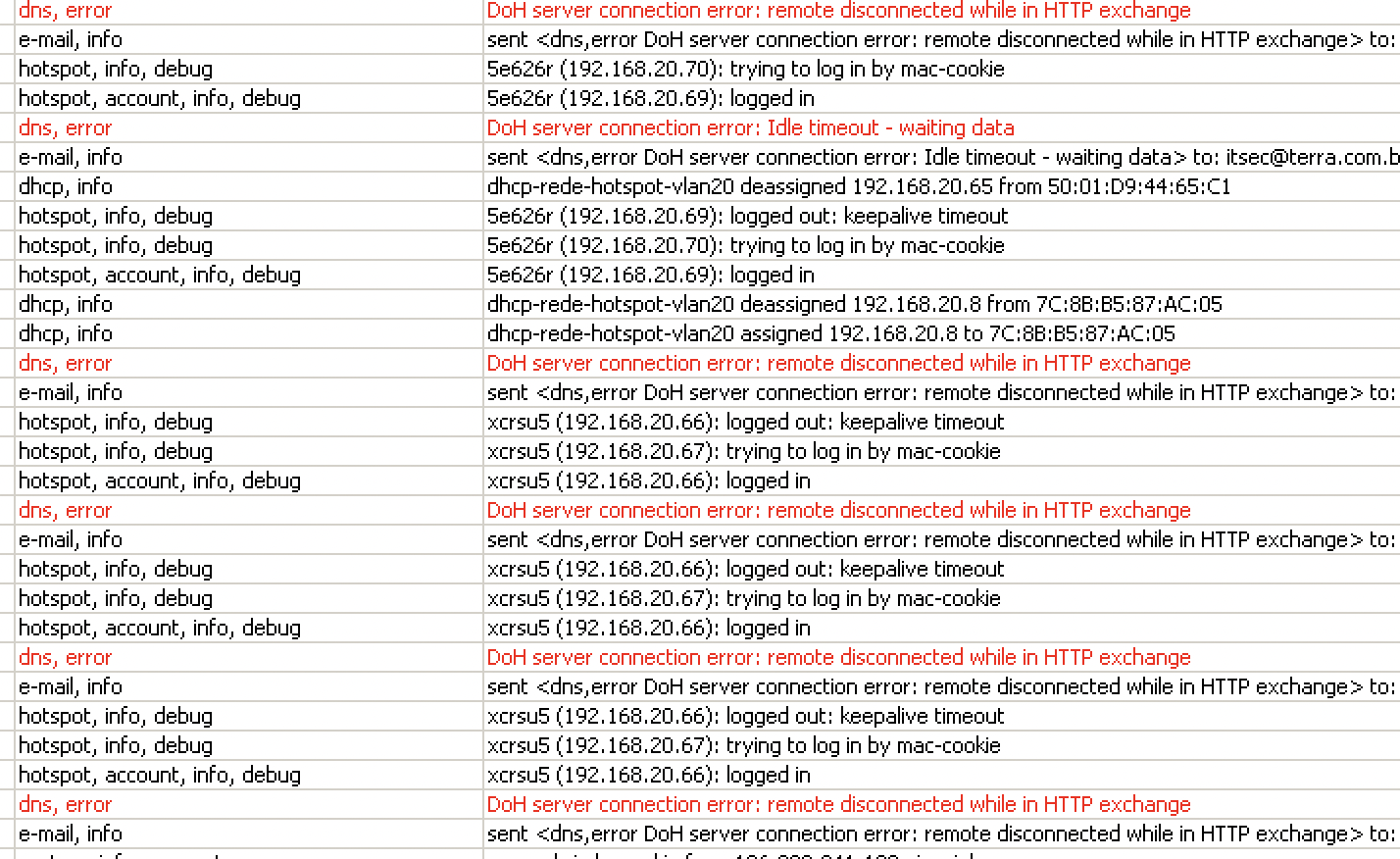
I have the same problem but using OPENDNS as my DNS server
I’m these rules for OPENDNS - https:///mikrotik-dns-over-https-doh.html
Any tips to resolve this?
@marcelofares your published url it’s just to make money with other advertising?
Here is the correct Url from which I followed the steps for deploying OPEN DNS over DOH:
https:///mikrotik-dns-over-https-doh.html
Again?
Want to give me a Gift ?
PayPal paypal.me/dfghdfghd
Saweria saweria.co/dfghdfghdfgh
Bitcoin asdfasdfasdfa
Publish the resulting script, not the URL or the AD…
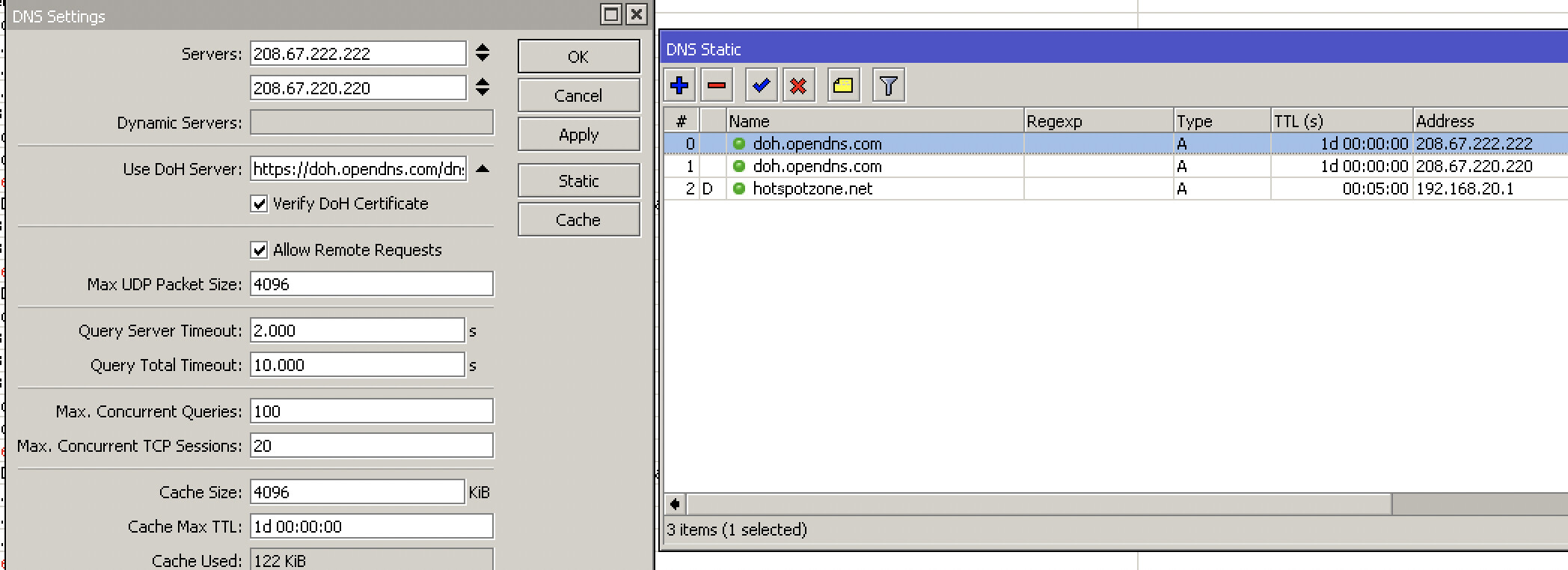
This is the configuration that I used for OPENDNS.
It’s exactly the print screen of the censored site:
