I am aware about UDP and TCP for DNS. I had this working for more than 10 years.
Also for (S)NTP, to have the same time on all devices (UDP, Destination-Port 123).
The problem is now, that with Mangling/Routing-Marks these (redirected) packets dont reach the router itself anymore, if the (defined in Mangling) Routing-Tabel contains a defaut route (0.0.0.0/0) - which will match always.
I have tried that but it is still not working. Actually I set the Mikrotik as Bridge but enable the DNS Cache by redirecting via Firewall NAT. What I found previously is, when using the ROS 6 the source reply address is set to 8.8.8.8 (the google DNS). But after upgraded into ROS 7, using the Wireshark I checked that source reply address is coming from the Mikrotik (Bridge) IP Address as an example 192.168.1.2 where the modem or gateway is actually 192.168.1.1.
Anyone is able to get it working properly on ROS 7? Or may be know what additional config needed to make it working on ROS 7?
DNS redirection only works on ROS 7 when the Mikrotik is set as Router/Gateway.
The configuration is very simple, nothing special. It is just bridge mode where the modem is connected to ether1 and the PC is connected to ether5. Anyone know what is missing from the config below? It is working in ROS 6.
So, it looks like you want to catch and redirect for the case where a client 192.168.1.XX contacts another client on the same subnet 192.168.1.YY for DNS queries? Because both are in the same /24 subnet, 192.168.1.XX will bypass the gateway (the router) and send packets directly on layer 2.
Your "solution" is to turn on /interface bridge settings set use-ip-firewall=yes, and then think that your DSTNAT rule will work?
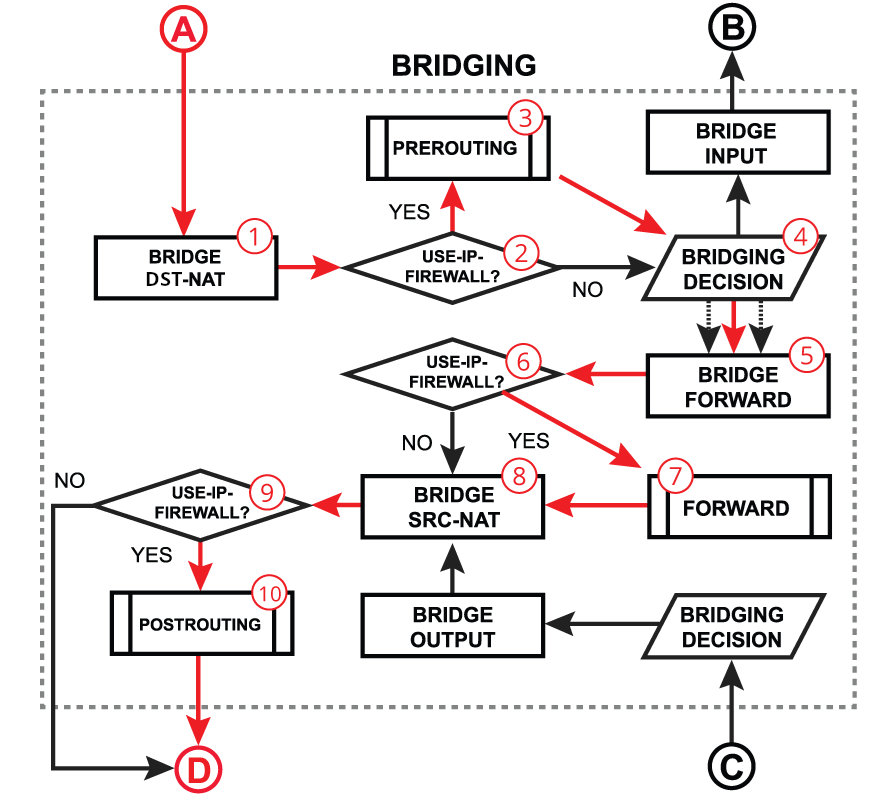
When you turn on use-ip-firewall, your IP firewall filter rules, as well as the SRCNAT rules (in postrouting) will normally be effective, and work as you intended. However, if you take no further actions, then your IP firewall DSTNAT rules will not do what you think they should do! Let's use the illustration and documentation from here:
Client 192.168.1.XX with MAC address XX:XX:XX:XX:XX:XX wants to send DNS query to 192.168.1.YY. It uses ARP to find out that the MAC address of 192.168.1.YY is YY:YY:YY:YY:YY:YY. The client will construct the ethernet frame containing the IP packet, with source MAC address XX:XX:XX:XX:XX:XX, destination MAC address YY:YY:YY:YY:YY:YY, MAC protocol is IP 0x0800, the IP payload specifies source IP address 192.168.1.XX, destination IP address 192.168.1.YY, IP protocol is UDP and destination port is 53.
The bridge part of the router (acting as a switch) sees the incoming frame at point A in the diagram above. The is no bridge DSTNAT rule (#1) for now.
Next, because use-ip-firewall=yes the packet is processed by the prerouting chain of the IP firewall (number #3). This is the chain where your firewall DSTNAT rules (the action=redirect rules) reside.
That rule will modify the destination IP address field of the IP packet, and change the destination IP address to the router's address 192.168.1.2.
However, the ethernet frame still has the destination MAC addressYY:YY:YY:YY:YY:YY!
Next the control flow goes back to the bridge, at #4 "bridging decision". Here the destination MAC address is checked and because it's not one of the router's MAC addresses, the decision will be to forward the ethernet frame.
Which means the next block is #5 "bridge forward" and not "bridge input". If no filter rules (bridge filter or IP firewall filter) block or drop the frame/packet, then it will end up being sent to the host at MAC address YY:YY:YY:YY:YY:YY.
Host at MAC address YY:YY:YY:YY:YY:YY will receive an ethernet frame with 192.168.1.2 in the destination IP address field, instead of its address 192.168.1.YY.
If IP forwarding is turned off on the host (it's normally so for non-router devices), then this host will drop this packet not destined for it. -> Your attempt to use action=redirect fails completely.
If for some reason IP forwarding is enabled on the 192.168.1.YY host (probably because it's configured as a router) then that host might (if its firewall configuration allows) forward the packet back to the MikroTik router at 192.168.1.2 -> In this case your attempt to use action=redirect might work.
After reading the above and looking at the diagram, you'll see that we need to intervene at step #1, to change the destination MAC address of the frame from YY:YY:YY:YY:YY:YY to ZZ:ZZ:ZZ:ZZ:ZZ:ZZ, with ZZ:ZZ:ZZ:ZZ:ZZ:ZZ being the MAC address of the MikroTik router on the bridge. Doing so will ensure that the "bridging decision" will choose "bridge input" as the next step.
Here is some untested bridge NAT rules that might work:
You'll need to replace ZZ:ZZ:ZZ:ZZ:ZZ:ZZ with the router's MAC address on the bridge interface.
Also please note that the above will not work if you use VLANs. Because of the current restriction for bridge NAT/filter rules: you can only select the IP-related conditions if mac-protocol is set to ip. But to filter by VLAN you need to use mac-protocol=vlan, a combination of both is unfortunately not possible.
Also, using NAT & filter on the bridge of course only works if your MikroTik router acts as a switch between the two hosts. If the hosts do not use the MikroTik router as an intermediary then nothing can be done, unless it's used as gateway.
Using the resolve command in Mikrotik is working and able to give the DNS IP Address. But it is failing when I am using Windows OS to resolve the domain name via nslookup command. With similar configuration and more investigation via Wireshark, the ROS 6 actually returns 8.8.8.8 as the source reply address while ROS 7 return 192.168.1.2 as source reply address.
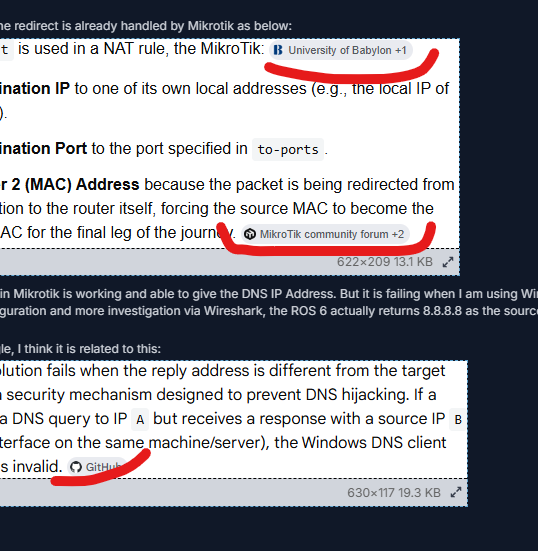
Searching more on the Google, I think it is related to this:
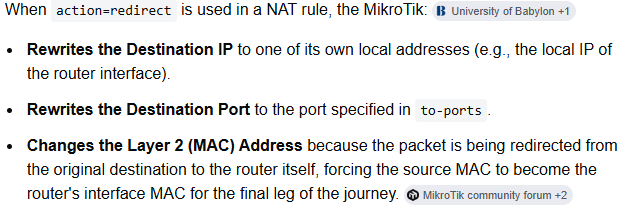
No! You quoted some hallucinated BS from some AI. The DSTNAT chain of the IP Firewall has no mechanism to modify whatever fields of the Layer 2. It works with IP packets, and the layer below is not always ethernet with MAC addresses. You can use action=redirect for packets coming over a WireGuard or PPPoE or SSTP interface for example, where there is no ethernet header to modify.
Here is the result of packet sniffer on ROS 7.23beta5:
Bridge mode device diagram:
Gateway / modem (192.168.1.1) <========== > Mikrotik with all ports are bridged and DNS redirect (192.168.1.2) <=========== > PC (192.168.1.3)
DNS packets when redirect is disabled:
DNS packets when redirect is enabled (not working)
As you can see the Mikrotik DNS responded with Bridge IP (192.168.1.2) as the source reply address. That is the difference where the PC failed to resolve the DNS.
Router mode device diagram:
Mikrotik as Gateway with ether1 as WAN and ether5 connected to PC (192.168.1.1) <=========== > PC (192.168.1.3)