Do you use cAPsMan
- Yes
- No
0
voters
I use capsman and really like it, I have colleagues that say no one uses it and its worthless. So if you use it, or not , can you give me opinions?
Do you use cAPsMan
I use capsman and really like it, I have colleagues that say no one uses it and its worthless. So if you use it, or not , can you give me opinions?
Can’t decide whether it’s a yes or no for me.
At home I used to have two APs and a router. Router is running CAPsMAN, one AP was a CAPsMAN client, the other one was configured directly. I did it to learn CAPsMANish. Now both APs are running ROS v7 while router is still on v6 … I’m gonna use one of APs as router temporarily to aide with transition to v7. I don’t know if I’ll make one of APs a CAPsMAN client again, it’s a 50-50 decission right now.
My take: CAPsMAN is in theory a very nice solution, but lacks some finesse to become truly great … e.g. it’d be great if it could provision wired part of client devices as well … but I guess it’s a chicken-egg problem so probably not gonna happen. It also provides worse set of settings and worse observability … but so does wifiwave2 driver and I fear this is becoming a norm.
Im not sure I understand the provisioning of the wired clients, wouldn’t that just be DHCP. In my network, all cAP clients(wlan and ethers) are configured in a bridge, so the main cAP server conrols the wireless, but also gives out IPs to all devices in the network.
Just like CAPsMAN sets radio parameters on clients (frequency, channel width, SSID, adds slave interfaces) it could set up e.g. bridge, ports, VLANs, etc. But CAPsMAN client needs already working connection to CAPsMAN manager to receive configuration, so at least some of it needs to be done already.
I use it in a vacation home setup (2APs) and SXT LTE as controller (and all controlled from home using wireguard).
Educational purpose and practical point of view.
At work I have quite some hap, ac, ac3 devices, 28 sites connected using MPLS network (not Tik), still considering if those MT wifi devices should be brought under capsman control.
Currently there are quite some Symbol/Motorola caps devices controlled with Wing Manager controller. I like the fact you can do quite some stuff centrally and push it everywhere.
Beats connecting all those devices separately to change the config.
Pro’s: once you get it, it’s not that hard to configure a lot of devices in the same concept. Adding devices is as simple as reset to CAPS and off they go.
Neg: you are not as flexible as standalone config with the wireless settings.
As for the remark of mkx, that’s indeed the chicken and egg problem. Something needs to be there first before the rest can function.
Since the core of capsman is wireless devices, I don’t see the wired part not being that controllable as a problem.
But that’s my view.
And now waiting for capsman and wifiwave 2… (setup of wifiwave2 is quite capsman like, as far as I see. Also less flexibility for controlling the wireless part. Coincidence ?)
Had three capacs in the house at one time, now just one, and mostly to help others with wifi issues if possible.
Never seen the need to add cycles to CPU and add a layer of complexity to my configs when configuring an AP is dirt simple.
Worst case scenario is copy one good config to the two others LOL.
To me the value in capsman would be in a significant deployment scenario, probably 5 or more APs…
However, there is no significant value to capsman IMHO until MT has wifi6/6E/7 to go with it.
High quality WIFI + CAPSMAN = Good for clients/family - decent for admin (once over the learning hump of capsman - meaning less hair and high blood pressure)
Crappy WIFI + CAPSMAN = unhapply clients/family - decent for admin
Moral of the story is one is providing a service, doesnt matter if the bells and whistles makes the Admins life easy as pie, if the clients are not taken care of!!
Do note I am talking WIFI in areas where multiple APs exist! If you live on a farm etc… most anything works okay.
I have been using Capsman for about 5 years. Satisfied with its performance and use it wherever it is needed.
A small digression into theory. Setting up 1 WiFi access point requires almost no theoretical knowledge of how it works. (L1 level) When you need to set up multiple access points that have overlapping coverage areas, it requires at least 3 times more knowledge of how WiFi level L1 works. That is, you must calculate how to position the devices relative to each other and to the floor plan, determine the coverage and overlap zones of each point, the distribution of points on non-overlapping channels (frequency plan 1.6.11 or 1.5.9.13) and the required power level for each. And then it’s easy to apply these settings to all points via Capsman.
Capsman is a tool that makes it easy for an engineer to set up multiple points. And what settings are to be set only a human understands.
No software can do this job automatically yet. Because only the radio engineer has a floor plan and radio reconnaissance data.
95% of the network administrators I know do not have sufficient knowledge of how WiFi works and therefore cannot configure a network of multiple points well.
90% of users don’t understand why they have to choose a free channel only from 1, 6, 11!
Hi!
Many people writing about issues with MT WLAN +CapsMan just don´t have enough time/will/knowledge to configure them correctly.
I did 2 CapsMan installations (6APs+3APs) and I also have a non CapsMan MT WIFI installation with 3APs. They all work well and are also very stable. More than enough for home use.
I also don´t neet more speed, than they provide.
However the effort I put in to correctly set them up was huge and I don´t think there are many home users, who really should do it.
Therefore it would be great for MT if also the deafult settings would be better and also the documentation could be made easier to read.
If home users are not the target, that´s also OK, but there are features missing for the power users (especially roaming and band steering).
W
Exactly WOLAND!
For me much easier to setup three CAPACs in 5 minutes, NO CAPSMAN.
Just select non interfering 2.4ghz channels and same for 5ghz channels.
Basically thats it! (besides choosing cee and 20/40/80hz bandwidths and done.
Anymore is overkill and ridonkulous for the homeowner.
Once the homeowner is a bit comfortable in RoS
This is the way to go…
https://forum.mikrotik.com/viewtopic.php?t=182276
I am not one of them.
I love caps-man until I actually have to keep wireless clients working.
The problems with the RADIOS is the issue. Caps-Man is awesome at giving me back useful data. It let me script all sorts of things. Even per device passwords.
The radios… caps-man works with the old radio driver. Which is like Wifi from 2014. EXCEPT… that they actually lock up under enough interference.
LOST A LOT OF TIME CHASING SOMETHING THAT WAS FIXED IN WAVE 2 Driver.
Wave 2 driver only works on a few devices and doesn’t work with caps-man.
Hi!
I never attempted to use WifiWawe2 with capsman. I am strictly keeping myself to ROSv6 until ROS v7 actually becomes stable, which it is not.
My smaller setup with capsman (2xCAPac+1xWAPac) is located in an area where I can see hundreds of SSIDs. Many of them are horribly configured and creating a lot of noise.
Performance is not great, but it is stable and suffcient for my purposes (http, video conferencing, watching movies). For fast file transfers, there is the 10G wired network.
Was it worth the time I have invested? No probably not. It was quite fun however. (yeah depends on the kind of person)
Important was for me: the power draw of the network itself is remarkably low, I have PoE, and now the time spent on maintenance is almost zero.
Also I have much less fuss with my APs than I had previously on OpenWRT. Still the MT provides me with good VLAN + MultiSSID support.
Would I recommend the same setup for someone else? Probably not. Go with TPL Omada. (Ubiquity is horrible with cloud stuff, brrr.)
I just don´t feel the need to get something faster.
BR
W
Ps. the worst part of that all: I got used burning a lot of time on the MT forums…
Loving capsman so far. Installed to customers from 3 to 85 caps with vlans or not. So nice to control all the network inside winbox.
Some favorite tools for me from mikrotik are capsman, ip/cloud, romon, hotspot, user manager.
Installed for 8 AP. After some tweaking with ACLs for SSID+AP combinations all was working quite good.
My take on WIFI is stability is more important than speed.
Using CapsMAN and WAP/CAP -AC’s I make really stable WIFI’s. Not really quick WIFI’s, but quick enough for general WIFI usage. (Everything needing speed should be wired anyway..)
The key for me is to not make any frequency stuff dynamic - I do a frequency survey when installing and hard code frequencies on every radio, both on 2,4GHz and 5GHz.
I generally hard code to 20/40MHz on AC, less bandwidth = more stable.
This is easy to do from capsMAN, since every interface is available from the capsMAN manager.
I also mostly use capsMAN forwarding mode. This both gives me easy access to put virtual SSID’s on separate VLANS (without trunking to the AP), and I can also easily see all traffic data on the capsMAN itself.
I have deployed 30+ capsMAN WIFI networks, mostly small setups with 2 AP’s, but also some with 10+AP’s.
CAPsMAN on RouterOS 6.4x working well for me for two+ years now with four different types of Mikrotik APs after my initial challenges setting it up. Once you get the hang of it, it’s somewhat smooth sailing. I haven’t been brave enough to try it on RouterOS 7.x, yet, though.
My tips from my little experience is (1) avoid using underpowered routers/devices as the controller and (2) configure local forwarding instead of CAPsMAN forwarding. In my case local forwarding is achieved via the wireless clients on the two SSIDs onto a bridge on the cAPs with two separate VLANS, then next, transfer the cients to the bridge on the central ‘access-concentrator(s)’ via MPLS/VPLS (what I term the ‘data/forwarding plane’) where the clients get assigned IP addresses via DHCP. That way too the client devices don’t get reassigned IPs (thereby disrupting the connections) if ‘roaming’ from one cAP to the other. I’d usually see see “disconnected, registered to other interface, signal strength” in the CAPsMAN logs, but no IP reassingment. Perhaps that’s a misconfiguration? 
What I also like about CAPsMAN is that the cAPs don’t advertise the wireless SSIDs if for any reason the connection from the cAPs to the controller/core network is interrupted. However, preferabley there should be an option to enable/disable that as it seems to be an issue for some use cases (any trick to make cap client keep settings while capsman is down?)
Regarding flexibility of the wireless settings just like you’d have if the AP were standalone, for the wireless settings CAPsMAN can’t/doesn’t control (like antenna gain on a basebox, for example), you set it on the AP itself, then reactivate CAPsMAN management of the cAP. Perhaps that defeats the purpose of CAPsMAN?
My objective for the CAPsMAN-controlled wireless network is more of ease of admin/control and stability of the wireless network for general use than speed/high bandwidth, and so far so good.
I really look forward to RouterOS finally getting wireless interworking profiles/HotSpot 2.0 to work with/when the cAP is under CAPsMAN control.
Here’s a recent Mikrotik video with Normis explaining CAPsMAN: MikroTips: managing many access points with CAPsMAN.
How do you assign different channels to each access point in this situation? I have 6 points all working, but they are using the same channels, and this is causing significant performance problems (goes from 250Mbps on good ones, to 20Mbps on “bad” ones). Thanks!
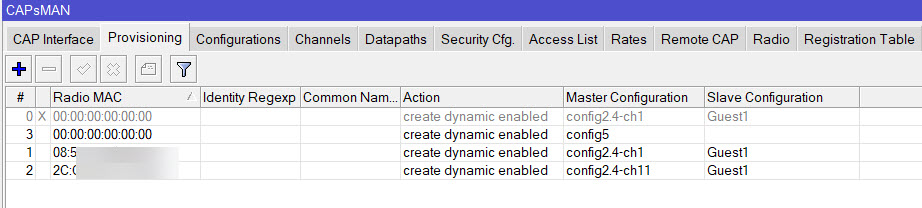
Capsman - provisioning
There you can set MAC address of physical radio and which master config it needs to use.
Plan the placement of your APs and collect the MAC addresses so you can specify which channel is to be used where.
Provide one master config for each channel you’d like to use.
To be done for each radio type (2.4 and 5Ghz).
Guest SSID for that AP will follow setting of main SSID for that AP.
Also foresee one line with MAC=00:00:00:00:00:00 with default config in case you add a new AP later. Then at least it gets a default config.
Or not. Then you will notice it doesn’t work 
E.g. this is how it looks like on my lab setup:
1 cAP AC: 2 radios: default config for 5Ghz since there is only 1, specified config for 2.4Ghz radio
1 cAP Lite: 1 radio: specified config for 2.4GHz radio
For me, on the contrary, it’s much faster to configure multiple points through Capsman than to configure each point separately. If I need to configure two points, then 90% of the time I configure them with Capsman. The number of settings is exactly the same, but with Capsman they are all in one place and very convenient to use. In the settings of Cap interfaces it is very convenient to change any settings. The interface does not have to be dynamic to do that.
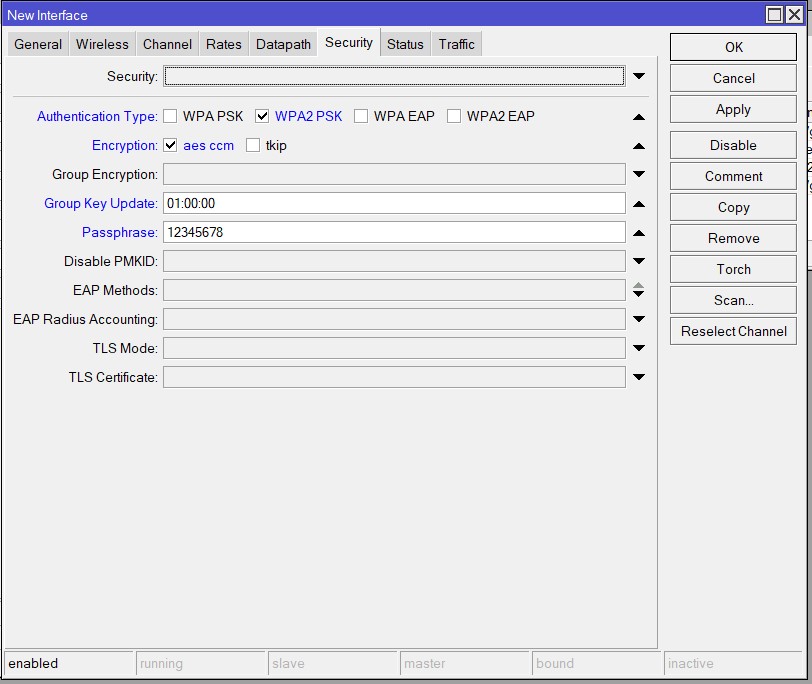
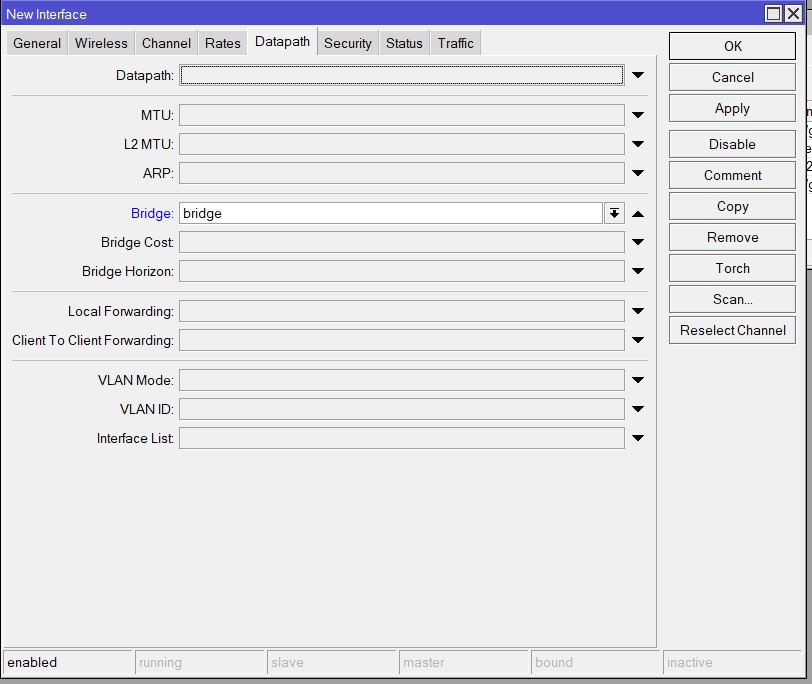
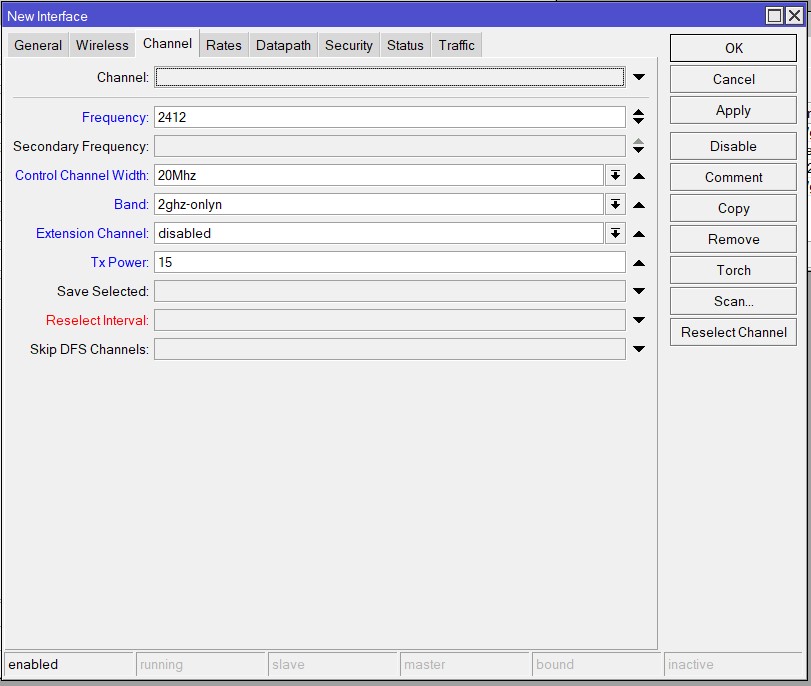
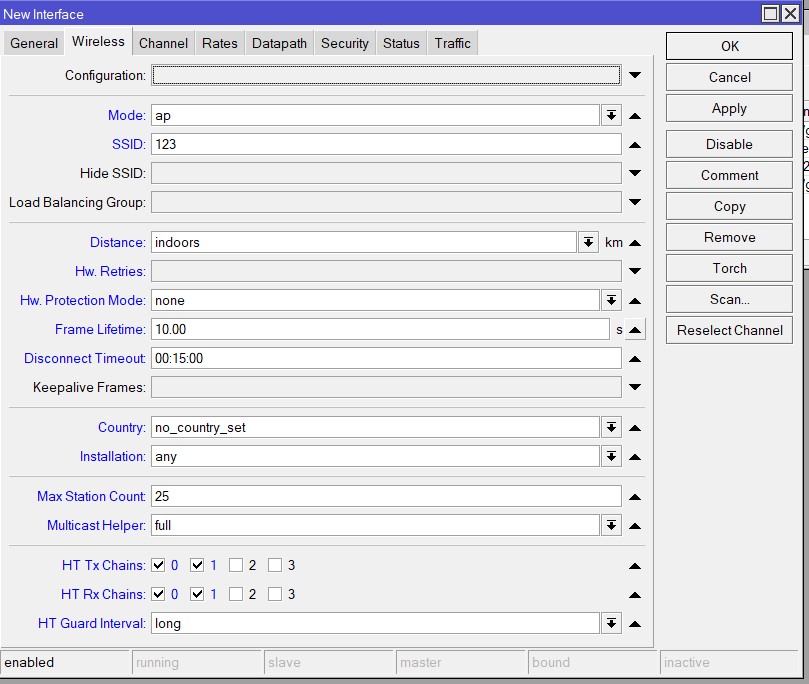
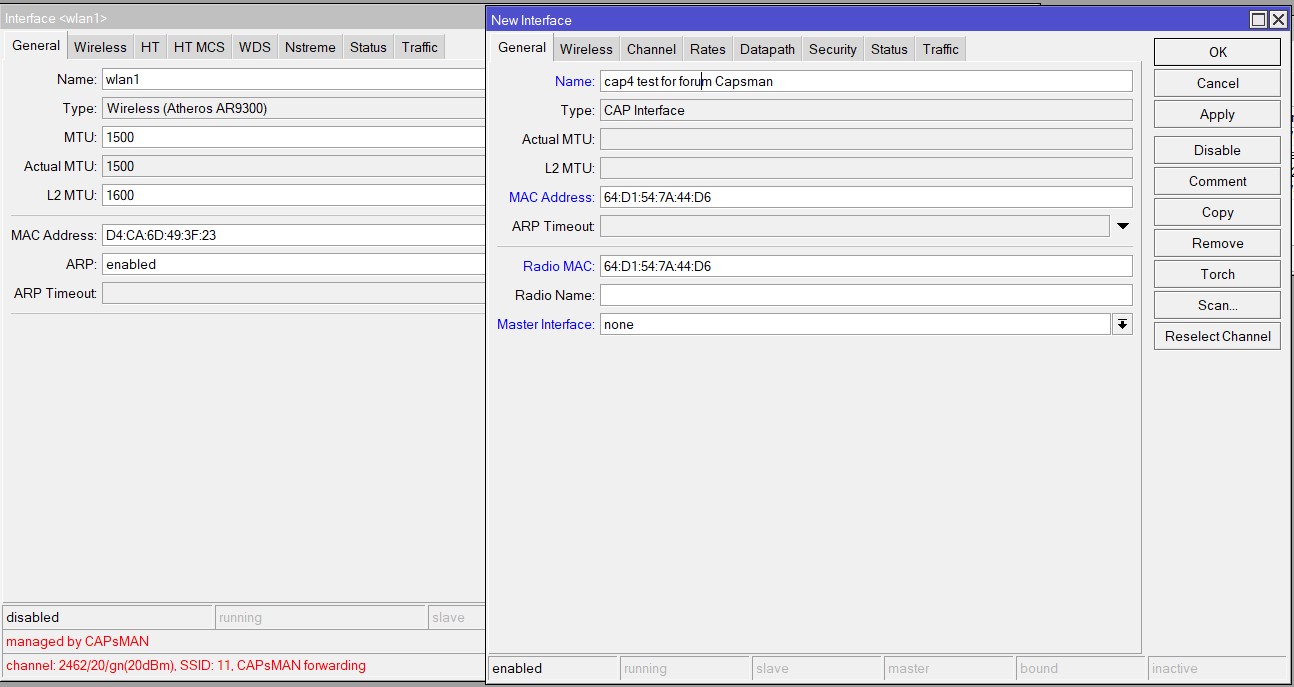
In the screenshot you can see the settings that are grayed out automatically through Provisioning, those in black are changed manually after.
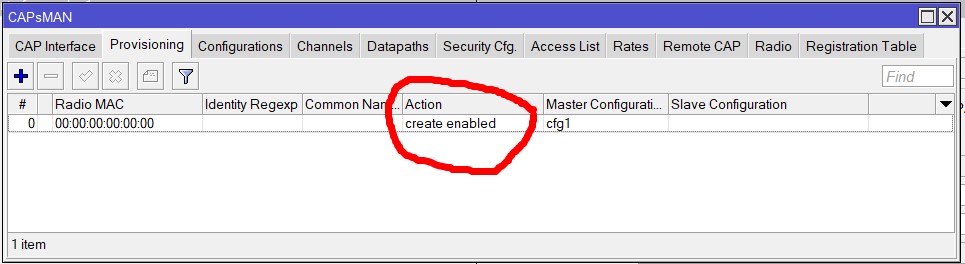
@rsalmar Set the Provisioning action create-enable instead of creata-dinamic-enable. Then you can open the Cap interface and change any settings manually.
