dynDNS Update Script

Using bits of script from this thread and Greg Sowell’s tutorial and examples, I have a Tik with a DynDNS WAN and IPsec tunnels with DynDNs entries for both SA-Src and SA-Dst in each tunnel pointed back at the TIK


In the Tik scripts here,there is an IF , Then, Else portion for the Tik’s WAN …if no updated is needed after resolve, no action taken…and I use that for this Tik, even though it probably wont ever get another address…but just in case, its there.

I need close to the same thing for this code…

I am resolving both the local and the remote dyndns for each tunnel via a scheduled script every ten minutes and updating the policy and peer for each tunnel…in order.

Works great…but, every time it resolves, even if it gets the same result, it updates the peer and policy to every tunnel, resulting in new SA’s i.e. tunnel setup. Every ten minutes.

I need to resolve every ten minutes because I am checking for an address change on failover at those tunnel ends.

So, can a fetch..check a variable, change if necessary script , if not leave alone script be written for each tunnel’s local and remote site dyndns?

I think I am close, but a push in the right direction would be appreciated.

I am resolving the local site with a different variable for the same ip address for each tunnel …it may not be needed, but it worked. It populates the peers and policies perfectly for all 20 tunnnels.

I would just like to change the tunnel ip addresses only when needed by a change after resolve.


add name="Tunnel 0" policy=\
    ftp,reboot,read,write,policy,test,winbox,password,sniff,sensitive,api \
    source=":global LocalSite [:resolve x1.dyndns.org]\r\
    \n:global RemoteSite0 [:resolve y1.dyndns.org]\r\
    \n/ip ipsec policy set 0 sa-dst-address=\$RemoteSite0 sa-src-address=\$Loc\
    alSite \r\
    \n/ip ipsec peer set 0 address=\$RemoteSite0"
add name="Tunnel 1" policy=\
    ftp,reboot,read,write,policy,test,winbox,password,sniff,sensitive,api \
    source=":global LocalSite1 [:resolve x1.dyndns.org]\r\
    \n:global RemoteSite1 [:resolve y2.dyndns.org]\r\
    \n/ip ipsec policy set 1 sa-dst-address=\$RemoteSite1 sa-src-address=\$Loc\
    alSite1 \r\
    \n/ip ipsec peer set 1 address=\$RemoteSite1\r\
    \n"
add name="Tunnel 2" policy=\
    ftp,reboot,read,write,policy,test,winbox,password,sniff,sensitive,api \
    source=":global LocalSite2 [:resolve x1.dyndns.org]\r\
    \n:global RemoteSite2 [:resolve y3.dyndns.org]\r\
    \n/ip ipsec policy set 2 sa-dst-address=\$RemoteSite2 sa-src-address=\$Loc\
    alSite2\r\
    \n/ip ipsec peer set 2 address=\$RemoteSite2\r\
    \n"

I have a problem with the script for RouterOs5

http://wiki.mikrotik.com/wiki/Dynamic_DNS_Update_Script_for_dynDNS

Please correct me if iam wrong.

But this script is writing into the flash everytime it is called.
It writes some files to the flash file system.

I think this is not good if the script runs every minute, this will damage the flash with the time.

I hope Mikrotik will do a free configurable DYNDNS client (wich only runs complete in the ram).

hi. i am trying to setup dyndns to rb750 without success.
the user details are correct since i am checking them on different routers.
these are the steps i followed.
-in winbox i created a new script called dynDNS. there i have added the script from the creator of this thread, but i chenged to my username/passwd/hostname
-then i clicked on the script to run now, to check if it is working. nothing happens. it does not make the correct resolution of the ip to hostname, since dyndns did not get the update.
-in terminal i added the script to run every 1 min.
-reboot

unfortunately dyndns it does not get the info of my new ip to resolve it, everytime i reboot.
how can i fix this issue?

dyndns didn’t work for me. Now I use changeip and it’s working OK

hello Samuel

Are you using RB750 5.22 Version?

thanks.

Hi, I can confirm that following script works on rb751G-2HnD with RouterOS v5.24. However, remember to check that this script has proper line endings: \r\n. If you are unix or mac user and copied the script from webpage directly to winbox then it probably won’t work. Before pasting use external text editor to convert line endings to \r\n.
Hope this helps.

Script [can also be found in earlier posts in this thread]:

# Set needed variables
:local username "xxxxxxxxxx"
:local password "yyyyyyyy"
:local hostname "yyyyyyyyyyyyy"
:global ddnsinterface "xxxxxxxxx e.g. pppoe-out1 xxxxxxx"
:global ddnsip ""

:global dyndnsForce
# Remove the # on next line to force an update every single time - useful for debugging, but you could end up getting blacklisted by DynDNS!
#:set dyndnsForce true

# Grab the current IP address on that interface.
:global ddnsip2 [/ip address get [/ip address find interface=$ddnsinterface ] address];
:set ddnsip [:pick $ddnsip2 0 [:find $ddnsip2 "/"]];
:log info ("UpdateDynDNS: currentIP = $ddnsip")

#get IP from DynDNS for my hostname
:local resolvedIP [:resolve $hostname]
:log info ("UpdateDynDNS: resolved IP =$resolvedIP")

# Determine if dyndns update is needed
# more dyndns updater request details available at http://www.dyndns.com/developers/specs/syntax.html
:if (($ddnsip != $resolvedIP) || ($dyndnsForce = true)) do={
    :set dyndnsForce false
    /tool fetch user=$username password=$password mode=http address="members.dyndns.org" src-path="/nic/update?hostname=$hostname&myip=$ddnsip" dst-path="/dyndns.txt"
    :local result [/file get dyndns.txt contents]
    :log info ("UpdateDynDNS: Dyndns update needed")
    :log info ("UpdateDynDNS: Dyndns Update Result: ".$result)
    :put ("Dyndns Update Result: ".$result)
} else={
    :log info ("UpdateDynDNS: No dyndns update needed")
}

Cheers,

Hello,

I have an RB750 with OS 6.0RC12 i try the scripts that found in this topic but no success.

Can some one confirm if the scripts work with OS 6.0RC12?

Try this.... it is slightly modified, but tested yesterday on V.6.rc11
(remember, your pppoe interface must be renamed to "ADSL" and you have toi edit "+++something+++" variables....

#SuperScript V.3.0 [20130330]

#Variables definition

:global adslip
:global adsllastip
:global datum [/system clock get date]
:global vrijeme [/system clock get time] 
:global ime [/system identity get name]

#IF lastip is non existant - set it to "0"
:if ([ :typeof $adsllastip ] = nil ) do={ :global adsllastip "0" }
 
#Set variable with actual ADSL address
:global adslip [ /ip address get [/ip address find interface=ADSL ] address ]

#If not existant - log it
:if ([ :typeof $adslip ] = nil ) do={
 :log error "=== No IP on ADSL Interface"
} else={

#...if existsi
:if ($adslip != $adsllastip) do={

:local dynuser "+++dynuser+++" 
:local dynpass "+++dynpass+++"
:local dynhost "+++dynhost+++"

:log info "=== Updating dns record at DynDNS"
:local str "/nic/update?hostname=$dynhost&myip=$adslip&wildcard=NOCHG&mx=NOCHG&backmx=NOCHG" 
/tool fetch address=members.dyndns.org src-path=$str mode=http user=$dynuser password=$dynpass dst-path=("/DynDNS.".$dynhost)


:local mailsender "$ime@something.com";
:local mailrec +++mailrec@something.com+++;
:local mailsubject "IP adresa from /$ime/ $datum $vrijeme";
:local mailbody "$adslip";
:local mailserver [:resolve +++mymailserver+++];
:local mailuser +++mymailuser+++;
:local mailpass +++mailpass+++;

:log info "=== Sending mail"
/tool e-mail send from=$mailsender to=$mailrec subject=$mailsubject body=$mailbody server=$mailserver user=$mailuser password=$mailpass;

#Moving new IP to lastip variable
:global adsllastip "$adslip"

} else={ 
:log info "=== No IP update needed"
}
}

Just my version of the script. Runs on a RB750GL OS v5.20.
It probably could use some finetuning.
Remark: I used the Google nameserver for resolving. It was not working without it, have not figured out why yet. There is only a tiny delay when the IP changes.
Ramark 2: The interface 1 needs to be connected to the WAN (external IP). Because I’m not using the checkip service in case of NAT.

# Set variables
:local username "username";
:local password "password";
:local hostname "hostname";
:local inetinterface "ether1-gateway";
:local sysdate [/system clock get date];
:local systime [/system clock get time];
:local sysname [/system identity get name];

:local dyndnsForce;

#:set dyndnsForce true;

# Print debug info
#:log info ("DynDNS: username = $username");
#:log info ("DynDNS: password = $password");
#:log info ("DynDNS: hostname = $hostname");

# Check if WAN interface is running
:if ([/interface get $inetinterface value-name=running]) do={

# Get the current IP on the WAN interface
 :local currentIP [/ip address get [find interface="$inetinterface" disabled=no] address];

# Strip the net mask off the IP address
 :set currentIP [:pick $currentIP 0 [:find $currentIP "/"]];
 :log info ("DynDNS: current WAN IP = $currentIP");

# Get resolved IP
 :local resolvedIP [:resolve domain-name=$hostname server=8.8.8.8];
 :log info ("DynDNS: resolved IP = $resolvedIP");

# Determine if dyndns update is needed
# Dyndns updater request details http://www.dyndns.com/developers/specs/syntax.html
 :if (($currentIP != $resolvedIP) || ($dyndnsForce = true)) do={
  :set dyndnsForce false;
  /tool fetch user=$username password=$password mode=http address="members.dyndns.org" \
  src-path="nic/update?system=dyndns&hostname=$hostname&myip=$currentIP&wildcard=no" \
  dst-path="/dyndns.txt";
  :delay 1;
  :local result [/file get dyndns.txt contents]
  :log info ("DynDNS: Update needed")
  :log info ("DynDNS: Update Result: ".$result)
# Send mail
  :local mailsender "routerboard@domain";
  :local mailrec "mailbox@domain";
  :local mailsubject "IP address from /$sysname/ $sysdate $systime";
  :local mailbody "$currentIP";
  :local smtpserver "mailserver.domain";
  :local mailserver [:resolve domain-name=$smtpserver server=8.8.8.8];
  :log info ("DynDNS: Sending mail");
  /tool e-mail send from=$mailsender to=$mailrec subject=$mailsubject body=$mailbody server=$mailserver;
} else={
  :log info ("DynDNS: No update needed");
}
} else={
    :log info ("DynDNS: $inetinterface is not currently running");
}

I've been using the script below but havent had any luck. When I look at the log all i get is
dyndns-update: user name XXXXX
dyndns-update:password XXXX
dyndns-update:XXXXXX

And my nothing else shows up in the log nor does my IP update.

Set needed variables

:local username "dyndnsUsername"
:local password "dyndnsPassword"
:local hostname "hostname.dyndns.org"

:global dyndnsForce
:global previousIP

print some debug info

:log info ("dyndns-update: username = $username")
:log info ("dyndns-update: password = $password")
:log info ("dyndns-update: hostname = $hostname")
:log info ("dyndns-update: previousIP = $previousIP")

get the current IP address from the internet (in case of double-nat)

/tool fetch mode=http address="checkip.dyndns.org" src-path="/" dst-path="/dyndns.checkip.html"
:local result [/file get dyndns.checkip.html contents]

parse the current IP result

:local resultLen [:len $result]
:local startLoc [:find $result ": " -1]
:set startLoc ($startLoc + 2)
:local endLoc [:find $result "" -1]
:local currentIP [:pick $result $startLoc $endLoc]
:log info "dyndns-update: currentIP = $currentIP"

Determine if dyndns update is needed

more dyndns updater request details available at http://www.dyndns.com/developers/specs/syntax.html

:if (($currentIP != $previousIP) || ($dyndnsForce = true)) do={
:set dyndnsForce false
:set previousIP $currentIP
/tool fetch user=$username password=$password mode=http address="members.dyndns.org" src-path="/nic/update?hostname=$hostname&myip=$currentIP" dst-path="/dyndns.txt"
:local result [/file get dyndns.txt contents]
:log info ("dyndns-update: Dyndns update needed")
:log info ("dyndns-update: Dyndns Update Result: ".$result)
:put ("Dyndns Update Result: ".$result)
} else={
:log info ("dyndns-update: No dyndns update needed")
}

My Version for working with EuroDns, AsiaDns…

On WebSite(Eurodns.com) , signin, → Control Panel->Domain Portfolio-> Manage Zone
Setting/adding record A or AAA → Dynamic =active


https://www.eurodns.com/products/plugins/documentation/
http://sourceforge.net/apps/trac/ddclient/wiki/Usage

RouterBoard RB2011 Vers 6.3


:local username "user";
:local password "pw";
:local hostname "subnet.domain.be";
:local inetinterface "ether1-gateway";
:local sysdate [/system clock get date];
:local systime [/system clock get time];
:local sysname [/system identity get name];

:local dyndnsForce;

#:set dyndnsForce true;

# Print debug info
#:log info ("EuroDNS: username = $username");
#:log info ("EuroDNS: password = $password");
#:log info ("EuroDNS: hostname = $hostname");

# Check if WAN interface is running
 :if ([/interface get $inetinterface value-name=running]) do={

# Get the current IP on the WAN interface
:local currentIP [/ip address get [find interface="$inetinterface" disabled=no] address];

# Strip the net mask off the IP address
 :set currentIP [:pick $currentIP 0 [:find $currentIP "/"]];
 :log info ("EuroDNS: current WAN IP = $currentIP");

# Get resolved IP
 :local resolvedIP [:resolve domain-name=$hostname server=8.8.8.8];
 :log info ("EuroDNS: resolved IP = $resolvedIP");

# Determine if dyndns update is needed
# Dyndns updater request details https://www.eurodns.com/products/plugins/documentation/ and http://sourceforge.net/apps/trac/ddclient/wiki/Usage
 :if (($currentIP != $resolvedIP) || ($dyndnsForce = true)) do={
  :set dyndnsForce false;
 /tool fetch  user=$username password=$password url="http://eurodyndns.org/update/?hostname=$hostname&myip=$currentIP" dst-path="/eurodns.txt";
  :delay 1;
  :local result [/file get dyndns.txt contents]
  :log info ("EuroDNS: Update needed")
  :log info ("EuroDNS: Update Result: ".$result)
# Send mail
  :local mailsender "routerboarb@lli.be";
  :local mailrec "xx@xx.be";
  :local mailsubject "IP address from /$sysname/ $sysdate $systime";
  :local mailbody "$currentIP";
  :local smtpserver "smtp.voo.be";
  :local mailserver [:resolve domain-name=$smtpserver server=8.8.8.8];
  :log info ("EuroDNS: Sending mail");
  /tool e-mail send from=$mailsender to=$mailrec subject=$mailsubject body=$mailbody ; #configure Email Setting  /tool e-mail 
} else={
  :log info ("EuroDNS: No update needed");
}
} else={
    :log info ("DynDNS: $inetinterface is not currently running");
}
}

Hi all,
The script is working fine, but i’ve got “badauth” every times. I’ve checked username/pass, i can login to dyn services use with it.
BUT!
My dyn account’s password contain special character, so, many hours later found a solution:
In the script use special characters with escape, as
:global ddnspass “pa$$word”
instead
:global ddnspass “pa$$word”
:slight_smile:
Sorry if obvious for everyone, i am a newbie on MikroTik.

HI all

I tried to setup dynDNS update but smthng goes wrong:
i tried all scripts
my hostname is NAME.HOMEIP.NET
my acc in dyn.com is SECONDNAME

as i thought, right script is:

# Define User Variables
:global ddnsuser "SECONDNAME"
:global ddnspass "PASSWORDtoDYN.COM"
:global ddnshost "NAME.homeip.net"

# Define Global Variables
:global ddnsip
:global ddnslastip
:if ([ :typeof $ddnslastip ] = nil ) do={ :global ddnslastip "0" }

:global ddnsinterface
:global ddnssystem ("mt-" . [/system package get system version] )

# Define Local Variables
:local int

# Loop thru interfaces and look for ones containing
# default gateways without routing-marks
:foreach int in=[/ip route find dst-address=0.0.0.0/0 active=yes ] do={
  :if ([:typeof [/ip route get $int routing-mark ]] != str ) do={
     :global ddnsinterface [/ip route get $int interface]
  }
}

# Grab the current IP address on that interface.
:global ddnsip [ /ip address get [/ip address find interface=$ddnsinterface ] address ]

# Did we get an IP address to compare?
:if ([ :typeof $ddnsip ] = nil ) do={
   :log info ("DynDNS: No ip address present on " . $ddnsinterface . ", please check.")
} else={
  :if ($ddnsip != $ddnslastip) do={
    :log info "DynDNS: Sending UPDATE!"
    :local str "/nic/update?hostname=$ddnshost&myip=$ddnsip&wildcard=NOCHG&mx=NOCHG&backmx=NOCHG"
    /tool fetch address=members.dyndns.org src-path=$str mode=http user=$ddnsuser \
        password=$ddnspass dst-path=("/DynDNS.".$ddnshost)
    :delay 1
    :local str [/file find name="DynDNS.$ddnshost"];
    /file remove $str
    :global ddnslastip $ddnsip
  }
}

is it?

But it’s not work.

Where is a mistake?

input does not match any value of value-name

thats all i have after running script

routeros 6.23
rb951ui-2hnd

(edit)- got it working via another script i found that is for dyndns service.


just got my 2011UiAS-2HnD in and have it connected to the web and my local network seems working thus far. trying to get dyndns working. i’ve added the script listed below via the webgui and changed the variables that i’m aware need changing. i’m wanting to have the ip on my wan port updated to dyndns. i’m sure i’m leaving out some steps and would greatly appreciate help. loving the 2011UiAS-2HnD.


:global ddnsuser “theddnsusername”
:global ddnspass “theddnspassword”
:global theinterface “interfacename”
:global ddnshost blabla.dyndns.org
:global ipddns [:resolve $ddnshost];
:global ipfresh [ /ip address get [/ip address find interface=$theinterface ] address ]
:if ([ :typeof $ipfresh ] = nil ) do={
:log info (“DynDNS: No ip address on $theinterface .”)
} else={
:for i from=( [:len $ipfresh] - 1) to=0 do={
:if ( [:pick $ipfresh $i] = “/”) do={
:set ipfresh [:pick $ipfresh 0 $i];
}
}

:if ($ipddns != $ipfresh) do={
:log info (“DynDNS: IP-DynDNS = $ipddns”)
:log info (“DynDNS: IP-Fresh = $ipfresh”)
:log info “DynDNS: Update IP needed, Sending UPDATE…!”
:global str “/nic/update?hostname=$ddnshost&myip=$ipfresh&wildcard=NOCHG&mx=NOCHG&backmx=NOCHG”
/tool fetch address=members.dyndns.org src-path=$str mode=http user=$ddnsuser
password=$ddnspass dst-path=(“/DynDNS.”.$ddnshost)
:delay 1
:global str [/file find name=“DynDNS.$ddnshost”];
/file remove $str
:global ipddns $ipfresh
:log info “DynDNS: IP updated to $ipfresh!”
} else={
:log info “DynDNS: dont need changes”;
}
}

All of dyndns script broken since 6.25 anyone have the update one?

Ah… it solved, the problem laid in “Dyndns updater client key”, I need to generate new key. Its worked now.

I try to use a script to update the Dyn-dns, and none one of them does not run from the scheduler.

first:

:local username "login"
:local password "pass"
:global hostname "my.com" 

:global dyndnsForce
:global previousIP
:local resolvedIP [:resolve $hostname]

#print some debug
#:log info ("UpdateDynDNS: username = $username")
#:log info ("UpdateDynDNS: password = $password")
:log info ("UpdateDynDNS: hostname = $hostname")
:log info ("UpdateDynDNS: previousIP = $previousIP")
:log info ("UpdateDynDNS: resolvedIP = $resolvedIP")

# get the current IP address from the internet (in case of double-nat)
/tool fetch mode=http address="checkip.dyndns.org" src-path="/" dst-path="/dyndns.checkip.html"
:local result [/file get dyndns.checkip.html contents]

# parse the current IP result
:local resultLen [:len $result]
:local startLoc [:find $result ": " -1]
:set startLoc ($startLoc + 2)
:local endLoc [:find $result "" -1]
:local currentIP [:pick $result $startLoc $endLoc]
:log info "UpdateDynDNS: currentIP = $currentIP"

# Remove the # on next line to force an update every single time - useful for debugging,
# but you could end up getting blacklisted by DynDNS!
# Edit: Not really needed anymore... the result is not equal... Update will happen.

#:set dyndnsForce true

# Determine if dyndns update is needed
# more dyndns updater request details http://www.dyndns.com/developers/specs/syntax.html
#This is where we check the DNS record against actual result. Thanks to jimstolz76
:if (($currentIP != $resolvedIP) || ($dyndnsForce = true)) do={
  :set dyndnsForce false
  :set previousIP $currentIP
  /tool fetch user=$username password=$password mode=http address="members.dyndns.org" \
  src-path="/nic/update?hostname=$hostname&myip=$currentIP" dst-path="/dyndns.txt"
  :local result [/file get dyndns.txt contents]
  :log info ("UpdateDynDNS: Dyndns update needed")
  :log info ("Update Result: " . $result)
  :put ("Dyndns Update Result: " . $result)
} else= {
  :log info ("UpdateDynDNS: No dyndns update needed")
}

second:

# Define User Variables
:global ddnsuser "user"
:global ddnspass "passwd"
:global ddnshost "domain.com"
:global ddnsinterface "beeline-l2tp"
:global ddnsip
:global ddnslastip
:if ([:typeof $ddnslastip] = nil) do={ :global ddnslastip "0.0.0.0/0" }  
# Grab the current IP address on that interface.
:global ddnsip [/ip address get [/ip address find interface=$ddnsinterface] address]
:if ([:typeof $ddnsip] = nil) do={
  :log info ("DynDNS: No ip address present on " . $ddnsinterface . ", please check.")
} else={
  :if ($ddnsip != $ddnslastip) do={
    :log info "DynDNS: Previous IP was: $ddnslastip"
    :log info "DynDNS: Sending new IP:$ddnsip UPDATE!"
    /tool fetch keep-result=no url="http://$ddnsuser:$ddnspass@204.13.248.112/nic/update\?hostname=$ddnshost"
    :global ddnslastip $ddnsip
 } else={
:log info "DDNS: No update required."
  }
}

run from the console script works OK. access rights everywhere exhibited maximum.
what am I doing wrong?

I’m trying to configure automatic updates DNS from Dyn-DNS.
I took as a basis for two of the script. I add them to the scheduler, exposing the maximum rights. no one does not run.
the script only works if i run it from the console.

first

:global ddnsuser "user"
:global ddnspass "passwd"
:global theinterface "beeline-l2tp"
:global ddnshost devabap.com
:global ipddns [:resolve $ddnshost];
:global ipfresh [ /ip address get [/ip address find interface=$theinterface ] address ]
:if ([ :typeof $ipfresh ] = nil ) do={
   :log info ("DynDNS: No ip address on $theinterface .")
} else={
   :for i from=( [:len $ipfresh] - 1) to=0 do={ 
      :if ( [:pick $ipfresh $i] = "/") do={ 
    :set ipfresh [:pick $ipfresh 0 $i];
      } 
}
 
:if ($ipddns != $ipfresh) do={
    :log info ("DynDNS: IP-DynDNS = $ipddns")
    :log info ("DynDNS: IP-Fresh = $ipfresh")
   :log info "DynDNS: Update IP needed, Sending UPDATE...!"
   :global str "/nic/update\?hostname=$ddnshost&myip=$ipfresh&wildcard=NOCHG&mx=NOCHG&backmx=NOCHG"
   /tool fetch address=members.dyndns.org src-path=$str mode=http user=$ddnsuser \
         password=$ddnspass dst-path=("/DynDNS.".$ddnshost)
    :delay 1
    :global str [/file find name="DynDNS.$ddnshost"];
    /file remove $str
    :global ipddns $ipfresh
  :log info "DynDNS: IP updated to $ipfresh!"
    } else={
     :log info "DynDNS: dont need changes";
    }
}

second

# Define User Variables
:global ddnsuser "user"
:global ddnspass "passwd"
:global ddnshost "devabap.com"
:global ddnsinterface "beeline-l2tp"
:global ddnsip
:global ddnslastip
:if ([:typeof $ddnslastip] = nil) do={ :global ddnslastip "0.0.0.0/0" }  
# Grab the current IP address on that interface.
:global ddnsip [/ip address get [/ip address find interface=$ddnsinterface] address]
:if ([:typeof $ddnsip] = nil) do={
  :log info ("DynDNS: No ip address present on " . $ddnsinterface . ", please check.")
} else={
  :if ($ddnsip != $ddnslastip) do={
    :log info "DynDNS: Previous IP was: $ddnslastip"
    :log info "DynDNS: Sending new IP:$ddnsip UPDATE!"
    /tool fetch keep-result=no url="http://$ddnsuser:$ddnspass@204.13.248.112/nic/update\?hostname=$ddnshost"
    :global ddnslastip $ddnsip
 } else={
:log info "DDNS: No update required."
  }
}

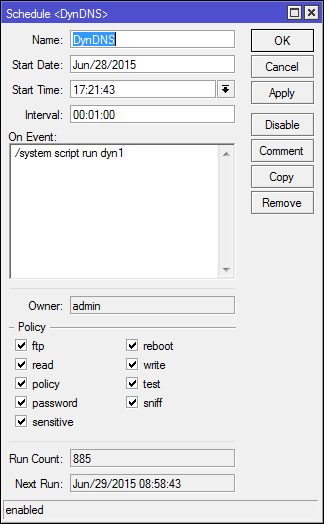
and script screen

Pictures of the script can be seen that it is run - the counter increases.

anyone have full script for 6.30 version od mikrotik
old has stop woking

# Set needed variables
:local username yyyy
:local password zzzzzz
:local hostname xxx.dyndns.tv

:global dyndnsForce
:global previousIP 

# print some debug info
:log info ("UpdateDynDNS: username = $username")
:log info ("UpdateDynDNS: password = $password")
:log info ("UpdateDynDNS: hostname = $hostname")
:log info ("UpdateDynDNS: previousIP = $previousIP")

# get the current IP address from the internet (in case of double-nat)
/tool fetch mode=http address="checkip.dyndns.org" src-path="/" dst-path="/dyndns.checkip.html"
:delay 1
:local result [/file get dyndns.checkip.html contents]

# parse the current IP result
:local resultLen [:len $result]
:local startLoc [:find $result ": " -1]
:set startLoc ($startLoc + 2)
:local endLoc [:find $result "</body>" -1]
:local currentIP [:pick $result $startLoc $endLoc]
:log info "UpdateDynDNS: currentIP = $currentIP"

# Remove the # on next line to force an update every single time - useful for debugging,
# but you could end up getting blacklisted by DynDNS!

#:set dyndnsForce true

# Determine if dyndns update is needed
# more dyndns updater request details http://www.dyndns.com/developers/specs/syntax.html

:if (($currentIP != $previousIP) || ($dyndnsForce = true)) do={
   :set dyndnsForce false
   :set previousIP $currentIP
   :log info "$currentIP or $previousIP"
   /tool fetch user=$username password=$password mode=http address="members.dyndns.org" \
      src-path="nic/update?system=dyndns&hostname=$hostname&myip=$currentIP&wildcard=no" \
      dst-path="/dyndns.txt"
   :delay 1
   :local result [/file get dyndns.txt contents]
   :log info ("UpdateDynDNS: Dyndns update needed")
   :log info ("UpdateDynDNS: Dyndns Update Result: ".$result)
   :put ("Dyndns Update Result: ".$result)
} else={
   :log info ("UpdateDynDNS: No dyndns update needed")
}