Cheers and thanks for the quick response!
Yes, I just noticed after a reboot+replug it recognized an lte interface. But its only inactive and its settings cannot be adjusted, nor NAT nor routing added via it.

Seems like it briefly comes up just to go down.
Update:
I tested the USB dongle on a Linux machine as well. As it turns out the 2 seconds are not random: On The Linux machine the dongle is recognized as RNDIS device for a brief 2 second period before changing into storage device mode. It then stays in the storage device mode until usb_modeswitch, automatically configured or in my case manually ran, changes the usb mode again. I suppose this is not a function expected to work within RouterOS (in my case 7.20.6 stable). Is there a way to configure RouterOS to accept that behaviour instead of disconnecting and never trying to reconnect with the dongle?
It appears to be something specific to this stick that I use, that is supposedly manufactured by HUAWEI but not exactly their firmware design from the 3372h/s dongles: https://www.draisberghof.de/usb_modeswitch/bb/viewtopic.php?t=3043&start=15
[  797.602557] usb 3-4: new high-speed USB device number 19 using xhci_hcd
[  797.727818] usb 3-4: New USB device found, idVendor=3566, idProduct=2001, bcdDevice=ff.ff
[  797.727838] usb 3-4: New USB device strings: Mfr=2, Product=3, SerialNumber=4
[  797.727845] usb 3-4: Product: Mobile
[  797.727851] usb 3-4: Manufacturer: Mobile
[  797.727855] usb 3-4: SerialNumber: 123456789ABCD
[  797.733548] rndis_host 3-4:1.0 usb0: register 'rndis_host' at usb-0000:00:14.0-4, RNDIS device, 8e:67:27:8c:33:be
[  797.759575] rndis_host 3-4:1.0 enx8e67278c33be: renamed from usb0
[  799.726236] usb 3-4: USB disconnect, device number 19
[  799.726960] rndis_host 3-4:1.0 enx8e67278c33be: unregister 'rndis_host' usb-0000:00:14.0-4, RNDIS device
[  800.512661] usb 3-4: new high-speed USB device number 20 using xhci_hcd
[  800.638423] usb 3-4: New USB device found, idVendor=3566, idProduct=2001, bcdDevice=ff.ff
[  800.638444] usb 3-4: New USB device strings: Mfr=2, Product=3, SerialNumber=4
[  800.638451] usb 3-4: Product: Mobile
[  800.638457] usb 3-4: Manufacturer: Mobile
[  800.638461] usb 3-4: SerialNumber: 123456789ABCD
[  800.643515] usb-storage 3-4:1.0: USB Mass Storage device detected
[  800.644333] scsi host0: usb-storage 3-4:1.0
[  801.686665] scsi 0:0:0:0: CD-ROM            Linux    File-Stor Gadget 0310 PQ: 0 ANSI: 2
[  801.688385] sr 0:0:0:0: Power-on or device reset occurred
[  801.689128] sr 0:0:0:0: [sr0] scsi3-mmc drive: 0x/0x caddy
[  801.699610] sr 0:0:0:0: Attached scsi CD-ROM sr0
[  801.699743] sr 0:0:0:0: Attached scsi generic sg0 type 5
[  801.954114] /dev/sr0: Can't open blockdev
[  801.965434] ISO 9660 Extensions: RRIP_1991A
On Linux however with usb_modeswitch it eventually starts to work: https://unix.stackexchange.com/questions/733971/usb-lte-modem-brovi-e3372-325-not-working
Update:
In the resources view the device keeps showing even after stopping to work after 2 seconds:

Update:
RouterOS 7.21rc4 mentions in the changelog “*) lte - added support for additional Huawei E3372-325 variation (vendor-id="0x3566" device-id="0x2001");” so I gave this a try without success.
Update:
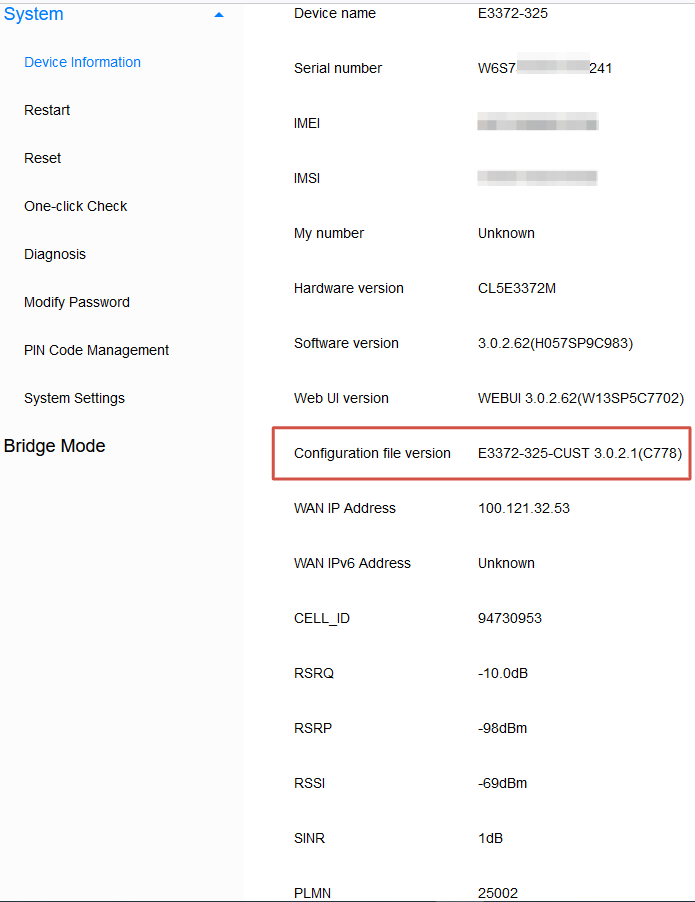
The specifics from the “Info” tab are:
ZOWEE TECHNOLOGY (HEYUAN) CO., LTD.
E3372-325
3.0.2.61(H057SP5C983)
Update:
For completeness’ sake I reached out to the chinese Brovi brand/manufacturer and asked them if it would be possible to get the newest firmware for the dongle which is supposed to fix the switching issue on their behalf. But I am not sure if this will lead somewhere, as I read online that this firmware update is only enrolled within Asia and people in Europe are kinda out of luck. The upgrade comes directly to the device via its proprietary updater so I suppose it is difficult to workaround with a VPN.
Update:
MikroTik support answered my request and stated that this is nothing they can fix at their end easily. The USB dongle is basically misbehaving:
Hello,
Modem stuck in the moment when it needs to "tell" RouterOS what kind of network device it is, for example: configless, mbim, rndis, etc.
We can not help with it from the RouterOS side.
After examining similar cases, we can say that the variation "Brovi" of this modem, is not supported at this time and we cannot fix this at the current moment because the issue source is the modem's behavior.
According to our testing, Huawei variation of this modem works with RouterOS ARM/ARM64 based devices, but unfortunately even with these are some issues observed like after the router reboots its shows up as a USB mass storage device instead of a modem.