mikrotik could make it possible to manage the esim at least of the quectel modems, and not only those used in his equipment, it would already be a step forward and one more reason to choose routeros. as far as compatibility (as @eider says) with m2-mpcie adapters is concerned i think it really exists, with EM160gl even if it is certified that it uses esim, i have never managed to get it to work, on the quectel forum after a lot of requests there is also a post that explains how to do it.
I think we’ll have at least more clues in a few days:
https://www.mwcbarcelona.com/exhibitors/31867-mikrotik
I don’t think Mikrotik has ever had a booth there, so that’s telling.
Now I suspect it be what was “leaked” on twitter in terms of hardware. But maybe news on eSIM front, and/or specs.
mikrotik could make it possible to manage the esim at least of the quectel modems, and not only those used in his equipment
The current ROS implementation should be able to communicate with eUICC module on Quectel modems. Have you confirmed that your modem does support it? Start with
AT+QESIM="eid"
and
AT+QSIMCFG="dual_slot_status"
(only supported on newer firmware revisions).
the answers are these :
 interface lte at-chat lte1
input: AT+QESIM="eid"
failure: port timeout
interface lte at-chat lte1
input: AT+QSIMCFG="dual_slot_status"
  output: OK
it would be very convenient to manage the esim without physically doing so on the router board
@Amm0 I bet as soon as I buy the new m2 5G modem a new routerboard or atl++ comes out 
Neither of these look like valid responses. Can you share output from these commands?
AT+GMM
AT+GMR
AT+QESIM=?
AT+QSIMCFG=?
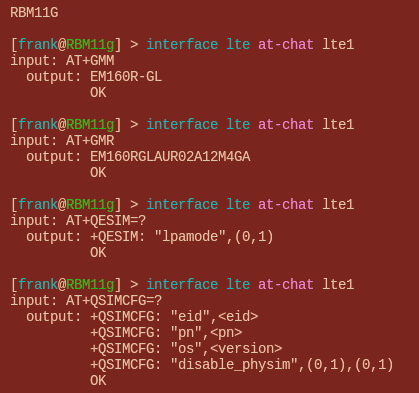
Okay, there is some difference in what commands are supported on this firmware. Proceed as follows by enabling LPA first:
AT+QESIM="lpamode",1
This should take effect immediately. Next, ensure that both SIM slots are active:
AT+QSIMCFG="disable_physim"
The response should be 0,0. If it is not, you should execute
AT+QSIMCFG="disable_physim",0,0
and reboot device and modem (ensuring power is interrupted).
Finally, query eUICC module by executing:
AT+QSIMCFG="eid"
The response should include eUICC module ID. If this commands results in
ERROR
, the card does not have built-in eUICC module and you can proceed to disable LPA by executing
AT+QESIM="lpamode",0
.
Assuming everything went fine, you should be able to manage eSIM via MikroTik.
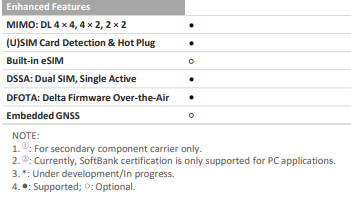
despite the fact that the datasheet explicitly states that it is provided with esim, unfortunately it does not work (I have performed the above procedure to the letter twice)
interface lte at-chat lte1
input: AT+QSIMCFG="eid"
  output: ERROR
Thank you for the feedback, we will update the wiki to clarify that eSIM functionality requires HW eSIM chip. All future products will have the eSIM chip integrated. In general the eSIM management/provisioning option in SW is already working, so you can add a physical eSIM card in the SIM slot and use it for most of our old mobile devices.
3rd party modems should also be supported as we have implemented a generic low level sim access interface to manage the eSIM. Most of these modules have multiple SIM slots, and the eSIm card is not the default slot. This slot can be changed with AT commands that should be available in the modules AT manual.
Very good news  .
.
With all due respect , this is one of the usual vague statements from Mikrotik, really, there is nothing bad in saying yes or no, instead of maybe.
AFAIK there are just 3 (three) providers of physical e-sims on a sim card:
- https://esim.me/
- http://esim.5ber.com
- https://www.estk.me/
The last one is seemingly focused on Asia only at the moment.
All of them require (again AFAIK) to be configured/set/provisioned/whatever using an android app or however they are not documented to be configurable directly on a Mikrotik device.
It would be a nice thing to know if this is now possible, and if it is on which provider of these e-sims on sim (again no problem if it is not possible, we will - grudgingly but gracefully - take a no as an answer)
@emilst, this is good news, I would love to have one of these sims programmable with multiple profiles and manageable by ros, maybe certified by mikrotik and properly implemented on the old lte/5g systems, maybe activated for failover by a script . It would show once again how attentive mkt is to useful news. i look forward to the news!!!
@jaclaz, i had read about these physical esims such as the 5ber, lenovo, etc., the problem is that they are only manageable from android apps and the procedure is quite cumbersome. does anyone also have the possibility of extracting the data from a normal sim via a sim reader or with a special app and writing them onto the physical esim, all strictly non-certified and to be tested on lte/5g routers
Take this info with a grain of salt, but there is this reader:
https://www.estk.me/product/estkme-red/
and this howto, both for Windows and Linux:
https://docs.estk.me/manual/quickstart/pc/index.html
But, even if that approach works, it doesn’t solve the actual problem that e-sim should solve.
I personally believe that e-sim on phones - with some particular exceptions - is a non-solution to a non-problem, causing, in case of issues, more problems than the traditional SIM.
But on a device that may be outside, on a pole on a roof or up a mast it will solve three possible common problems greatly lowering the probability of needing to climb up there (it is also indirectly an increase in safety):
- allow better waterproofing of the device
- avoid possible contacts issues between the SIM and the SIM holder
- allow changing ISP at will.
A physical e-sim in a socket would only help for #3, but only if it can be managed by the Mikrotik device accessed remotely.
despite the fact that the datasheet explicitly states that it is provided with esim, unfortunately it does not work (I have performed the above procedure to the letter twice)
The datasheet states the function is optional. The firmware does support management of eSIM as well as LPA but hardware eUICC module is optional (different order code). Apparently, you bought module without hardware eUICC support, which is not surprising, as it is default and most popular variant. If you want module with hardware eUICC support, you should request such explicitly by contacting your Quectel supplier.
MikroTik works with Quectel more directly, so they are in position to request these variants and place them in their devices. I consider it a good choice, given how cumbersome SIM management can be on remote devices and how delicate these slots are.
All of them require (again AFAIK) to be configured/set/provisioned/whatever using an android app or however they are not documented to be configurable directly on a Mikrotik device.
I have not verified any of these, so take my opinion with grain of salt, however barring some obvious attempts at blocking standard methods - they should work. 5ber is notable exception here because it uses custom AID instead of standardized one, so attempts to communicate with it will fail on ROS. As far as I know, this was implemented by them post-release as a response to people using SIM readers on PC to circumvent their additional charge for more profiles on cheaper variant (yay, DRM in your eSIM!) :>
Any news about Mikrotik hardware mounting modem with eUICC support soldered into?
Kindly regards,
RG
The news here isn’t particularly inspiring, but I found a YouTube video that gives me hope, especially in light of the 2nd last rOS update that included plenty of LTE changes:
https://youtu.be/ZLtrLNTSyh4?si=SXClFsH9E3xUGJFl
I’ve yet to try it on my hAP ax lite LTE6, but once I find an adapter for a nano SIM to be inserted (backup, in case of eSIM failure), I’ll rectify that.