Thanks, it’s totally worked for me, but in 7.8 version still not fixed and need apply ure workaround
Haven’t seen it in the latest changelogs (no longer using Deco), but:
“This is an automated message. Our bug tracker reports, that your issue has been fixed. This means that in the upcoming days, we plan to release a RouterOS update with this fix. Make sure to upgrade to the next release when it comes out soon. To be sure this specific fix is included, read the changelog when the next version comes out. If your issue is not mentioned, it might mean it will be in the next release.”
Hi, I disable Loop Prevention in the MicroTik interfaces where my 3 PX50 Deco are Pluged, and it’s working now.
I find this comments in the Tplink FAQ.
A: Deco switching from Wi-Fi backhaul to Ethernet backhaul may create a short loop in the network for 1~2s. If your switch supports loop detection, it may block the port used by Deco. Please turn off the loop detection function on your switch, then reboot your switch and try again.
URL: https://www.tp-link.com/ae/support/faq/1794/
BR
Diego
I thought I was going crazy!
I have a TP-Link Deco setup and I couldn’t for the life of me figure out why my connection was so slow using this switch.
Turned protocol from ‘RSTP’ to ‘none’ and all my clients got their full speed back.
Running RouterOS 7.13.2
Hi there,
I’m running Deco X60 (3 of them) and I’m trying to get ethernet backhauling to work with my CRS328. I parked the ethernet backhaul on a separate VLAN (3 ports => ether1, ether3, ether4) and use another to get Internet router (1 port => ether17). One of the Deco has 2 cables plugged in it (1x Internet, 1x backhaul).
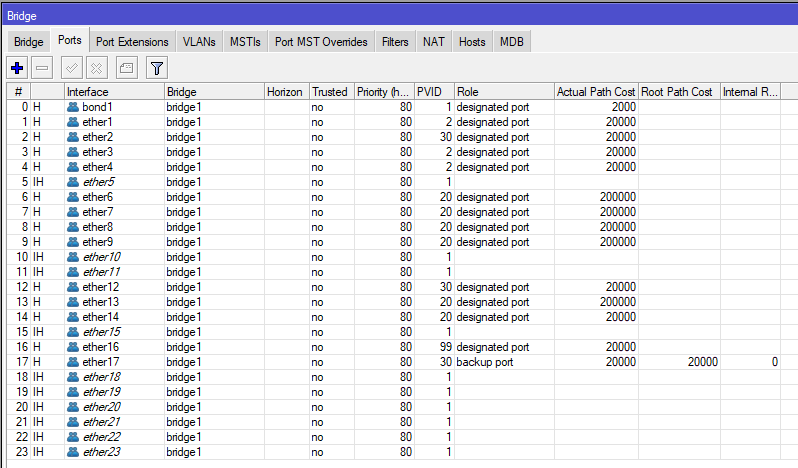
I was running the exact same setup on a Zyxel GS1920-24HP and it was working like a charm out of the box. I must be missing something here.
I tried to disable loop protect on those ports, it does not work. I always end up with a “Backup port” or two on the those 4 ports.
Any ideas?
Thanks,
D.
By reading this thread once again (and the reply from MikroTik Support team), I temporary fixed my problem by creating a second bridge with the 3x ethernet backhaul ports and RTSP=none.
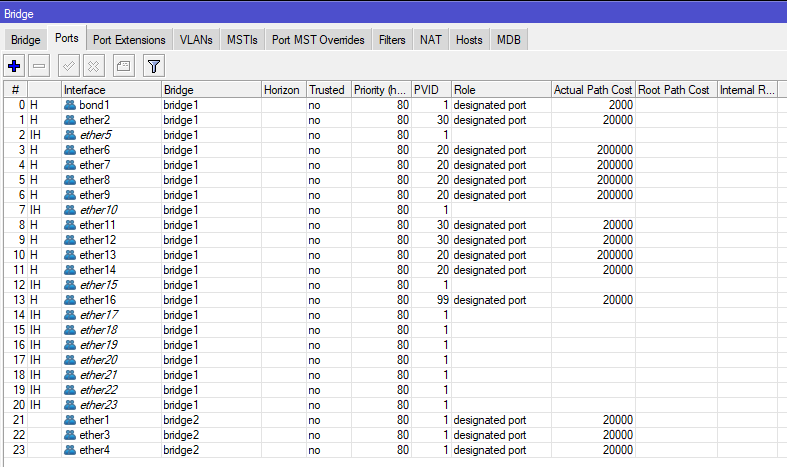

My issue now is that hardware offloading isn’t enabled anymore and CPU spikes at 40%. I’m wondering how it is going to work when Wi-Fi is going to be heavily used :-/
Not ideal and I would love to find a proper solution with the main bridge + hardware offloading + VLAN based configuration. I’m kind of puzzled that it works fine on Zyxel and not on MikroTik.
Does anyone who well RTSP and hardware offloading to have a look in there?
Thanks,
D.