Failover between Routerboard Hex(Starlink) and a SXT LTE6

@Amm0

As usual, everything I try does not seem to work as advertized.
I am trying to use the ‘canary’ system, but I cannot make it work.
First this:

/ip firewall nat
add chain=srcnat action=masquerade out-interface=ether1
add chain=srcnat action=masquerade out-interface=bridge

/ip route 
add dst-address=9.9.9.9 scope=10 gateway=192.168.1.1
add dst-address=8.8.4.4 scope=10 gateway=192.168.50.253

add distance=1 gateway=9.9.9.9 target-scope=11 check-gateway=ping
add distance=2 gateway=8.8.4.4 target-scope=11 check-gateway=ping

Nothing happens when 9.9.9.9 fails (when I disconnect the Starlink dish from the Starlink WIFI unit). I just lose all Internet, and the second gateway does not come online.

So question: When the Ping to 9.9.9.9 fails after 3 times (?), what is actually supposed to happen? Who decides that it should start using the second gateway, and how does it do this?
When I then add this:

:if ($bound=1) do={
/ip route add distance=1 gateway=192.168.1.1 dst-address="9.9.9.9" scope=10 target-scope=31 comment="Starlink"
/ip route add distance=3 gateway=9.9.9.9 check-gateway=ping scope=10 target-scope=32 comment="Starlink"
} else={
/log info "Failover: Deleting main route"
/ip route remove [/ip route find dst-address=0.0.0.0/0 and gateway=192.168.1.1] 
}

The interface is always Bound. Even if the Starlink disk falls of the roof. So when does this delete main Route occur? Only when I pull the plug between the Starlink WIFI unit and the main Switch.
Then, even IF this main route has been deleted, how do I get it back? Because my second Gateway is an IP address on the main LAN, and not part of a DHCP-Client.

Sorry for all the questions…
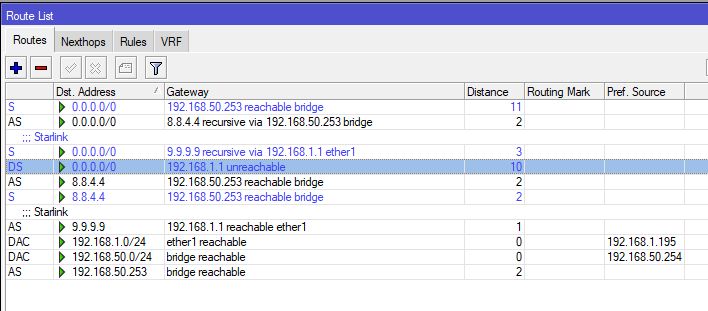
When 9.9.9.9 is not pingable any more, the default route via 9.9.9.9 should stop being “active” after those 30 seconds (the A letter in the leftmost column should disappear). Is that not the case? Your configuration looks OK to me, but better show the complete output of /ip route print detail.

This is with the system live:

[admin@MikroTik] >  /ip route print detail
Flags: X - disabled, A - active, D - dynamic, C - connect, S - static, r - rip, b - bgp, o - ospf, m - mme, 
B - blackhole, U - unreachable, P - prohibit 
 0 ADS  dst-address=0.0.0.0/0 gateway=192.168.1.1 gateway-status=192.168.1.1 reachable via  ether1 distance=1 scope=30 
        target-scope=10 vrf-interface=ether1 

 1   S  dst-address=0.0.0.0/0 gateway=192.168.50.253 gateway-status=192.168.50.253 reachable via  bridge check-gateway=ping 
        distance=2 scope=30 target-scope=10 

 2   S  dst-address=0.0.0.0/0 gateway=8.8.4.4 gateway-status=8.8.4.4 recursive via 192.168.50.253 bridge check-gateway=ping 
        distance=2 scope=30 target-scope=11 

 3   S  ;;; Starlink
        dst-address=0.0.0.0/0 gateway=9.9.9.9 gateway-status=9.9.9.9 recursive via 192.168.1.1 ether1 check-gateway=ping 
        distance=3 scope=10 target-scope=32 

 4 A S  dst-address=8.8.4.4/32 gateway=192.168.50.253 gateway-status=192.168.50.253 reachable via  bridge distance=1 scope=10 
        target-scope=10 

 5   S  dst-address=8.8.4.4/32 gateway=192.168.50.253 gateway-status=192.168.50.253 reachable via  bridge distance=1 scope=10 
        target-scope=10 

 6 A S  ;;; Starlink
        dst-address=9.9.9.9/32 gateway=192.168.1.1 gateway-status=192.168.1.1 reachable via  ether1 check-gateway=ping 
        distance=1 scope=10 target-scope=31 

 7 ADC  dst-address=192.168.1.0/24 pref-src=192.168.1.195 gateway=ether1 gateway-status=ether1 reachable distance=0 scope=10 

 8 ADC  dst-address=192.168.50.0/24 pref-src=192.168.50.254 gateway=bridge gateway-status=bridge reachable distance=0 scope=10 

 9 A S  dst-address=192.168.50.253/32 gateway=bridge gateway-status=bridge reachable distance=2 scope=30 target-scope=10 
[admin@MikroTik] >

This is with the StarLink Dishy disconnected, after a few minutes:

[admin@MikroTik] >  /ip route print detail
Flags: X - disabled, A - active, D - dynamic, C - connect, S - static, r - rip, b - bgp, o - ospf, m - mme, 
B - blackhole, U - unreachable, P - prohibit 
 0 ADS  dst-address=0.0.0.0/0 gateway=192.168.1.1 gateway-status=192.168.1.1 reachable via  ether1 distance=1 scope=30 
        target-scope=10 vrf-interface=ether1 

 1   S  dst-address=0.0.0.0/0 gateway=192.168.50.253 gateway-status=192.168.50.253 reachable via  bridge check-gateway=ping 
        distance=2 scope=30 target-scope=10 

 2   S  dst-address=0.0.0.0/0 gateway=8.8.4.4 gateway-status=8.8.4.4 recursive via 192.168.50.253 bridge check-gateway=ping 
        distance=2 scope=30 target-scope=11 

 3   S  ;;; Starlink
        dst-address=0.0.0.0/0 gateway=9.9.9.9 gateway-status=9.9.9.9 recursive via 192.168.1.1 ether1 check-gateway=ping 
        distance=3 scope=10 target-scope=32 

 4 A S  dst-address=8.8.4.4/32 gateway=192.168.50.253 gateway-status=192.168.50.253 reachable via  bridge distance=1 scope=10 
        target-scope=10 

 5   S  dst-address=8.8.4.4/32 gateway=192.168.50.253 gateway-status=192.168.50.253 reachable via  bridge distance=1 scope=10 
        target-scope=10 

 6 A S  ;;; Starlink
        dst-address=9.9.9.9/32 gateway=192.168.1.1 gateway-status=192.168.1.1 reachable via  ether1 check-gateway=ping 
        distance=1 scope=10 target-scope=31 

 7 ADC  dst-address=192.168.1.0/24 pref-src=192.168.1.195 gateway=ether1 gateway-status=ether1 reachable distance=0 scope=10 

 8 ADC  dst-address=192.168.50.0/24 pref-src=192.168.50.254 gateway=bridge gateway-status=bridge reachable distance=0 scope=10 

 9 A S  dst-address=192.168.50.253/32 gateway=bridge gateway-status=bridge reachable distance=2 scope=30 target-scope=10 
[admin@MikroTik] >

According to the display, the link to 9.9.9.9 is still live, which is impossible as the entire hardware is disconnected.
So at this state, I have no internet access. The second interface is not used. Only when I pull the plug on the WAN, if fails over to the second gateway.

The route to 9.9.9.9 is indeed active even if Starlink is dead because it does not check the gateway availability, that’s OK. What is important that 9.9.9.9 cannot be actually pinged via 192.168.1.1 once Starlink dies, so the check-gateway ping fails.

First, remove the script that adds and removes the default routes, you can use one or the other approach, not mix them.

Next, set the distance of the default route with gateway=192.168.1.1 to 10 and the distance of the default route with gateway=192.168.50.253 to 11, and set the distance of the default routes with gateway=9.9.9.9 to 1; keep the distance of the default route with gateway=8.8.4.4 unchanged, i.e. 2.

Then try again. While Starlink is connected, the default route with gateway=9.9.9.9 will be active because the pings via 9.9.9.9 will keep succeeding; once the ping fails for long enough, it will become inactive and the route with gateway=8.8.4.4 will take over.

Thanks, that worked immediately. But now it refuses to get back to the main WAN, and I lost access to the Starlink system.
When I connect to the Starlink WIFI (which I normally never do) I have Internet connection, but via the Hex WAN to it, I cannot reach it.

EDIT: Oops I see a mistake. Will try again.
EDIT 2: No, I now have real problems. I completely lost access to the Starlink WAN. It says 192.168.1.1 Unreachable. Even after restarting the interface and restarting the Starlink WIFI unit.
The interface exists and even shows traffic. The DHCP-Client shows it is Bound. The route says it is unreachable. I don’t understand what is going on…
Help?

change the 9.9.9.9 route’s distance to 1, the dhcp one is not used since 0.0.0.0 routes to 9.9.9.9, which then routes to 192.168.168.1 - why it’s called recursive routing: it goes through the route table twice. the one with distance 10 is in fact correctly not used/unavailable since a route with a higher distance= is available.

Thanks man, I have completely cleared the system, and re-entered the data in the right way. To much editing going on.
I think I now have it working, going both ways.

It still does not clear any ‘pings’ which I run from the two Windows PC’s during testing.
It stops pinging to a specific host, but when I switch pinging to another host it works. While at the sime time the other PC works exactly the other way around :slight_smile:
It seems that Windows remembers an ICMP route to a specific IP address. This then fails after the switchover. But then pinging something else, it works.
It is confusing when you try to determine if the switchover worked.

Using an Android phone, pinging 8.8.8.8 continuousely, it continues without a single packet lost. Much better system.

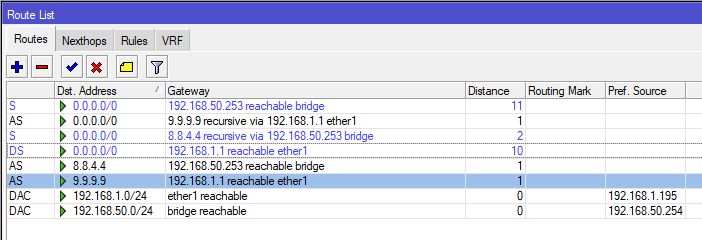
This screenshot from when it switched to the secondary gateway.
Clipboard02.jpg

THE FINAL SIMPLE SOLUTION:

Both the RouterBoard Hex and the SXT LTE6 are used in their default configurations.
The Routerboard is in default Router mode, the LTE6 is in default Bridge mode.
The main IP range used here is 192.168.50.0/24.
The Routerboard IP address is 192.168.50.254, and its default Gateway is a Starlink at 192.168.1.1 on ether1 (From Starlink DHCP Server)
The entire local network is on a single ethernet port on the Hex (because it connects to a huge Switch)

In the LTE6 I disabled the DHCP Server. Its IP address is manually set to 192.168.50.253 (so on the main network). No VLAN’s or LTE-Passthrough’s are used.

The failover is by setting the Distance for the primary and secondary Gateways to 10 and 11.

In /ip dhcp-client, advanced, set the distance to 10.

Then in the Terminal:

/ip route add 0.0.0.0/0 gateway 192.168.50.253 distance 11

/ip firewall nat add chain=srcnat action=masquerade out-interface=ether1
/ip firewall nat add chain=srcnat action=masquerade out-interface=bridge

/ip route add dst-address=9.9.9.9 scope=10 gateway=192.168.1.1
/ip route add dst-address=8.8.4.4 scope=10 gateway=192.168.50.253

/ip route add distance=1 gateway=9.9.9.9 target-scope=11 check-gateway=ping
/ip route add distance=2 gateway=8.8.4.4 target-scope=11 check-gateway=ping

if the Ping to 9.9.9.9 fails, it falls back on the 192.168.50.253 gateway (which is simply on the main network).
When the Ping works again, it switches back to the main Starlink gateway.

In addition I added sindy’s Houskeeping script to clean up old routes, but I am not quite sure how much this helps:

/system script add name=housekeeper
/system script edit housekeeper source

:if ([:len [/ip route find where dst-address=0.0.0.0/0 active distance=1]]>0) do={
  :foreach conn in=[/ip firewall connection find where !srcnat !(dst-address~"^(192\\.168|10\\.|172\\.(1[6-9]|2|3[01])\\.)")] do={
    :do command={/ip firewall connection remove $conn} on-error={:nothing}
  }
}

Paste the script into the window and press Ctrl-O to save it.

Execute:

/system script run housekeeper

I used the scheduler to run it every minute.

It now works fine here, without any complicated setup’s.
There are weird ICMP / Ping issues with connected Windows PC’s, while Android devices seem to switch without trouble (Yay Linux!)

BIG thanks for all who helped me and taught me a lot!
Clipboard02.jpg