Can you give me an approximate list of features which would have to be separated in a “soho” package and how we could call it? I understand that each company has their own set of features they use, but we can’t separate each small service into a separate package. And if we would make a “soho” package with all those “unnecessary” functions (from your point of view), what would happen if you needed just one of the, say, 10 features.
The SMB server in v6 was only pointed out (partly in jest) to highlight MikroTik’s absurd priorities. Doesn’t look like it even installs SMB server unless the device has USB. And I assume it’s disabled by default even if USB is present, in which case it’s not really bloatware. In and of itself, I don’t even care that RouterOS is getting new features for home users, since it doesn’t appear to have effected any existing functions within RouterOS.
well, if that gives you all any peace - addition of SMB as a feature did not impact speed of development of so called “serious” features you see in RouterOS v6 change-log. And definitely sped up addition of full NS functionality if that is someday added to RouterOS.
Howerver, using firewall rules you can simulate behavior of different zones:
/ip firewall layer7-protocol
add name=home.local regexp="\\x04home\\x05local"
/ip firewall nat
add action=dst-nat chain=dstnat comment=home.local disabled=no dst-port=53 \
    layer7-protocol=home.local protocol=udp to-addresses=192.168.10.8
It does work, but:
- it redirects queries from clients directly to target nameserver, so it bypasses cache on ROS (ok, it’s probably not such a big deal)
- for the same reason, redirected domain can’t be resolved by router itself
- if target server is on the same subnet as client, you need another srcnat rule (hairpin)
- if target server is on separate subnet which is not supposed to be able to communicate directly with client’s subnet, you need another exception (probably rare, but still..)
Simply put, it’s not nice nor admin friendly. But better than nothing of course.
+1000 to allow NS record in dns static cache.
+1 for native zone forwarding with caching (without layer7)!
+1000 this for me too.
Use case:
I install Mikrotik and Ubiquity Unifi combination for medium to large (but simple) networks with off site Unifi Controller. The Unifi access points do a lookup on “unifi” to find the controller for adoption with is in the cloud with an IP address that occasionally changes.
Yes I can SSH into each AP to assign the location of the controller, which is ok when there are a handful, but when there are 30+ its a long tedious process.
Would be very useful to have “unifi” = unifi.controller.com. Then all the AP’s will appear for adoption without sitting for long periods assigning.
add address=unifi.mycontroller.com name=unifi
or maybe even
add alias=unifi.mycontroller.com name=unifi
Im sure this cant be a hard? Seems like a minor but very useful feature to me.
Two years later and I still need NS in DNS and NEVER EVER needed SMB.
I guess I am not professional enough when I need DNS and do not need SMB.
Funny thing is this is so simply to add and it s just matter of somoene’s good will.
I would like to sign this request as well, but depending on the local network setup NS entries are not sufficient so I would like to add the option (as an option for the NS record) for the NS entry to behave as forwarder as well.
This means that if I add an NS entry for “local.mydomain.net” into the static list without this option, any NS record request for local.mydomain.net would return the given entry as expected. With the “forwarder” option enabled however, any request for *.local.mydomain.net for any record type (including NS,MX,…) where there is no matching static entry (currently only for A record) would be directed to the given name server instead of normal processing.
My scenario is for medium networks with quite some IP devices requiring a DNS setup but with only one dedicated server being able to be the DNS server and where internert access is the primary DNS use. In this configuration setting the DNS to the internal DNS server is at risk iof that one is down. Even with a secondary DNS entry at the client level (not available in all cases) this is not really practiable as tests did confirm.
Since internet access is the primary use and the router is required for it it is preferebale to have the router being the primary DNS server for my clients. Previously I did set the internal DNS as primary DNS and the router as secondary but this showed as a bad solution as many clients seem to stick with th epriomary DNS when it fails requiring a timeout at each (or each other) non-cached request.
So I came back to a configuration where most of my clients arte configured for using the router as primary DNS and written a script on my Linux DNS server that parses the DNS configuration and uploads static entries to the router.
Just so everyone knows, this was a feature request long before this thread. We asked for this back when we were using RoS v2. They were able to add RegEx capabilities to the DNS proxy, but nothing yet in over 10 years about being able to specify the record type…
I’m working on an issue for a customer right now in China where we need to do queries across a VPN for some domains and locally for others. Even though we have a big bad Cloud Core Router over there, we’re having to setup a virtual machine so we can run dnsmasq… unneeded infrastructure because our favorite router vendor won’t add a simple feature to an already amazing router platform. 
I will throw out some huge kudos for all the other amazing features that have come out over the years… Mikrotik is still the best!!! 
Another two years later and I still need NS in DNS.
I guess I am stil not professional enough when I need simple DNS.
Funny thing is this is so simply to add and it s just matter of somoene’s good will.
Another argument:
Imagine small company that has three offices, so small that each deals fine with single Mikrotik in each office. Office are connected via VPN. Each office has some static DNS entries for local services. But they also need to access services in other offices via VPN using human readable addresses instead of IP’s. For this to work now whole set of static DNS entries must be copied and synchronized among offices.
Simple option to set NS records to point to other offices would be tremendous.
To think I responded to this in 2012, and probably sooner in other threads, … oh the memories. And I still need it all the time. Maybe we should get more radical, do a leaflet campaign or something.
+1 for NS records in DNS static cache, but also I would like to have SVR records there.
It’s two things:
-
Most people don’t want ability to add actual NS records but conditional DNS forwarding (nicely summed up in this thread)
-
Adding records of various types could be useful too. With that, I understand that MikroTik might not want to specifically support all of them, but they could easily add support for generic syntax (raw bytes) and you could enter any record that way. They have the same thing for DHCP options. It’s not the most user friendly way, but allows people to do anything they want.
We finally got our wish! I’m not sure when this was added, but in v6.47 you can now specify the record type!!!
Thank you Mikrotik! It only took 12 years.
Well, yes. It’s definitely much better than it was before. But the requirement to use regexp if you want subdomains for type=FWD, that’s not the greatest solution. I hope that there’s still a chance that they will rethink that, but I’m not sure how likely that is.
A very interesting bug with FWD DNS.
-
Add FWD to handle local reverse zones.
We get DNS from ISP.
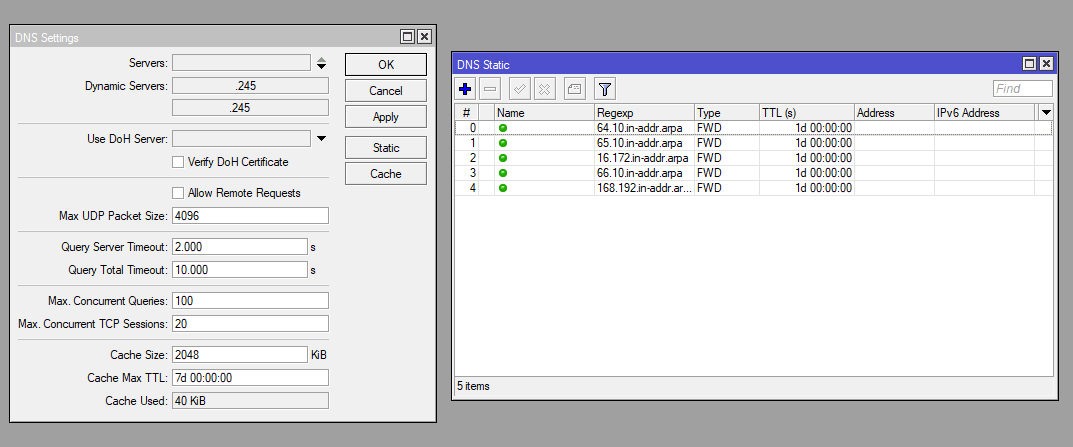
-
We use the utility several times /tool tracerout with flag use-dns=yes
-
PROFIT! Your DNS is breaking.
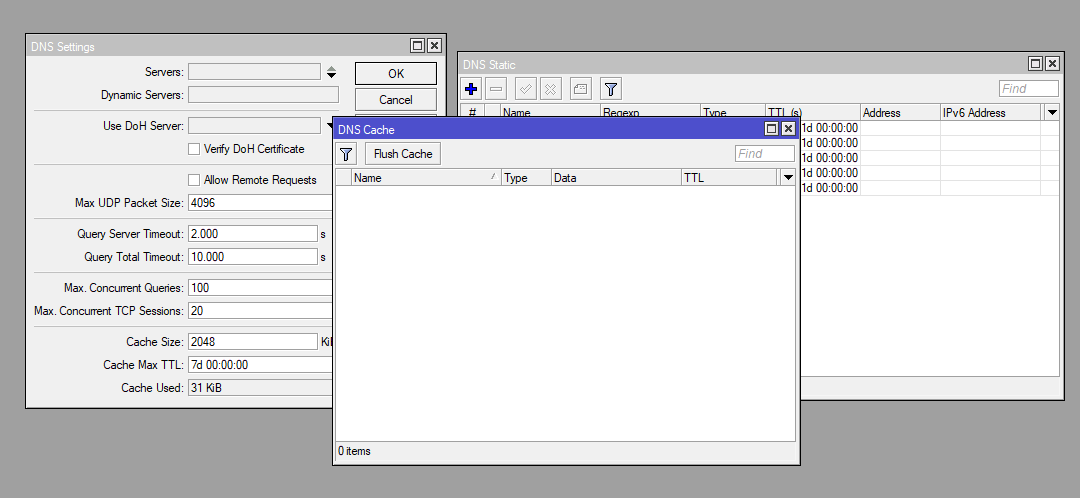
Moreover, it breaks down in a strange way. Sites (A / CNAME records) convert normally, but reverse zones (PTR) break. Only reboot helps.
Problem playable on devices: hAp lite, CCR1016 (version 6.48).