The DNS resolver is a joke… just see how many new bugs there are in every v7 beta/rc release.
The fact that a DoH server should just have been another server in addition to the plain servers (keeping the same functionality for the static entries) is just the most obvious problem.
I just wish there was some clarity when folks should use the “Feature Request” in the new-ish help.mikrotik.com. I’d like to think some the items here and above link are at least being tracked by them – but hard to know.
Just for example, should everyone who needs JSON support, file a feature request in Jira / help.mikrotik.com? That seems a bit silly. At the same time, it be good to know an item is “on the list” with some ACK in forum to some of the reoccuring themes.
+1
Are there plans to add support for additional LACP hashing algos? encap2+3 and encap3+4 would be greatly appreciated
Hi,
Happy new year everyone and great Mikrotik Tip shared today:
https://www.youtube.com/watch?v=BbDnBxlBTdY
Feature Request:
Possibility to disable the anti-replay protection
Description:
This feature request is probably very specific, however don’t think it would be hard to implement, at the moment the replay value seems to be always ON and hard-coded to 128B:
/ip ipsec installed-sa> print
Flags: H - hw-aead, A - AH, E - ESP
0 HE spi=0x70426F0 src-address=162.159.65.18:4500 dst-address=192.168.1.100:4500 state=mature auth-algorithm=sha256 enc-algorithm=aes-cbc enc-key-size=256 auth-key=“” enc-key=“”
add-lifetime=24m19s/30m24s > replay=128 >
This anti-replay protection it’s actually a problem when trying to use the Mikrotik IPsec with anycast networks like Cloudflare:
https://developers.cloudflare.com/magic-wan/reference/anti-replay-protection/
Many devices allow disabling the anti-replay protection but i wasn’t able to find a way to do it on Mikrotik, which is why i mentioned above it’s hard-coded, if there is one way to do this please let me know.
While i’m not able to make the IPsec work, the alternative will be to set up GRE tunnels, which due to the lack of encryption not everyone is willing to use.
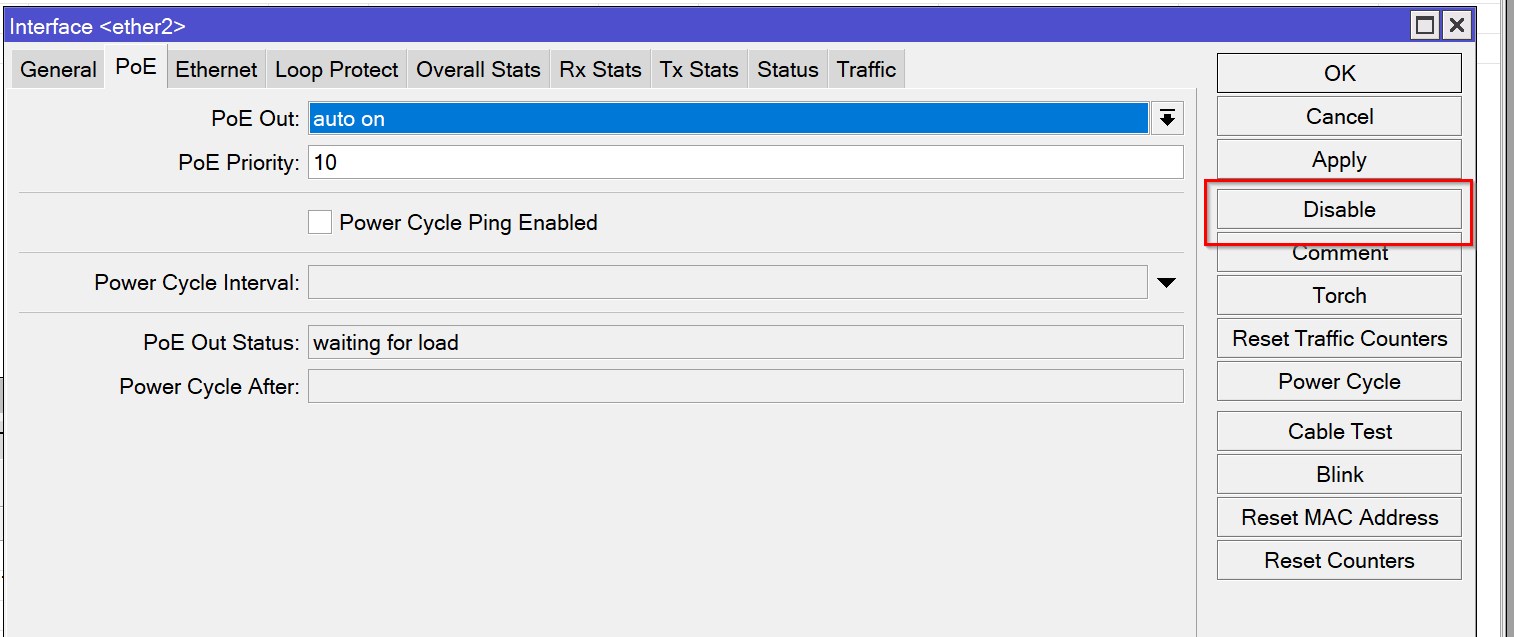
Feature request is to move the “Disable” button away from other common actions such as “Comment” or to add a “Confirm” dialogue. Too easy to disable an interface accidentally by being a few pixels off target when you are trying to click on “Apply” or “Comment”.
[feature request]
pppoe-relay
and broadcast-relay
could be extra package possibly bundled with other relay daemons
[feature request]
ipsec alg (helper)
[feature request] dhcpv6 server - address (/128) distribution
[feature request] dhcpv6 client: ability to change DUID manually
would be useful if you have lots of links from same provider.
[feature request]
configurable looking glass package for ROSv7
[feature request]
Please add routing-table support for ping and traceroute
[feature request]
Please add clear-DF and strip-IPV6-options actions for IPv6 firewall (mangle)
[bug report]
4 uplink with 4 VRF
each had add default route feature with distance:10
VRF confuses and one pppoe interface has TX drops and shows RX bytes/bps: 0
thanks for reading hope it can be fixed.
changing default route distances fixes the problem temporarily. i guess VRF conflicts with ECMP. fyi.
[feature request]
please add wireless DTIM and beacon interval setting.
[feature request]
please add TCP_RTO_MIN, TCP_RTO_MAX and the tcp_retries2 settings
[feature request]
Please add target and destination to queue tree rules
Please add ‘any’ packet mark matcher to queue tree.
[feature request]
Please add;
expired DNS cache size
and
expired DNS cache TTL
and fallback to expired storage when resolver is unable to resolve something.
something like recycle bin
[feature request]
regarding wireless ANI feature; add one another choice line below: REQUIRED or just ENABLED.
thanks for reading and considering, regards
[feature request]
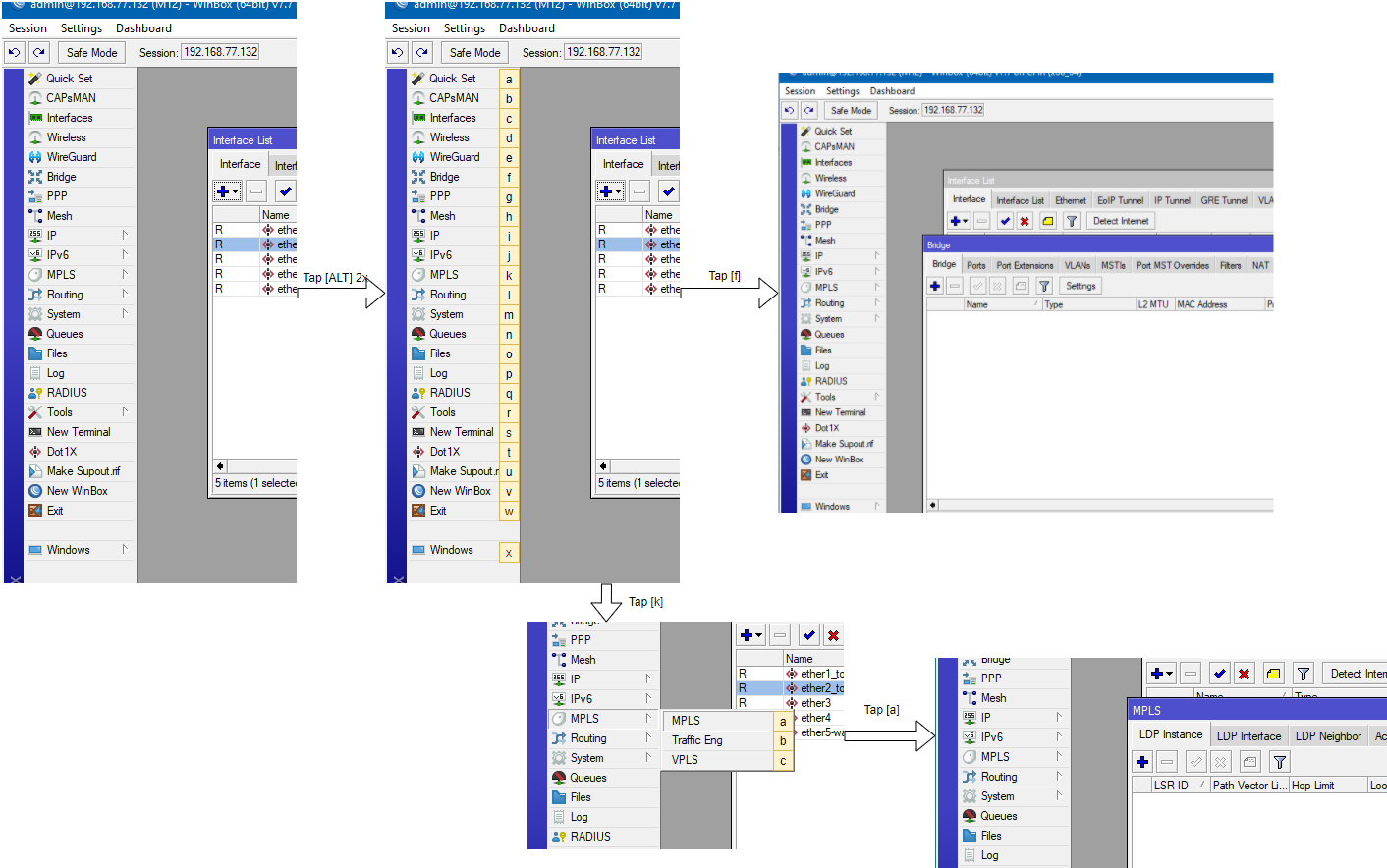
WinBox Keyboard hotkey navigation
to be activated for example pressing [ALT] twice
then the menu items could, for example, be iterated through a-z and on submenus (like MPLS, etc.) the iterations could move over to the submenu
so navigation could be much faster, hence one can navigate with the keyboard anyways for adding entries ( [INS] key) or de/activating items ( [STRG]+[D] / + [E] )
Add to Winbox a menu section with commands for automatic arranging multiple windows (cascade, side by side, in a stack) !
I suggest in Winbox program implement the ability to display two additional columns in the window of the “IP - Firewall - Connection” section: the first should display the number # of the rule line from the “Filter Rules” section, which allowed packets to pass, and the second column should display that " comment" which is recorded for the corresponding rule with line number # from the “Filter Rules” section. This functionality will make it possible to significantly simplify the process of debugging firewall rules, i.e. it will become similar to modern Next-generation firewalls.
Wow. That's a good one! +1 for #HotLockWinbox
You can already do some of that yourself! In the firewall you can apply connection marks and you can see them in the connections window.
Also, in the firewall you can enable “log” (+ optional tag) and see the matching packets in your log window.
[feature request]
Hi all,
On my Tik I am using few VLAN’s, multi Wireless networks and about 10 DHCP servers due to a need of splitting the connection to different sectors that should not communicate one to the others.
I also need a way of seeing in one place all the connected devices for all the network’s , and the best way of seeing this closer to my need is similar to Quick Set - WISP AP - Local Clients (but the Quick set is intended for other purposes, and not for "viewing things, or so).
I would like to see something similar on the main menu, maybe on the Interface menu would be a good place for this; to create a tab about “Connected devices”, or maybe a dedicated place on the main menu for this would do the trick.
I would like to see over here:
- All the local clients listed (IPv4 and IPv6)
- The type of the client connection (wifi / ethernet)
- The total number of clients connected via Wifi / Ethernet - if possible listed also by each network (VLAN / VPN / each Wifi network), e.g 2 clients VLAN 22, 3 clients Wireguard, 22 clients VLAN 33, 1 client IPSec
- The MAC of the device
- The IP of the device
- The VLAN, VPN (Wireguard, IPSec or whatever) and the DHCP server used
- The comment of the DHCP Lease for the static IP’s (i am using this for naming the clients in case of the client does not have a defined name - some IoT and not only IoT devices does not have a device name on the network provided by the device itself for the identification)
- For the Wifi devices - the signal straight and the 2.4 / 5 GHz, whatever connection it uses
- The up-time
- The current up/download speed, the average rate, the Bytes and the packages, the top up/download speed on the last hour / day / week / month
- The Brigde used for the client
- The Interface used for the client
It would be also nice to be able on this screen to enable/disable the view of the entire DHCP leases that uses a static IP that are not connected at the current moment and to see the last connection time..
You do some of this in webfig with the Status page. Any of the controls in webfig, from any page, can be add as an element on a Status page. See https://wiki.mikrotik.com/wiki/Manual:Webfig#Status_page
When you start the phrase like “You do some of this into other whatever” you troll me.
My request was:
- for Winbox
- more complex than what the Webfig offer’s on that cripy interface for your own puzzle that puzzled you from the start
If you cannot add value, or, if you do not understand the request, please keep your words for yourself.
You did not mention that your request was for Winbox! How can anyone know that?
Of course it is possible to do what you want using an external program and scripting and/or API calls.
Maybe a useful feature request for Winbox would be to have some capability for user-defined menu entry that opens a form (or even a generic terminal window) that can be populated using a script.
I have seen uses for that as well. And it would be more generic than to have them implement exactly what you need in that much detail.
Sorry, my bad, i had lost some text and missed that; the request was for Winbox indeed, even if it is not mentioned  .
.
It would be a huge effort to make the Winbox able to be manage a sort of lego screen composed with whatever you like as columns from the entire RouterOS available screen’s, i do not think that this is a bad idea; but the first thing to do is a “Status page” that may be used to see all the connected devices from all the network’s in one page. I have just made a list of what i consider, but the software architect and the Mikrotik team will be the ones that will decide if this is manageable, if this is required and what should contain. My feature request and my list is just a start for whatever may be, if it may be anything on this side.
The first step is to have something like this build in into Winbox from the start; API’s, script’s, lego and puzzle’s may be developed afterwards.
Not to have something so basic into Winbox is worse than having something that does not satisfy all the client’s. Scrip’t and API’s are not for the basic users of Tik’s (e.g. soho users)but i agree that are a good ideea; but, let’s nail them one by one.
In fact, they got all they need to do this, is that screen from the Quick Set that may be improved a little bit and placed as independend window or a tab, is not so difficult i assume.
Well, I hope that (but I have never researched that) winbox, webfig and command operate using some form of table that defines how a dialog is presented (layout) and what data it shows.
I.e. that this is not in code, but it is data-driven. The capability should already be there, it just isn’t exposed to the user.
Similarly I would like to have the possibility to add an extra field in a form, especially on the Status tab of some items, where it can show the output of a user script.
I have worked with a Windows application that has that capability, and it is very convenient to have that. It also reduces the number of feature requests a supplier has to implement, because users can resolve some of them on their own without bothering the supplier.
Not any controls, and by the way, the Design is extremely buggy, slow, crashes with Firefox and even with Chrome, log’s you out random sometimes. I never manage to add more than few things (basic). You were never able to add the mentioned list and status of the Local client’s (the one that i was referring to). To be honest…could that feature be ever used by the users that want a Status of the clients, interfaces, VPN connections, signal and other real time data; or is it only for static fields data meant to be usable ? No, to honest, not even if I try (i have just tried now to do my setup on Webfig), I could not get what I need from that functionality, because you simply cannot.
I’m not the target. Especially as someone who design configs so they don’t break “QuickSet as a status page” & too familiar with limitations of the webfig. All I was saying it’s not like they are starting 0% on a “status page” & more trying to be helpful to readers here who may not even know the webfig status page part existed – it is useful, but could be better for sure.
But I’ll be honest it’s the talk of “Multiplatform Client” I fear (in “WinBox for MacOS” from @Normis (in 2021)):
I even use a Mac, and I want winbox fixed up rather than some new client… Maybe with 60+% of internet traffic mobile users (and growing), fixup the existing, languishing mobile apps? So this Mac user wants the same incremental progress on winbox as the “Desktop solution”.
Anyway, this forum is littered with reasonable and somewhat smallish feature-ettes and/or “bugs” – some more trivial than others no doubt. But progress on some of the small items here (and other threads too), but especially on the tools like Winbox, Dude, etc. is extreme slow or non-existent. Obviously I’d like them working innovative new things. But so many good features…that are missing a few minor things that really make them shine. Instead I get the impression they get lumped into future/mythical “new multiplatform winbox”. For what? to solve theoretical concerns about wine…