and additionally the #number of the matching rule
and additionally the #number of the matching rule
Yes! I forgot to note that, but definitely, it would make things way easier to analyse and troubleshoot
These are all great points. Items 1 and 2 in particular were surprising to me when I first started using Mikrotik. I had previously used Ubiquiti EdgeRouters, which do this. It seemed like a basic, common sense approach. For those unfamiliar, any config changes in EdgeOS don’t take effect until you issue the
commit
command. You can issue
commit-confirm
to commit changes and auto-reboot the router if you don’t issue a
confirm
command within ten minutes by default. This is handy if you have a remote router that you discover you’ve locked yourself out of.
If you want to preview the changes you’re about to make before committing, you can issue the
compare
command. Once you’ve committed changes and you decide you want them to persist past a reboot, you issue the
save
command.
Also the config file includes all configuration and can be easily imported to another router of the same model. You just need to modify if it you want to import to a different model that, say, might have a different number of ports.
Karl Denninger, who was one of the pioneers in bringing Internet to personal use, just posted a recommendation for users to randomize their IPv6 addresses on Wi-fi (via OS settings) since the standard SLACC protocol for assigning IP addresses results in a globally-unique identifier for each machine, regardless of which location it travels to or network it is connected to.
Fair Use Excerpt:
Unfortunately in the IPv6 world this [MAC addresses being readable only on the local network] is no longer true. SLACC, which is what most IPv6 networks use for local devices, results in a globally-unique address that is specifically tied to your hardware and is visible anywhere on the Internet you connect to!
So now when you connect to any site on the Internet and are using IPv6 the other end has a globally-unique identifier for your specific device, and unless you can randomize the MAC address it uses you now have dropped a “breadcrumb” that identifies your specific machine. You did not have to sign on, your browser didn’t have to send a cookie or do anything else for this to occur. The mere connection attempt is enough as that address always winds up in the other end’s log data.
Karl goes on to note that “Unfortunately for most systems there is no similar setting for hardware connections (e.g. cabled.)…” My suggestion is that MikroTik add the option to randomize IPv6 addresses via a local DHCPv6 and separate the address assignment from the devices’ MAC addresses. So if a laptop, for example, is taken from its home network and used on the road, it will not be trivially identified with the user.
Just a suggestion. By The Way, Karl rotates posts off his site regularly, usually after 90 days. Come November or after you probably can’t access the original article any more.
It seems Karl has gotten a bit behind the times…
Not only does he not know how to spell SLAAC, he also does not know about “Privacy Extensions for IPv6 SLAAC”.
It is a problem that has been solved long ago, even without his input.

Linux (systemd-networkd): just use “IPv6PrivacyExtensions=true” and done.
It is on by default in systems like Windows, Android, iOS, etc.
If I do not remember bad, Windows use 2 IPs, overlapped for 12h
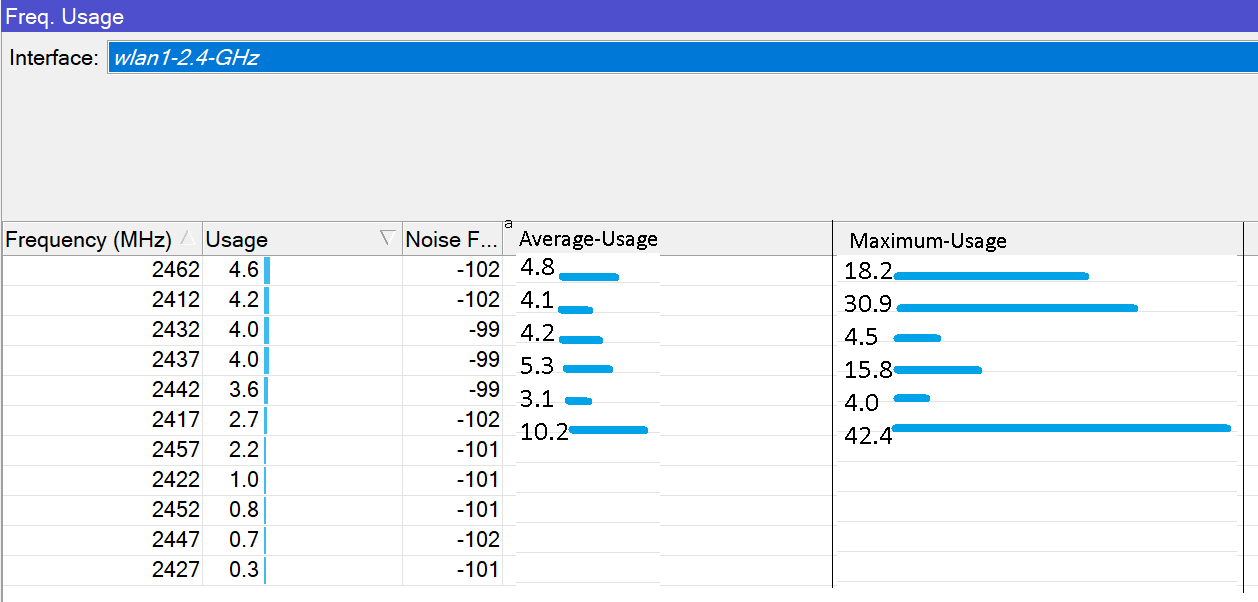
I have a feature request.
Where → Using Winbox , In the wireless interfaces , in the [ Frequency-usage ] screen.
I would like to see two new usage items added to the screen.
- Average-Usage ; shows the total average during the scan.
- Maximum-Usage ; shows the maximum peak detected when the scan was performed.
These two new features would be very useful - especially when looking for potential most-quiet frequency ( best frequency ) for an AP.
Let the scan run for about 10 minutes , then pick the frequency with the lowest average and/or lowest peak usage for the AP.
Please add the source IP to the message “ipsec,error payload missing: SA”.
(the address where the packet was sent from that triggers the message)
Hello everyone,
I have suggestion for: ip firewall address-list
for selected IP address entry it would be usefull to have quick access to telnet, ssh, ping
right now there is enable and disable, it would be also good to have other options to test, monitor or login to selected address.
Thanks
Please add support for the AmneziaWG protocol using standard tools without using Docker. Bypassing Internet censorship is very important and using it directly inside the router is a big advantage.
The problem with adding features like AmneziaWG is its effectiveness is subject to change over time, and built-in things are generally based on some durable RFC/etc standards. i.e. while DPI may be used today… no doubt AmneziaWG still might have other identifiable patterns over time.
IMO, this kinda need is why Mikrotik added /containers (generically “Docker™”). But I totally get the reluctance – /container is not so easily setup. And since RouterOS /container !== Docker™ often something like Anastasia or really most things on DockerHub require more tweaks/adaptation to actually work on RouterOS.
My feature request be a little broader… I wish had some Mikrotik “container store” with some curated images… so well-known container is more like adding an extra-package. Or even some “higher-level” CLI/API or “compose-like” metadata be useful.
While I get you can just “pull” from DockerHub… the issue some containers have a fair amount of configuration and/or assume some orchestration platform. Basically it often takes reverse-engineering “docker commands” into what be needed on RouterOS. RouterOS specific registry and/or metadata be useful to fill in that gap.
i.e. “just use a container” is actually a bit daunting for most users… since someone need to be familiar with firewall, routing, “Docker”, on top of the software package inside the image… to actually use /container for something like AmneziaWG.
I agree, it would certainly be useful when there was some location (MikroTik or not) where one could pull ready-made containers for RouterOS for often requested additions!
Especially when Docker containers are often only available for amd64 architecture, and may not be tailored to RouterOS use.
There is an example for “freeradius” in the help page, but that would not work on a CCR or RB, only on CHR.
Such a repository could contain several often-requested features for RouterOS as easy to use (and update) containers.
Examples of useful ready-made containers could be:
- Unusual or newly developed VPN protocols (as above)
- DNS server/resolver
- RADIUS server (freeradius)
- Web server
and other similar network services.
Hi all – this is my first time posting…
I’m long-time *nix user. I would really appreciate Ctrl-w (delete word) support on the CLI. Should be easy to implement right?
Please, allow several /ip socks entries on different ports with different VRFs.
+1 for this, I think the development of mikrotik features and capabilities went through a lot of changes through the years, however such a simple feature like registering DHCP leases in DNS natively was never one of them.
It would be much easier if we could have this feature as an option rather then scripting it… I hope we will see this soon.
I support this request. DNS gained a lot of attention recently (adlist, dns forwarders, etc.). And such a feature, registering hostnames in internal DNS resolver, would be a killer. I could remove that wonky dhcp lease script that just bloats my configuration export. And save on disk writes I would welcome as well.
Don’t know if this has been discussed already, but I do find it baffling that I can’t see, let along control any of my additional switch interfaces from my router. Instead I have to log into and configure the switch independently. I should imagine most people sooner or later need more than the five, or eight ethernet ports that come with most routers and want to add more. Why can’t they simply be ‘added’ some way to the configuration page of the controlling router?
Add info in winbox tool
It would be very functional to be able to add a description for each connection that you save and thus identify more quickly to which mikrotik equipment I want to connect, until today whenever you save an access you only have as reference the IP address and the user name after that there is a big blank space that is not used. This will be the perfect space to add that description.
It is difficult when you have more than 50 mikrotik devices installed and they are not in your network to see their description like when you use the NEIGHBORS tab.