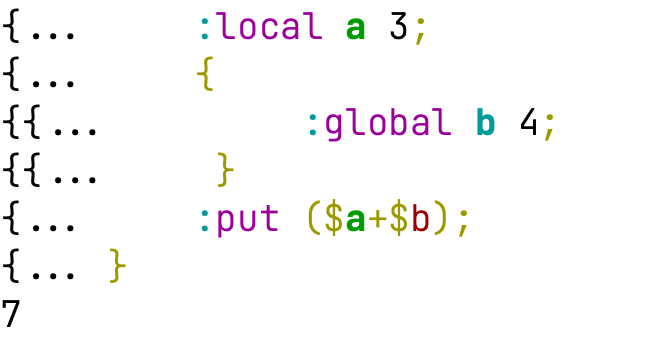
Hmm. Your robots might have messed up on this claim on:
In the interactive CLI, a local variable defined on one command line stays visible on the following command lines for the rest of the console session:
[admin@MikroTik] > :local myVar a;
[admin@MikroTik] > :put $myVar
a
BUT if you try that on 7.26beta3... that obviously does not print a, since each CLI line is its own scope. Now of course some [admin@MikroTik] > { :local myVar a; :put $myVar } would print a... but the { } create a scope.
Since I don't regular re-read the "Scripting" page, only notice since I was checking the Docs Changes | RouterOS Manual which had the clue "in the interactive CLI a :local stays visible on the following lines", but apparently no one pushed back on the changelog nor the changes. And manual does not show using { } either
My guess is your agent used ssh as proxy for the "interactive CLI" ... but sent the operation as one command using ; in its test... but then reconstructed the [admin@MikroTik] > "format" the manual uses everywhere else in the writeup... now only based on the unneeded semi-colon...since agent seem to try it but still got it wrong.
Now... if you have some "Page Diff", this would have been spotted without that... it's way hard to find these things. Now, the Doc Changes did summarize the problem, so in some ways that worked, but still so diff between the versions be really useful, especially since folk did use the "History" on the old help.mikrotik.com site
But the real WinBox terminal "highlight" shows the $b as an error type. And I would absolutely not recommend this... since better to keep the "always declare a global in new scope" as here the $b was not declared as :global b;. So you're own syntax checker shows a problem with that syntax... since $b be shown if you did declare it...
And not going to quibble about unneeded semi-colons, since it arguable there "safer", although I personally dislike unneeded semi-colons myself...
One idea here for your agent is adding some "RouterOS script block" component that render RSC script blocks using custom MDX (aka JSX) component, that your Docusarus build could validate using disposable CHR or "the lab router" to run some internal call behind parse//console/inspect. Now CHR make it simple to access the serial console from a build script, so that the "interactive CLI" can be check using a style more like expect, or forward serial console over TCP for hardware.
The theoretically MDX component could then render the [admin@MikroTik] >or "script" block based on tag/attribute when building the HTML. But the more important part be the backend build could use the MDX blocks to validate the script used when generating docs. Bonus be the HTML rendering of RouterOS script using proper syntax colors, instead of relaying on the older highlightjs coloring – which is how this human has long check RouterOS script: one color being wrong tells the story.
Basically, since y'all added version, the build should validate the RouterOS it's showing in docs, on that version, ideally automatically as part of the build. If the build failed because a script block was bad, that's free QA.
Since we still don't have some Feedback button on the manual pages....
On Apps | RouterOS Manual , there should be some callout about the "quoting" and [placeholder] variables. While I'm pretty familiar with the /app YAML, I forgot to quote one of the variables in environments, so I thought there was a bug (testing on ARM32 so possible...). But forgot that [] are arrays, if you use only a myvar: [secret:admin_password], it becomes empty value, so it needs to be myvar: "[secret:admin_password]". Basically some "Tip" or sentence about the string interpolation rules be good to add to Apps | RouterOS Manual
Not sure what do you mean by hard to find, it is literally using the same path as in RouterOS, so if you can find ipv6/address in ROS, then there should be no problems finding cli-ref/ipv6/address
The version labels are still missing, and the landing page still opens 7.26 with nothing saying it's a beta. Now that 7.25 is stable and 7.24 is long-term, something like "7.26beta", "7.25 (stable)" and "7.24 (long-term)" would do the job. Also, the 7.25 and 7.24 pages are set to noindex, so search engines only find the beta docs.
Regarding LACP/MLAG:
lacp-strict (new in 7.26beta4) isn't on the Bonding page in any version yet, and someone in the beta thread is already asking whether it's an on/off setting or always on.
A few MLAG fixes might be worth a line in the MLAG docs too: BPDUs leaking to the wrong dual-connected bond and VLAN-tagged traffic looping back on CRS8xx (7.24.6), plus the wrong root-path-cost when the root bridge sits on a single-connected port and MLAG restarting when hardware offloading is turned back on (7.26beta4 and beta5).
And the VRRP page should warn that group-authority lets the other instances' virtual MACs age out in the switches. Only the group authority sends advertisements, and without VRRP hardware offloading the routed traffic uses the router's own MAC, so nothing keeps the virtual MAC alive on the other VLANs. Once it ages out, traffic to the gateway gets flooded to the whole VLAN, backup router included. The WAN+LAN example even suggests making LAN the group authority, which is exactly the setup where the WAN MAC ages out. More in this thread and this one.
P.S.
Please add a feedback button to the manual pages, preferably at the end of each page
My main issue is labels reflect don't actual version for CLI Reference. Agree the default is confusing, but it does say what version it is.
Right now it unclear what version CLI References ("cliref") applies to since its ambiguous (or if is really the implied .0 always, then there are bugs). My rosetta MCP assumes it's the latest patch for that channel at the time of scrape, since it needs something to pin it to. But I made up the rule, and don't actually know, (assuming over time the RouterOS channel builds, trigger a docs builds, of at least the CLI Reference part).
Not suggesting you need every point-release per se, but the "cliref" should indicate what version exactly.
Since we still don't have some Feedback button on the manual pages.... another doc "nit".
The manual fails to describe how any of the /app/settings "assumed-" items are actually assumed. While the download/media path may appear clear, but only if "disk" is in the path, not <disk>/.
Apps | RouterOS Manual and the CLI Reference does not off more clues, just same "typically" vague description. And I'm not sure the "Default" is correct since I think it does follow the /app disk, not the system disk. I could be wrong and/or have "atypical" settings on the "disk/media" stuff, but assumed-router-ip and assumed-lan-bridge is not clear for sure.
Property
Type
Default
Description
assumed-router-ip
IP
(detected)
Automatically detected network IP address of the RouterOS device.
assumed-lan-bridge
string
(detected)
Automatically detected bridge interface used for LAN connectivity.
assumed-media-path
string
disk/media
Default media storage path, typically located on the system disk.
assumed-download-path
string
disk/media/downloads
Default download directory path, typically located within the media storage area.
So it the (detected) that has no description anywhere. The doc should since if you're trying to build a custom defconf, know which one item be used be good information to avoid needing to override them, which then break further configuration since it multiple place to update on DHCP/static IP change.
Since we still don't have some Feedback button on the manual pages.... another doc thing.
Y'all seem to have an undocumented any operator in scripting/CLI. I wonder is just over-sight that it's not documented. Or, is it intentionally undocumented, Or perhaps, it a "bug" that's it's even allow to pass the :parse into (code) type since it not valid syntax otherwise..
Basically, it seems, the any operator is used like this :if (any $myvar) do={} else={:error}, which will do a proper check for "existence"... which avoid longer :typeof checks needed today IF it was actually "supported" (i.e. documented in manual).
That is nice! What I have asked for several times is a similar feature for release notes!
You select two versions and you get the release notes that were made between those versions, with the notes removed that are about problems introduced after the first version and fixed before or in the second version. So you get all relevant notes that you need to consider when upgrading your router across several versions.