IP > Firewall > Filter > add new chain:forward Dst. Address: 10.0.0.201 Prot: 6(tcp) Desport: 80 Out Interface: ether6 action:accept. (do not declare the In interface because I want to be reachable from the outside)
It start catching the package (when try to get this web from the public IP), but still unreachable…
I’m having the same problem. My $40 routers from walmart do a better job setting up port forwarding with harpin.
Why on earth would hairpin not work by default? We’re setting up port forwarding to access a machine from outside the LAN. Would it ever make sense to deny the same request because someone happens to be inside the LAN?
Because walmart device is a (sort of) “firewall” and has predefined lan/wan sides and his job is to facilitate non professional users.
Mikrotik/ros is a (multi purpose) router which can handle many network scenarios; skilled enough people can fine tune configuration to achieve what they want/need without precooked hidden rules.
Now I am having the same issue in another RB (in my home).
I really don’t know what i am doing wrong. Tried changing the “in. interface” and “dest address” but nothing works…
The weirdest thing, is that the RB see the packages (in the Firewall Nat) but don’t link the connection
I will copy here the print asked in some previous post.
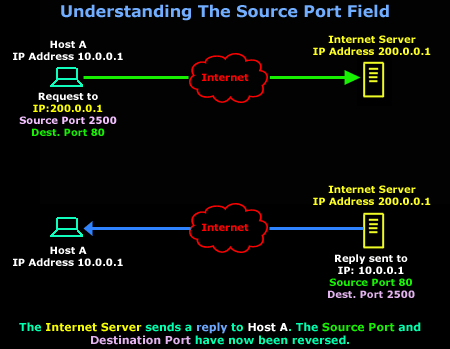
It appears you are specifying src-port instead of dst-port in the nat matching rules. The source port of the host coming in from the internet is difficult to match on because it is normally different every time a new connection is made.
Here is a good illustration of src-port vs dst-port and how they differ based on which side of the TCP conversation you are on.
I had already test that, but doesn’t work too. but I will test again when go home (erasing all the rules and creating a new one)
Are there something more that have to be configured to able that, I dont know, maybe the connection is nos being allowed in another menu.
Just to know: I have a public DHCP provided from my ISP, are there any way to have this rule set to a port or some alias to the WAN address, because if the public IPs change, I will have to change the rule.
Remember A.B.C.D is the public ip given to you by ur ISP
However i prefer to use netmap instead of dst-nat[/quote]
Hi Zizodabby,
I had already test that, but doesn’t work too. but I will test again when go home (erasing all the rules and creating a new one)
Are there something more that have to be configured to able that, I dont know, maybe the connection is nos being allowed in another menu.
Just to know: I have a public DHCP provided from my ISP, are there any way to have this rule set to a port or some alias to the WAN address, because if the public IPs change, I will have to change the rule.
Thanks.[/quote]
Hi
I use Net-map personally
Below is the rule
NB:
Ensure your wan ip is a live/public IP (contact your ISP) also use whatismyip.com to check if it same as what you have as NAT
Remember A.B.C.D is the public ip given to you by ur ISP
However i prefer to use netmap instead of dst-nat[/quote]
Hi Zizodabby,
I had already test that, but doesn’t work too. but I will test again when go home (erasing all the rules and creating a new one)
Are there something more that have to be configured to able that, I dont know, maybe the connection is nos being allowed in another menu.
Just to know: I have a public DHCP provided from my ISP, are there any way to have this rule set to a port or some alias to the WAN address, because if the public IPs change, I will have to change the rule.
Thanks.[/quote]
Hi
I use Net-map personally
Below is the rule
NB:
Ensure your wan ip is a live/public IP (contact your ISP) also use whatismyip.com to check if it same as what you have as NAT
If this doesn’t work then im sure its ur Public IP[/quote]
Hi,
I apologize about the post. the Connection was working, but all the test I made was from my internal network. Some friend could access from outside to mi internal ssh server, and I made the same test (using my Works VPN), and it is working right now.
Only have to test if the streaming of my XBONE to my work, and its all done.