where only local addresses belonging to the 192.168.1.0/24 network appear, while yours uses a DNS resolved public address (and noone answered whether a direct IP can be used instead of the DNS resolved name) and the OP has the src-nat with a specific dst-address (dst-address=192.168.1.7) whilst your example has the subnet (dst-address=192.168.1.0/24).
But then it is also unclear (to me) which problem OP is trying to solve (and if his posted nat rules are actually solving it) and whether your posted rules solve that same problem or another (similar but different) one.
Maybe it is just me, but when info is provided fragmented in several posts and with empty/meaningless (for a not-in-the-knows person like myself) references to “names” like “hairpin-nat” or “split DNS” that could mean everything and the opposite of it without precise context and examples I get confused.
But this is actually your Hairpin-NAT rule. And you didn't see the issue because your network has only one subnet. But if your LAN has multiple subnets, then your rule will cause unnecessary NAT-ing, compared to rules that include scr-address=192.168.88.0/24 instead of src-address=!192.168.88.1.
The domain in address list is solely used to replace the dst-address-type=local in your DSTNAT rule. Instead of dst-address-type=local it would be dst-address-list=MyWAN.
It's not used for the SRCNAT rule (the hairpin-NAT rule).
But still a hairpin-NAT failover rule is still needed because not all devices use the local DNS resolver. And as OP mentioned above, you might use a mobile device that roam from 5G to WiFi and its DNS cache still has the public IP address for the domain.
For normal configurations it's totally ok to write in the hairpin-NAT rule dst-address=192.168.1.0/24 src-address=192.168.1.0/24 instead of more precise /32 addresses.
The reason is that because in normal configuration when Use IP Firewall on the Bridge is not enabled, direct traffic between devices in 192.168.1.0/24 don't see the router's firewall, and won't be subjected to that NAT rule.
It really only when DSTNAT was triggered that that hairpin-NAT rule wil be hit. As a result, you are already limited by the only destinations listed in to-addesses of the DSTNAT rules, no need to repeat those individual addresses in the dst-address condition of the hairpin-NAT rule, just use the full subnet.
Which confirms (I am trying to make a mental model) that the order the rules are written (even it makes no difference in effects) is more correct the way both the MIkrotik guys and rextended wrote them, first the dst-nat rule and then the src-nat (Hairpin Nat) one, as the Hairpin nat by itself does nothing and only comes into play if triggered by the dst-nat rule.
@jaclaz my problem is the mobile phone that needs to reach a reverse proxied server from inside and outside the network. The split dns trick is working some of the time (I assume because of stale DNS entries), I could not find a way to change the TTL for my DDNS provider and did not think I could improve the networking stack of my mobile. Because of the dynamic IP, I tried to find a more dynamic configuration of the dst-nat rule than just entering the WAN IP in each dst-nat rule (I have several).
So it seems anav’s configuration in Hairpin NAT instruction inconsistency? - #10 by anav where the add address lines automatically translates the DDNS domain into the dynamic WAN-IP, and applying that address list in the dst-nat rules + using the 192.168.1.0/24 for dst-address and src-address is the ‘good’ way to handle this scenario (where a network setup with a separate subdomain for the server would prevent the need for the src-nat rule, but still would use the address list for the dynamic WAN-IP in the dst-nat rule.)
Hence, why the generic approach, which works for most cases ( one or more servers, one or more subnets ), may not be the most efficient or targeted solution, but it solves the majority of potential setups.
I personally am keen to explore the split DNS approach, keep the generic rules for the externals, and add DNS rules for internal traffic. As noted, for internal work with NAS, this would probably be ideal.
Trying to implement the address list: is this configurable in the WebFig or only through the Terminal?
Nevermind: I confused the IP Address menu item with the IP → Firewall → Addresses tab.
And it doesn’t work if you have the split DNS in use. It now resolves to the internal IP
Ok, so I will make this work for myself by removing the static entry for the DDNS domain from the router DNS static list, since the router DNS is only my secondary DNS. I have a pihole server as primary DNS.
Yeah unfortunately, in this case you'll need multiple (sub)domains, and can use one especially for the address list, for example use the MikroTik IP Cloud domain for this purpose, because it updated automatically by RouterOS.
And use other DDNS (or real domains you own) for client access to resources.
However we can also argue that outside from IP Cloud, as we probably already use a script that uses API to update the remote DNS records, that script could as well also directly update an IP Firewall Address list entry with the new IP address. Then we don't need the domain in the address list.
I made the static DNS for the DDNS domain not ‘Match subdomain’ and made a separate static DNS entry for the reverse proxy subdomain, both pointing to the internal server IP. Then in the Firewall addresses list, I use another DDNS subdomain to look-up the WAN IP. This seems to work!
For the original question the answer was that the documentation should read out-interface-list when referencing LAN, or reference bridge (or equivalent) when using out-interface.
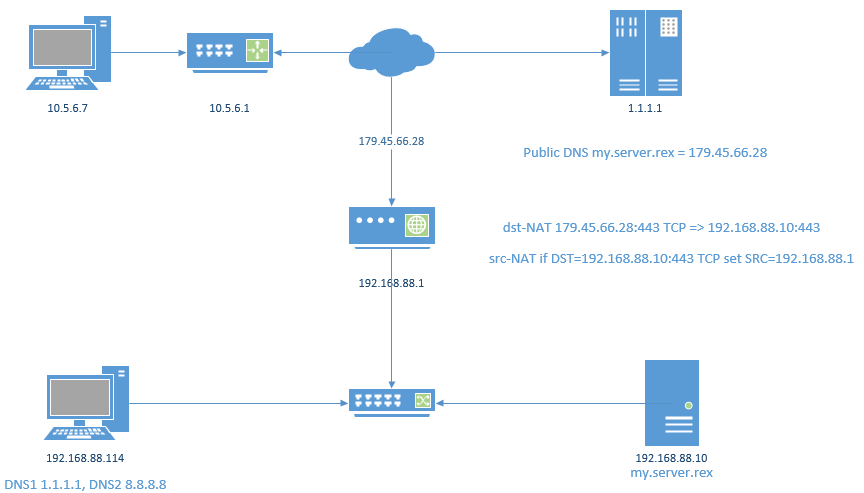
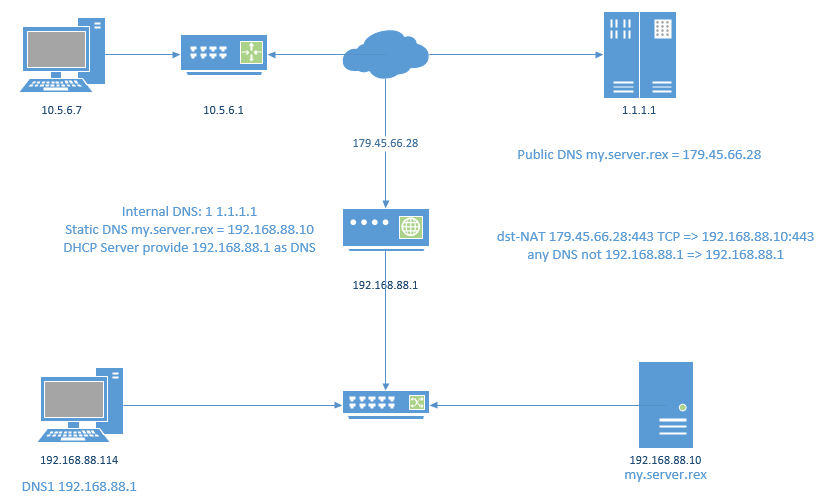
Of course I was reading the documentation because I could not get Hairpin NAT to work. This had to do with a misconfiguration in the dst-nat, which this thread then extensively discussed solutions for. Below is the summary outcome of that very nice discussion.
To allow for my mobile phone to access a https reverse-proxied service on my internal network (e.g. using a https://subdomain.DDNSdomain.name address) I implemented the following.
split DNS to have the DNS server resolve to the local IP in the local network for both the https webserver on the main DDNSdomain.name and the reverse proxy subdomain.DDNSdomain.name, fastest way to access.
Using address-list to automatically register my dynamic WAN IP, using as look-up a different subdomain from the reverse proxy subdomain, because the main domain and subdomain now both resolve to the local IP while the dynamic WAN IP is what I need to capture in a variable.
Multi-use Hairpin NAT, works now for any future hairpins that I might need.
dst-nat that uses the dst-address-list populated in step 2 to define the WAN IP in the dst-nat, instead of needing to manually fill-in the dynamic WAN IP in each dst-nat rule and instead of the dst-address-type=local trick that I used at first.
 .
.