Looks like MT better add Ubnt AP controller into ROS, so everyone will be happy.
Since both products (cAP ac and hAP ac^2) appear almost at the same time with the same chipset and there are tons of complaints about the 5G wifi poor performance, MikroTik Engineering Team has to take immediate action to resolve this issue otherwise more and more MikroTik users planning to buy other RELIABLE brands for their APs.
I find it ironic that i, as a home user, was looking to get away from the flakey performance of consumer grade gear, and asked MT support what they would recommend. They suggested an RB3011 and CAP AC, which i bought. RB3011 has port flapping issues when mixing fast internet and gigabit on the same switch chip, and the CAP AC just seems to to be neurotic…
I can only hope the the mother of all updates will resolve these issues.
Perhaps a little more testing prior to launch MT?
I’d prefer to see MT has a bigger team so they have more hands and brains. As of today, great plans and promises are too optimistic. May they want to sell 10G switches or maybe 40g or 100g devices but most customers won’t trust them based on low end devices impression.
And, MT wifi is something that’s under question on many sites and discussion boards so this is huge negative to MT.
In my experience, the performance varies greatly depending on the device which connects to the router. I’ve tried a couple of devices
- ASUS netbook E203NA, 1 stream, Atheros QCA8377
- Samsung cellphone S3neo G903, 1 stream
- Samsung tablet S2 T715, 2 streams
a 5GHz, using the test suites - Kai Uwe Rommel’s netio (PC only)
- iperf3
- Tamosoft Throuput Test
against access points - Mikrotik hAPac2
- AVM Fritz!box 6490
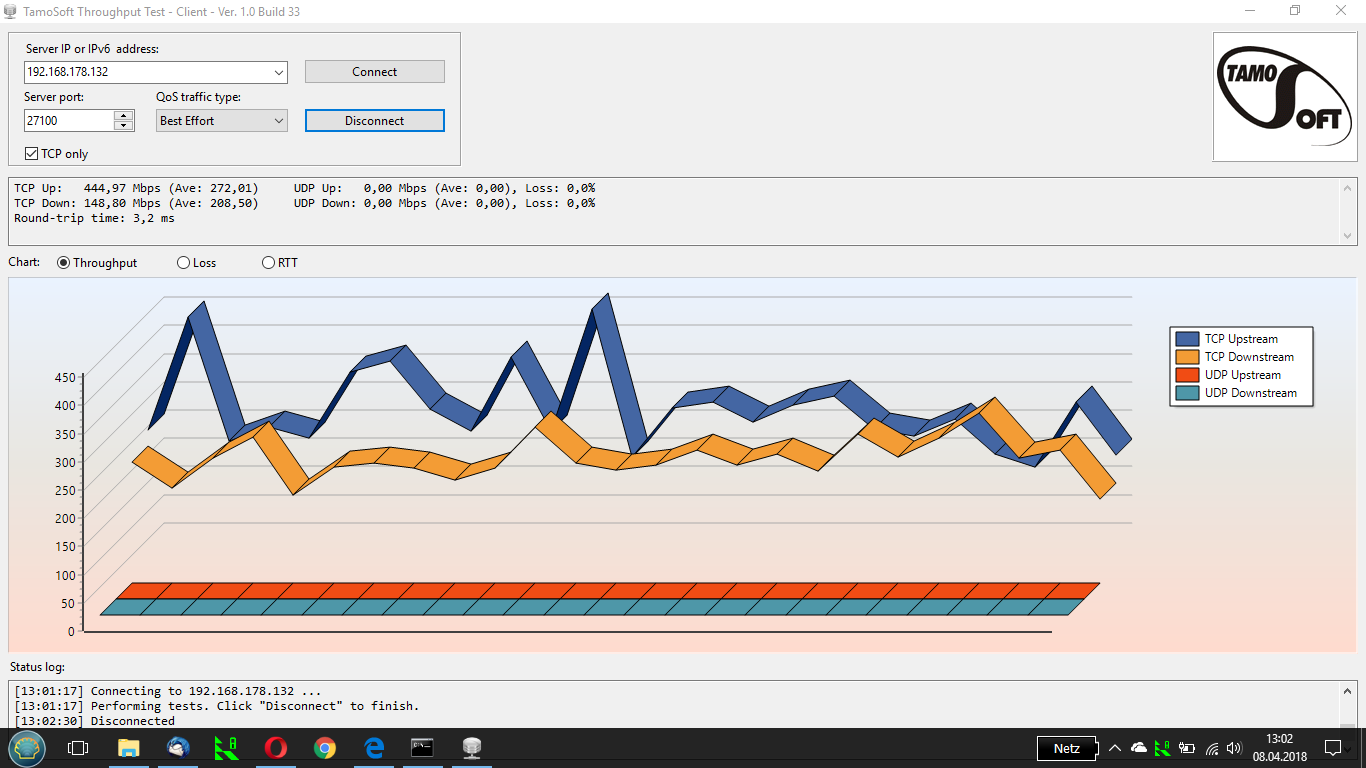
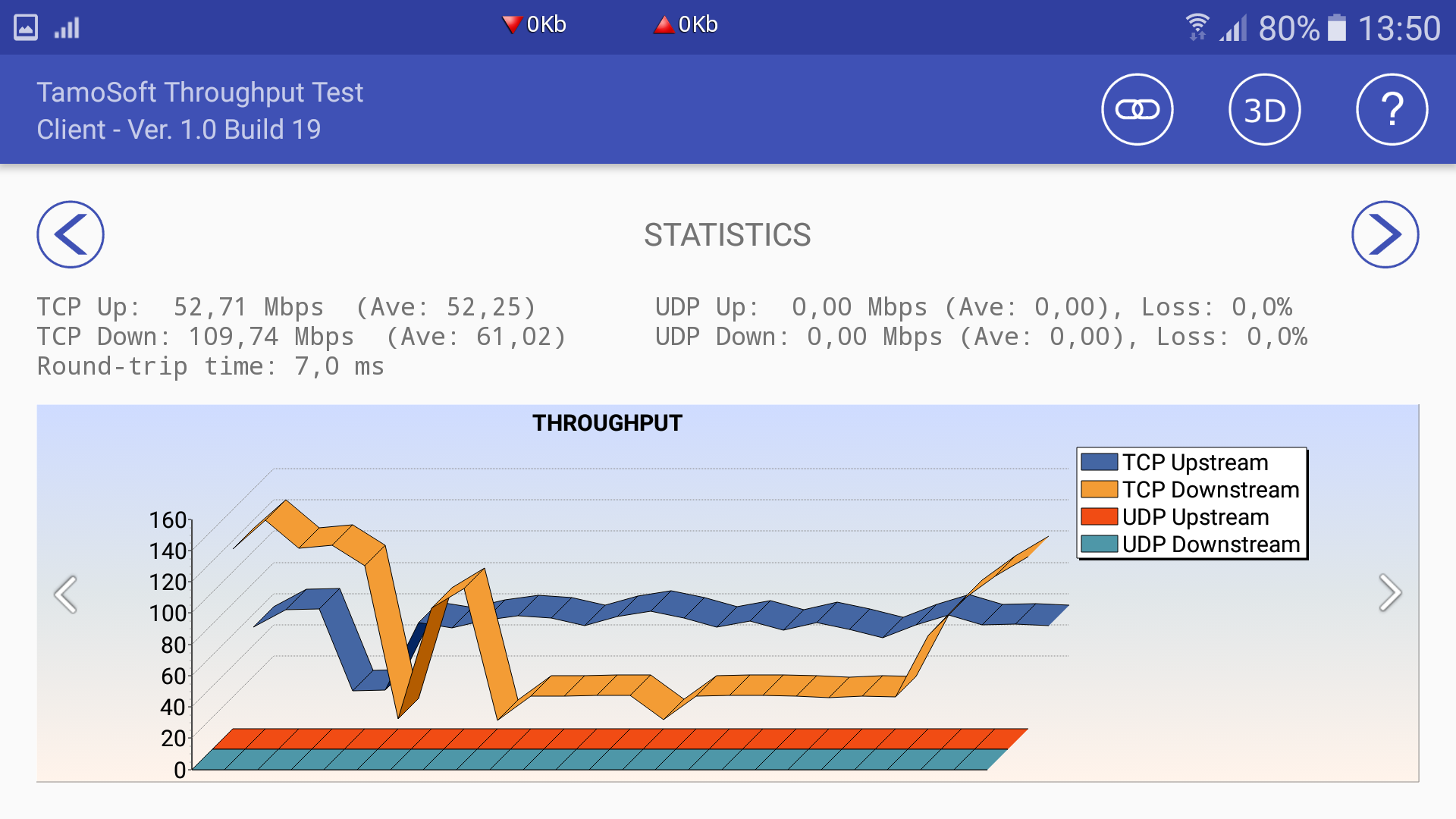
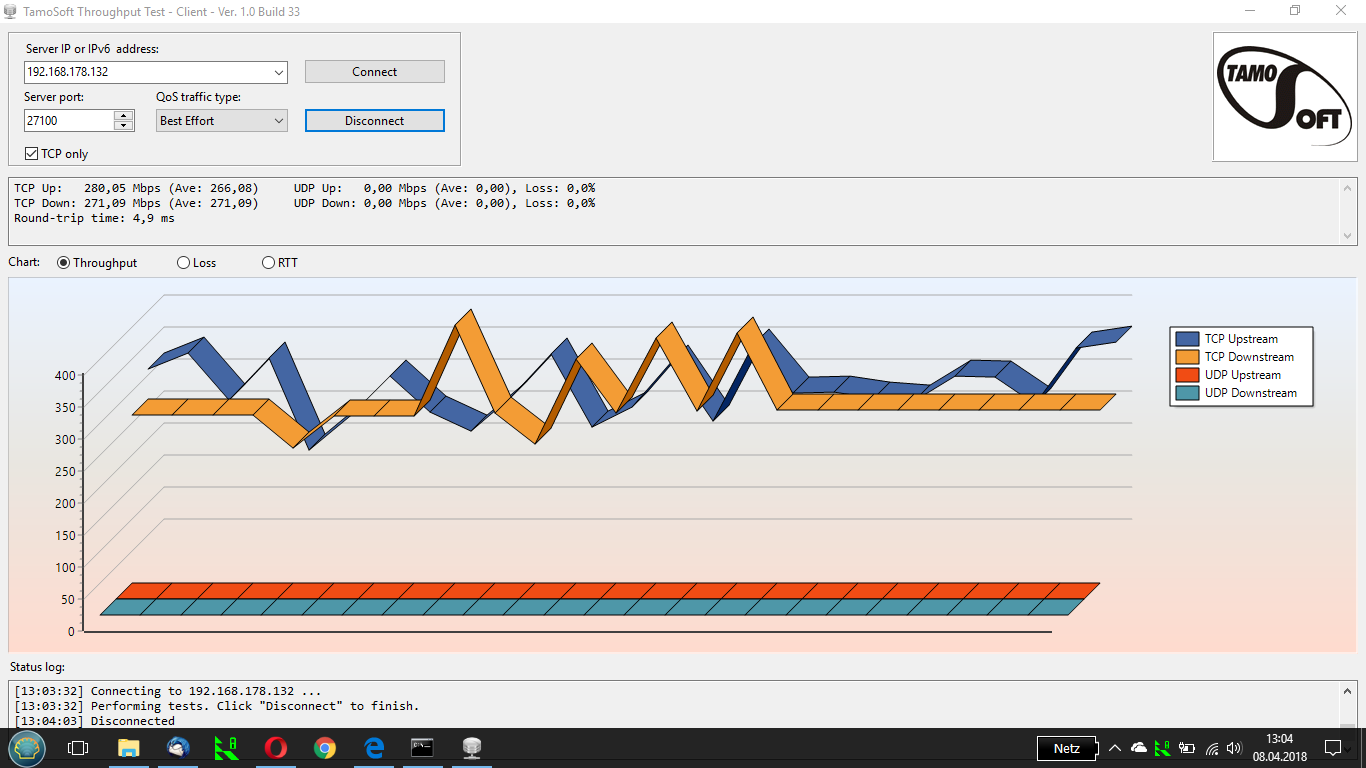
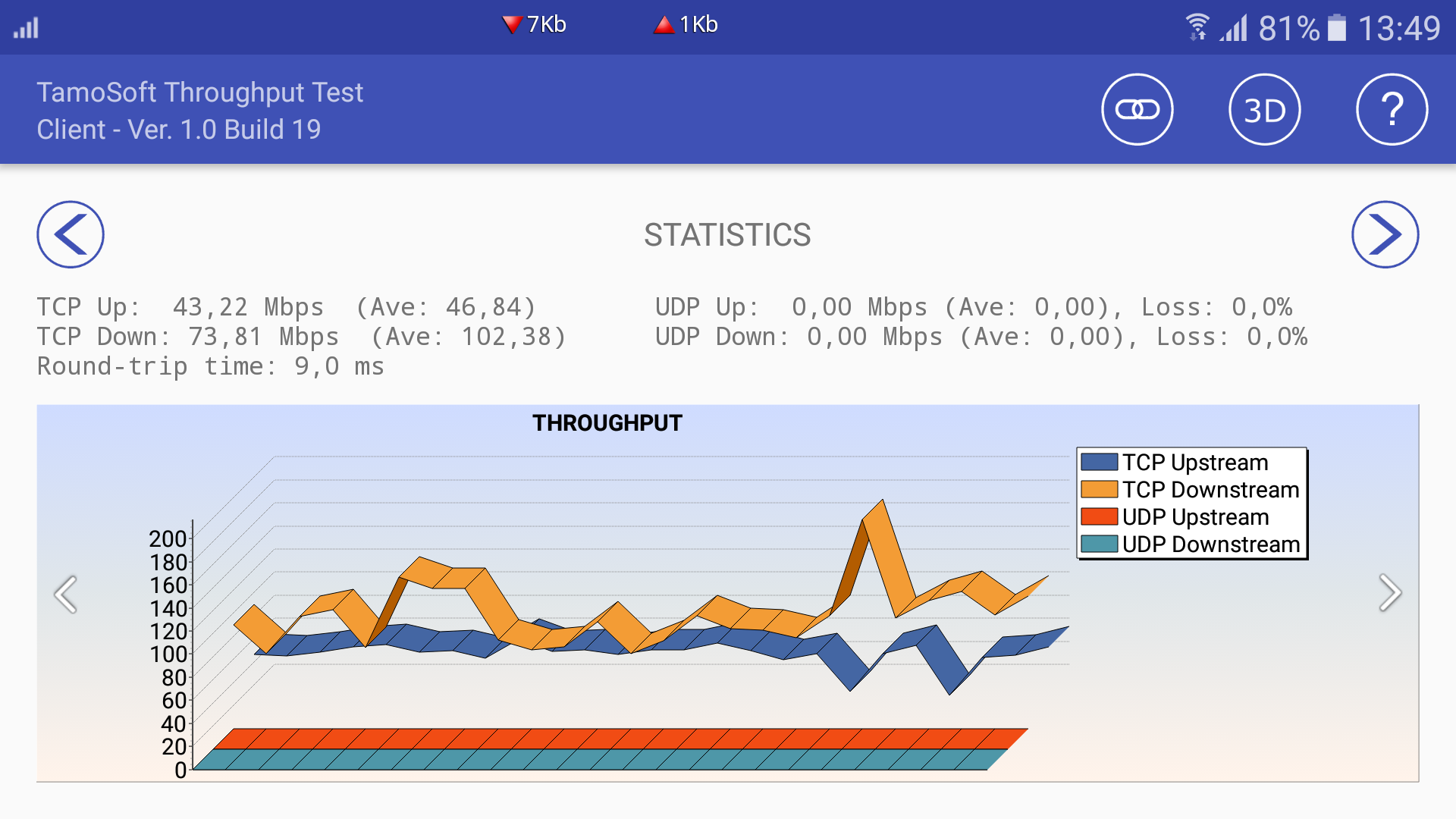
The results are pretty consistent. With the netbook I get stable throughputs in all cases. With the Androids however only the results on the AVM connections are stable while the Mikrotik connections are not.
- Netbook to Mikrotik:
- Netbook to AVM:
- Smartphone to Mikrotik:
- Smartphone to AVM:
Results are already uploaded for 6.40.7. The point is how comes the stock firmware (or production firmware) v6.40.5 performs so badly and released to the market for sales! I had been a quality control and certification engineer for many years, it is unbelievable for MikroTik to release these products for sales. The more MikroTik sell this product to the market, the more complaints MikroTik will receive from the world. I really hope that the MikroTik Engineering Team can resolve this issue as soon as possible.
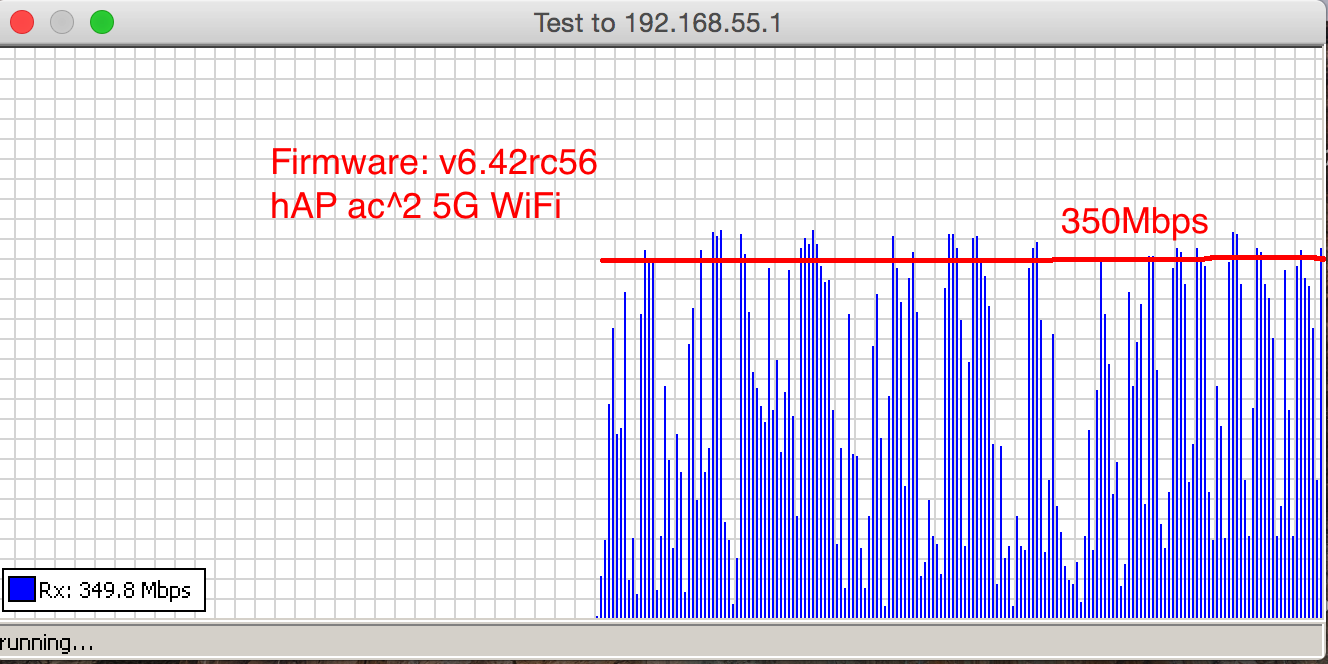
Today, I found that there is a new test candidate available for evaluation. I update the firmware in my hAP ac^2 and the following results as shown in Figures 1 and 2.
It seems that there is not much speed improvement since v6.42r52. The 5G transmission rate, as shown in Figure 2, looks very terrible as it goes up and down. The average speed is around 120Mbps, which is much below any other’s brand ac products. Our user expectation, it keeps at a steady rate of 500Mbps. I am wondering whether the MikroTik Engineering Team is aware of these problems?
Figure 1: 2.4G WiFi Performance

Figure 2: 5G WiFi Performance
Just to be honest: if you have tuned up your radio well so the AP won’t mess up things due to radio picture around? Fankly I don’t know much on how to tune radio in latest fw and ros, maybe MT team come here to give some directions? After all if the ROS devices are tested there should be so basic settings that are used to do the tests (and I suspect tests are considered ok)?
Sad to know basic line TP-Link and D-Link APs are all performs at least better that MT APs, both on 2.4 and 5 band.
Intel ac 8260 - the same issue.
Intel ac 7260 - the same issue.
Mikrotik?
Interesting issue!
Has anyone tried connecting two hAP AC2’s to each other and seeing what throughput is that way? That way it should not have any incompatibility issues.
p.s. Always use iperf3 to test through the device, never use the performance test on the device itself because it will load the CPU unrealistically. Also iperf3 will allow you to test several things such as small and big blocks, multiple streams, forward or reverse to further diagnose what’s going on.
p.p.s. Also no internet based speedtest.
Same problem here - both bands speed is very poor - also in v6.42rc56
Intel ac 8265
Same laptop connected to RB922UAGS-5HPacD gives rock-stable 300mbps
You can test as reliably as iperf3 (though without the range of options) using the Windows btest.exe application or Bandwidth Test on other router devices, as long as you run it from two devices through the router being tested.
Btest actually has functionality iperf3 does not, though iperf2 has: you can test duplex simultaneous throughput with the “Both” setting. In iperf2 it would be the “-d” option.
I have carried many tests involving different methods, for instance iperf3, ping, MikroTik BTest, actual final file transfer test. Based on the results, I obtained the following conclusions:
-
iperf3 is good but it always provides the maximum bandwidth of the channel to be under test. (If the ping time is stable and short, then the figure can be treated as the throughput of the data link otherwise it is not).
-
ping is a very simple to test the latency between two points but it does not provide the throughput and bandwidth of the data link.
-
Actual file transfer test which provides the resultant outcome due to many uncertainties. This is the yard stick of user test. For general users, they do not care how good the iperf3 and ping tests. They are only interested in the actual file transfer rate. In simplicity,
-
MikroTik BTest can provide a quick simple tool to cover the above three methods. (BTest’s results may be a little bit lower than that of iperf3). The area under the curve is the throughput of the data link. If there are many spikes or stops (resulted in large latency in ping test) during the measurements, the data link is very badly. For a good data link, the rate should be stable and high without any sudden stops.
YH
Has anyone sent email to support? What was the answer?
No for me!
I thought they have seen it but I deliberately sent one just a few minutes ago.
YH
Since I have done a number of tests on hAP ac^2 and got some findings for sharing.
Let R1 be the hAP ac^2
Test 1. Laptop → LAN → Bridge of R1 → WAN → External BTest server: Performance very good
Test 2. Laptop → wireless → Bridge of R1 → External BTest server: Performance very bad
Test 3. Laptop → LAN - Bridge of R1 → Internal BTest server: Performance very good
Test 4. Laptop → wireless → Bridge of R1 → Internal BTest server: Performance good
MikroTik router performs very well. However when it works with internal APs, problems comes!!! Based on the above observation, if hAP ac^2 is configured as an AP without routing and connected to a MikroTik router, I guess the performance would be acceptable. As after Test 4, I carried out another test by connecting an NAS to one of LAN ports of hAP ac^2. I carried out the actual file internal transfer test and found the actual file transfer rate could reach AT LEAST 380Mbps without any problem.
Based on the above findings, the problem comes from the link between the data of APs and the routing block to the external interface WAN port.
If the hAP ac^2 is configured as an AP, it should work very well.
YH
Ha-ha-ha!
Mikrotik’s support is the worst one I’ve ever contacted!
I contacted Mikrotik via email on 29 March.
Some of the answers:
For faster support we suggest to contact the company, where you bought the device.
As initial/main support is provided by them.
Sergejs B.
General support rules are listed here,
https://mikrotik.com/support
- If you have bought a RouterOS license or a RouterBOARD product, limited support service might be provided by e-mail for 30 days after the purchase by > support@mikrotik.com> . Contact your distributor for help and support, if device is not purchased from MikroTik directly.
If you found hardware/software issue, we might help, when device is not purchased from us. However for faster support we encourage you to contact seller.
Sergejs B.
I got nothing related to:
- the issue confirmation
- someone started working on the issue
- the issue resolution ETA
I bought hAP ac2 because of this issue:
https://forum.mikrotik.com/viewtopic.php?f=7&t=102908&start=50#p645558
https://forum.mikrotik.com/viewtopic.php?f=7&t=102908&start=50#p645578
and got another one!
Looks like the company won’t pay much attention on that, still thinking their devices are priced not that high so people will buy it anyway. But noone care for the overall image of their devices for partners who actually sell their devices to end-users.
Imagine how you feel when you go to pretty big company plan to sell ~150 routers for their company VPN network and then you hear from some tech guy: “Hey, I know their routers are decent good, but I totally disappointed with my home Mikrotik AP so let’s skip this brand just to be on the safe side so we won’t sit down with 150 of semi-working units one day”. And yes, noone considered CCRs after these words, too.
Partners on their side won’t fix chipset problem but only recommend to change device (“you know office wifi is not MT’s primary business”) for they can’t say anything better.
I suspect D-Link can behave like this (remember DES-3028 story, where hash conflict happens all the time, that was a h/w problem and they won’t change them blaming this is not D-Link problem but chipset problem? Here is the link http://xcme.blogspot.ru/2014/11/hash.html I looked up quickly, it is in Russian but surely you can translate it with Google Translator or something https://translate.google.ru/translate?sl=auto&tl=en&js=y&prev=_t&hl=ru&ie=UTF-8&u=http%3A%2F%2Fxcme.blogspot.ru%2F2014%2F11%2Fhash.html&edit-text=), but for MT this is ridiculous!
[Ticket#2018041022003281] created.