I’ve been having these issues as well using my HAP ax2 running ROS > 7.14.3. Been through the hoops with MT support using minimum configuration and trying to identify what devices cause WIFI disconnects. What we have found is that my Google Nest Speakers (Audio and Mini) cause regular and temporary WIFI drop-out for most, if not all all connected WIFI devices. Removing the Google Nest Speakers (Audio and Mini) increases WIFI stability significantly.
Trying to re-configure ROS based on Mikrotik Support and forum recommended settings has been a rabbit hole for me with zero improvement to stability.
Instead of trying to change the ROS configuration. Try to identify what devices are causing the issue by temporality removing them. Like Android TV, Google Nests and other similar devices. It’s tedious, but could be bring valuable information to MK support.
Since my issue cannot be reproduced on ROS <= 7.14.3, my conclusion is that this is a Mikrotik issue.
As I have already mentioned in another thread here: http://forum.mikrotik.com/t/not-responding-f-k-a-sa-query-timeout/168864/293
I am pretty certain my issues started after I introduced WiiM Streamer into my network. Before that, my phone was the only device permanently connected on 5Ghz with occasional temporary connections of laptops. No issues observed. After connecting WiiM on 5GHz, the phone, perfectly working up till then for almost a year, started giving me SA query timeouts at least once a day randomly.
And yes, most likely it is Mikrotik issue, since in 7.15 the Qualcomm Wifi driver was updated, so it is pretty clear what is behind all this mess. Just rollback of the driver should fix it, but Mikrotik does not wanna hear about it apparently. So we are stuck with broken Wifi.
Thanks, I suppose you are using same SSID for 2 and 5GHz and use roaming between the 2, correct? Since I see you have FT enabled.
I have 2 and 5Ghz separated on different SSIDs, and connect devices directly where I want them to, and I have FT disabled, but otherwise basically the same setup (I even tried the connect priority setting with no impact), and with only 2 devices (my phone and WiiM Ultra), my phone gets SA query timeouts. Crazy to think you have no issues whatsoever with dozens of devices at the same time.
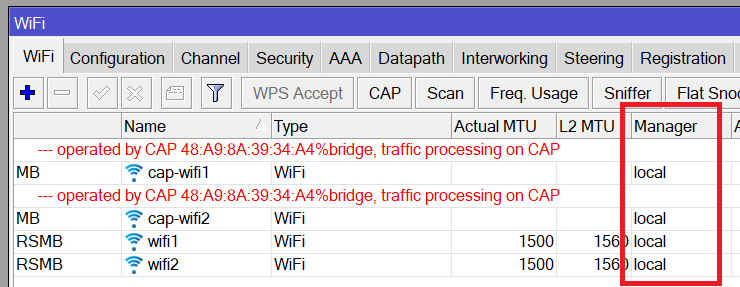
Today I tried to update to 7.17 and set up local WiFi interfaces via local CapsMan.
I understand that this is a hack and an excessive solution, but it works for Massinia.
The solution worked for 3 hours and my TV box started reconnecting to WiFi again
Since, i’ve fixed channel width AND create a “fake master hidden ssid”
I’ve no disconnect except roaming on a building with 4 floors and 12 hap ax3 running 7.17.
Tested 7.18beta2 today and the issue is still not completely fixed. Though it has been reduced a lot since the 7.16-7.17 builds I find. It’s actually almost entirely usable now where as before I HAD to be on 7.14.3 to actually have a usable connection on the 5GHz interface. The two devices I have that trigger the problem do still cause the 5GHz interface to drop, but it’s only when they first connect and its for a much shorter period of time.
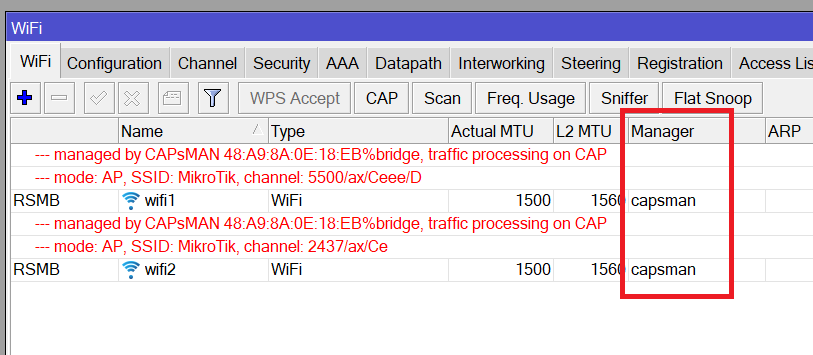
On device with CAPsMAN active the cAPs interfaces are local managed, otherwise fast roaming can never work.
In the CAPs instead they are managed by CAPsMAN
This is the right way if you have additional access points and need centralized network management.
But in my case there is only one hAP AX3 router and running CapsMan is a redundant solution. But this, unfortunately, does not work either.
I agree with this. I also have fewer interruptions on this version, and on Windows computers, instead of interruptions, there are sometimes delays in data transfer. But unfortunately, watching YouTube or Netflix is interrupted on TVBox and tablets.
People, please, let’s help the developers solve our common problem with WiFi.
Please open tickets on the support portal https://help.mikrotik.com/servicedesk/servicedesk/customer/portal/1
describe the problem and attach the Supout.rif file.
This will help the developers collect more information and solve the problem faster.
Because more than half a year has passed, and the problem is not solved.
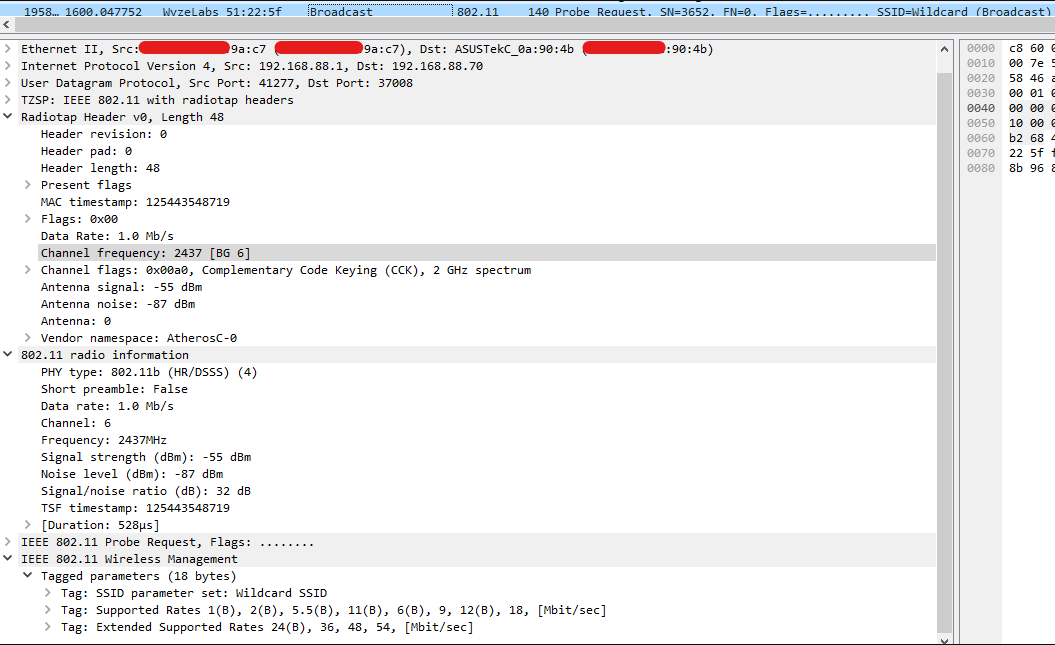
Here is what I see when trying to connect my old Wyze Cam v1. Camera continuously sends ‘Probe Request’ but router is silent.
I simplified configuration 2.4GHz to next:
But still silence form router. In logs it looks like that (2nd image), but I cannot see those connections and associations in Wireshark. May be some packets are filtered and I need to buy USB WiFi module that can be put into monitor mode to properly log WiFi communication.. I don’t know.