You contributed so much to this post. It’s sad that after all this time, we still don’t have a solution to this. Even very cheap routers from TP-Link and Netgear have that function working out of the box.
What do you suggest for the new topic name? I will rename it.
I tried SMB with ROSE today and while I was able to mount the share on macOS 14.1.1, it did not work properly.
While transferring a 6.5GB file from macOS to RouterOS, I got an error after about 1GB. Surprisingly the /disk/monitor-traffic still reported writes at disk speed, although no data was being transferred as per Wireshark on macOS. /tool/profile reported 40% of unclassified CPU.
Considering it’s not just about one model…
Slow speed transfer with built-in SMB and macOS/Apple TV
Does it work correctly with smaller files?
In all (4) hAP ac2 I have installed this container https://hub.docker.com/r/filebrowser/filebrowser
After reading Normis’ last answer I gave up, MikroTik doesn’t care about this problem and filebrowser was the only solution for me.
Issue is not device related, it’s ROS SAMBA service issue and it’s problem when you own device on which you cannot install ROSE storage package because of small flash size. I think MT should consider maintaining SAMBA on ROS and not forcing ROSE storage usage for it or remove obsolete service from ROS to free some space on flash, optional package also can be an option for those who doesn’t have issue (for non Apple devices).
Yes, in 7.14 the default SMB is replaced with the fast / modern implementation that previously was only in ROSE package. Now the performance will be better
Hey Guys, I was reading the previous comments and decided to upgrade to 7.14rc2. Unfortunately, after the upgrade, SMB is not working for me anymore.
I tried to connect via MacOS and Windows, but it just won’t connect.
I wanted to do what was mentioned in this post earlier and configure the SMB with smb-export=yes, but only these commands are available on my end:
smb-address smb-encryption smb-password smb-share smb-sharing smb-user
This is how SMB is configured:
/ip smb users
set [ find default=yes ] name=user2 read-only=yes
add name=user
/ip smb
set comment=fileserver domain=local enabled=yes
/ip smb shares
set [ find default=yes ] directory=/pub valid-users=user2
add directory=usb1-part1 invalid-users=user name=share valid-users=user2
Here is the output copied directly from the CLI.
[admin@MikroTik] /disk> set us
usb1 usb1-part1 numbers raid-chunk-size smb-user usb2
[admin@MikroTik] /disk> set usb
usb1 usb1-part1 usb2
[admin@MikroTik] /disk> set usb1-part1 smb-
smb-address smb-encryption smb-password smb-share smb-sharing smb-user
[admin@MikroTik] /disk> set usb1-part1 smb-export=yes smb-user=user1 smb-password=test
expected end of command (line 1 column 16)
I downgraded to 7.13.5 because I needed to work with my SMB server.
The first thing I noticed was that all my previous SMB settings, such as users, shares, etc they were all deleted.
I added them again, but I cannot connect to SMB anymore.
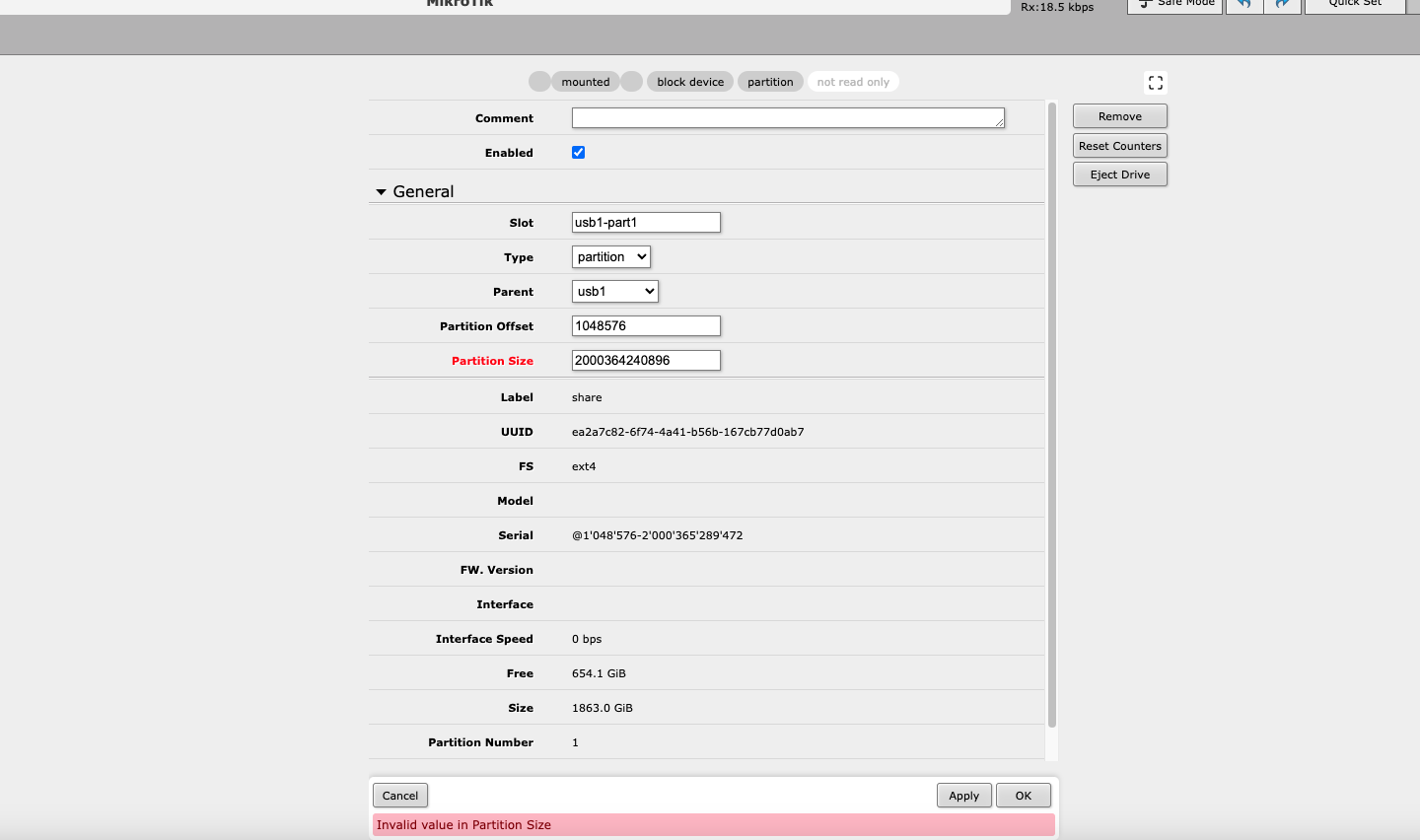
I checked the disk settings, and when I clicked on OK it showed me this error: “Invalid value in Partition Size”
The disk was initially wiped and formatted with hAP AX3.
I’m so confused right now. I couldn’t find any documentation regarding that error.