I’m use script to automatically write static arp.
:foreach i in [/ip arp find dynamic=yes interface=vlanXXX] do={
/ip arp add copy-from=$i
}
Now i have full arp table ip’s with mac 00:00:00:00:00:00
How to disable this feature?
We have several CCR routers in place and I can confirm that the 00:00:00:00:00:00 arp issue started with 6.34. Downgrading to 6.33 fixes the issue.
This is how the “big boys” do it too - Cisco holds incomplete ARP for a while before dropping from the table.
I logged into one of our public routers and did show ip arp just now: (IPs / MACs hidden of course)
cisco-router>show ip arp
Protocol  Address          Age (min)  Hardware Addr   Type   Interface
Internet  198.51.100.121            5   xxxx.xxxx.xxx9  ARPA   GigabitEthernet0/1
Internet  198.51.100.122            -   xxxx.xxxx.xxx1  ARPA   GigabitEthernet0/1
Internet  192.0.2.18            -   xxxx.xxxx.xxx2  ARPA   GigabitEthernet0/2
Internet  192.0.2.129           -   xxxx.xxxx.xxxa  ARPA   GigabitEthernet0/0.1
Internet  192.0.2.131           -   xxxx.xxxx.xxx0  ARPA   GigabitEthernet0/0.1
Internet  192.0.2.135           0   Incomplete      ARPA
Internet  192.0.2.145           0   Incomplete      ARPA
Internet  192.0.2.146           0   Incomplete      ARPA
Internet  192.0.2.152           0   Incomplete      ARPA
Internet  192.0.2.158           0   Incomplete      ARPA
Internet  192.0.2.170           0   Incomplete      ARPA
Internet  192.0.2.171           0   Incomplete      ARPA
Internet  192.0.2.178           0   Incomplete      ARPA
Internet  192.0.2.180           0   Incomplete      ARPA
Internet  192.0.2.183           0   Incomplete      ARPA
Internet  192.0.2.184           0   Incomplete      ARPA
Internet  192.0.2.185           0   Incomplete      ARPA
Internet  192.0.2.186           0   Incomplete      ARPA
Internet  192.0.2.188           0   Incomplete      ARPA
Internet  192.0.2.196           0   Incomplete      ARPA
Protocol  Address          Age (min)  Hardware Addr   Type   Interface
Internet  192.0.2.197           0   Incomplete      ARPA
Internet  192.0.2.200           0   Incomplete      ARPA
Internet  192.0.2.201           0   Incomplete      ARPA
Internet  192.0.2.212           0   Incomplete      ARPA
Internet  192.0.2.231           0   Incomplete      ARPA
Internet  192.0.2.237           0   Incomplete      ARPA
Internet  192.0.2.243           0   Incomplete      ARPA
Internet  192.0.2.249          63   xxxx.xxxx.xxxe  ARPA   GigabitEthernet0/0.1
Internet  192.0.2.250         248   xxxx.xxxx.xxxe  ARPA   GigabitEthernet0/0.1
Internet  192.0.2.254          90   xxxx.xxxx.xxxe  ARPA   GigabitEthernet0/0.1
That’s 22 “Incomplete” entries.
as you can see, there’s always scanning going on to cause this sort of thing on a public router.
00:00:00:00:00:00 MAC in ARP table is Mikrotik’s version of this behavior.
In fact, if you look at the ARP table from the terminal window, it doesn’t show all-zeroes MAC addresses, but these entries are shown with a missing “complete” flag:
[admin@CHR-1] /ip arp> print
Flags: X - disabled, I - invalid, H - DHCP, D - dynamic, P - published, C - complete
 #    ADDRESS         MAC-ADDRESS       INTERFACE
 0 DC 10.1.1.3        CA:01:26:14:00:08 ether1
 1 DC 10.1.2.2        08:00:27:07:AB:81 ether2
 2 DC 10.1.1.254      02:00:4C:4F:4F:50 ether1
 3 D  10.1.2.6                          ether2
I timed this entry 10.1.2.6 to see how long it stays in the ARP cache, and it removed itself after 7min:43sec - not quick, but not that long either in the grand scheme… The only real difference I can see is that Cisco deletes Incomplete ARP entries mere seconds after they’re created, so maybe Mikrotik could shorten the lifetime of incomplete ARP entries.
If these entries are staying there and never going away, then I assure you that it’s because SOMETHING is trying to reach those unused addresses… chances are good that it’s zombie-hosts doing scans for their evil botnet herders. If you have an “inside” router interface that’s showing these entries, then it’s because some internal host is doing a scan. The only time the router creates such an entry is if it has a packet to deliver to that IP address and it’s sending an ARP request to find out what MAC address it is.
In short…
dontpanic.jpg
Instead, use this information as an indication that there’s something strange on your network (if it’s a private interface) and that you might need to do some investigation as to the source of the scans. If it’s a public IP interface, then that’s just a fact of life.
Of course there are always exceptions, but unless you have a /16 network on an interface, or if you’re forwarding a default GW to a proxy-arp-enabled router, you shouldn’t get a giant flood of incomplete arps in your table.
same case with me with ROS v6.34.2 
and now try to downgrade back into v6.28
Same problem on 6.34.2. I downgraded to 6.33.5 which still had the same problem. I downgraded again to 6.33.1 and problem is resolved.
ARP.GIF
same issue here.
ARP shows many 000000000 entries.
How to fix ?
It is not “an issue” and not “a reason to downgrade”.
Your ARP table does not have to increase because of this! Those entries were not shown before,
but they still were in your table, waiting for a response. So when your ARP table size is not enough, it
will not help to not have these entries.
What you need to do if you have very many entries like this: make sure that incoming traffic from internet
to a large network that you are routing is filtered so that traffic to hosts that do not exist on your ethernet
is filtered in the router (in the FORWARD chain) as much as possible.
@pe1chl, you’re wrong…
Those aren’t incomplete ARPs from a subnet whose requested hosts are unreachable, those are incompletes for destinations that should be routed.
From looking at that screenshot, my takeaway is that there is load-balancing going on, and that there are routes in the tables which have gateway=WAN2-ether2, WAN3-ether3, etc.
Hi,
This “feature” since v6.33.6: “mikrotik arp - show incomplete ARP entries;” is for us also a very, very unpleasant bug.
We have a script on a lot of routers, that sends all active and inactive connected dhcp or fixed IP clients IP addresses to an central server periodically, or in a case if happens something changes. We have to makes in the script an IP scan, to see also an inactive, but existing hosts. It worked nice until 6.33.3, but after that the ARP - filled with trash - does not fit in the variable.
Can I print anyhow with command only the complete ARP entries? Something like this:
/ip arp print where mac-address!=“00:00:00:00:00:00” (but this not works)
Sorry, meanwhile I have find out the very simple solution myself, but maybe it can be useful for others:
/ip arp print terse where complete
Hi Guys,
We have the same issue with one of our CCR routers and it’s affecting our day to day operations. Following is the simplest setup we have.
Mikrotik — SWITCH —> UNIT / Unit ARP entry shows as all 0s. But if we connected that unit directly to another router port it shows the correct entry.
Router Model # CCR 1036 -12G - 4S
Router OS # 6.35.1
Here I attached a screen shot with how it’s look.

What issue? There are at least 3 different “issues” described by others in this topic, as far as I can see all of
them caused by misconfiguration or other misunderstanding.
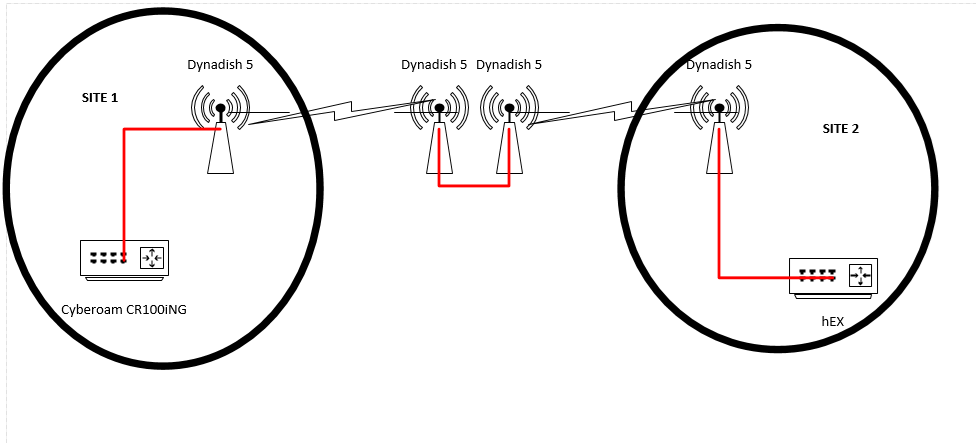
I have same problem but with hEX, ROS: 6.37.1. and different configuration.
When connected over Dynadish 5 L2 bridge it gets 00:00:00:00:00:00 MAC on ether1 and routing fails.
When connected directly via LAN cable to Cyberoam it gets Cyberoam PortG MAC on ether1 and routing works.
Our routers have default routes via IP address next hop (not interface) and yet we have loads of 00:00:00:00:00:00 entries for hundreds of ip addresses not on the router or even our network. Our routers should be sending packets destined to these addresses via the next hop IP addresses, not ARPing. How is this misconfiguration or misunderstanding?
Please post your configuration!
These have very large configs. What parts in particular are you after?
There must be something that causes this.
It could be IPsec policies for very large networks.
Avoid that. Use a tunnel with IPsec policies for the endpoints and route the network traffic over that tunnel
interface using static routes or an automatic routing protocol (BGP, OSPF).
We don’t run IPSEC. These routers run static internal routes for MPLS-TE tunnels, iBGP for internal distribution of client public addresses and eBGP for external peering. We also run EoIP to some end clients.
Hi,
If you set route with interface as gateway it’s normal that the source does arp for all destinations out that interface.
Intefaces with dhcp-client act like this. So, as stated by others, there are a couple of ways to make things working:
- your dhcp-server has proxy-arp so all those destinations map to his mac
- you set the dhcp-server ip as gateway manually or by script(latest ros i think has that option built-in)
- you set reply-only on your client and set gateway manually or by script - you can also set arp entry manually but you have to be careful
It’s normal for your gateways to have some incomplete arp but you should check why that happens. For instance you can have clients that seek a server that isn’t there or you have people scanning your network. Also you can go further and see who’s requesting those ips.