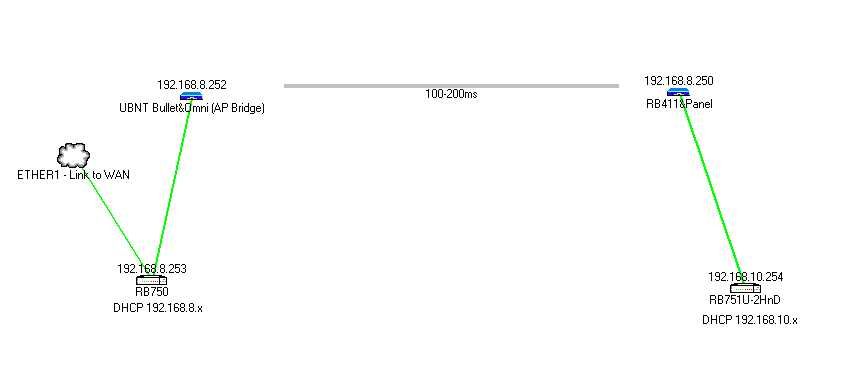
The Setup
Currently at SiteA I have a RB750 running my network . ETHER1 connected to VSAT modem, ETHER2-4 Local LAN including WAP, ETHER5 to a Ubiquiti Bullet and omni aerial. There is also a PPTP VPN running to my work network. This RB also does the DHCP.
On SiteB (a couple of hundred meters away) I have a simple Edimax Universal Repeater which was picking up the network from the omni and rebroadcasting it however this was not ideal as the signal is poor.
SiteA - 192.168.1.x
SiteB - 192.168.2.x
DHCP server, gateway, DNS etc. were all set to the RB on SiteA and this worked - albeit intermittently due to signal issues.
I then purchased a RB411 (1xwireless, 1xether) which I had hoped to set up as a simple AP into a second RB which would be situated on SiteB giving this site a standalone network.
The Problem
My problem is that I would like to be able to ideally use computer/device names in order to connect to devices over both networks or second prize would be IP addresses. I’ve managed to set up the RB411 as an AP and bridged the WLAN and ETHER1 but when I connected the other end (an RB751U-2HnD) I can’t seem to ping any of the addresses at SiteA. I’ve removed the 192.168.2.x pool from the RB on SiteA and instead the RB on SiteB should now do DHCP for Site B but it doesn’t seem to matter what I add to the IP>ROUTES, I just can’t seem to get it working!
I only have a very basic knowledge of MikroTik and what I’ve picked up is just from playing I do admit so there could be easily something wrong that I’ve missed? Is anyone able to take me through it step by step to help me set it up? Or perhaps point me in a better direction?
I would like to be able to ideally use computer/device names in order to connect to devices over both networks or second prize would be IP addresses
I am guessing here that what you want to do is have a layer 2 Ethernet bridge here and that is what you mean by use device names. If you really need this kind of functionality you need to bridge between these two networks instead of routing with IPs. The simplest way would be to just set up a bridge on the Mikrotik box at siteB and add the wireless and Ethernet interfaces to the bridge that you want to be able to see each other, then you would be on one subnet across both locations. You would not need the second /24, just have the RB411 get a dhcp address for the bridge interface so you can manage the router. That is probably not going to be the most efficient way to do it, because brodcast traffic etc. that might not really be needed will be sent across your wireless link, but it should work. If you using bridging like this the site A mikrotik box will handle all the dhcp etc. for the whole network. It sounds like that is how you had it set up before with your other equipment. To duplicate that setup just create a bridge on the 411 at site B and add the Ethernet and WLAN interface as ports to that bridge.
interface bridge add name=bridge1
ip dhcp-client add interface=bridge1 disabled=no
interface bridge port add interface=ether1 bridge=brige1
interface bridge port add interface=wlan1 bridge=brige1
In this configuration the 751U with a default configuration (plugged in via ethernet to the 411) would also get an address on the 192.168.1.x network and would be able to NAT out from that. If you want to bridge all the way through add another bridge on the 751U and remove all the ip addresses (and pools dhcp server etc) and add the interfaces you want on the bridge as ports to that bridge on the 751u as well (as above). Then all devices connected to the 751 would get IP addresses handed out by the 750 at site A and would be on the same subnet and have layer 2 (ethernet level) visibility.
If you really only need IP address connectivity (layer 3), and want to not have your wireless link carrying your extra Ethernet traffic you can route the network. Have the wireless interface at site B get an address via dhcp and use that as the destination address for the route from that network at Site A. So if for example the Site B wlan1 got the address 192.168.1.200 you would add
ip route add dst-address=192.168.2.0/24 gateway=192.168.1.200
on Site A so that the devices on the 1.1 subnet would be able to ping the 192.168.2.0/24 network. You could also add 192.168.3.0/24 to the 751 (or bridge it through to the 411). Then you would also need a route on site A and on the site B 411 and for that network. Each device in the network that you want to be able to ping each other will need a static route pointing to the IP of the device in the right direction for that network. This has the advantage of only traffic destined for that subnet needing to be carried across your wireless links.
I hope that was clear enough. If you decide on one method or the other feel free to ask any questions if you have trouble getting it working.
mmc1800 - Thank-you so much for taking the time to respond. Very much appreciated.
Initially the reason that I wanted the two totally separate /24s was so that the info didn’t always have to travel back over the wireless link however I do require to be able to utilise info from either network at any one time. Also although not absolutely necessary I need to be able to access the VPN network from SiteB as well. What I initially thought was going to be so simple ended up getting me very lost!
I did create the bridge on the 411 however I couldn’t get it to work! It seemed to want to use the Ethernet as the first port of call instead of using the WLAN to access the network. This I managed to fix by making Ether1 Priority(hex) 90 and WLAN 80. I’m not even sure this was right but it is working! (Sorry, I did mention I’m a total novice at this didn’t I!?)
First thing in the morning I will try remove all configuration from the 751U and start again. I’ll come back to you for help I’m sure!
I am not sure what you mean exactly by access the VPN, but we can cross that bridge as it is burning behind us.
It is also possible to set up a layer 2 bridge on top of the routed layer 3 network with an EOIP bridge or a MPLS setup between the Mikrotik devices (also possible to tie into your vpn probably depending on how that is working), but these things are more complicated and it seemed like simple was good.
Good luck with your configuration - I am sure with some patience and spending some time to learn the concepts you will get it doing what you need.
The picture is helpful and is more or less what I expected. If you can do
/ip address print
/ip route print
on each of the 3 Mikrotik boxes I can tell you what is missing to just get the routing to work without worrying about the bridging.