If you take the hEX-S things gets simpler if you insert a SFP. Ports 1-5 share all the same lane and the SFP gets its own private lane to the CPU.
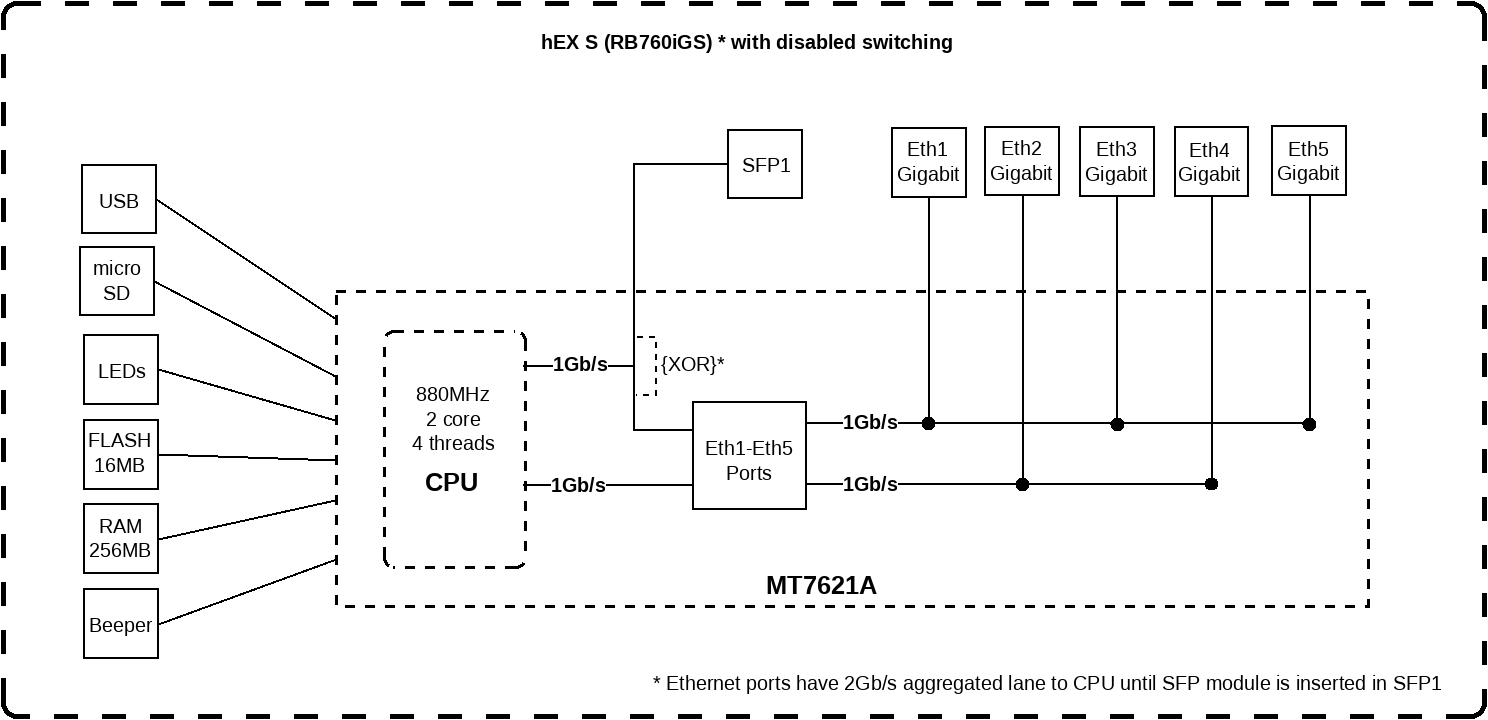
If you take the hEX-S things gets simpler if you insert a SFP. Ports 1-5 share all the same lane and the SFP gets its own private lane to the CPU.
Exactly. Thank you. Using the SFP port as WAN gives it a full 1Gb/s lane to the CPU while the other 1Gb/s lane is for the remaining 5 ethernet ports.
One could buy 1x hEX-S + 1x S-RJ01 just for that if you have only ethernet ports, but at that price you can get the hAP ac2 which has a 2Gb/s lane from the CPU to the switch and you can use the switch ports however you want.
And judging by this topic, that is not a happy combination (hEX-S + S-RJ01): http://forum.mikrotik.com/t/hex-s-sfp-s-rj01/131104/1
Any hEX-S users using S-RJ01 like that out there? care to make some tests? is the issue mentioned in that topic above fixed?
Back to current topic, bottom line, I just wanted to see if it is possible to assign ONE ethernet port to one lane and the remaining 4 ports to the other lane, apparently not.
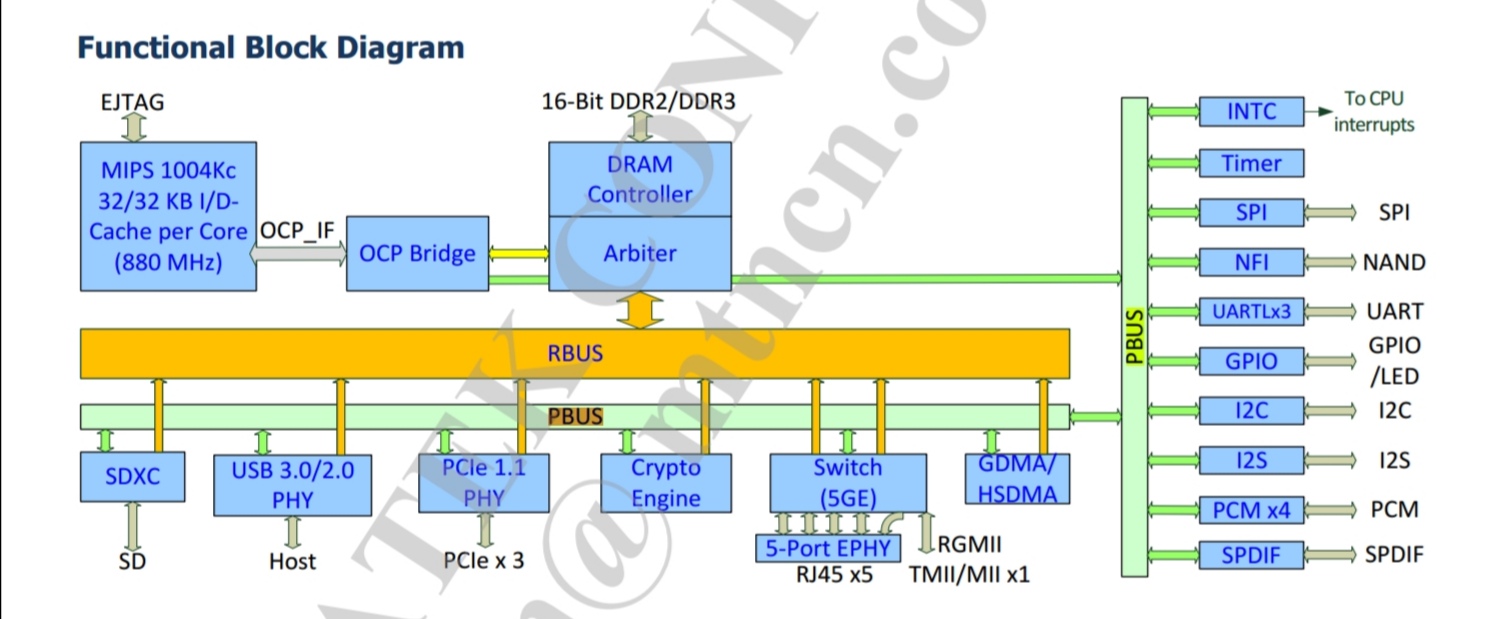
Then looking at at the CPU. Two lane go up from the switch to the RBUS and trafic can only return through the right PBUS. Traffic can’t flow from the switch through the PBUS to the CPU.
According to this schematic, five into two lanes, returning one lane (PBUS) 5->2->1 Gbit/s when forwarding.
I have two hEX-S and replaced one with a 4011 connected to the internet. The other hEX-S is stil in between the 4011 and the internal network. It work fine as long you remember not put bilk traffic on the same lane as you noticed. The encrypting power of the 4011 is much higher than of the hEX-S and thst is why I got me the 4011.
I would only advise to use an optical SFP in in ahEX-S.
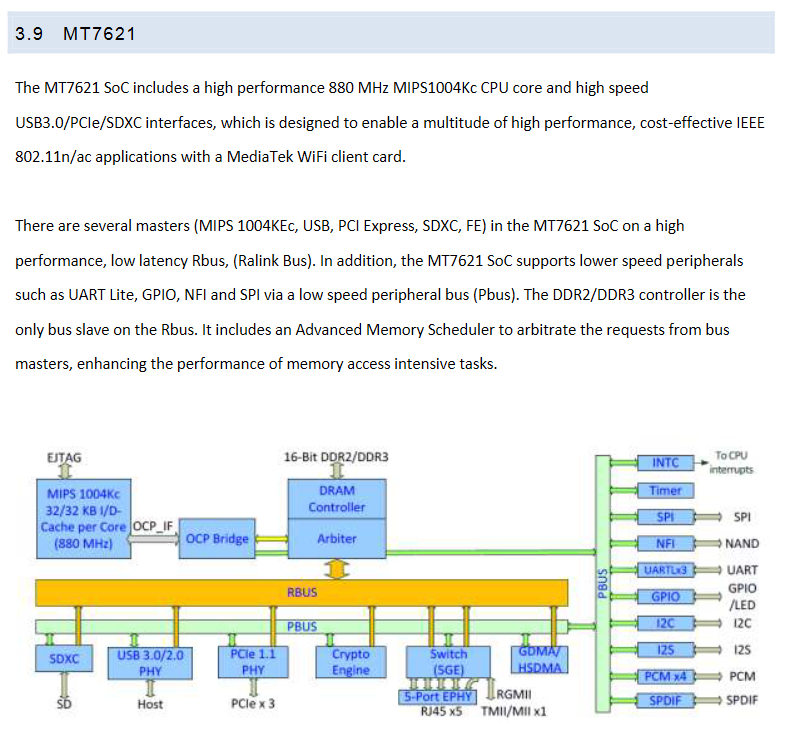
The PBUS is used for something else, found it described in another PDF:
I also have an RB4011 in use, even used a S-RJ01 on it until this happened: http://forum.mikrotik.com/t/s-rj01-sfp-module-in-rb4011igs-flapping/147423/1
But this little 750Gr3 is a little beast too, it’s worth knowing how to use it at its full potential  and understand when limitations occur and why.
Here’s how I understand the block diagram of a RB750Gr3 when ether1 is stand-alone interface (e.g. to piggy-back PPPoE) while ether2-ether5 are members of same bridge which has HW offload enabled (and active):
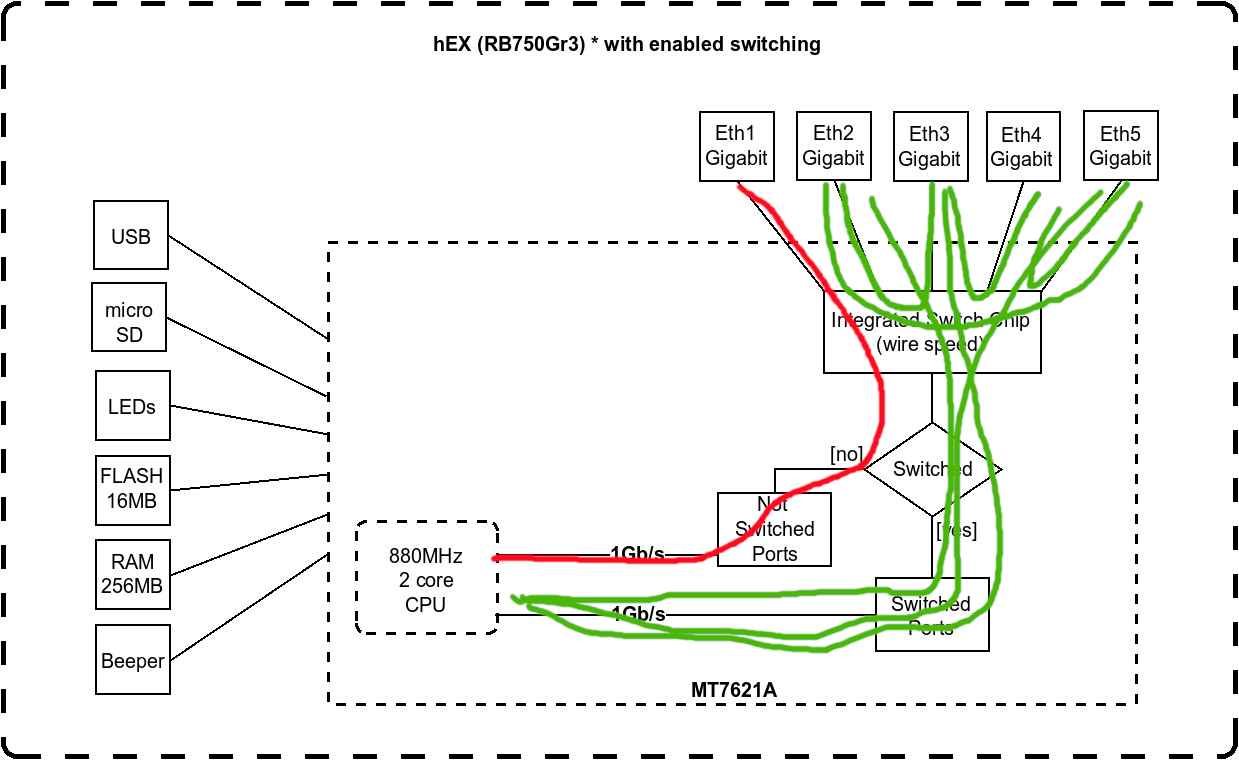
If there was another stand-alone interface, e.g. ether2, then ether1 and ether2 would share one interconnect (the upper one) while switched ports (ether3-ether5) would share the other interconnect.
I’m not sure how it would handle, if someone made two or more bridges. This isn’t a recommended config, anyway.
All but one of bridges would be entirely done in software … HW offload is limited to single bridge per switch chip and RB750Gr3 has single switch chip.
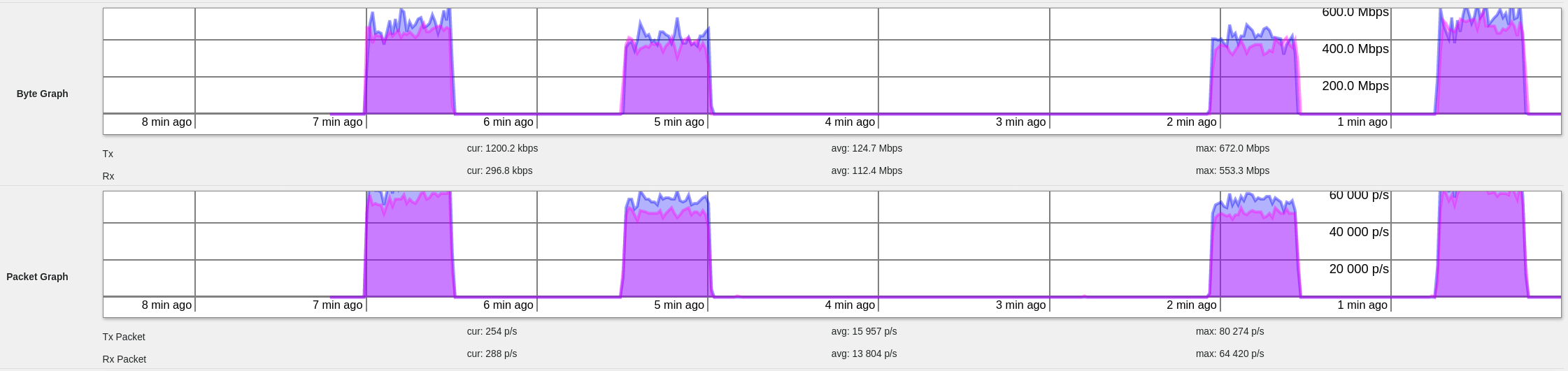
Yeah, that’s what I thought it works like too, until I did the above tests. The first 4 tests are done with ether1 standalone, other 4 ports in a bridge with hardware offload enabled and active (bridge protocol-mode=none, since STP disables Bridge HW Offload on MT7621).
From the CPU profile it’s obvious that most of CPU is consumed for interrupt handling. Since any given interrupt can be handled by any of CPU cores (however, usual linux drivers in recent versions of stock kernel tend to stick to a particular CPU core), it could well happen that during certain tests the interrupt handling is distributed differently (you’d have to run CPU profiler during all the tests and compare load distribution). If too much interrupt handling is allocated to one of cores, it can become a bottleneck.
Ah, sorry. My mistake.
No, not a lie. I just thought they would be wrong.
Well, I can’t get as high as 1Gbps up/down at the same time (ISP throttling). I did get some differences, while using eth1<->eth5 and eth2<->eth5. Not that much, but it’s there.
Looks like You are right about the link distribution. I still find it really weird, but can’t argue with the numbers. 
Yes, I know they are on the block diagram. I just thought that they weren’t that specific. After all, one can’t make a diagram dividing 5 ports into 2 links…
Glad that we see the same thing and thinking about using eth 5 as WAN. Yes it looks logical and you have a symmetrical distribution of the other ports.
However looking again, better is to use port 2 or 4 for WAN. Why? Using one of those tow port give you possible maximum speed on three ports and a lower speed on one port, which you can use for a less important device connected to you hEX.
Yes. I’m thinking about moving my internet to ether4. It wasn’t a problem, until 5 days ago - when I got a speed upgrade. The hEX is just a router - it’s connected to a switch, and everything else goes there. I can’t move the LAN from eth1 as I use PoE on this hEX.
I think it’s hilarious that we are discussing a 1Gbit bottleneck on a router that costs as much as the monthly fee as the connection
That connection (1000/500) costs here 1/6 of the routers price. How is that relevant in any way to those two diagrams of this router?
My 500/500 connection costs more then 17 hEX a year.
Here a 1000/1000 FTTH connection is about €60-99/mo. A hEX costs about €65.
If I would to spend that money on an Internet connection, then I would probably also invest in a router on that level (like a RB4011 or so) instead of spend hours figuring out how to achieve wire-speed performance on an entry level device.
If this is a case of internal/inter-vlan traffic, then I must excuse myself for being ignorant.
Here the hEX RB750Gr3 can be currently found at ~55€ including shipping, the 1000/500 connection for residential customers is ~8.2€ at most providers, most of them offer the services via PPPoE which itself is taxing enough on the CPU.
At work, yes, I have an RB4011 in one place for similar connection, also PPPoE which is only 10€ more than the residential one, but the RB4011 is there just because of the many IKEv2 clients connected to it, the traffic can otherwise easily be sustained by this little RB750Gr3 if using the right ports.
For home, moving the cables around and adjusting the config a little in this RB750Gr3 is cheaper than a RB4011, smaller sized, less power consumption, heat etc.
There’s nothing wrong trying to figure out how to use the full potential of that connection on this router. Or on any router for that matter, no matter the price of it
And even if you’d use it for inter-vlan routing, you’d like to know which ports cause a bottleneck and which don’t, no?
As Paternot mentioned below, I’ll mention it too, all of this in a country where the minimum wage, on paper, is 470€, but in hand you only get ~283€, rest of it goes to taxes.
Not as hilarious when my hEX is bought and paid for. It’s already in place, was bought when my connection was 30/30, and here in Brazil we pay 50% up the suggested price, given our taxes.
So, no. A lousy hAP AC2 costs US$ 145,00 here.
An RB4011 (without wifi) costs US$ 365,00 here.
And my internet connection (officially a 350/350 one) costs US$ 22,12.
All of this with a minimum wage of US$ 196,00.
Now You know why people try to get the most out of their hardware.
So, guess what? this looks like a bug, since the bridge actually does seem to control which port gets on which lane, since I wanted to move my WAN to port 2, SURPRISE (see below).
I redid all the below tests, three times each. Including the one which started this "search" (port 1 stand-alone, rest of them bridged). Results:
bridged: 2,3,4,5; stand-alone: 1
1<=>2 - ok
1<=>3 - notok
1<=>4 - ok
1<=>5 - notok
bridged: 1,3,4,5; stand-alone: 2
2<=>1 - notok
2<=>3 - notok
2<=>4 - ok
2<=>5 - notok
bridged: 1,2,4,5; stand-alone: 3
3<=>1 - notok
3<=>2 - ok
3<=>4 - ok
3<=>5 - notok
bridged: 1,2,3,5; stand-alone: 4
4<=>1 - notok
4<=>2 - ok
4<=>3 - notok
4<=>5 - notok
bridged: 1,2,3,4; stand-alone: 5
5<=>1 - notok
5<=>2 - ok
5<=>3 - notok
5<=>4 - ok
So the bridge config does seem to do something, but doesn't do it right?
There might be hope for a fix!
Too bad there's no tested config above where you can have atleast 3 OK bridged ports. I have not done tests with fewer bridged ports. Maybe some other time.
I switched this afternoon stand alone one to two and two to one. I could not test properly but I saw a lower throughput than before.
I use a hEX-S with no SPF installed. There seems to be something out of wack in that little box.
Yeah, I thought switching port 2 or 4 to stand-alone and using the rest in a bridge would be the best, but apparently those two are the worst options of them all. As seen above:
Using port 2 as stand-alone and 1,3,4,5 in a bridge, throughput is over 1Gb/s only between ports 2 and 4, no more.
Using port 4 as stand-alone, and 1,2,3,5 in a bridge, throughput is over 1Gb/s only between ports 4 and 2.
Since in the other tests port 2 and 4 seem to be on the same lane.. in these two tests they seem to be on different lanes.
Something looks broken, I’ve wrote to support about this too.. we’ll see.
PS: I have only tested this as a router so packets HAVE to pass through the CPU. I have not made any tests between the bridged ports. That isn’t the thing tested here.