I got it working. I changed these settings on my Bridge (the one that links the WiFi and the “LAN” ports)
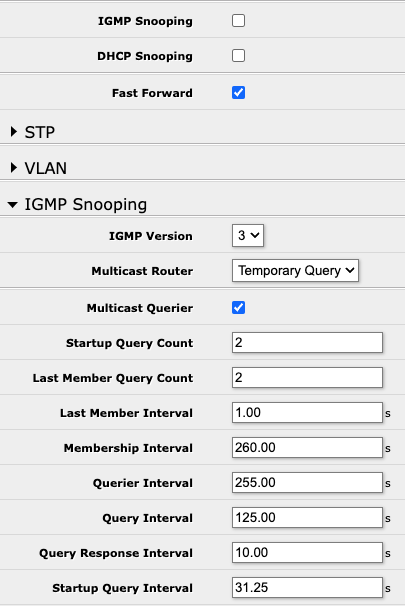
I don’t understand why they work since IGMP Snooping is off but hey - it joined the network…
(It could be that it takes a while to update…but yeah - that worked for me)
Anyways, just as an addition.
You DONT NEED to use 2.4Ghz “n” standard network settings in order to use thise devices and loose bandwith and waste your routers possibilities ! The settings in MikroTik WiFi interfaces as meant as “maximum-highest”. So if you set 2.4ghz Ax 20/40Mhz, it is backward compatible with lower standard devices !
IGMP snooping saves also your WiFi bandwith in order not to flood the interfaces, however some users from different vendors had better results with Apple Home by disabling it, it is always a question (i have it ON also). Ill suggest you to let IGMP snooping on (not sure about multicast router option), set your 2.4Ghz interface to 20/40 Ax standard, 5ghz to 20/40/80 Ax, enable multicast enhance and set security to wpa2/ccmp or wpa2/wpa3. Also consider the “new” FT and FT over DS options to enable fast roaming, since now i can say it works really nice !
Those are my default settings now for a year in 3 different locations, with Ax and Ac standard MT devices, since wifiwave2 popped up. In all locations are Apple Home clients, IoT and “standard” devices present. Everything works really nice !
Just to second this - my 2.4 Ghz was set to (and still is) “AX” when I did the setup
So…
you set up this on all APs ?
I have 3 APs on CAPS mode and one router (which is CAPSMAN enabled). Where you have this enabled?
How about IGMP querier ? it is safe to have more than one IGMP querier on network?