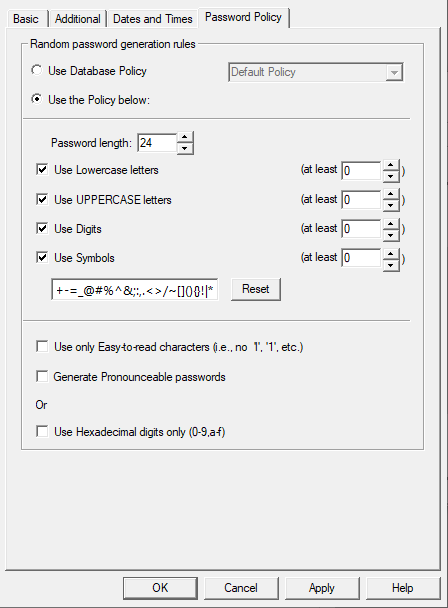
So, if you want to set good password, that can be used from ssh, console, winbox etc. with a password manager, set the password manager's "password policy" for RouterOS not to use ? \ " $ and most password managers probably won't use or or other non-printing characters.
I prefer not to have passwords that require special use cases (like quoting), because it can be very confusing when a password works with winbox, but does not from the console.
For example the following Password Safe should work?
I do not see any problem, just some hint to all:
do not use more than one following another,
do not use space at start or at end,
do not use ’ or ` because are sometime undistinguished…
But the better password is a non standard username, deleting admin, and not using other standard names like root, user, guest, etc.
For example if username is rex576518719 and the password 713sdfas672 the user is safe and sufficently complex…
First you must find the username but… how?
You need to try all possible passwords and ALSO all possible usernames…
First backup and save the .backup to another computer.
Add new fully prived account from admin with good password and uncommon name.
Suggestion: save credentials in password manager.
Then log out of admin, log into new account from ssh and winbox, web access and any other method you would normally use. Verify that you can log in to the new account using any method you plan to in the future. If you saved with password manager, verify you can use it to retrieve username/password and that it works.
After you have verified that you can log into the new account multiple ways, then from the new account, delete the admin account.
If you follow these steps, you won’t lock yourself out. And as long as you don’t forget the new username/password you should be able to log into your router in the future.