You can offload some but all the traffic when queues are in play using FastTrack, but you need to implement it correctly while allowing queues to work as you intended. Some design and planning would be required.
NAT can be offloaded. RAW is prerouting chain, before conn_track, but it is after sk_buff, so it cannot be offloaded unless MikroTik supports XDP (with NIC/driver offloading). Filter table is after conn_track, by definition, it can never be offloaded, as state tracking is always CPU not ASIC.
Bridge filter, I think it’s not much of an impact in conjunction with Bridge FastFoward/FastPath, I may be wrong. You should make use of STP parameters and bridge parameters to try and do what you want without bridge filters as much as possible.
Sorry for hoping on an old thread, but I’m running the CCR2216 and also experience issues similar to this for reference here is my issue described a bit more in detail.
I’m using the CCR2216-1G-12XS-2XQ and I’ve setup vlans on a single bridge interface as documented. I have L3HW offload working but it only works in some directions and I just want to make sure this is expected functionality.
Router Version: 7.8rc1
Topology:
Single bridge
VLAN 3999 = WAN (On SFP28-12) (bridge and sfp28-12 are tagged)
VLAN 1-7 = LAN (On SFP28-5) (bridge and sfp28-5 are tagged)
SFP28-1 = LAN network with a server/workstation.
Current Functionality:
Going from SFP28-1 to the WAN or LAN on sfp28-12 or sfp28-5 is HW offloaded as expected. Bi-Directional.
Going from SFP28-5 (any VLAN) to SFP28-12 (WAN) is not offloaded.
So essentially, when the packet originates from a vlan that is coming through an interface that is on the bridge and is leaving through another interface on the bridge which is a different VLAN, it is not offloaded. If the packet originates from the a vlan on the bridge and goes to some other interface not on the bridge then it is offloaded and vice versa in terms of direction, for example sfp28-1 which is not on the bridge to any vlan on the bridge is offload. Is this expected?
On my 2116’s, once I load up full routes from two providers, it mentions the HW table is full and it only keeps /25’s or larger. The log shows something like 45 routes, although I have a hard time believing that there are only 45 /25’s or larger in a table with 1.4M routes. It would be nice to have a quick visual as to how many routes are actually offloaded and how many are being processed by software. And instead of having a way to keep them out of HW tables, I’d like a way to encourage the system to keep certain routes in HW tables. I was under the impression that the algorithm switches less-used routes out of HW for those more commonly used.
I peer with three providers, two on one router and one on the other. A third router in the middle combines what it learns from the other two. To help make them fit, I set up an input filter allowing just 1-2 AS paths deep. For the most part that works well on 7.4.1 and the switch load drops to 5% on the borders (all of it going to routing processes) and 0% on the center router.
With releases after 7.4.1, I started seeing issues with L3HW offload getting out of sync with the routing table, so I’ve disabled it for now. We’re not pushing enough traffic for the routers to go above 20%, and I prefer the improvements to BGP management offered by 7.5-7.7.
In my network topology, I have a managed switch that has access ports to some workstations and then I also have an access port for WAN (because I don’t want to use a Ethernet to SFP+ module). So some networks are on VLAN 1-7 and then the WAN is on VLAN 4000. There are two uplinks from the single switch into the CCR router, trunk port one (sfp28-5) carries the tagged VLAN’s 1-7 and then trunk port two (sfp28-12) carries the WAN traffic only.
Okay, in this case on CCR side sfp28-5 and everything else will be in bridge as usual. sfp28-12 will be outside the bridge on the CCR side.
On the switch side, are you using MikroTik? If so, all ports will be on bridge as well on that side. And you should enable ingress filtering on both bridge and port to prevent possible leaks or misconfig or BUM traffic from leaking into the ports.
Ok just to make sure I understand this: I have sfp28-1 through sfp28-4 as LAN networks (no VLANs), then sfp28-5 (VLAN 1-7 for some other LAN networks) and sfp28-12 (VLAN 4000 for WAN). According to MikroTik https://help.mikrotik.com/docs/display/ROS/L3+Hardware+Offloading#L3HardwareOffloading-Inter-VLANRouting we should not attach VLANs directly to the interfaces, all VLAN’s should be on a bridge to take advantage of L3HW offloading and then just using IP firewall and such to enforce rules.
You are suggesting either:
A) Put interfaces sfp28 1-5 on a bridge, and put a VLAN directly on interface sfp28-12.
B) Don’t touch sfp28 1-4, only put sfp28-5 on a bridge, and put a VLAN directly on interface sfp28-12.
Just to re-iterate in my tests, going from VLAN 1 (LAN) on sfp28-5 to VLAN 4000 (WAN) on sfp28-12 does not appear to be offloaded. But going from VLAN 1 on sfp28-5 to sfp28-1 (A non-VLAN network) is offloaded, and going from sfp28-1(A non-VLAN network) to either VLAN 1 on sfp28-5 or VLAN 4000 on sfp28-12 is offloaded. Both sfp28-5 and sfp28-12 are on the bridge as their own bridge ports and associated tagged VLANs.
You’re overcomplicating this discussion. CCR side, WAN PHYSICAL port, remove from bridge, attach VLAN directly to it. For EVERYTHING else physical port, leave it in the bridge as is.
Ok I don’t think we are on the same page. Posting my export so you can get a better idea of whats going on, for brevity I have removed all other interfaces to avoid confusion. My ultimate goal is to get traffic offloaded between VLANs regardless if one VLAN is carrying WAN traffic it is still considered a VLAN. So that means traffic from VLAN 3,4 or 6 to and from VLAN 4000 (and any other distinct combination like VLAN 6 to VLAN 4 etc..) should be able to be offloaded with firewall-compatible Inter-VLAN routing. I have a CCR2216 and it is able to offload inter-vlan forwarding with L3HW offload when setup per Mikrotik documentation. That is not occuring here.
/interface bridge
add frame-types=admit-only-vlan-tagged name=bridge pvid=4094 vlan-filtering=\
    yes
/interface vlan
add interface=bridge name="IoT Wifi" vlan-id=6
add interface=bridge name="Mobile Wifi" vlan-id=4
add interface=bridge name="Secure Wifi" vlan-id=3
add interface=bridge name="WAN (4000)" vlan-id=4000
/interface ethernet switch
set 0 l3-hw-offloading=yes
/interface ethernet switch port
set 0 l3-hw-offloading=no
set 1 l3-hw-offloading=no
set 2 l3-hw-offloading=no
set 3 l3-hw-offloading=no
set 4 l3-hw-offloading=no
set 5 l3-hw-offloading=no
set 6 l3-hw-offloading=no
set 7 l3-hw-offloading=no
set 8 l3-hw-offloading=no
set 9 l3-hw-offloading=no
set 10 l3-hw-offloading=no
set 11 l3-hw-offloading=no
set 12 l3-hw-offloading=no
set 13 l3-hw-offloading=no
set 14 l3-hw-offloading=no
set 15 l3-hw-offloading=no
set 16 l3-hw-offloading=no
set 17 l3-hw-offloading=no
set 18 l3-hw-offloading=no
set 19 l3-hw-offloading=no
/interface bridge port
add bridge=bridge frame-types=admit-only-vlan-tagged interface=sfp28-12 pvid=\
    4094
add bridge=bridge frame-types=admit-only-vlan-tagged interface=sfp28-5 pvid=\
    4094
/interface bridge settings
set use-ip-firewall=yes use-ip-firewall-for-pppoe=yes \
    use-ip-firewall-for-vlan=yes
/interface ethernet switch l3hw-settings
set ipv6-hw=yes
/interface bridge vlan
add bridge=bridge tagged=bridge,sfp28-12 vlan-ids=4000
add bridge=bridge tagged=bridge,sfp28-5 vlan-ids=3-4,6
Please see the info from Raimondsp above (quoted the important part here below).
We’re on the same page but you keep going in circles. Remove sfp28-12 from the bridge. Make it a standalone Ethernet port. Put VLAN 4000 directly on it.
I did test your suggestion and it does not work. Furthermore, traffic from any non VLAN network is no longer offloaded when sfp28-12 is set as just a VLAN on top of an ethernet interface. And logically this makes sense, if you read above @Raimondsp and the MikroTik documentation clearly state that by doing it in this method (VLAN on an ethernet interface) you are not able to take advantage of the L3HW offload for VLANs. After re-reading through this thread it seems both @llag and @asaleh75 have identified the same issue as I have. I’m not sure if a support ticket is already out there or maybe a bug ticket but clearly this is a bug as it does not work as described in the documentation. Check the information provided in this thread and else where (some quotes below).
Hello everybody! I hope that I can post my throuble here, if not, sorry…
I’m a little bit confused with l3hw, i think the first thing that i need to know if it’s possible:
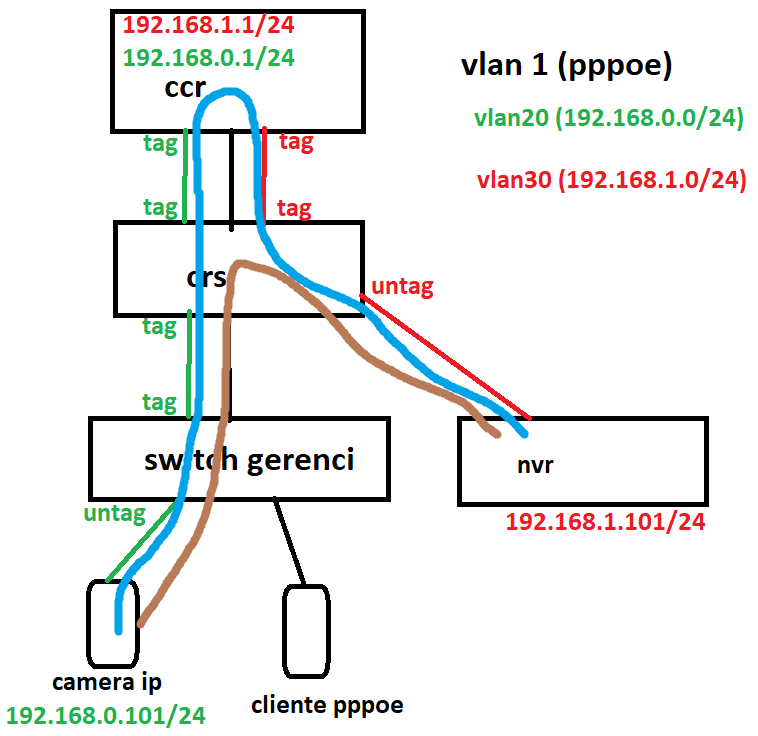
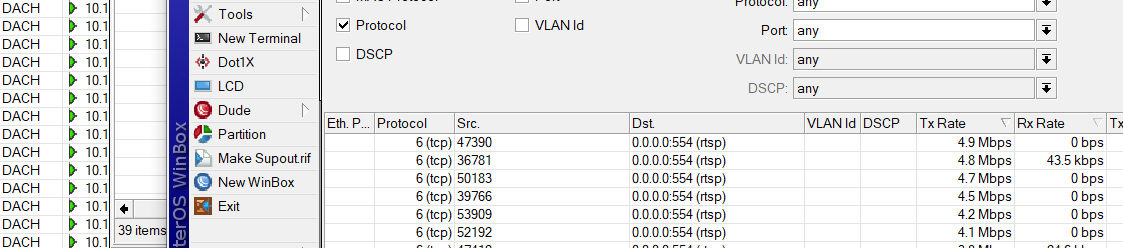
Where I work there was just a ccr1016, routing 400 ip cam and nating pppoe, my boss bought a crs326, to all cams route via l3hw to nvrs, only pppoe go to ccr1016, I “think” that I setting the l3hw right, but all rtsp cameras still going to ccr1016.
Its possible that rtsp goes from one vlan to another (where is nvrs) through l3hw?
If you want to HW offload routing between LANs and WAN, then indeed all relevant interfaces have to be members of same bridge.
Having two SFP28 connections between switch and CCR has potential for loops if both links are members of same bridge on both sides. And any xSTP except MSTP will detect it as such. So you have four possibilities:
on both sides (switch and CCR) enable MSTP
keep using (it’s default on ROS) RSTP but configure both interfaces on both sides as edge ports. Beware of misconfigurations, loops can happen and with this setting loop won’t be detected
set bridge mode to none (disable xSTP) on both sides (one side is not enough, it might loop LLDP packets making the other side panic). Same warning as in preceeding bullet applies
use both SFP28 links in a 802.3ad bond and play with transmit hash policy to steer traffic evenly between links
simply use single SFP28 link between the two devices if combined throughput is not likely to congest the link capacity
I appreciate your suggestions but none of them worked. Disabling STP on both the switch and the router (and rebooting both) did nothing. Putting all VLANs onto a single link and physically disconnecting the other and doing a complete reboot did nothing. And putting the switch and CCR into MSTP mode and complete reboot did nothing.
In all of these scenarios I was able to maintain non-VLAN to VLAN L3HW offload. But from VLAN’s on the bridge to other VLAN’s on the bridge none of it was offloaded. Hoping a MikroTik engineer can just replicate this and see if its a bug or expected functionality.
Try disabling the bridge firewall and see if that helps:
/interface bridge settings
set use-ip-firewall=no use-ip-firewall-for-pppoe=no use-ip-firewall-for-vlan=no
Using the bridge firewall prevents Fastpath, which, in turn, disables FastTrack and its hw-offloading. I guess you can still leave “use-ip-firewall-for-pppoe=yes” since PPPoE traffic is not offloaded anyway, but for the sake of testing, please entirely disable the firewall.
Consider using Switch Rules (ACL) for stateless firewalling. ACL rules are executed on the hardware level.
l3hw does not perform any “magic” under the hood - it just offloads the routing table to the hardware. Hence, to make l3hw work, you need to set up your CRS326 as a router - to route traffic between 192.168.0.0/24 and 192.168.1.0/24 VLANs. Usually, you want to configure a router with l3hw disabled (for better diagnostics); then enable l3hw for a speed boost.
It is hard to advise without seeing the entire network topology, but I guess the easiest solution is to move IP addresses 192.168.0.1 and 192.168.1.1 from CCR to CRS. It will make CRS route the traffic without the need to reconfigure network hosts. Then, I’m not sure if CCR needs to be a member of vlan20 and vlan30 anymore. Maybe CRS can use vlan1 for routing packets to the default gateway. Or make a separate VLAN between CCR and CRS to route traffic from vlan20/vlan30 and the outside world (if needed).
The rest of your posted config looks fine, so I’m unsure why it doesn’t work on your side. Please create a support ticket, and we will try to reproduce your issue on our end.
Please share the solution here, once the problem is solved. I’m really interested if it’s a configuration error or a bug.
I never could get L3 offloaded inter-vlan routing working on my 2116, reading the wiki page dozens of times, and trying every possible configuration.
IP communication worked, but fasttracked connections were never offloaded to the switch chip. It was easy ro see, no H-Flag in connection table and CPU usage went up when transferring multiple Gb/s.