I wasted the whole afternoon trying to get down from 7.13 but there was no way, not even to 7.12.1 and so I had to use Netinstall (which I had never managed to use until the procedure was completed) …
I posted post n.424 in the specific section on Thursday 28 December 2023 at 2.08am with the downgrade procedure in detail if it can be useful to anyone, given that both I and someone else spent a few hours trying to carry out the downgrade from 7.13:
@frengo
It’s certainly good that you posted your paraphrase of the netinstall instructions, but that’s not what we’re interested in.
Did downgrading the ROS version to 6 fix the authentication problem or not?
During these holidays here in Italy, unfortunately before 12/30/2023 I cannot have physical access to the device to be reset with Netinstall, given that I need to press the button on the Routerboard.
Don’t worry, as soon as I have completed the downgrade to 6.49.10 as you tell me I will post the response immediately.
If it really does work again (I hope so) it would be interesting to test by reinstalling version 7 (or 7.13) to understand if it is actually a version problem…
I’ll post everything here
I made dozens of attempts following this guide but when I restarted it ALWAYS remained 7.13. Seeing is believing. I also followed the red errors in the Log. Once it told me that the System was missing, then I also put the System on and it told me that the Wireless was missing. The next time it told me that another package was missing, I put it in and nothing happened. Everything always remained at 7.13 - No problem anyway. With Netinstall I solved it and went back to 6.49.10. Now I’m waiting for them to give me the site keys to do the same operation on the other device…
Is there no change in the logs now? Show me.
To downgrade to 7.12, you must first remove the Wireless package and only then downgrade.
If you have wifi access, you can’t do that. If you access the device via cable, you don’t have to press the button to netinstall.
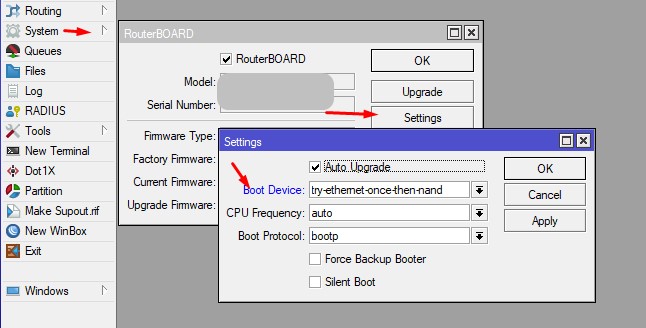
Use system Routerboard / Settings / Boot device = try ethernet once then NAND.
Then reboot using winbox / ssh / cli / … whatever.
It should first go looking for a netinstall server then.
No press on any button needed.
But … you need to have a netinstall server ready in the same network segment then.
Unless I missed something on that process.
Finally today I managed to access the remote site and also downgrade the other device from 7.13 to 6.49.10 as you recommended but unfortunately nothing has changed.
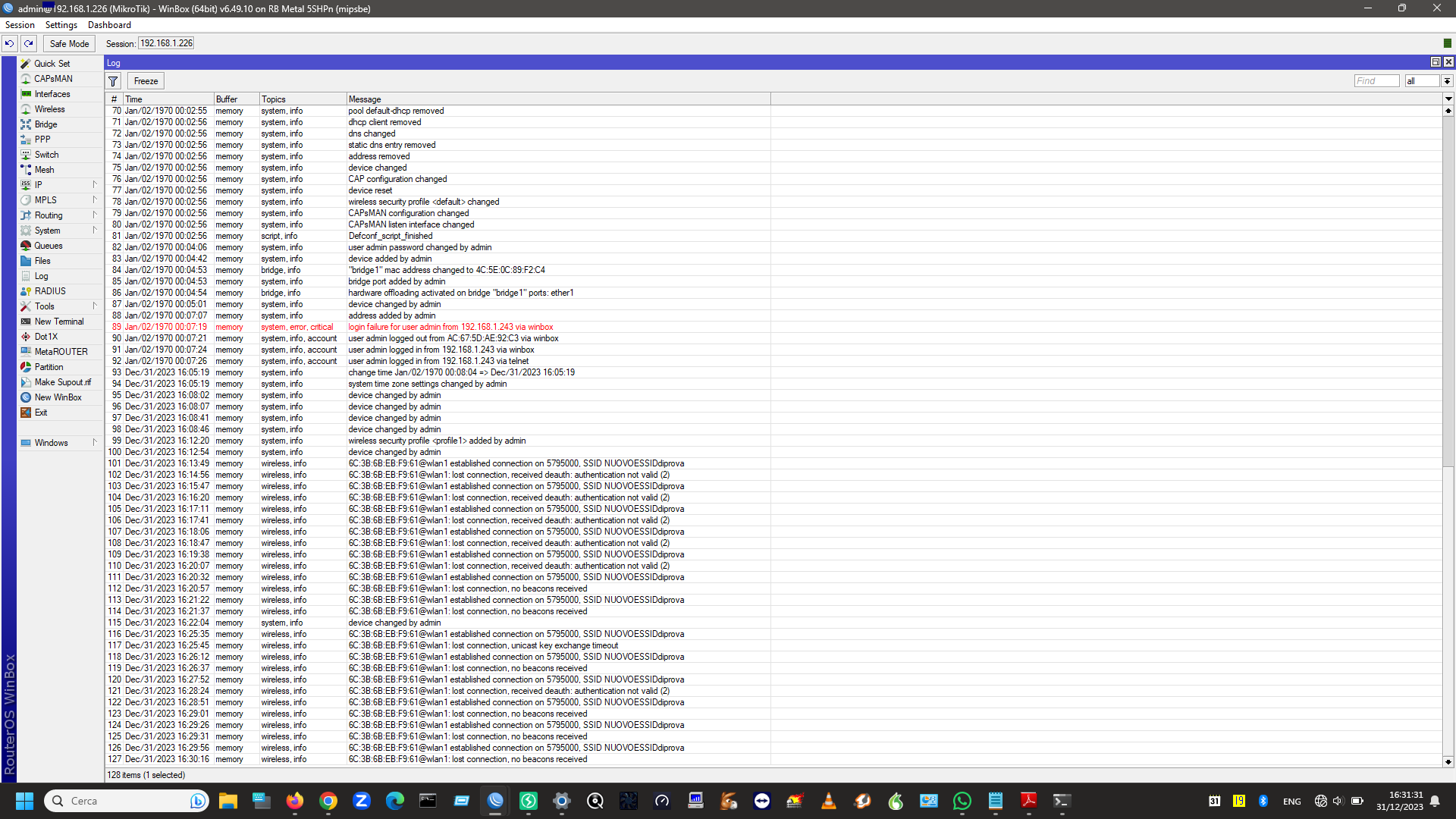
I just noticed something strange and curious. Having seen so far the duration of the connection which every time before it breaks is about 30 seconds, as soon as I downgraded and put the connection back on which had been down for several days I noticed that the first attempt lasted almost 90 seconds and I had already deluded myself that everything was back in operation. Instead, unfortunately, the subsequent associations lasted less and less until at the fourth or fifth time the association attempt with the remote AP went back to lasting a maximum of 30 seconds (as can be seen from the log)… and some pings.
Well, you didn’t want to open a separate topic, so we’ll continue here.
You said that only one radio link is not working. But in your last post you show data from another radio link on the same frequency, but with a different SSID.
If you want help
3.The status tab of the wifi interface on each side.
4.Signal tab from the registration tab on the access point
I don’t know whether to say the “mea culpa” but perhaps it’s just a question of interference from one of the two sites and above all of signal limits.
First of all I have to apologize to all of you and especially to Ca6ko for not having responded anymore and returning here after over 3 months.
Basically I’ll show you my updates here. Having 2 Metal 5shpn devices available to test, I directly replaced the devices present on the two sites as being made up of 2 RB433s with low power cards of a certain low power I would have obtained improvements on the signal, and so I did. The antennas have remained exactly unchanged as have their pointing and position on the two sites.
As if by magic, the problem of continuous disconnections that I had in the previous months has no longer recurred (so far) having obtained a signal increase of 3-4 dB on both the Tx and Rx.
So at this point I tried to give myself some answers that could explain what had actually happened previously when I continually blamed targeted interference: what comes to mind is that evidently not having sufficient experience in the field I always I thought that a signal below -80 dBm could be more than fine given that even with -90 in other cases the connection is established.
This is true in “desert” situations, i.e. where to connect two sites there are no other devices nearby that could disturb my link a bit. But unfortunately one of the two sites in my case is also inhabited by 2 wisps and this certainly increases the level of noise and interference present.
I therefore deduced that now the link is fine only because the signal in the antenna is almost always higher than -80 dbm as it is thus able to be heard with that margin “enough” higher than the surrounding noise so as not to be affected by disconnections of which I thought I was a victim in a way that was done on purpose by someone (yes, I deserve someone to tell me that I had delusions of persecution).
This, I repeat, arose from the fact that the problem was not always present and perhaps this was due to the weather conditions or the traffic exchanged by these wisps. One thing is certain. If (for research purposes) I want to make the problem reappear, it should be sufficient for me to lower the power of the devices to see if the phenomenon occurs again.
For now the link works (and it’s fine) but at this point I still have to figure out whether to update the OS to version 7 (and which one exactly) as I’m still at 6.49.10…
I was saying this because I don’t know the reason why I should use version 6 of RouterOS instead of 7. It’s advice you gave me here on the forum and so I’m at 6.49.10 on my devices which are Metal 5Shpn, RB433AH, RB433gigabit, RB941 2nd and SXTsq 5 ac.
I don’t know if and when to switch to 7 (and above all the necessity but being the 7 newest and recommended by the manufacturer I thought it could be beneficial but maybe I’m wrong…)