How to set up VLAN to pass traffic through a managed switch?

Okay this time will be less polite LOL… use the phucking guide → http://forum.mikrotik.com/t/using-routeros-to-vlan-your-network/126489/1 ( one bridge, all vlans, bridge does no dhcp )

The switch and AP get trunk ports between each other including the base or managment vlan and the switch and AP get an IP address from this vlan. Only the managment vlan gets tagged to the bridge on the AP.

From that thread:

And I use CAPsMAN in my setup as well.

You adapt CAPsMAN configuration to VLANs, not the other way around. So do the VLANs properly first, then worry about CAPsMAN.

And yes, if one doesn’t know exactly what he’s doing, he will break things … and probably break them hard. So it’s questionable if it’s worth doing things only partially in order to not break current setup.

Okay, okay, I followed your advice and went all VLAN now. Adapted the CAPsMAN config to it by following the guidance in this thread here: http://forum.mikrotik.com/t/guide-capsman-configuration-with-management-vlan-routeros-7-14-3/176344/20

Most of the setup works:

  • cAPs get their IP address from the mgmt VLAN/DHCP
  • home WiFi devices get an IP from the home VLAN/DHCP
  • guest WiFi devices get an IP from the guest VLAN/DHCP

However, connecting to the guest and iot WiFi doesn’t grant me access to the internet now. Connection to the home WiFi works, though.

Router config:

# 2025-02-02 18:32:38 by RouterOS 7.17.1
# software id = REDACTED
#
# model = RB4011iGS+
# serial number = REDACTED
/interface bridge
add admin-mac=F4:1E:57:0D:41:A7 auto-mac=no comment=defconf name=bridge \
    vlan-filtering=yes
/interface ethernet
set [ find default-name=ether3 ] comment="b\C3\BCro"
set [ find default-name=ether6 ] comment=knx
/interface wireguard
add listen-port=21841 mtu=1420 name=seedbox1
add listen-port=13231 mtu=1420 name=wireguard1
/interface vlan
add interface=bridge name=guest-vlan50 vlan-id=50
add interface=bridge name=home-vlan40 vlan-id=40
add interface=bridge name=iot-vlan60 vlan-id=60
add interface=bridge name=mgmt-vlan30 vlan-id=30
add interface=sfp-sfpplus1 name=sfp-vlan7 vlan-id=7
/interface bonding
add mode=802.3ad name=nas slaves=ether7,ether8
add mode=802.3ad name=switch slaves=ether9,ether10 transmit-hash-policy=\
    layer-2-and-3
/interface pppoe-client
add add-default-route=yes allow=pap,chap,mschap2 disabled=no interface=\
    sfp-vlan7 name=telekom use-peer-dns=yes user=REDACTED
/interface list
add comment=defconf name=WAN
add comment=defconf name=LAN
add name=GUEST
add name=MGMT
/interface wifi datapath
add bridge=bridge comment=defconf disabled=no name=capdp
add comment=guest disabled=no name=guest-datapath vlan-id=50
add comment=home disabled=no name=home-datapath vlan-id=40
add comment=iot disabled=no name=iot-datapath vlan-id=60
/interface wifi security
add authentication-types=wpa2-psk,wpa3-psk connect-priority=0 disabled=no \
    name=family-sec
add authentication-types=wpa2-psk,wpa3-psk disabled=no name=guest-sec
add authentication-types=wpa2-psk,wpa3-psk disabled=no name=iot-sec
/interface wifi configuration
add channel.reselect-interval=10m..30m comment=family datapath=home-datapath \
    disabled=no mode=ap name=family security=family-sec \
    security.connect-priority=0 .ft=yes .ft-over-ds=yes ssid=\
    BuddhasBlessedBunch
add comment=guest datapath=guest-datapath disabled=no mode=ap name=guest \
    security=guest-sec ssid=BuddhasBlessedGuests
add comment=iot datapath=iot-datapath disabled=no mode=ap name=iot security=\
    iot-sec ssid=BuddhasBlessedDevices
/ip pool
add name=dhcp ranges=192.168.88.100-192.168.88.254
add name=mgmt ranges=192.168.30.100-192.168.30.254
add name=home ranges=192.168.40.100-192.168.40.254
add name=guest ranges=192.168.50.100-192.168.50.254
add name=iot ranges=192.168.60.100-192.168.60.254
/ip dhcp-server
add address-pool=dhcp interface=bridge lease-time=2h name=defconf
add address-pool=mgmt comment=mgmt-vlan30 interface=mgmt-vlan30 name=mgmt
add address-pool=home comment=home-vlan40 interface=home-vlan40 name=home
add address-pool=guest comment=guest-vlan50 interface=guest-vlan50 name=guest
add address-pool=iot comment=iot-vlan60 interface=iot-vlan60 name=iot
/port
set 0 name=serial0
set 1 name=serial1
/system logging action
set 3 bsd-syslog=yes remote=192.168.88.6 syslog-facility=syslog
/interface bridge port
add bridge=bridge comment=defconf interface=ether2
add bridge=bridge comment=defconf interface=ether3 pvid=30
add bridge=bridge comment=defconf interface=ether4
add bridge=bridge comment=defconf interface=ether5
add bridge=bridge comment=defconf interface=ether6
add bridge=bridge comment=defconf interface=ether1
add bridge=bridge interface=nas
add bridge=bridge interface=switch
/ip neighbor discovery-settings
set discover-interface-list=LAN
/interface bridge vlan
add bridge=bridge comment=vlan tagged=switch,bridge vlan-ids=30,40,50,60
/interface list member
add comment=defconf interface=bridge list=LAN
add interface=sfp-sfpplus1 list=WAN
add comment=wireguard interface=wireguard1 list=LAN
add interface=sfp-vlan7 list=WAN
add interface=telekom list=WAN
add comment=home interface=home-vlan40 list=LAN
add comment=mgmt interface=mgmt-vlan30 list=LAN
add comment=mgmt interface=mgmt-vlan30 list=MGMT
/interface ovpn-server server
add mac-address=FE:97:BD:F3:AB:5D name=ovpn-server1
/interface wifi capsman
set ca-certificate=auto enabled=yes interfaces=mgmt-vlan30 package-path="" \
    require-peer-certificate=no upgrade-policy=none
/interface wifi provisioning
add action=create-dynamic-enabled comment=5ghz disabled=no \
    master-configuration=family slave-configurations=guest,iot \
    supported-bands=5ghz-ax
add action=create-dynamic-enabled comment=2ghx disabled=no \
    master-configuration=family slave-configurations=guest,iot \
    supported-bands=2ghz-ax
/interface wireguard peers
add allowed-address=192.168.87.10/32 client-address=192.168.87.10/32 \
    client-dns=192.168.87.1 client-endpoint=REDACTED \
    interface=wireguard1 name=pixel preshared-key=\
    "REDACTED" private-key=\
    "REDACTED" public-key=\
    "zA3KVqkFdyeYs8SeH5bBty5q8a6aqZjHmywineHN0EQ="
add allowed-address=192.168.87.11/32 client-address=192.168.87.11/32 \
    client-dns=192.168.87.1 client-endpoint=REDACTED \
    interface=wireguard1 name=tuxedo preshared-key=\
    "REDACTED" private-key=\
    "REDACTED" public-key=\
    "hYoazZbXFmbE148jFN8s6v0D3cRCkTawVtaaXySosEE="
add allowed-address=192.168.87.12/32 client-address=192.168.87.12/32 \
    client-dns=192.168.87.1 client-endpoint=REDACTED \
    interface=wireguard1 name=travelrouter preshared-key=\
    "REDACTED" private-key=\
    "REDACTED" public-key=\
    "PaIB5Rp1hI1pRtadUrtSDAFEOI//urx6fhApJaZqrDM="
add allowed-address=192.168.87.13/32 client-address=192.168.87.13/32 \
    client-dns=192.168.87.1 client-endpoint=REDACTED \
    interface=wireguard1 name=iphone preshared-key=\
    "REDACTED" private-key=\
    "REDACTED" public-key=\
    "FHB9LwPAgM7MoR2pSOqO1RnvaAXy77XkpJ4Mo62qPis="
add allowed-address=0.0.0.0/0 endpoint-address=REDACTED endpoint-port=\
    51026 interface=seedbox1 name=seedbox public-key=\
    "Tq7MDaNyunVrfko5mLMWoN8rZ08hSJOCpJEPUfQcHVo="
/ip address
add address=192.168.88.1/24 comment=defconf interface=bridge network=\
    192.168.88.0
add address=192.168.87.1/24 comment=wireguard interface=wireguard1 network=\
    192.168.87.0
add address=10.102.6.2/24 comment=seedbox interface=seedbox1 network=\
    10.102.6.0
add address=192.168.50.1/24 comment=guest interface=guest-vlan50 network=\
    192.168.50.0
add address=192.168.30.1/24 comment=mgmt interface=mgmt-vlan30 network=\
    192.168.30.0
add address=192.168.40.1/24 comment=home interface=home-vlan40 network=\
    192.168.40.0
add address=192.168.60.1/24 comment=iot interface=iot-vlan60 network=\
    192.168.60.0
/ip dhcp-server network
add address=192.168.30.0/24 comment=mgmt-vlan30 dns-server=192.168.30.1 \
    domain=vlan30.lan gateway=192.168.30.1
add address=192.168.40.0/24 comment=home-vlan40 dns-server=192.168.40.1 \
    domain=vlan40.lan gateway=192.168.40.1
add address=192.168.60.0/24 comment=iot-vlan60 dns-server=192.168.60.1 \
    domain=vlan60.lan gateway=192.168.60.1
add address=192.168.88.0/24 comment=defconf dns-server=192.168.88.14 domain=\
    lan gateway=192.168.88.1 netmask=24
add address=192.169.50.0/24 comment=guest-vlan50 dns-server=192.168.50.1 \
    domain=vlan50.lan gateway=192.168.50.1
/ip dns
set allow-remote-requests=yes servers=9.9.9.9 verify-doh-cert=yes
/ip dns static
add address=192.168.88.1 comment=defconf name=router.lan type=A
add address=192.168.88.3 name=proxmox2.lan type=A
add address=192.168.88.4 name=myspeed.lan type=A
add address=192.168.88.5 name=zigbee2mqtt.lan type=A
add address=192.168.88.6 name=nas.lan type=A
add address=192.168.88.7 name=jellyfin.lan type=A
add address=192.168.88.8 name=syncthing.lan type=A
add address=192.168.88.9 name=paperless.lan type=A
add address=192.168.88.11 name=box.lan type=A
add address=192.168.88.12 name=jellyseerr.lan type=A
add address=192.168.88.14 name=homeassistant.lan type=A
add address=192.168.88.16 name=flaresolverr.lan type=A
add address=192.168.88.17 name=zigbeecoordinator.lan type=A
add address=192.168.88.20 name=proxmox3.lan type=A
add address=192.168.88.21 name=proxmox.lan type=A
add cname=nginx.lan name=jellyfin.REDACTED type=CNAME
add cname=nginx.lan name=jellyseerr.REDACTED type=CNAME
add cname=nginx.lan name=radarr.REDACTED type=CNAME
add cname=nginx.lan name=sonarr.REDACTED type=CNAME
add cname=nginx.lan name=myspeed.REDACTED type=CNAME
add cname=nginx.lan name=paperless.REDACTED type=CNAME
# bad CNAME data
add cname=homeassistant.lan. name=mqtt.lan type=CNAME
# bad CNAME data
add cname=homeassistant.lan. name=radarr.lan type=CNAME
# bad CNAME data
add cname=homeassistant.lan. name=sonarr.lan type=CNAME
# bad CNAME data
add cname=homeassistant.lan. name=prowlarr.lan type=CNAME
# bad CNAME data
add cname=homeassistant.lan. name=nginx.lan type=CNAME
/ip firewall filter
add action=accept chain=input comment=\
    "defconf: accept established,related,untracked" connection-state=\
    established,related,untracked
add action=drop chain=input comment="defconf: drop invalid" connection-state=\
    invalid
add action=accept chain=input comment="defconf: accept ICMP" protocol=icmp
add action=accept chain=input comment=\
    "defconf: accept to local loopback (for CAPsMAN)" dst-address=127.0.0.1
add action=accept chain=input comment="allow Wireguard" dst-port=13231 \
    protocol=udp
add action=accept chain=input comment="allow Seedbox (Wireguard )" dst-port=\
    21841 protocol=udp
add action=drop chain=input comment="defconf: drop all not coming from LAN" \
    in-interface-list=!LAN
add action=accept chain=forward comment="defconf: accept in ipsec policy" \
    ipsec-policy=in,ipsec
add action=accept chain=forward comment="defconf: accept out ipsec policy" \
    ipsec-policy=out,ipsec
add action=log chain=forward comment="guest log" in-interface=guest-vlan50 \
    out-interface-list=WAN
add action=fasttrack-connection chain=forward comment="defconf: fasttrack" \
    connection-state=established,related hw-offload=yes
add action=accept chain=forward comment=\
    "defconf: accept established,related, untracked" connection-state=\
    established,related,untracked
add action=drop chain=forward comment="defconf: drop invalid" \
    connection-state=invalid
add action=drop chain=forward comment=\
    "defconf: drop all from WAN not DSTNATed" connection-nat-state=!dstnat \
    connection-state=new in-interface-list=WAN
/ip firewall nat
add action=masquerade chain=srcnat comment="defconf: masquerade" \
    ipsec-policy=out,none out-interface-list=WAN
add action=masquerade chain=srcnat comment=seedbox out-interface=seedbox1
/ip ipsec profile
set [ find default=yes ] dpd-interval=2m dpd-maximum-failures=5
/ipv6 dhcp-client
add add-default-route=yes interface=telekom pool-name=pool-ipv6 request=\
    prefix
/ipv6 firewall address-list
add address=::/128 comment="defconf: unspecified address" list=bad_ipv6
add address=::1/128 comment="defconf: lo" list=bad_ipv6
add address=fec0::/10 comment="defconf: site-local" list=bad_ipv6
add address=::ffff:0.0.0.0/96 comment="defconf: ipv4-mapped" list=bad_ipv6
add address=::/96 comment="defconf: ipv4 compat" list=bad_ipv6
add address=100::/64 comment="defconf: discard only " list=bad_ipv6
add address=2001:db8::/32 comment="defconf: documentation" list=bad_ipv6
add address=2001:10::/28 comment="defconf: ORCHID" list=bad_ipv6
add address=3ffe::/16 comment="defconf: 6bone" list=bad_ipv6
/ipv6 firewall filter
add action=accept chain=input comment=\
    "defconf: accept established,related,untracked" connection-state=\
    established,related,untracked
add action=drop chain=input comment="defconf: drop invalid" connection-state=\
    invalid
add action=accept chain=input comment="defconf: accept ICMPv6" protocol=\
    icmpv6
add action=accept chain=input comment="defconf: accept UDP traceroute" \
    dst-port=33434-33534 protocol=udp
add action=accept chain=input comment=\
    "defconf: accept DHCPv6-Client prefix delegation." dst-port=546 protocol=\
    udp src-address=fe80::/10
add action=accept chain=input comment="defconf: accept IKE" dst-port=500,4500 \
    protocol=udp
add action=accept chain=input comment="defconf: accept ipsec AH" protocol=\
    ipsec-ah
add action=accept chain=input comment="defconf: accept ipsec ESP" protocol=\
    ipsec-esp
add action=accept chain=input comment=\
    "defconf: accept all that matches ipsec policy" ipsec-policy=in,ipsec
add action=drop chain=input comment=\
    "defconf: drop everything else not coming from LAN" in-interface-list=\
    !LAN
add action=accept chain=forward comment=\
    "defconf: accept established,related,untracked" connection-state=\
    established,related,untracked
add action=drop chain=forward comment="defconf: drop invalid" \
    connection-state=invalid
add action=drop chain=forward comment=\
    "defconf: drop packets with bad src ipv6" src-address-list=bad_ipv6
add action=drop chain=forward comment=\
    "defconf: drop packets with bad dst ipv6" dst-address-list=bad_ipv6
add action=drop chain=forward comment="defconf: rfc4890 drop hop-limit=1" \
    hop-limit=equal:1 protocol=icmpv6
add action=accept chain=forward comment="defconf: accept ICMPv6" protocol=\
    icmpv6
add action=accept chain=forward comment="defconf: accept HIP" protocol=139
add action=accept chain=forward comment="defconf: accept IKE" dst-port=\
    500,4500 protocol=udp
add action=accept chain=forward comment="defconf: accept ipsec AH" protocol=\
    ipsec-ah
add action=accept chain=forward comment="defconf: accept ipsec ESP" protocol=\
    ipsec-esp
add action=accept chain=forward comment=\
    "defconf: accept all that matches ipsec policy" ipsec-policy=in,ipsec
add action=drop chain=forward comment=\
    "defconf: drop everything else not coming from LAN" in-interface-list=\
    !LAN
/system clock
set time-zone-name=Europe/Berlin
/system identity
set name=Router
/system logging
set 0 topics=info,!wireless
add action=remote topics=info
add action=remote topics=debug
add action=remote topics=warning
add action=remote topics=critical
add action=remote topics=error
/system note
set show-at-login=no
/system ntp client
set enabled=yes
/system ntp client servers
add address=0.de.pool.ntp.org
add address=1.de.pool.ntp.org
add address=2.de.pool.ntp.org
add address=3.de.pool.ntp.org
/system routerboard settings
set auto-upgrade=yes enter-setup-on=delete-key
/system scheduler
add comment=strato interval=1h name=dyndns on-event=\
    "/system script run dyndns" policy=\
    ftp,reboot,read,write,policy,test,password,sniff,sensitive,romon \
    start-date=2024-10-20 start-time=17:57:15
/system script
add comment=strato dont-require-permissions=no name=dyndns owner=admin \
    policy=ftp,reboot,read,write,policy,test,password,sniff,sensitive,romon \
    source=":global ddnsuser \"REDACTED\"\
    \n:global ddnspass \"REDACTED\"\
    \n:global theinterface \"telekom\"\
    \n:global ddnshost1 \"REDACTED\"\
    \n\
    \n:global ipddns\
    \n:global ipfresh [/ip address get [find where interface=\$theinterface] v\
    alue-name=address]\
    \n\
    \n:if ([ :typeof \$ipfresh ] = nil ) do={\
    \n  :log info (\"DynDNS: No ip address on \$theinterface.\")\
    \n} else={\
    \n  :for i from=( [:len \$ipfresh] - 1) to=0 do={ \
    \n    :if ( [:pick \$ipfresh \$i] = \"/\") do={\
    \n      :set ipfresh [:pick \$ipfresh 0 \$i];\
    \n    }\
    \n  }\
    \n  :if (\$ipddns != \$ipfresh) do={\
    \n    :log info (\"DynDNS: IP-DynDNS = \$ipddns\")\
    \n    :log info (\"DynDNS: IP-Fresh = \$ipfresh\")\
    \n    :log info (\"DynDNS: Update IP needed. Sending UPDATE...!\")\
    \n    :global str1 \"/nic/update\\\?hostname=\$ddnshost1&myip=\$ipfresh\"\
    \n    /tool fetch address=dyndns.strato.com src-path=\$str1 user=\$ddnsuse\
    r password=\$ddnspass mode=https dst-path=(\"/DynDNS.\$ddnshost1\")\
    \n    :delay 1\
    \n    :global str1 [/file find name=\"DynDNS.\$ddnshost1\"];\
    \n    /file remove \$str1\
    \n    :global ipddns \$ipfresh\
    \n    :log info \"DynDNS: IP updated to \$ipfresh!\"\
    \n  } else={\
    \n    :log info \"DynDNS: dont need changes\";\
    \n  }\
    \n}"
/tool e-mail
set from="Router <mikrotik@REDACTED>" port=587 server=\
    smtp.protonmail.ch tls=yes user=mikrotik@REDACTED
/tool graphing interface
add allow-address=192.168.88.0/24 interface=sfp-sfpplus1
add allow-address=192.168.88.0/24 interface=nas
add allow-address=192.168.88.0/24 interface=switch
/tool graphing resource
add allow-address=192.168.88.0/24
/tool mac-server
set allowed-interface-list=LAN
/tool mac-server mac-winbox
set allowed-interface-list=LAN

AP Ground floor config:

# 2025-02-02 18:34:20 by RouterOS 7.17.1
# software id = REDACTED
#
# model = cAPGi-5HaxD2HaxD
# serial number = REDACTED
/interface bridge
add admin-mac=48:A9:8A:A2:9D:29 auto-mac=no comment=defconf name=bridgeLocal \
    vlan-filtering=yes
/interface vlan
add comment=mgmt interface=ether1 name=mgmt-vlan30 vlan-id=30
/interface wifi datapath
add bridge=bridgeLocal comment=defconf disabled=no name=capdp
/interface wifi
# managed by CAPsMAN F4:1E:57:0D:41:A7%mgmt-vlan30, traffic processing on CAP
# mode: AP, SSID: BuddhasBlessedBunch, channel: 5500/ax/Ceee/D
set [ find default-name=wifi1 ] configuration.country=Germany .manager=\
    capsman .mode=ap datapath=capdp disabled=no
# managed by CAPsMAN F4:1E:57:0D:41:A7%mgmt-vlan30, traffic processing on CAP
# mode: AP, SSID: BuddhasBlessedBunch, channel: 2462/ax/eC
set [ find default-name=wifi2 ] configuration.country=Germany .manager=\
    capsman .mode=ap datapath=capdp disabled=no
/interface bridge port
add bridge=bridgeLocal comment=defconf frame-types=admit-only-vlan-tagged \
    interface=ether1
add bridge=bridgeLocal comment=defconf interface=ether2
/interface bridge vlan
add bridge=bridgeLocal comment=vlan tagged=bridgeLocal,ether1 vlan-ids=\
    30,40,50,60
/interface ovpn-server server
add mac-address=FE:81:CE:1B:D8:03 name=ovpn-server1
/interface wifi cap
set discovery-interfaces=mgmt-vlan30 enabled=yes slaves-datapath=capdp
/ip dhcp-client
add comment=defconf interface=mgmt-vlan30
/ip ipsec profile
set [ find default=yes ] dpd-interval=2m dpd-maximum-failures=5
/system clock
set time-zone-name=Europe/Berlin
/system identity
set name="AP Hauswirtschaftsraum"
/system note
set show-at-login=no
/system routerboard settings
set auto-upgrade=yes

AP First floor config:

# 2025-02-02 18:33:23 by RouterOS 7.17.1
# software id = REDACTED
#
# model = cAPGi-5HaxD2HaxD
# serial number = REDACTED
/interface bridge
add admin-mac=48:A9:8A:A2:8F:9C auto-mac=no comment=defconf name=bridgeLocal \
    vlan-filtering=yes
/interface vlan
add interface=ether1 name=mgmt-vlan30 vlan-id=30
/interface wifi datapath
add bridge=bridgeLocal comment=defconf disabled=no name=capdp
/interface wifi
# managed by CAPsMAN F4:1E:57:0D:41:A7%mgmt-vlan30, traffic processing on CAP
# mode: AP, SSID: BuddhasBlessedBunch, channel: 5720/ax/eeeC/D
set [ find default-name=wifi1 ] configuration.manager=capsman datapath=capdp \
    disabled=no
# managed by CAPsMAN F4:1E:57:0D:41:A7%mgmt-vlan30, traffic processing on CAP
# mode: AP, SSID: BuddhasBlessedBunch, channel: 2467/ax/eC
set [ find default-name=wifi2 ] configuration.manager=capsman datapath=capdp \
    disabled=no
/interface bridge port
add bridge=bridgeLocal comment=defconf frame-types=admit-only-vlan-tagged \
    interface=ether1
add bridge=bridgeLocal comment=defconf interface=ether2
/ipv6 settings
set max-neighbor-entries=15360 min-neighbor-entries=3840 \
    soft-max-neighbor-entries=7680
/interface bridge vlan
add bridge=bridgeLocal tagged=bridgeLocal,ether1 vlan-ids=30,40,50,60
/interface wifi cap
set discovery-interfaces=mgmt-vlan30 enabled=yes slaves-datapath=capdp
/ip dhcp-client
add comment=defconf interface=mgmt-vlan30
/system clock
set time-zone-name=Europe/Berlin
/system identity
set name="AP Dachboden"
/system note
set show-at-login=no
/system routerboard settings
set auto-upgrade=yes
Could be it’s because you’re blocking access to DNS server on router itself from !LAN subnets (blocked by general “drop input all not from LAN”). You’ll have to create allow rules for both TCP and UDP port 53 … and be careful not to allow it from WAN interface list. These rules then have to be above the “drop input from not LAN” rule.

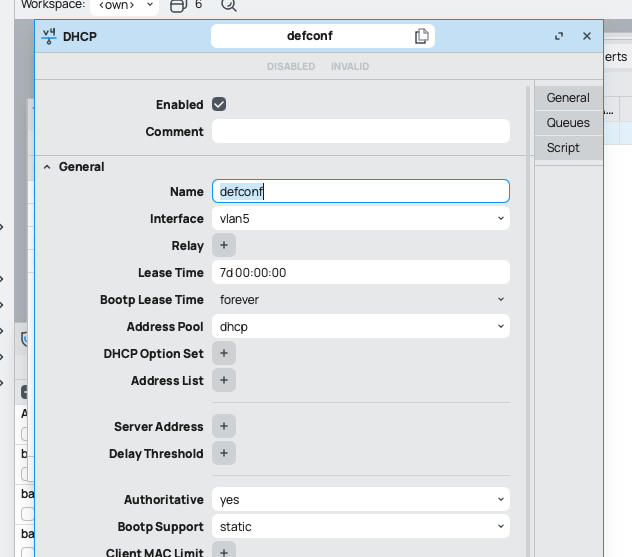
You can set which interface gets DCHP requests. You should really have a separate VLAN set up for your LAN that is different from the management VLAN of your switches. Put all your LAN traffic on that VLAN (maybe you do - I’ll be honest I haven’t read the entire thread). Then set the DHCP server to hand out addresses on that interface:

In my case VLAN 5 is the LAN. See the pic:
Screenshot 2025-02-02 at 1.08.12 PM.png
You should need minimal firewall rules to pass traffic between VLANS unless you want to limit certain traffic between them. If you have the interfaces set up properly then the traffic just flows. Again - see the guide I wrote.

Here’s the link to the writeup I did. It was only thanks to Lurker88 that I was able to do this:

http://forum.mikrotik.com/t/configuring-intervlan-routing-on-mikrotik/181530/1

I have 16 VLANs. Two managed switches and the Mikrortik all connected by 10G links. Traffic routes smoothly through all of them and between all of them.

I’m not an expert on this in any shape or form. Just did this to try to help people out and reinforce what I learned by putting it to paper.

Yes, this partly solved it. I added both to my LAN interface list which should grant them access to the router (for now).

However, the guest one still doesn’t go through. I explicitly set the DNS server to 192.168.50.1 and tested it on a device connected to the guest network. All working as expected. However, when I try to access this forum for example or run a speedtest = no connection.

Thanks, that is my setup exactly. The DHCP requests look fine. Depending on which SSID I am connected to, I get different IP addresses of the respective pools.

No you have me curious and I’ll have to read this whole thread! :grinning_face:. But I have a five hour drive ahead of me.
Have you added the guest vlan as an interface of the LAN?

ROUTER

VeRY confUsing!!
Make up your mind.

  1. USE VLANS, do not assign dhcp to bridge etc.

  2. a. What should NOT be on your router anywhere is 192.168.88.0

  • if you need it assign another vlan but you already have a home subnet, and a management subnet, so WTF is 192.168.88 ???

b. What should be on your router everywhere is the management vlan 30 and you have it covered the only thing I dont understand is what is the meaning of capdp on the wifi datapath settings?

c. You will note that

  • the unknown 192.168.88 does not have a datapath assignment,
  • the unknown 192.168.88 is going to ports 1,2,4,5,6 ( and if its not home, iot, home, guest, or management ??? )

++++++++++++++++++++++++++++++++++++++++++++++++++++++++++

Conclusion → Before proceeding need to know what is the purpose of the 192.168.88 network. If I had to guess, which I hate to do, is that its the WIRED home network and in reality there should be only ONE home network and for some reason you have split the two up. So the question is do you need actually need a separate call it WORK network that is wired that home users should not automatically access over Layer 2 ( just one simple home subnet) and which the wired home users should not be able to access the wifi home users automatically… ???

PS Also what is purpose of capds setting??


+++++++++++++++++++++++

Ground AP,

  1. what the heck is attached to ether2 ???

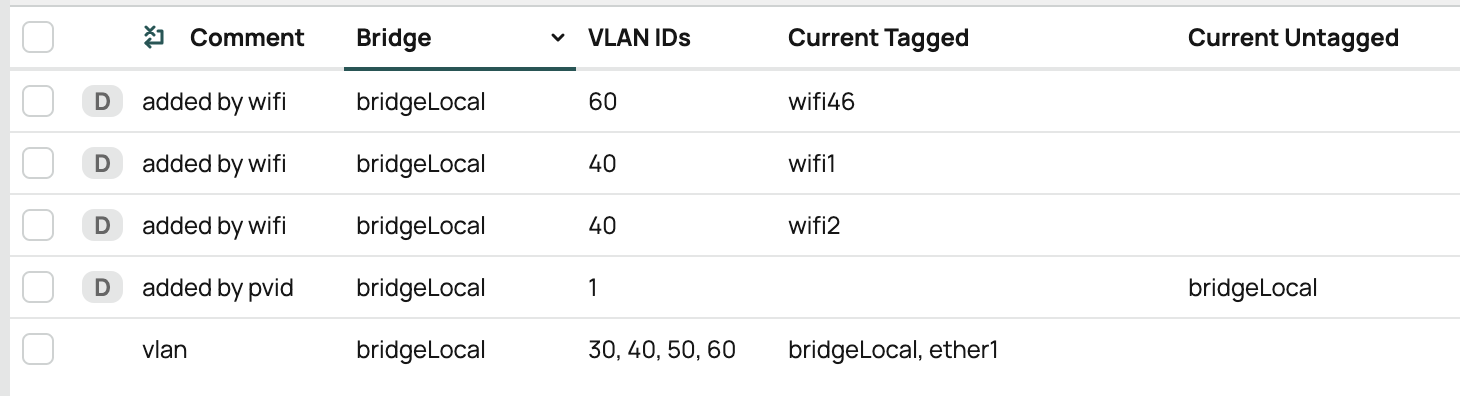
  2. WHy do you have datacap stuff for vlan 30, when you are not sending any wifi out 30 and you have dhcp already set client set to vlan30.
    Much easier to turn dhcp client OFF, and set a fixed static IP address on vlan30 for each AP.

  3. The interface for the management vlan should be the bridge, not ether1

  4. I dont see any assignment of data vlans on the AP ??? what is on wifi1 and wifi2 ??? how do vlans 40,50,60 get assigned???

+++++++++++++++++++++++++

AP first floor

ALL SAME COMMENTS.

I presume you mean the LAN interface list? Yes, I did.

Regarding your guide: I think my setup is similar, except that I do use the mgmt VLAN to hand out IP addresses instead. What is your reasoning to adding this additional LAN VLAN?

With most managed switches (Cisco, Ubiquiti, etc), the management VLAN is non-routable. So if you want to route from your LAN to other VLANs and back, you need to use a routable VLAN. Some switch models I’ve seen do allow it on the management VLAN but most do not. When I was setting up the VLAN routing on the Mikrotik and Lurer88’s help, he told me it is best practice to use a different VLAN for the LAN than the management VLAN. So glad I was doing something correctly all these years! :smiley:

I was the one who recommended adding an additional management VLAN. The reason, that many L3 switches are hard-wired config-wise to have one is one of the reasons.

The other being that in larger deployments (anything commercial/enterprise) you have to deal with security and uptime issues. Having a management VLAN limits the attack surface to the gateway(s) used to access this VLAN. It’s quite common to run several devices worth (several) thousand dollars each, and not want to update them. (A few reasons: The manufacturer doesn’t, or is slow to release a software update; the manufacturer wants a “support” contract, with its associated costs; you want to test the new version extensively before upgrading production; you have to wait for or allocate a maintenance window for such and upgrade…) If you don’t run anything of importance then of course this doesn’t apply to you. It’s still best (and down the line actually easier) to follow best practices. At first it might seem inconvenient, but believe me, it very soon becomes second nature to do so. It also makes life much more easier when using equipment from multiple vendors; and perversely the higher the tier of the equipment, the more often such a configuration is the expected (or the only supported) one.

Many management VLANs do hand out addresses via DHCP (and I usually set them up like this.) This is just to simplify connecting something to it, and not have to manually reconfigure the network interface each time.

I didn’t?


Removed, so we can focus on the actual problem.


Nothing.


I don’t have a datapath for vlan 30. Only 40, 50 and 60.


Changed.


This is RouterOS magic, probably?

Bildschirmfoto 2025-02-06 um 13.47.53.png

Router config:

/ip dhcp-server
add address-pool=dhcp interface=bridge lease-time=2h name=defconf

EDIT: already been answered (oops)

Touché. It’s not in the latest config any more, though. I still cannot access the internet on the guest WiFi. That is my current problem. Everything else is working great now.

In that case please post the latest config, not one from above etc.. and will have a fresh look.

Dang, I thought I had it attached to my last post…

Router

# 2025-02-06 12:30:36 by RouterOS 7.17.1
# software id = REDACTED
#
# model = RB4011iGS+
# serial number = REDACTED
/interface bridge
add admin-mac=REDACTED auto-mac=no comment=defconf name=bridge \
    vlan-filtering=yes
/interface ethernet
set [ find default-name=ether3 ] comment="b\C3\BCro"
set [ find default-name=ether6 ] comment=knx
/interface wireguard
add listen-port=21841 mtu=1420 name=seedbox1
add listen-port=13231 mtu=1420 name=wireguard1
/interface vlan
add interface=bridge name=guest-vlan50 vlan-id=50
add interface=bridge name=home-vlan40 vlan-id=40
add interface=bridge name=iot-vlan60 vlan-id=60
add interface=bridge name=mgmt-vlan30 vlan-id=30
add interface=sfp-sfpplus1 name=sfp-vlan7 vlan-id=7
/interface bonding
add mode=802.3ad name=nas slaves=ether7,ether8
add mode=802.3ad name=switch slaves=ether9,ether10 transmit-hash-policy=\
    layer-2-and-3
/interface pppoe-client
add add-default-route=yes allow=pap,chap,mschap2 disabled=no interface=\
    sfp-vlan7 name=telekom use-peer-dns=yes user=REDACTED
/interface list
add comment=defconf name=WAN
add comment=defconf name=LAN
/interface wifi datapath
add bridge=bridge comment=defconf disabled=no name=capdp
add comment=guest-vlan50 disabled=no name=guest-datapath vlan-id=50
add comment=home-vlan40 disabled=no name=home-datapath vlan-id=40
add comment=iot--vlan60 disabled=no name=iot-datapath vlan-id=60
/interface wifi security
add authentication-types=wpa2-psk,wpa3-psk comment=home-vlan40 \
    connect-priority=0 disabled=no name=home-sec
add authentication-types=wpa2-psk,wpa3-psk comment=guest-vlan50 disabled=no \
    name=guest-sec
add authentication-types=wpa2-psk,wpa3-psk comment=iot-vlan60 disabled=no \
    name=iot-sec
/interface wifi configuration
add channel.reselect-interval=10m..30m comment=home country=Germany datapath=\
    home-datapath disabled=no mode=ap name=home security=home-sec \
    security.connect-priority=0 .ft=yes .ft-over-ds=yes ssid=\
    BuddhasBlessedBunch
add comment=guest datapath=guest-datapath disabled=no mode=ap name=guest \
    security=guest-sec ssid=BuddhasBlessedGuests
add comment=iot datapath=iot-datapath disabled=no mode=ap name=iot security=\
    iot-sec ssid=BuddhasBlessedDevices
/ip pool
add name=mgmt ranges=192.168.30.100-192.168.30.254
add name=home ranges=192.168.40.100-192.168.40.254
add name=guest ranges=192.168.50.100-192.168.50.254
add name=iot ranges=192.168.60.100-192.168.60.254
/ip dhcp-server
add address-pool=mgmt comment=mgmt-vlan30 interface=mgmt-vlan30 name=mgmt
add address-pool=home comment=home-vlan40 interface=home-vlan40 name=home
add address-pool=guest comment=guest-vlan50 interface=guest-vlan50 name=guest
add address-pool=iot comment=iot-vlan60 interface=iot-vlan60 name=iot
/port
set 0 name=serial0
set 1 name=serial1
/system logging action
set 3 bsd-syslog=yes remote=192.168.30.20 syslog-facility=syslog
/interface bridge port
add bridge=bridge comment=defconf interface=ether1 pvid=40
add bridge=bridge comment=defconf interface=ether2 pvid=30
add bridge=bridge comment=defconf interface=ether3 pvid=30
add bridge=bridge comment=defconf interface=ether4 pvid=30
add bridge=bridge comment=defconf interface=ether5 pvid=40
add bridge=bridge comment=defconf interface=ether6 pvid=30
add bridge=bridge interface=nas pvid=30
add bridge=bridge interface=switch
/ip neighbor discovery-settings
set discover-interface-list=LAN
/interface bridge vlan
add bridge=bridge comment=mgmt tagged=switch,bridge untagged=\
    ether3,nas,ether2,ether4,ether6 vlan-ids=30
add bridge=bridge comment=home tagged=bridge,switch,ether2,ether4 untagged=\
    ether1,ether5 vlan-ids=40
add bridge=bridge comment=guest tagged=bridge,switch,ether2,ether4 vlan-ids=\
    50
add bridge=bridge comment=iot tagged=bridge,switch,ether2,ether4 vlan-ids=60
/interface list member
add comment=defconf interface=bridge list=LAN
add interface=sfp-sfpplus1 list=WAN
add comment=wireguard interface=wireguard1 list=LAN
add interface=sfp-vlan7 list=WAN
add interface=telekom list=WAN
add comment=home interface=home-vlan40 list=LAN
add comment=mgmt interface=mgmt-vlan30 list=LAN
/interface ovpn-server server
add mac-address=FE:97:BD:F3:AB:5D name=ovpn-server1
/interface wifi capsman
set ca-certificate=auto enabled=yes interfaces=mgmt-vlan30 package-path="" \
    require-peer-certificate=no upgrade-policy=none
/interface wifi provisioning
add action=create-dynamic-enabled comment=5ghz disabled=no \
    master-configuration=home slave-configurations=iot,guest supported-bands=\
    5ghz-ax
add action=create-dynamic-enabled comment=2ghx disabled=no \
    master-configuration=home slave-configurations=iot,guest supported-bands=\
    2ghz-ax
/interface wireguard peers
add allowed-address=192.168.70.10/32 client-address=192.168.70.10/32 \
    client-dns=192.168.70.1 client-endpoint=REDACTED \
    interface=wireguard1 name=pixel preshared-key=\
    "REDACTED" private-key=\
    "REDACTED" public-key=\
    "zA3KVqkFdyeYs8SeH5bBty5q8a6aqZjHmywineHN0EQ="
add allowed-address=0.0.0.0/0 endpoint-address=REDACTED endpoint-port=\
    51026 interface=seedbox1 name=seedbox public-key=\
    "Tq7MDaNyunVrfko5mLMWoN8rZ08hSJOCpJEPUfQcHVo="
/ip address
add address=192.168.70.1/24 comment=wireguard interface=wireguard1 network=\
    192.168.70.0
add address=10.102.6.2/24 comment=seedbox interface=seedbox1 network=\
    10.102.6.0
add address=192.168.50.1/24 comment=guest interface=guest-vlan50 network=\
    192.168.50.0
add address=192.168.30.1/24 comment=mgmt interface=mgmt-vlan30 network=\
    192.168.30.0
add address=192.168.40.1/24 comment=home interface=home-vlan40 network=\
    192.168.40.0
add address=192.168.60.1/24 comment=iot interface=iot-vlan60 network=\
    192.168.60.0
/ip dhcp-server network
add address=192.168.30.0/24 comment=mgmt-vlan30 dns-server=192.168.30.1 \
    domain=vlan30.lan gateway=192.168.30.1
add address=192.168.40.0/24 comment=home-vlan40 dns-server=192.168.40.10 \
    domain=vlan40.lan gateway=192.168.40.1
add address=192.168.60.0/24 comment=iot-vlan60 dns-server=192.168.40.10 \
    domain=vlan60.lan gateway=192.168.60.1
add address=192.169.50.0/24 comment=guest-vlan50 dns-server=192.168.40.10 \
    domain=vlan50.lan gateway=192.168.50.1
/ip dns
set allow-remote-requests=yes servers=9.9.9.9,149.112.112.112,8.8.8.8,8.8.4.4 \
    verify-doh-cert=yes
/ip dns static
add address=192.168.30.1 name=router.lan type=A
add address=192.168.30.10 name=proxmox.lan type=A
add address=192.168.30.11 name=proxmox2.lan type=A
add address=192.168.30.12 name=proxmox3.lan type=A
add address=192.168.30.20 name=nas.lan type=A
add address=192.168.30.30 name=zigbee2mqtt.lan type=A
add address=192.168.30.40 name=syncthing.lan type=A
add address=192.168.30.50 name=zigbeecoordinator.lan type=A
add address=192.168.40.10 name=homeassistant.lan type=A
add address=192.168.40.20 name=jellyfin.lan type=A
add address=192.168.40.30 name=box.lan type=A
add address=192.168.40.40 name=jellyseerr.lan type=A
add address=192.168.40.50 name=frigate.lan type=A
add address=192.168.40.60 name=flaresolverr.lan type=A
add address=192.168.40.70 name=paperless.lan type=A
add cname=nginx.lan name=jellyfin.REDACTED type=CNAME
add cname=nginx.lan name=jellyseerr.REDACTED type=CNAME
add cname=nginx.lan name=radarr.REDACTED type=CNAME
add cname=nginx.lan name=sonarr.REDACTED type=CNAME
add cname=nginx.lan name=paperless.REDACTED type=CNAME
add cname=nginx.lan name=z2m.REDACTED type=CNAME
add cname=homeassistant.lan name=nginx.lan type=CNAME
add cname=homeassistant.lan name=mqtt.lan type=CNAME
add cname=homeassistant.lan name=radarr.lan type=CNAME
add cname=homeassistant.lan name=sonarr.lan type=CNAME
add cname=homeassistant.lan name=prowlarr.lan type=CNAME
/ip firewall filter
add action=accept chain=input comment=\
    "defconf: accept established,related,untracked" connection-state=\
    established,related,untracked
add action=accept chain=input comment="dns: accept TCP" dst-port=53 protocol=\
    tcp
add action=accept chain=input comment="dns: accept UDP" dst-port=53 protocol=\
    udp
add action=drop chain=input comment="defconf: drop invalid" connection-state=\
    invalid
add action=accept chain=input comment="defconf: accept ICMP" protocol=icmp
add action=accept chain=input comment=\
    "defconf: accept to local loopback (for CAPsMAN)" dst-address=127.0.0.1
add action=accept chain=input comment="allow Wireguard" dst-port=13231 \
    protocol=udp
add action=accept chain=input comment="allow Seedbox (Wireguard )" dst-port=\
    21841 protocol=udp
add action=drop chain=input comment="defconf: drop all not coming from LAN" \
    in-interface-list=!LAN
add action=accept chain=forward comment="defconf: accept in ipsec policy" \
    ipsec-policy=in,ipsec
add action=accept chain=forward comment="defconf: accept out ipsec policy" \
    ipsec-policy=out,ipsec
add action=fasttrack-connection chain=forward comment="defconf: fasttrack" \
    connection-state=established,related hw-offload=yes
add action=accept chain=forward comment=\
    "defconf: accept established,related, untracked" connection-state=\
    established,related,untracked
add action=drop chain=forward comment="defconf: drop invalid" \
    connection-state=invalid
add action=drop chain=forward comment=\
    "defconf: drop all from WAN not DSTNATed" connection-nat-state=!dstnat \
    connection-state=new in-interface-list=WAN
add action=drop chain=forward comment="iot: drop all WAN traffic" \
    in-interface=iot-vlan60 log-prefix=arenti-outbound out-interface-list=WAN
add action=drop chain=forward comment="guest: drop TCP non-DNS traffic" \
    dst-address=!192.168.40.10 dst-port=!53 in-interface=guest-vlan50 \
    protocol=tcp
add action=drop chain=forward comment="guest: drop UDP non-DNS traffic" \
    dst-address=!192.168.40.10 dst-port=!53 in-interface=guest-vlan50 \
    protocol=udp
add action=drop chain=forward comment="guest: drop all non-WAN traffic" \
    in-interface=guest-vlan50 out-interface-list=!WAN
/ip firewall nat
add action=masquerade chain=srcnat comment="defconf: masquerade" \
    ipsec-policy=out,none out-interface-list=WAN
add action=masquerade chain=srcnat comment=seedbox out-interface=seedbox1
/ip ipsec profile
set [ find default=yes ] dpd-interval=2m dpd-maximum-failures=5
/ipv6 dhcp-client
add add-default-route=yes interface=telekom pool-name=pool-ipv6 request=\
    prefix
/ipv6 firewall address-list
add address=::/128 comment="defconf: unspecified address" list=bad_ipv6
add address=::1/128 comment="defconf: lo" list=bad_ipv6
add address=fec0::/10 comment="defconf: site-local" list=bad_ipv6
add address=::ffff:0.0.0.0/96 comment="defconf: ipv4-mapped" list=bad_ipv6
add address=::/96 comment="defconf: ipv4 compat" list=bad_ipv6
add address=100::/64 comment="defconf: discard only " list=bad_ipv6
add address=2001:db8::/32 comment="defconf: documentation" list=bad_ipv6
add address=2001:10::/28 comment="defconf: ORCHID" list=bad_ipv6
add address=3ffe::/16 comment="defconf: 6bone" list=bad_ipv6
/ipv6 firewall filter
add action=accept chain=input comment=\
    "defconf: accept established,related,untracked" connection-state=\
    established,related,untracked
add action=drop chain=input comment="defconf: drop invalid" connection-state=\
    invalid
add action=accept chain=input comment="defconf: accept ICMPv6" protocol=\
    icmpv6
add action=accept chain=input comment="defconf: accept UDP traceroute" \
    dst-port=33434-33534 protocol=udp
add action=accept chain=input comment=\
    "defconf: accept DHCPv6-Client prefix delegation." dst-port=546 protocol=\
    udp src-address=fe80::/10
add action=accept chain=input comment="defconf: accept IKE" dst-port=500,4500 \
    protocol=udp
add action=accept chain=input comment="defconf: accept ipsec AH" protocol=\
    ipsec-ah
add action=accept chain=input comment="defconf: accept ipsec ESP" protocol=\
    ipsec-esp
add action=accept chain=input comment=\
    "defconf: accept all that matches ipsec policy" ipsec-policy=in,ipsec
add action=drop chain=input comment=\
    "defconf: drop everything else not coming from LAN" in-interface-list=\
    !LAN
add action=accept chain=forward comment=\
    "defconf: accept established,related,untracked" connection-state=\
    established,related,untracked
add action=drop chain=forward comment="defconf: drop invalid" \
    connection-state=invalid
add action=drop chain=forward comment=\
    "defconf: drop packets with bad src ipv6" src-address-list=bad_ipv6
add action=drop chain=forward comment=\
    "defconf: drop packets with bad dst ipv6" dst-address-list=bad_ipv6
add action=drop chain=forward comment="defconf: rfc4890 drop hop-limit=1" \
    hop-limit=equal:1 protocol=icmpv6
add action=accept chain=forward comment="defconf: accept ICMPv6" protocol=\
    icmpv6
add action=accept chain=forward comment="defconf: accept HIP" protocol=139
add action=accept chain=forward comment="defconf: accept IKE" dst-port=\
    500,4500 protocol=udp
add action=accept chain=forward comment="defconf: accept ipsec AH" protocol=\
    ipsec-ah
add action=accept chain=forward comment="defconf: accept ipsec ESP" protocol=\
    ipsec-esp
add action=accept chain=forward comment=\
    "defconf: accept all that matches ipsec policy" ipsec-policy=in,ipsec
add action=drop chain=forward comment=\
    "defconf: drop everything else not coming from LAN" in-interface-list=\
    !LAN
/system identity
set name=Router
/system logging
set 0 topics=info,!wireless
add action=remote topics=info
add action=remote topics=debug
add action=remote topics=warning
add action=remote topics=critical
add action=remote topics=error
/system note
set show-at-login=no
/system ntp client
set enabled=yes
/system ntp client servers
add address=0.de.pool.ntp.org
add address=1.de.pool.ntp.org
add address=2.de.pool.ntp.org
add address=3.de.pool.ntp.org
/system routerboard settings
set auto-upgrade=yes enter-setup-on=delete-key
/system scheduler
add comment=strato interval=1h name=dyndns on-event=\
    "/system script run dyndns" policy=\
    ftp,reboot,read,write,policy,test,password,sniff,sensitive,romon \
    start-date=2024-10-20 start-time=17:57:15
/system script
add comment=strato dont-require-permissions=no name=dyndns owner=admin \
    policy=ftp,reboot,read,write,policy,test,password,sniff,sensitive,romon \
    source=":global ddnsuser \"REDACTED\"\
    \n:global ddnspass \"REDACTED\"\
    \n:global theinterface \"telekom\"\
    \n:global ddnshost1 \"REDACTED\"\
    \n\
    \n:global ipddns\
    \n:global ipfresh [/ip address get [find where interface=\$theinterface] v\
    alue-name=address]\
    \n\
    \n:if ([ :typeof \$ipfresh ] = nil ) do={\
    \n  :log info (\"DynDNS: No ip address on \$theinterface.\")\
    \n} else={\
    \n  :for i from=( [:len \$ipfresh] - 1) to=0 do={ \
    \n    :if ( [:pick \$ipfresh \$i] = \"/\") do={\
    \n      :set ipfresh [:pick \$ipfresh 0 \$i];\
    \n    }\
    \n  }\
    \n  :if (\$ipddns != \$ipfresh) do={\
    \n    :log info (\"DynDNS: IP-DynDNS = \$ipddns\")\
    \n    :log info (\"DynDNS: IP-Fresh = \$ipfresh\")\
    \n    :log info (\"DynDNS: Update IP needed. Sending UPDATE...!\")\
    \n    :global str1 \"/nic/update\\\?hostname=\$ddnshost1&myip=\$ipfresh\"\
    \n    /tool fetch address=dyndns.strato.com src-path=\$str1 user=\$ddnsuse\
    r password=\$ddnspass mode=https dst-path=(\"/DynDNS.\$ddnshost1\")\
    \n    :delay 1\
    \n    :global str1 [/file find name=\"DynDNS.\$ddnshost1\"];\
    \n    /file remove \$str1\
    \n    :global ipddns \$ipfresh\
    \n    :log info \"DynDNS: IP updated to \$ipfresh!\"\
    \n  } else={\
    \n    :log info \"DynDNS: dont need changes\";\
    \n  }\
    \n}"
/tool e-mail
set from="Router <mikrotik@REDACTED>" port=587 server=\
    smtp.protonmail.ch tls=yes user=mikrotik@REDACTED
/tool graphing interface
add allow-address=192.168.0.0/16 interface=sfp-sfpplus1
add allow-address=192.168.0.0/16 interface=nas
add allow-address=192.168.0.0/16 interface=switch
/tool graphing queue
add allow-address=192.168.0.0/16
/tool graphing resource
add allow-address=192.168.0.0/16
/tool mac-server
set allowed-interface-list=LAN
/tool mac-server mac-winbox
set allowed-interface-list=LAN

AP Ground Floor

# 2025-02-06 13:30:21 by RouterOS 7.17.1
# software id = REDACTED
#
# model = cAPGi-5HaxD2HaxD
# serial number = REDACTED
/interface bridge
add admin-mac=REDACTED auto-mac=no comment=defconf name=bridgeLocal \
    vlan-filtering=yes
/interface vlan
add comment=mgmt interface=bridgeLocal name=mgmt-vlan30 vlan-id=30
/interface wifi datapath
add bridge=bridgeLocal comment=defconf disabled=no name=capdp
/interface wifi
# managed by CAPsMAN F4:1E:57:0D:41:A7%mgmt-vlan30, traffic processing on CAP
# mode: AP, SSID: BuddhasBlessedBunch, channel: 5500/ax/Ceee/D
set [ find default-name=wifi1 ] configuration.country=Germany .manager=\
    capsman .mode=ap datapath=capdp disabled=no
# managed by CAPsMAN F4:1E:57:0D:41:A7%mgmt-vlan30, traffic processing on CAP
# mode: AP, SSID: BuddhasBlessedBunch, channel: 2452/ax/Ce
set [ find default-name=wifi2 ] configuration.country=Germany .manager=\
    capsman .mode=ap datapath=capdp disabled=no
/interface bridge port
add bridge=bridgeLocal comment=defconf frame-types=admit-only-vlan-tagged \
    interface=ether1
add bridge=bridgeLocal comment=defconf interface=ether2
/interface bridge vlan
add bridge=bridgeLocal comment=vlan tagged=bridgeLocal,ether1 vlan-ids=\
    30,40,50,60
/interface ovpn-server server
add mac-address=FE:81:CE:1B:D8:03 name=ovpn-server1
/interface wifi cap
set discovery-interfaces=mgmt-vlan30 enabled=yes slaves-datapath=capdp
/ip dhcp-client
add comment=defconf interface=mgmt-vlan30
/ip ipsec profile
set [ find default=yes ] dpd-interval=2m dpd-maximum-failures=5
/system clock
set time-zone-name=Europe/Berlin
/system identity
set name="AP Hauswirtschaftsraum"
/system note
set show-at-login=no
/system routerboard settings
set auto-upgrade=yes

AP First Floor

# 2025-02-06 13:31:01 by RouterOS 7.17.1
# software id = REDACTED
#
# model = cAPGi-5HaxD2HaxD
# serial number = REDACTED
/interface bridge
add admin-mac=REDACTED auto-mac=no comment=defconf name=bridgeLocal \
    vlan-filtering=yes
/interface vlan
add interface=bridgeLocal name=mgmt-vlan30 vlan-id=30
/interface wifi datapath
add bridge=bridgeLocal comment=defconf disabled=no name=capdp
/interface wifi
# managed by CAPsMAN F4:1E:57:0D:41:A7%mgmt-vlan30, traffic processing on CAP
# mode: AP, SSID: BuddhasBlessedBunch, channel: 5720/ax/eeeC/D
set [ find default-name=wifi1 ] configuration.manager=capsman datapath=capdp \
    disabled=no
# managed by CAPsMAN F4:1E:57:0D:41:A7%mgmt-vlan30, traffic processing on CAP
# mode: AP, SSID: BuddhasBlessedBunch, channel: 2467/ax/eC
set [ find default-name=wifi2 ] configuration.manager=capsman datapath=capdp \
    disabled=no
/interface bridge port
add bridge=bridgeLocal comment=defconf frame-types=admit-only-vlan-tagged \
    interface=ether1
add bridge=bridgeLocal comment=defconf interface=ether2
/ipv6 settings
set max-neighbor-entries=15360 min-neighbor-entries=3840 \
    soft-max-neighbor-entries=7680
/interface bridge vlan
add bridge=bridgeLocal comment=vlan tagged=bridgeLocal,ether1 vlan-ids=\
    30,40,50,60
/interface wifi cap
set discovery-interfaces=mgmt-vlan30 enabled=yes slaves-datapath=capdp
/ip dhcp-client
add comment=defconf interface=mgmt-vlan30
/system clock
set time-zone-name=Europe/Berlin
/system identity
set name="AP Dachboden"
/system note
set show-at-login=no
/system routerboard settings
set auto-upgrade=yes