You can’t be sure but if buffers are not filling and thus ping is not increasing, it’s pretty safe to assume that bandwidth is higher than required throughput at that particular moment. Meaning that there is no problem (even if bandwidth dropped below subscribed).
But the illustration by @rextended is pretty good: when you drive at car’s full speed through a city (where there are lots of slower cars on the street), other traffic affects your assesment (due to lots of traffic, you only manage 70km/h … so did your car loose all the speed?). At the same time your lunatic driving upsets other drivers and they complain to traffic police (if you’re lucky and they’re not, then traffic police is you … but they’ll be mad at you anyway).
So when trying to test if your car still has the umph, you make sure you’re on German autobahn and tgat it’s a quiet stretch without much of traffic. Ditto for the speedtest, you do it when traffic is low and you don’t upset many other people.
That’s the problem, internet bandwidth is dropping while the ping results don’t always show an increase in latency. The less frequently the buffer fills, the more difficult it is to see an increase in latency.
High ping time == lower speed test, hmmm that’s not entirely true because on a network with high bandwidth usage the ping time will also increase. (assume no QoS on ping)
So in all the tests that I have done, ping cannot be used as a parameter to reroute internet access to a backup provider because ping fails to translate whether bandwidth is dropping or not.
Of course this will be difficult if we use the assumption that High ping time == lower speed test, looks like we want to measure the width of the road using a thermometer. How are we going to convert the temperature indicator inside the thermometer to measure the width of the road? It’s still too far to convert it to units of length.
That’s why speedtest is used as a reference to measure the actual bandwidth that we can use. At least the measurement results show clear indicators without wild assumptions.
Back to the question, "how do you change internet access routes automatically if bandwidth is dropping? (without using speedtest as a parameter).
Then if you are sure that the ping can represent the speedtest, what will you do if it turns out that the bandwidth is dropping but the ping time is low?
When your links are always saturated (i.e. you are one of those “WISP” companies that re-sell 20 Mbps of bandwidth to 100 customers), you can watch the actual rate of the link and see if it drops below some normal value.
When this is not the situation, i.e. the link rate is often below what you would call “dropped bandwidth”, the answer probably is that it isn’t possible.
That’s right, that’s why right now what I’m doing is monitoring the WAN interface, if the utilization seems low then run a speedtest, not a ping test.
If the speedtest results are good then there is no need to change routes, but if the speedtest results are bad then change routes immediately because that clearly indicates bandwidth drops. Everything is done automatically on the router.
But when your ISP drops your bandwidth when they think you use too much data (“fair use policy” or “data cap”), would you not cause a feed-forward loop where you cause the problem in the first place by pumping useless data (speedtest) over the line?
It seems better to monitor the effective speed of individual TCP sessions that you know to be uploads/downloads to/from fast servers. E.g. users sending e-mail or cloud files.
Is easy: do not do speed tests. The problem appear only when you do that.
If the problem is another service that do not work, I check that service instead do useless speedtesting for kids.
Some ISP put on the max precedence speedtesting, other drop useless repetitive testing.
Probably your line is ok, is the speedtest service that is blocked, before your play with it too often.
Let’s assume the internet provider doesn’t apply a fair usage policy, and I also don’t speedtest too often.
It seems better to monitor the effective speed of individual TCP sessions that you know to be uploads/downloads to/from fast servers. E.g. users sending e-mail or cloud files.
It looks the same as speedtest, but done manually by humans
It’s hard to translate, I’m not English, but let’s put it this way:
If for some reason independent of the ISP, netflix doesn’t work, do a speedtest?
Or maybe the most logical thing is to open something else like Disney+???
(names and brands, examples only)
How can you tell when there is no bandwidth in a connection, if you don’t test it continuously, incessantly, 24 hours a day, 7 days a week?
Doing it “automatically” occasionally does nothing but create interruptions when maybe the bandwidth is needed, also in your own connection,
and if I were the provider, who sees that from what you wrote, the lines are a pittance, I’d be the first to block the speedtests so as not to break the f–k to the others who pay.
It’s hard to translate, I’m not English, but let’s put it this way:
If for some reason > independent of the ISP> , netflix doesn’t work, do a speedtest?
Or maybe the most logical thing is to open something else like Disney+???
(names and brands, > examples only> )
Why is the question going to Netflix? Disney+ ? If the problem is only specific to a particular application then the solution is not speedtest or ping.
How can you tell when there is no bandwidth in a connection, if you don’t test it > continuously, incessantly, 24 hours a day, 7 days a week> ?
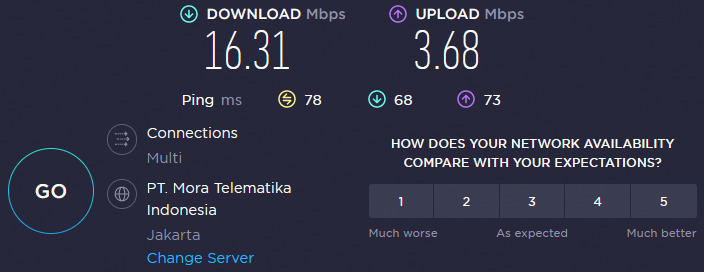
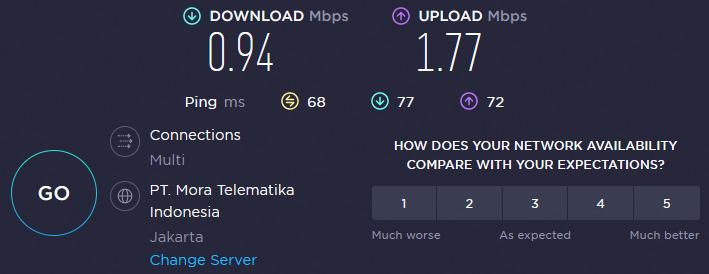
This happens to the internet bandwidth, not the specific application. Take a look at the screenshots of my speedtest results.
What if I test the speedtest with a file size of 2MB, does it not look like normal web browsing?
If using speedtest looks weird, using ping which results are even weirder. In my case, the difference in ping results is very slight when the bandwidth drops. The latency is even better when the bandwidth drops. So the use of ping is very very unreliable.
Is there really no automatic solution to switch internet access routes when the bandwidth on the main route is dropped?
Doing it “automatically” occasionally does nothing but create interruptions when maybe the bandwidth is needed, also in your own connection,
and if I were the provider, who sees that from what you wrote, the lines are a pittance, I’d be the first to block the speedtests so as not to break the f–k to the others who pay.
If the solution is just turn off the modem. It’s easy like you said but we will keep doing boring things again and again in our life.
Do you have access the ISP routers that are your next-hops? If not, then answer is NO.
You can focus on what gets prioritize, so those go out first. Traffic can go into the “right” queues “automatically” on your end, for your needs. But the measurement for that is does the application/website/etc work at an acceptable level. Not a HTTP speedtest.
Yes, from this discussion I have summarized 3 possible ways that can be done to change routes when bandwidth drops.
Check manually while waiting for complaints from the user, then move.
Using observation of the WAN interface and ping time although not always accurate (see the example of my speedtest results, I guarantee that if the parameters are ping time/latency, anything related to ping then failover will never succeed).
Using speedtest parameters which are still experimental.
You decided to misinterpret what I wrote … and the problem with screenshots you posted is that speedtest does latency test before performing (uni-directional) speed tests. If upstream link is not congested during latency test, then latency times for sure won’t show link degradation. So yes, I agree, simple ping times can’t detect link bandwidth degradation if it’s (current) capacity is not used entirely. But it seems you like to bother about bottlenecks which don’t really degrade performance.
I’ll repeat: observe ping times and if they get higher than usual, observe actual throughput via WAN interface. If throughput via WAN interface is lower than expected/subscribed (and that’s during higher ping times!), then WAN link bandwidth got reduced.
Let’s say there is a higher ping time, but the utilization of the WAN link is low, how do you conclude that the WAN link got reduced or not?
Be aware that screenshots of the speedtest results also occur during peak hours. If you use the ping time and bandwidth utilization parameters, then it is certain that the router will fail to execute the internet access route change command.
See that during peak hours it turns out that my ping results are only slightly different from normal conditions, even the latency is better when the bandwidth drops.
All methods have advantages and disadvantages, from manual methods, using ping time and WAN link parameters, including speedtest.
Because this topic is a http speed test topic so suggest a speedtest application, and that’s okay. If the topic author requires an http speed test, why not?
Why not? because http speed tests are for end users, for humans. They want to have a site where they can confirm that their nice new 1Gbps internet connection indeed transfers data that fast.
They are not for use in scripts. When you want to measure the speed of your line in some script, you don’t use a http speed test. You use the bandwidth test tool, you use iperf3, whatever. Not a http speed test.
Is it true? In numerous tests in my case it turned out that monitoring ping time and WAN links showed very low accuracy, while using speedtest on my network to automate internet access route switching based on bandwidth showed much more accurate results.
Maybe some people prefer to do the boring manual way all their lives, waiting for the customer to get angry and then act. But for me and some other people doing a speedtest automatically isn’t a problem.
Regardless of other people’s opinions like it or not, in my case using speedtest is much more powerful than just ping.
If you think it’s better to use the manual method then do it, if you feel the use of ping time parameters and WAN link monitoring is more suitable for use in your network then use it. Because both solutions are troublesome and inaccurate for me, I offer another solution that has been tested to have high accuracy on my network.
If someone feels that speedtesting via router will result in blocking the service, that’s their problem, not mine. They couldn’t generalize that all networks would behave the same as theirs. I’ve been using speedtest all day long for the last 8 months and until now my internet provider has never had a complaint or service cut off.
See that in fact the ping time and WAN link monitoring solution doesn’t work on my network. If someone asks me to return to the manual method or monitoring ping time and WAN links. Of course I’m not going to do such a ridiculous thing . If you’ve found the right solution why go back to something that is sure to cause problems, right?
This is a forum, your opinion is accepted or not, it’s normal, no need to get angry.
Do you have several clients to whom you supply the connection which you in turn take from two other connections, one 10M and one 5M and that’s it?
Are you an ISP? If not, don’t speak as a supposed "customer connoisseur"™
Some of the speeches you make are nonsense that only beginners can write or do.
There’s nothing worse than starting automatic tests (perhaps with an aggregated timetable) which will certainly piss off the customers,
because they just happen to be using the line at that very moment.
It makes no sense to say that you start the test when there is a slowdown, because otherwise it means that you already know when it slows down.
To make reliable pings you don’t have to look at the ping result on the speedtest servers.
They are NOT Certificate Authorities and often do badly because of all the idiots who stay all day just speedtesting.
They don’t have infinite bandwidth with machines with infinite power…
And often those who are doing speedtests all the time are the ones who piss off other people, subtracting their bandwidth,
Because, whether you like it or not, unless you have a guaranteed minimum bandwidth contract, all connections are on shared bandwidth,
that’s why we talk about fair use…
In Italy they say “There is none worse deaf than those who don’t want to hear”… at least be clear when you write.

 . If you’ve found the right solution why go back to something that is sure to cause problems, right?