A-MDPU is even more important right? (These are new things for me, I hope I’m not asking dumb questions.)
This was another good suggestion. Turned on adaptive noise immunity mode on both devices. The HAP AC can now always do at least 75Mbps. (with bw reduced to 20MHz and no encryption). The HAP Lite is still at 30Mbps max.
I’m trying to answer all questions, I hope we can find out what is causing the difference.
For HAP Lite, I see this: tx rate 144.4Mbps-20Mhz/2S/SGI rx rate=12Mbps Tx signal=0 Rx signal=-39 but if I look at the registration table while the test is running, then it goes down to 104Mbps, sometimes even 78Mbps-20MHz/2S
For HAP AC2, I also see tx rate 144.4Mbps-20Mhz/2S/SGI but the rx rate is different: tx 144.4Mbps-20Mhz/2S/SGI and the signal is -31. If I look at it while the test is running, then the tx rate usually stays at 144.4Mbps-20Mhz/2S/SGI , but down to 117Mbps-20MHz/2S for some seconds.
Many things at once …
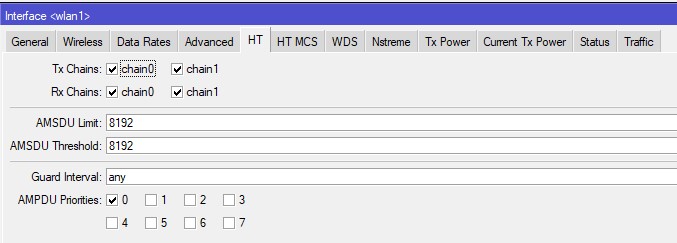
- A-MSDU is reduced for lower packet delay. Increasing it will help rise the max throughput. Normal (non CAPsMAN) value is 8192.The standard defined 7935 byte size is used then.
But this will not help much here. You are so far away from the normal expected throughput, that the fine tuning (minimum rate, basic rate, MSDU size etc) should be delayed until it’s time to fine tune.
These AMSDU values are found in the HT tab.
All is priority 0 (unless you add some mangle rules in the Firewall to set the priorities. So A-MPDU should be used in your setup.
.
Changing “adaptive noise immunity” which reduces the sensitivity of the receiver and getting better results points in the direction of interference or signal distortion.
The first simple basic check always is that TX Rate and RX Rate in wireless registration. If that does not give the expected max interface rate MCS7 (72Mbps, 144 Mbps, 300 Mbps, 150 Mbps … see http://mcsindex.com/ you are in the orange HT table only with 2.4GHz 802.11n), then the wifi signal is not perfect. (Too strong? Reflections? Interference?) It also learns what you actually get as PHY (MCSindex,1Stream or 2Streams, short guard interval.) This must be checked first ( If the MCS7 is not reached the TX/RX CCQ gives what part of the transmissions were successful). You can expect 50% of the PHY as data rate in one direction. (25% if bidirectional). This 50% can become 70% with the fine tuning, but it depends … (if there are very few AP’s then basic rate doesn’t matter, if you stay at the higher MCS rates then removing the lower rates doesn’t matter, if A-MPDU is used then A-MSDU is not very important, etc etc…)
OK I see you added that rate information. 144.4Mbps-20Mhz/2S/SGI is the perfect value. But it’s dropping under load. Keep other electronic devices, metal surfaces and the client away from the AP. Reading those rates can be tricky. When there is no traffic they tend to go low. But under load they should stay at the top level. Occasionally dropping to 130 is OK. 104 is yet one step lower and losing the short guard . 78 is a major step down to 16-QAM modulation, what indicates a strongly distorted signal. Something you should fix first. (Close to the AP the wifi signal is quite irregular in the different directions. Make sure the other AP is switched off.)
Thank you for your exhausting response! It will take a while for me to catch up and understand everything that you wrote. I’m going to come back later when I (hopefully) understand everything you write and tried all possible fixes.
OK Fine. Please also consider reducing the TX power of the AP. (It might be disturbed by its own reflected signal). I did not see what country (regulatory domain) you are in. For FCC (US,Canada, no-country-set) the max power is 30 dBm, for ETSI and most other places it is 20 dBm. You can see the used TX power in the Status tab (hAP Lite will be higher than hAP ac2 due to the reduction for the antenna gain). Smartphone is more 10 dBm. So for a smartphone public setting the TX power to 12 dBm or 15 dBm makes sense.
Here I’m again. I replaced my phone with my laptop. It can provide more information about the wifi network. It turned out that almost everybody is using channels 1,6 and 11 in the neighborhood. So I changed frequency and tried the speed with channel 1 (2412 Mhz) and 6 (2437 Mhz). I have also reduced the transmit power to 10, 13 and 15 dBm, and made some more tests.
Then I switched to channel 8, that is overlapping with many other APs and did some more tests.
As you can see, 2.4GHz is really crowded here. The tx speed in the registration table was about 60Mbps for both channel 1 and 6, and I had terrible TX CCQ values. I could only achieve about 6Mbps on channels 1 and 6 with the HAP Lite and the laptop. I could do about 20Mbps on channel 8 with HAP Lite and my phone.
Channel 8 was a bit better. I quess the explanation is that it is overlapping with many other APs. Once they notice that something else is using the channel, they all shut up. They cannot decode the headers and don’t know how much they have to wait before the cannel becomes free again. This gives me advantage. I might be wrong again, but I think this will give me more speed and take that away from others.
Registration table showed -30/-40 dBm for the phone and -40/-50 dBm for the laptop.
There are too many APs and there is too much interference. Previously I thought that because I’m indoors and the AP and the phone were very close to each other, and most of the other APs are under -70dBm, the conditions are close to ideal. But -70dBm is usable and it causes a lot of interference.
But the original question was about the difference between HAP AC2 and HAP Lite. I also tried the same things with HAP AC2. Same channels, same TX power, same placement of the AP, same distance from the phone/laptop etc. Powered off the HAP AC2 when I was testing the HAP Lite and vice versa.
On channel 8, the HAP AC2 can do 80-90Mbps reliably with my phone and 20-30Mbps with my laptop. (Registration table showed that my laptop always has lower signal level values. The same laptop could do 400Mbps+ on 5Ghz with Asus AX86AU so I think that the manufacturer did not think that 2.4Ghz was important and they put in a crappy antenna.)
I don’t have the time to buy a cAP Lite, hAP mini or mAP lite just to test the speeds with those, but I believe I would get very similar (crappy) results. Until (if I ever) find out what is causing this huge difference, I’ll stick to HAP AC2 and cAP AC.
Actually, I’m very happy with 80-90Mbps in this environment. But I still don’t understand why the HAP Lite can only do about 1/3rd speed. Given the specifications, the CPU load and all other things that I have tested, there is no good explanation.
Thank you very much for sharing your experiments. Unfortunately it did not solve your problem.
But you are in a rather crowded 2.4GHz area. And that changes the tuning of every AP considerably. All you can find to optimize your AP throughput could be contra-productive in this situation. Actually just the opposite should be done. [ It’s like tuning your car for a rally contest versus an off-road contest] On the other hand “2.4GHz is dead” (document from Divergent Dynamics disappeared from their website, and 1.9MB is too big for an attachment here.)
Still surprised about the poorer performance of the hAP Lite. The smaller antenna gain should have helped to avoid picking up neighbors.
Why tuning is a repeated PDCA cycle … “plan, do, check, adjust” … there is no magic setting that fixes it all. And there is no auto-tuning in MKT.
- setting the “Adaptive noise immunity” is good for reducing the receiver sensitivity. More traffic from AP and client will be seen as just noise. .
- The hAP Lite even has a “Noise floor threshold” parameter. It’s not in the hAP ac2.
- Adjacent channel interference normally is worse than the co-channel wait. The nummer of SSID on a channel is not a good indication for how busy the channel is. In Mikrotik you have the “Freq usage” as indication. This value will in reality change is a split second and blur the experiment outcome. Not many go for channel 13 if you chose the adjacent-channel strategy.
-Fighting adjacent channel interference is the opposite of aiming for max clean site throughput. A-MPDU is preferred over A-MSDU aggregation here. Small AMSDU adds an extra checksum block per AMSDU, and only the affected parts have to be retransmitted. So smaller AMSDU here is better, like 1500bytes the max of a standard ethernet frame, but even smaller.
-“HW-retries” is standard on 7. Setting it on 15 will hold the interface longer on the fast MCS modulation (good for short bursts of interference), setting it to 2 or 3 will make the AP move down in MCS modulation faster, avoiding the useless retransmits needed to trigger the step-down. (good for continuous interference). - If the MCS rate is almost never on the highest value then disabling MCS7 and MCS15 will stop the AP for trying and failing those.
- “HW protection mode” could help as well. (CTS self or RTS-CTS). As not everyone will see all players in the spectrum. “HW-protection threshold” will avoid this overhead for smaller packets.
- If adjacent channel interference is really bad, then even “HW Fragmentation threshold” should be considered to work with smaller packets.
-Not sure if the increased basic rate and supported rates for management traffic is not contra-productive with high interference.
The trial and error is up to you. But one day you will have to move up to 5GHz.
Thank you for your time! I’ll experiment some more.
High level of interference actually explains the difference in achievable speeds on both units which initiated this thread: hAP lite has much lower Tx power (16-18 dBm at highest rates) compared to hAP ac2 (23-24 dBm at same high rates). 6dB makes quite some difference in SINR which at the end of the day governs max throughput over a radio channel.
Rx sensitivity is not so much different but hAP ac2 has advantage here as well, so uploads are likely higher as well.
Well, you forgot that I manually set the TX power in CAPsMAN config. I believe that they used the same TX power when I was doing the tests. (Unless the TX power setting is relative and not absolute?)
The power is absolute in dBm. However the antenna gain must be added for the emitted power (EIRP). So the signal of the hAP ac2 is 1.5dBm stonger than from the hAP Lite if you set the TX power=12.
I think we are missing something in this investigation. If the hAP Lite is bogged with interference so should the hAP ac2 at least get disturbed. It does seem to not be the case.
There probably are a lot of emitted SSID around, but not much traffic (Freq Usage). So even the tuning for “heavy interference” will not solve the difference between the 2 devices.
Starting to think “something” is fundamentally wrong with the hAP Lite. Like not working properly with 6.48 (see the forum topic, 6.48 is very far from stable!). But also suspecting the power supply.
Just did a quick and dirty test. (I did not want to remove my hAP Lite from its duty), nor moving closer to the unit.
I took a hAP ac Lite (2.4+5GHz device) and placed it closer to the hAP Lite. Connected to it via 5 GHz from my laptop, and made it “bridge station” connect to the hAP Lite with the 2.4GHz.
For monitoring I was also connected 2.4GHz to the hAP Lite.
The devices connected 144Mbps-20MHz/2S/SGI.
Then a bandwidth test between the 2 devices. (I know, it’s wrong the 2 devices will die on CPU load, as I should use Btest on other devices), but still, what I get is the lowest possible value.
UDP unidirectional started from the hAP ac Lite to the hAP Lite was 85 Mbps
TCP unidirectional was only 50 Mbps, and the hAP Lite crashed on the heavy load.
As I wrote: hAP lite is capable of Tx power 16 dBm or 18 dBm when transmitting at high symbol rates. Your setting of 20 dBm does not override that. hAP ac2 did get slightly limited by your setting, but there’s still difference of 2 to 4 dB.
Additionally: my gut feeling is that Rx signal strength of -30 to -40 dBm is simply too high for usual WiFi receivers, something around -50 dBm is more comfortable (but then some receivers are probably better behaving than others). When Rx signal is too high, the amplifier can not reduce its gain low enough and due to over-amplification it distorts received signal which severely reduces SINR.
Add that to high real interference and it’s not surprising that wireless link performs poorly.
I manually set TX power to 10, 13 and 15dBm. I think it did override the hAP ac2.
It was -30/-40 dBm because the receiver (phone) was about 1 meter away from the AP. Even if you are right and the Rx signal is too high on the phone, it was (almost) the same for both APs. So even if it is disorted, it still does not explain the huge difference in speed.
But that is also invariant, the two devices were compared under the same conditions.
I hope I’ll some time time today to do more tests with RouterOs long term support version.
The HAP Lite devices are brand new. I bought them to test and experiment with CAPsMAN before I do a bigger installation. I don’t think that both of them have faulty (and brand new) power supplies.
-30dBm is way different from -40dBm if the Rx sensitivity is too high. And for duplex link also Rx sensitivity in AP matters … unless you’re benchmarking using unidirectional UDP stream.
Anyway, morale of the story is that wireless devices, even if they seem to be similar from basic technical specifications, behave differently in harsh conditions. And harsh conditions are anything other than peer’s signal strength outside interval of (-50dBm to -75dBm) and interference (either co-channel or adjacent channel) higher than -90dBm or higher than -30dB (relative to peer’s signal strength).
Either do the tests in conditions which actually resemble real conditions (are normal wireless clients going to be not more than 1 metere away from wireless antennae?) or, if real installation will be experiencing harsh conditions, you’ll have to find devices which perform best under those conditions. I guess you’ll be surprised sometimes about how good/bad some device performs.