Oh my go(o)d… 
I'd forgot about HexString, URL encoding, Base64, likely others. And added an expected response...
*if you use SSH it creates a "clickable" URL to search in the output of my "Encoding $CHOICES" example:

Dear, Amm0 !
Could you correct the $CHOISES function so that it would be possible to use the “enter” key to select a menu item WITHOUT COMPLETING THE WORK? That is, the function would transfer the selected item to some global variable, while remaining in the selection loop to select another item (the ability to reselect the selected item is also preserved). And for some other functional key (not “input”), the menu could complete the work without selecting anything.
Well… $CHOICES was made to be simple. Couldn’t you just use a :while loop and have a “fake” selection for “DONE” that you check in the loop? That be keep things simple.
And while more complex, $INQUIRE function has “function callbacks” that could be used to do this. The “validate=” in $INQUIRE can keep you in the same menu items.
Overall, I’ve tried to borrow from how “Inquirer.js” ( https://github.com/SBoudrias/Inquirer.js ) handles things. $CHOICE is same as “Select” in Inquirer.js. In that scheme, there are other “types” of these “TUI control”. So @Sertik is more asking for some $CHECKBOX function. That possible but it should be separate from $CHOICE.
No, I’m not asking for a new feature. Instead of :return ($lchoices->$isel->“val”) you need to do:
:global ValChoices ($lchoices->$isel->“val”)
and continue executing the $CHOICES function. My script will check $ValChoises and if a value appears in it, it will take it from there.
I don’t want to tinker with your function. It is better and easier for the author to make changes to it. 
$CHOICES was designed to be simple, and, eventually a “plugin” to $INQUIRE as a “type” in menu. Some future $SELECT is the missing function that stay in same menu to make multiple selections in this scheme, showing checkbox things or the like…like InquireJS/similar do.
But it should be a one-line change to use a global - @Sertik I have faith in your abilities. But… As a general programming best practice, functions should not be operating on variables outside their scope - that’s why there functions. And, using arbitrary globals in a function requires [:parse] tricks, which I don’t like since errors are deferred to runtime as :parse is not syntax checked. Anyway setting a :global is not going to be the example. But totally cool if you want to modify it for your uses.
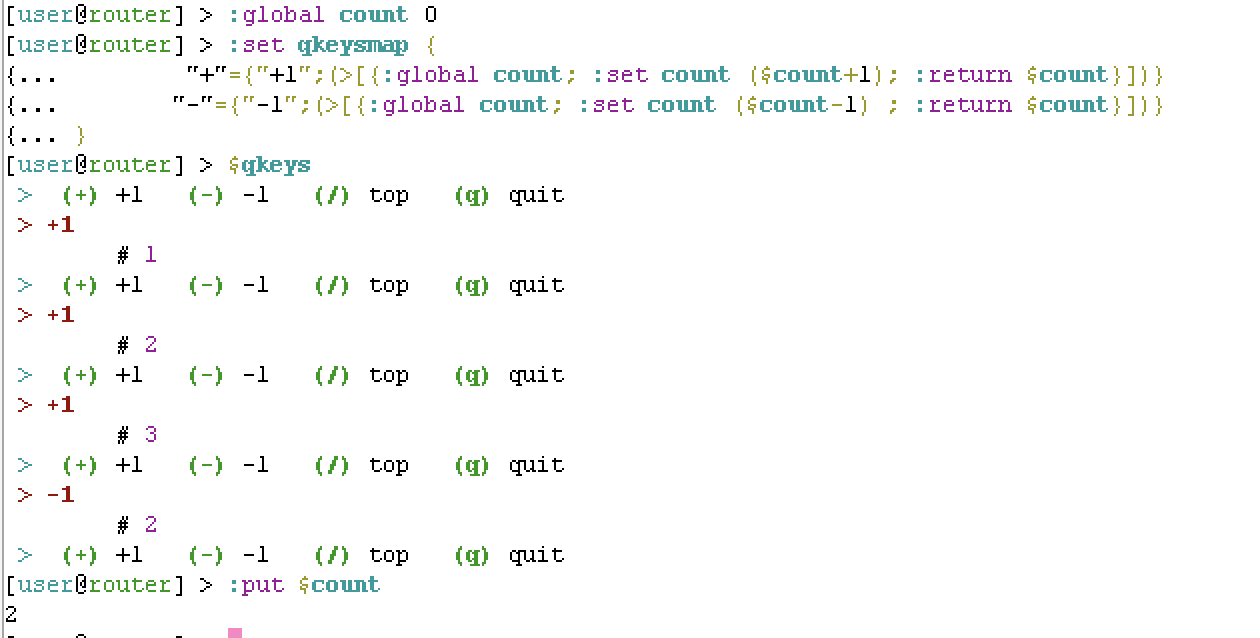
I did create another function, $qkeys in a different thread. This is simplified version of $INQUIRE, that just takes keypresses to either run a command, or present a menu if array contained another array.
See http://forum.mikrotik.com/t/a-few-undocumented-operators-that-are-kind-of-neat/163557/1
So for @Sertik’s case, the $qkeymap could set a global, on a keypress (not choice) but that might work. For example, changing $qkeymap to:
:global count 0
:set qkeysmap {
       "+"={"+1";(>[{:global count; :set count ($count+1); :return $count}])}
       "-"={"-1";(>[{:global count; :set count ($count-1); :return $count}])}
}
LOL, so Mikrotik @druvis did a good video to explain “Scripting Arrays”: https://www.youtube.com/watch?v=eWCJw0uZ-lE
Essentially, the $INQUIRE script at top is just a “for” loop shown in the video, just with more stuff going on inside the loop. i.e. looping over the array of questions, instead of array from /interfaces as shown in the video. Inside the $INQUIRE loop gets more complex… largely because of the “11 data types”, which I noticed there is another nice video on:
https://www.youtube.com/watch?v=9SeYC_s95rw
… but to ask a user for something practical like VLAN ID, you want to validate the “num” type is between 1 to 4094… so the “array loop” need to deal with all those data-types
Well idea here was ANYONE could USE these functions to create their OWN QuickSet. Since that take just knowing the {} array syntax, and not the complex array/data-type processing which is hidden in the $CHOICE/etc functions here.
Anyway, those video might help explain the array syntax used in the $INQUIRE and $CHOICE, so thought I’d point out Mikrotik’s contributions here  .
.
Now $CHOICE and $QKEYS, use the “mixed array” formats that @druvis said “hurt his head”. But CREATING an array is a little easier…than USING them in a script.
To keep things together and consistent, I updated the "qkeys" function in another thread, to a more sophisticated version $QKEYS function below that takes an array as a parameter (instead of using a global). With some more options, and "help" menu too. Additionally the "new QKEYS" uses the fancy <%% operator to, optionally, provide arguments to functions defined in the array with the menu choices.
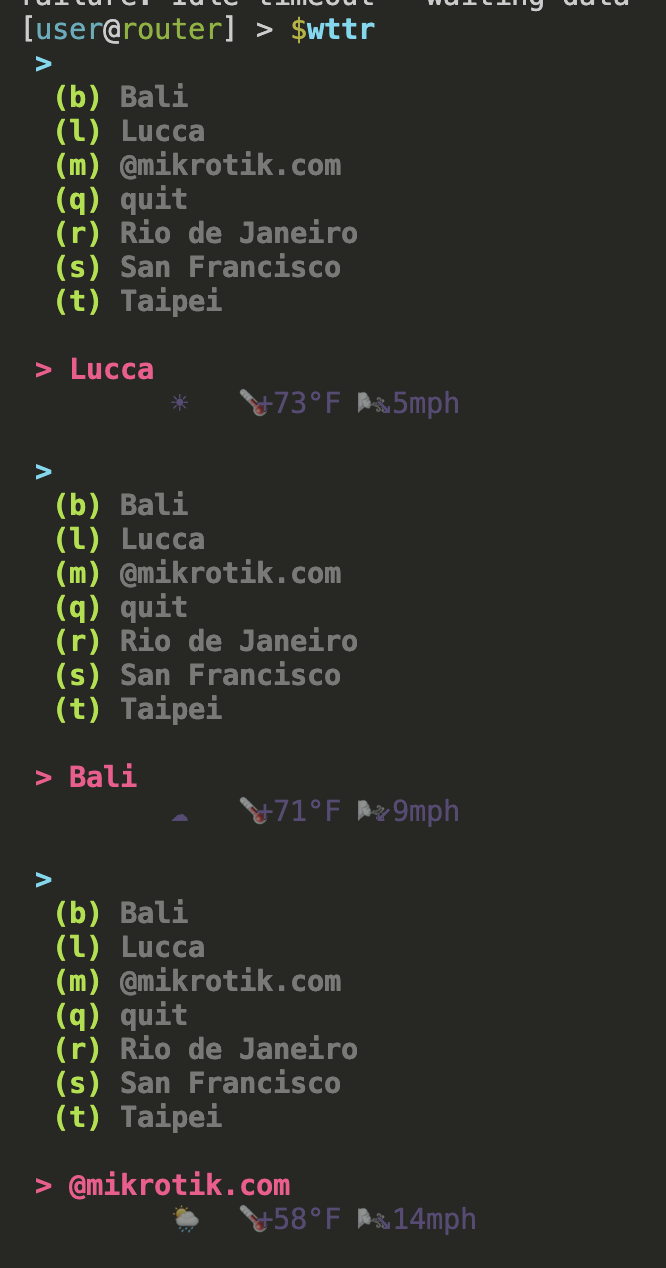
Part of the idea here is that someone can create new commands using QKEYS to build a console UI for anything. So here is an example using the wttr.in REST service to show weather for a few locations. The code builds the array to display from a more simple array, and also shows providing arguments to the function defined for the "macro". So you can have "multiple menus" by just calling $QKEYS from within your own function.
requires $QKEYS be loaded before calling
:global wttr do={
:global QKEYS
# https:///wttr.in support several formats, one-liner is 2
:local format 2
# list of city to show in menu
:local cities {
m="@mikrotik.com"
s="San Francisco"
r="Rio de Janeiro"
b="Bali"
l="Lucca"
t="Taipei"
}
# dynamically build the array needed for $QKEYS
:local keymap [:toarray ""]
:foreach key,city in=$cities do={
:set ($keymap->$key) [:toarray ""]
:set ($keymap->$key->0) $city
:set ($keymap->$key->1) (>([/tool/fetch url="https://wttr.in/$urlcity?format=$fmt" output=user as-value]->"data"))
# provide a 3rd arg to $QKEYS, so enable substitution in url
:set ($keymap->$key->2) {
urlcity=[:convert $city to=url]
fmt=$format
}
}
# :if ($1="dump") do={:put [:serialize to=json $keymap options=json.pretty]}
$QKEYS inline=no $keymap
}
now run the '$wttr' menu
$wttr
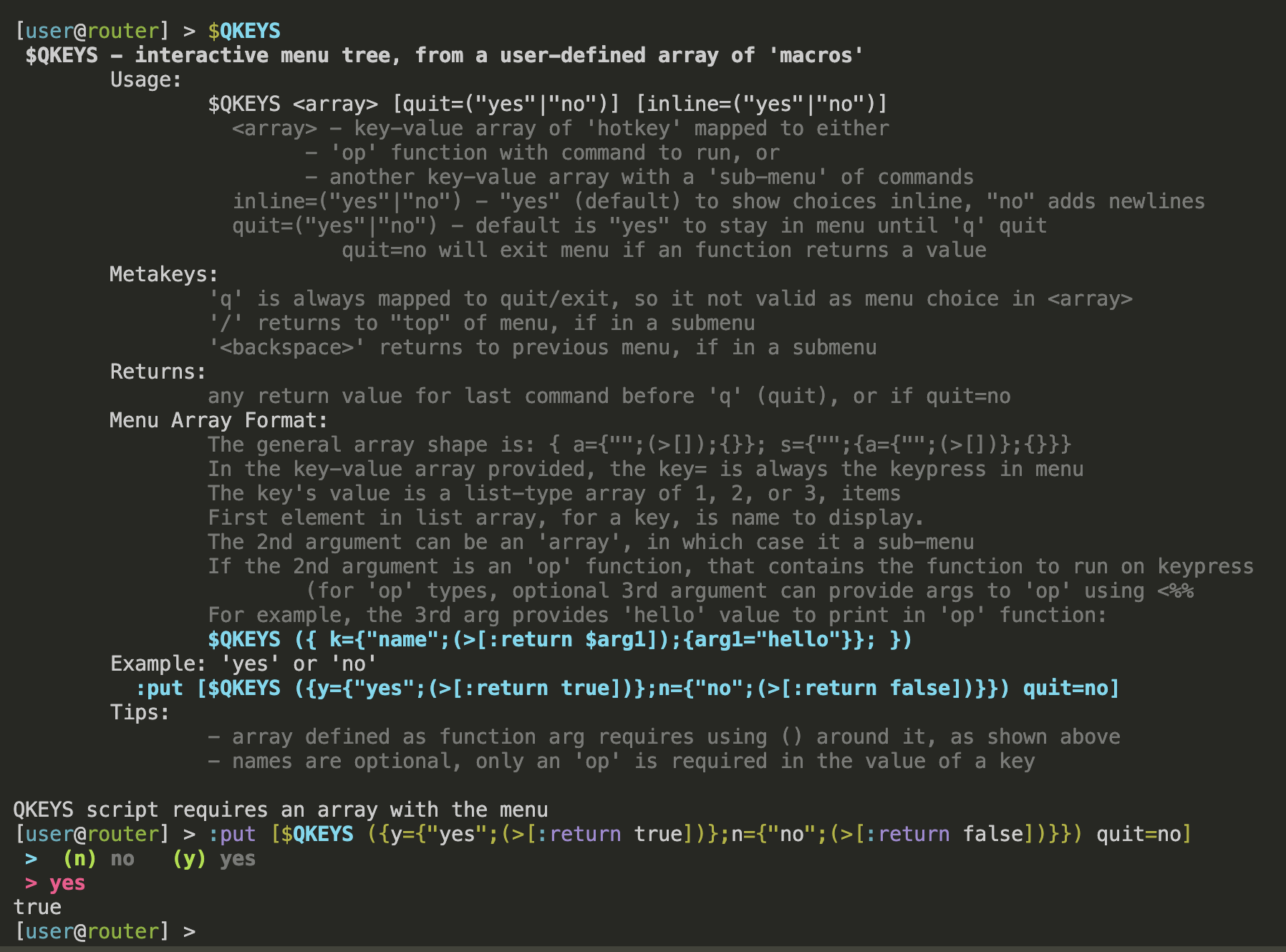
Here is the code needed to run $wttr or build-your-console-ui:
:global QKEYS
:set QKEYS do={
:global QKEYS
:local topmap
:if ([:typeof $1]!="array") do={
    :put " \1B[1m$0 - interactive menu tree, from a user-defined array of 'macros'\1B[0m"
    :put "\tUsage:"
    :put "\t\t$0 <array> [quit=(\"yes\"|\"no\")] [inline=(\"yes\"|\"no\")]\1B[2m"
    :put "\t\t  <array> - key-value array of 'hotkey' mapped to either"
    :put "\t\t\t- 'op' function with command to run, or "
    :put "\t\t\t- another key-value array with a 'sub-menu' of commands"
    :put "\t\t  inline=(\"yes\"|\"no\") - \"yes\" (default) to show choices inline, \"no\" adds newlines"
    :put "\t\t  quit=(\"yes\"|\"no\") - default is \"yes\" to stay in menu until 'q' quit"
    :put "\t\t           quit=no will exit menu if an function returns a value"
    :put "\t\1B[0mMetakeys:\1B[2m"
    :put "\t\t'q' is always mapped to quit/exit, so it not valid as menu choice in <array>"
    :put "\t\t'/' returns to \"top\" of menu, if in a submenu"
    :put "\t\t'<backspace>' returns to previous menu, if in a submenu"
    :put "\t\1B[0mReturns:\1B[2m"
    :put "\t\tany return value for last command before 'q' (quit), or if quit=no"
    :put "\t\1B[0mMenu Array Format:\1B[2m"
    :put "\t\tThe general array shape is: { a={\"\";(>[]);{}}; s={\"\";{a={\"\";(>[])};{}}}"
    :put "\t\tIn the key-value array provided, the key= is always the keypress in menu"
    :put "\t\tThe key's value is a list-type array of 1, 2, or 3, items"
    :put "\t\tFirst element in list array, for a key, is name to display."
    :put "\t\tThe 2nd argument can be an 'array', in which case it a sub-menu"
    :put "\t\tIf the 2nd argument is an 'op' function, that contains the function to run on keypress"
    :put "\t\t\t(for 'op' types, optional 3rd argument can provide args to 'op' using <%%"
    :put "\t\tFor example, the 3rd arg provides 'hello' value to print in 'op' function:"
    :put "\t\t\1B[0m\1B[1;36m\$QKEYS ({ k={\"name\";(>[:return \$arg1]);{arg1=\"hello\"}} })\1B[0m"
    :put "\t\1B[0mExample: 'yes' or 'no'\1B[1;36m"
    :put "\t  :put [$0 ({y={\"yes\";(>[:return true])};n={\"no\";(>[:return false])}}) quit=no]"
    :put "\t\1B[0mTips:\1B[2m"
    :put "\t\t- array defined as function arg requires using () around it, as shown above"
    :put "\t\t- names are optional, only an 'op' is required in the value of a key"
    :put "\1B[0m"
    :error "QKEYS script requires an array with the menu"
}

# use 1st argument as array with choices, the "top menu"
:set topmap $1

# store position within menu created by input array
:local currmap $topmap
:local currpath ""
:local mapstack [:toarray ""]

:local loop true
:local rv

# if quit=no, then "return on return"
:local exitOnReturn false
:if ($quit~"^(n|N)") do={:set exitOnReturn true}

# if inline=no, print menu choice on seperate lines
:local useNewlines false
:if ($inline~"^(n|N)") do={:set useNewlines true}

# print current menu choices
:local printHeader do={
    :local sep ""
    :if ($useNewlines) do={ :set sep "\r\n" }
    :local cmds "\1B[1;36m$currpath >\1B[0m$sep"
    :local builtin [:toarray ""]
    :if ($exitOnReturn = false) do={ :set builtin ($builtin,{q={"quit"}}) }
    :if ($currmap!=$topmap) do={ :set builtin ($builtin,{"/"={"top"}}) }
    :foreach k,v in=($currmap,$builtin) do={
        :set cmds "$cmds  \1B[1;32m($[:tostr $k]) \1B[2;39m$[:tostr ($v->0)] \1B[0m$sep"
    }
    :put $cmds
}

# main loop to go navigate array of keys
:while (loop) do={
    # normalize name so all keymaps have some name
    :foreach k,v in=$currmap do={
        :if ([:typeof $v]="op") do={
            :set ($currmap->$k) {"($[:pick [:tostr $v] 10 30])";$v}
        }
    }

    $printHeader currmap=$currmap currpath=$currpath topmap=$topmap exitOnReturn=$exitOnReturn useNewlines=$useNewlines

    # get key
    :local kcode [/terminal/inkey]
    :local key ([:convert to=raw from=byte-array {$kcode}])

    # find in map
    :local currval ($currmap->$key)
    :if ([:typeof $currval]!="nil") do={
        :local currname ($currval->0)
        :local currdata ($currval->1)
        :local currtype [:typeof $currdata]
        :local currargs [:toarray ""]
        :if ([:typeof ($currval->2)]="array") do={:set currargs ($currval->2)}

        # found array (another tree)
        :if ($currtype="array") do={
            # store previous menu in stack
            :set mapstack ($mapstack,{{$currpath;$currmap}})
            # set new menu tree, since array-in-array
            :set currpath "$currpath \1B[1;36m> $currname\1B[0m"
            :set currmap $currdata
        }
        # found op (function) to run
        :if ($currtype="op") do={
            :put "$currpath \1B[1;31m> $currname\1B[0m"
            # since element has a function, call it - potentially using args
            :set rv ($currdata <%% $currargs)
            # if quit=no, then exit on return
            :if ([:typeof $rv]!="nil" && $exitOnReturn) do={ :return $rv}
            :put "\t \1B[2;35m$[:pick [:tostr $rv] 0 64]\1B[0m"
        }
    } else={
        # not in map
    }
    # if no "q" in map, then assign to quit
    :if ($key~"(q|Q)") do={ :set loop false }
    # / go to top
    :if ($kcode=47) do={ :set currmap $topmap; :set currpath ""; :set mapstack [:toarray ""]}
    # handle BS (backspace), uses mapstack to pop of submenu
    :if ($kcode=8) do={
        :if ([:len $mapstack]>0) do={
            :set currmap ($mapstack->([:len $mapstack]-1)->1)
            :set currpath ($mapstack->([:len $mapstack]-1)->0)
            :set mapstack [:pick $mapstack 0 ([:len $mapstack]-1)]
        }
    }
}
:return $rv
}
The new $QKEYS here no longer relays on a global for menu - but the functions can use globals. And, any globals STILL have to be declared in "op" type too).
:global count 0
$QKEYS ({
       "+"={"+1";(>[{:global count; :set count ($count+1); :return $count}])}
       "-"={"-1";(>[{:global count; :set count ($count-1); :return $count}])}
})
And the more elaborate menu from the original version of $qkeys still works, with new $QKEYS, except $qkeysmap have to be provided as an argument to $QKEYS now:
$QKEYS inline=no $qkeymap
$QKEYS $qkeysmap inline=no
(4) ip
(6) ipv6
(C) clear
(`) edit macros
(b) bridge
(c) container
(e) export
(i) interfaces
(l) lte mon
(q) quit
(r) board
(v) vlansip >
(/) top
(a) address
(f) firewall
(q) quit
(r) routeip > firewall >
(/) top
(c) connections
(f) filter
(m) mangle
(n) nat
(q) quitip > firewall > mangle
Flags: X - disabled, I - invalid; D - dynamic
0 chain=input action=accept log=no log-prefix=""