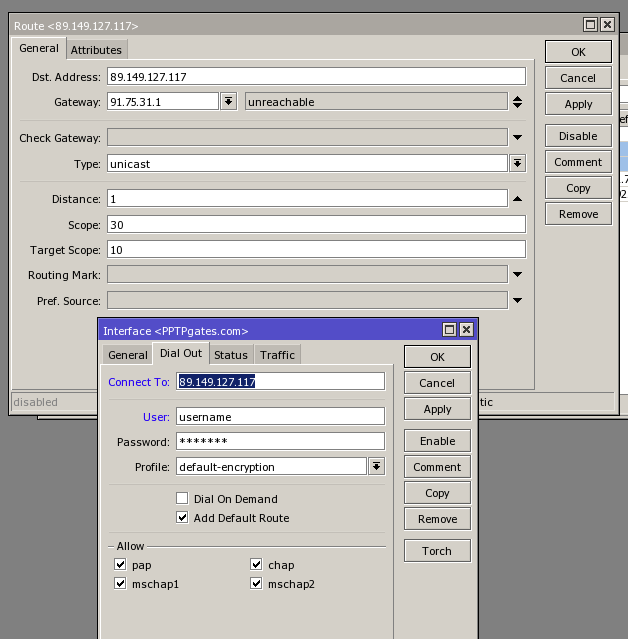
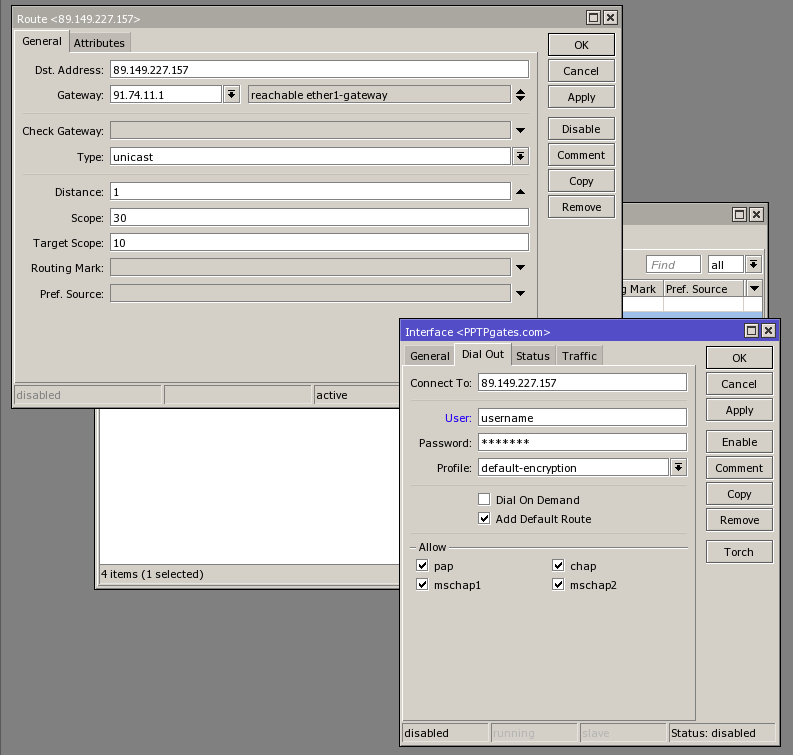
Hi Fewi,
Thanks for your reply, here is the information you wanted:
Also by taking a blunt approach like that wouldn’t the connection go down every minute whilst the rules update?
Bridge has all ethernet ports 2-5 attached to it.
Ethernet 1 is the WAN port
Before VPN connection:
/ip dhcp-client
add add-default-route=yes comment="default configuration" \
    default-route-distance=5 disabled=no interface=ether1-gateway use-peer-dns=\
    yes use-peer-ntp=yes
/interface print detail
Flags: D - dynamic, X - disabled, R - running, S - slave
 0  R  name="ether1-gateway" type="ether" mtu=1500 l2mtu=1524

 1  R  name="ether2-local-master" type="ether" mtu=1500 l2mtu=1524

 2     name="ether3-local-slave" type="ether" mtu=1500 l2mtu=1524

 3  R  name="ether4-local-slave" type="ether" mtu=1500 l2mtu=1524

 4     name="ether5-local-slave" type="ether" mtu=1500 l2mtu=1524

 5  X  name="PPTPgates.com" type="pptp-out"

 6  X  name="sstp-vpn" type="sstp-out"

 7  X  name="vpn-l2tp -L2TP" type="l2tp-out"

 8  R  name="bridge1" type="bridge" mtu=1500 l2mtu=1524
/ip address print detail
Flags: X - disabled, I - invalid, D - dynamic
 0   ;;; default configuration
     address=192.168.88.1/24 network=192.168.88.0 broadcast=192.168.88.255
     interface=bridge1 actual-interface=bridge1

 1 D address=91.74.11.139/24 network=91.74.11.0 broadcast=91.74.11.255
     interface=ether1-gateway actual-interface=ether1-gateway
/ip route print detail
Flags: X - disabled, A - active, D - dynamic,
C - connect, S - static, r - rip, b - bgp, o - ospf, m - mme,
B - blackhole, U - unreachable, P - prohibit
 0 ADS  dst-address=0.0.0.0/0 gateway=91.74.11.1
        gateway-status=91.74.11.1 reachable ether1-gateway distance=5 scope=30
        target-scope=10 vrf-interface=ether1-gateway

 1 A S  ;;; route for PPTPgates
        dst-address=89.149.227.157/32 gateway=91.74.11.1
        gateway-status=91.74.11.1 reachable ether1-gateway distance=1 scope=30
        target-scope=10

 2 ADC  dst-address=91.74.11.0/24 pref-src=91.74.11.139 gateway=ether1-gateway
        gateway-status=ether1-gateway reachable distance=0 scope=10

 3 ADC  dst-address=192.168.88.0/24 pref-src=192.168.88.1 gateway=bridge1
        gateway-status=bridge1 reachable distance=0 scope=10
VPN Connected:
/ip dhcp-client
add add-default-route=yes comment="default configuration" \
    default-route-distance=5 disabled=no interface=ether1-gateway \
    use-peer-dns=yes use-peer-ntp=yes
/interface print detail
Flags: D - dynamic, X - disabled, R - running, S - slave
 0  R  name="ether1-gateway" type="ether" mtu=1500 l2mtu=1524

 1  R  name="ether2-local-master" type="ether" mtu=1500 l2mtu=1524

 2     name="ether3-local-slave" type="ether" mtu=1500 l2mtu=1524

 3  R  name="ether4-local-slave" type="ether" mtu=1500 l2mtu=1524

 4     name="ether5-local-slave" type="ether" mtu=1500 l2mtu=1524

 5  R  name="PPTPgates.com" type="pptp-out" mtu=1380

 6  X  name="sstp-vpn" type="sstp-out"

 7  X  name="vpnl2tp -L2TP" type="l2tp-out"

 8  R  name="bridge1" type="bridge" mtu=1500 l2mtu=1524
/ ip address print detail
Flags: X - disabled, I - invalid, D - dynamic
 0   ;;; default configuration
     address=192.168.88.1/24 network=192.168.88.0 broadcast=192.168.88.255
     interface=bridge1 actual-interface=bridge1

 1 D address=91.74.11.139/24 network=91.74.11.0 broadcast=91.74.11.255
     interface=ether1-gateway actual-interface=ether1-gateway

 2 D address=192.168.177.3/32 network=192.168.177.1 broadcast=0.0.0.0
     interface=PPTPgates.com actual-interface=PPTPgates.com
/ ip route print detail
Flags: X - disabled, A - active, D - dynamic,
C - connect, S - static, r - rip, b - bgp, o - ospf, m - mme,
B - blackhole, U - unreachable, P - prohibit
 0 ADS  dst-address=0.0.0.0/0 gateway=192.168.177.1
        gateway-status=192.168.177.1 reachable PPTPgates.com distance=1
        scope=30 target-scope=10

 1  DS  dst-address=0.0.0.0/0 gateway=91.74.11.1
        gateway-status=91.74.11.1 reachable ether1-gateway distance=5
        scope=30 target-scope=10 vrf-interface=ether1-gateway

 2 A S  ;;; route for vpngates PPTP
        dst-address=89.149.227.157/32 gateway=91.74.11.1
        gateway-status=91.74.11.1 reachable ether1-gateway distance=1
        scope=30 target-scope=10

 3 ADC  dst-address=91.74.11.0/24 pref-src=91.74.11.139 gateway=ether1-gateway
        gateway-status=ether1-gateway reachable distance=0 scope=10

 4 ADC  dst-address=192.168.88.0/24 pref-src=192.168.88.1 gateway=bridge1
        gateway-status=bridge1 reachable distance=0 scope=10

 5 ADC  dst-address=192.168.177.1/32 pref-src=192.168.177.3
        gateway=PPTPgates.com gateway-status=PPTPgates.com reachable
        distance=0 scope=10