From the description. I would assume a Layer 2 misconfiguration. Rather than an IS-IS problem. https://help.mikrotik.com/docs/display/ROS/Layer2+misconfiguration#Layer2misconfiguration-BridgedVLANonphysicalinterfaces Concerning why Fast path gets disabled
Why would you assume that? All my vlans are directly on the bridge, single bridge, physical interfaces slaved. Disabling IS-IS immediately brings back the fast path / fasttrack. Actually, deliberately misconfiguring L2 by placing the VLANs on the physical interface that is a bridge port member has IS-IS working with fastpath.
Running OSPF all day with full fast path / fasttrack benefits.
Edited for spelling
17.6 has entered RC, with still no improvement on IS-IS
so I don’t think it will go on the final release .. sigh
Yea, one indicator that ISIS is closer to being ready is when it gets added to Winbox and not hidden in the CLI.
Hi community.
I implemented and is-is lab between Huawei CX and MikroTik CCR 1036 with following results:
MIKROTIK CONFIGURATION
/interface bridge
add name=loopback0
/ip address
add address=172.16.8.61 interface=loopback0 network=172.16.8.61
/interface vlan
add interface=sfp-sfpplus1 name=ISICP160BOGLAB vlan-id=5
/ip address
add address=192.168.5.250/30 interface=ISICP160BOGLAB network=192.168.5.248
/routing isis instance
add afi=ip areas=49.0170 disabled=no l2.lsp-update-interval=50 l2.redistribute=connected name=CP136BOGLAB system-id=1720.1600.8061
/routing isis interface-template
add instance=CP136BOGLAB interfaces=ISICP160BOGLAB,loopback0 levels=l2 ptp
HUAWEI CONFIGURATION
isis 1
 cost-style wide
 timer lsp-generation 1 50 50 level-2
 flash-flood level-2
 network-entity 49.0170.1720.1600.8254.00
 is-name CP160BOGLAB
 import-route direct
#
interface GigabitEthernet0/2/1.5
 vlan-type dot1q 5
 description ISICP136BOGLAB
 ip address 192.168.5.249 255.255.255.252
 isis enable 1
 isis circuit-type p2p
 isis cost 2000
 mpls
 mpls ldp
 statistic mode forward
#
On Huawei CLI appears isis peer, but MikroTik not, neither there is route redistribution.
Checking Mikrotik log, a warning appears:
memory , route, isis, warning instance 1720.1600.8061 ISICP160BOGLAB max area address mismatch from 60:08:10:19:89:1D
Regards.
can confirm with 7.17beta2 , IS-IS works with jumbo MTU
and route is now reachable from Juniper
Hi jlopez,
I encountered similar issues in my lab environment regarding interoperability with other vendors. I think that Huawei routers use a max-area of 3 by default in their ISO10589 header. By default, Mikrotik RouterOS seems to use 0. You can fix this by setting the max-area to 3 on the Mikrotik side, like this:
/routing isis instance
add afi=ip areas=49.0170 areas-max=3 disabled=no l2.lsp-update-interval=50 l2.redistribute=connected name=CP136BOGLAB system-id=1720.1600.8061
This should solve the adjacency issue with the Huawei router. But, it can break adjacencies with other vendors, like Cisco on their IOS XR routers, which use 0 as their default max-area, and this is not configurable on the Cisco router (at least on the NCS series on which I tested this).
However, ISO/IEC 10589 international standard states:
Maximum Area Addresses — number of area addresses permitted for this ISs area, as derived from the value of the System Management parameter maximumAreaAddresses. This field shall take on of the following values:
• An integer between 1 and 254 inclusive, indicated a corresponding number of area addresses supported.
• The value zero, which is treated upon reception as if it were equal to three, and which the IS may use if it supports only a value of 3 for maximumAreaAddresses.
Basically, 0==3 when evaluating max-area. It seems that RouterOS does not adhere do this part of the standard, yet.
For this issue I opened a ticket a week ago, SUP-167198. I’m still waiting for feedback from Mikrotik on this. I hope they will solve this, and that more documentation will be available in the help portal regarding IS-IS knobs on RouterOS.
Yes, currently it is made as you say, 0=/=3
noticed IPv6 routes coming from IS-IS have no ‘i’ flag in /ipv6/route/print:
[lexi@a2.i.lfns.org.uk] /routing/isis> /ipv6/route/print
Flags: D - DYNAMIC; A - ACTIVE; c - CONNECT
Columns: DST-ADDRESS, GATEWAY, DISTANCE
    DST-ADDRESS                GATEWAY                            DISTANCE
DA  ::/0                       fe80::400:ff:fe00:a01%ether5-c2.i       115
DAc ::1/128                    lo                                        0
DA  64:ff9b::/96               fe80::400:ff:fe00:a01%ether5-c2.i       115
DA  2001:8b0:aab5::/48         fe80::400:ff:fe00:a01%ether5-c2.i       115
DA  2001:8b0:aab5:1::1/128     fe80::400:ff:fe00:a01%ether5-c2.i       115
DA  2001:8b0:aab5:3::1/128     fe80::400:ff:fe00:a01%ether5-c2.i       115
DAc 2001:8b0:aab5:3::2/128     lo                                        0
DA  2001:8b0:aab5:3::3/128     fe80::400:ff:fe00:a01%ether5-c2.i       115
DA  2001:8b0:aab5:3::4/128     fe80::400:ff:fe00:a01%ether5-c2.i       115
[... etc... ]
reported as SUP-168334, but i mention it here in case either i’m doing something wrong, or someone else runs into the same issue.
Are you sure IPv6 adjacency is up?
Because it seems that the routes are locally-connected routes
yes, i had a discussion with support and this is a bug that will be fixed in a later release (not sure when, it’s still present in 7.17beta2). the ‘i’ flag does appear in /routing/route/print so the routes are definitely coming from IS-IS.
it doesn’t seem to affect functionality though, it’s just a display bug.
so other than this /ipv6/route/print bug, i’ve run into two more serious issues while testing IS-IS here.
the first is that sometimes, a particular route seems not to be installed in the L3HW FIB correctly, which creates a routing loop even though /ipv6/route/print on both peers shows the correct next-hop.
the second is that sometimes, all IS-IS routes will vanish from the FIB for some amount of time (~5-15 minutes), even though the neighbours are up and relevant LSPs are still present in /routing/isis/lsp/print. this seems to be caused by unrelated devices in the network rebooting – not sure exactly what’s going on there.
neither of these problems appear when using EBGP as IGP; L3HW is rock solid there.
i say ‘sometimes’ for both of these issues because i can’t reliably reproduce them (and have not managed to reproduce them at all in lab), and i don’t want to spend a lot of time testing and writing up a bug report if support will just say “please try with latest firmware” (which has been my experience with OSPF bugs), but if someone from MT (mrz?) is interested in investigating these issues i’m happy to do more testing.
hardware is CRS309, CRS305, CRS312, hAP ac2, all tested on 7.16.
Hi all!
Thank you for fixes with mtu and l2 lsp IS type field. But l1 lsp have the same truble. Tested on 7.17beta4.
config:
/routing isis instance
add afi=ip areas=23.0001 areas-max=0 disabled=no in-filter-chain=inISIS l1.out-filter-chain=myChain .redistribute=connected \
    l2.out-filter-chain=myChain .redistribute=connected name=isis-instance-1 system-id=0011.1111.1111
/routing isis interface-template
add instance=isis-instance-1 interfaces=bridge2.449 levels=l1
add instance=isis-instance-1 interfaces=bridge7.19 levels=l1
add instance=isis-instance-1 interfaces=lo levels=l1
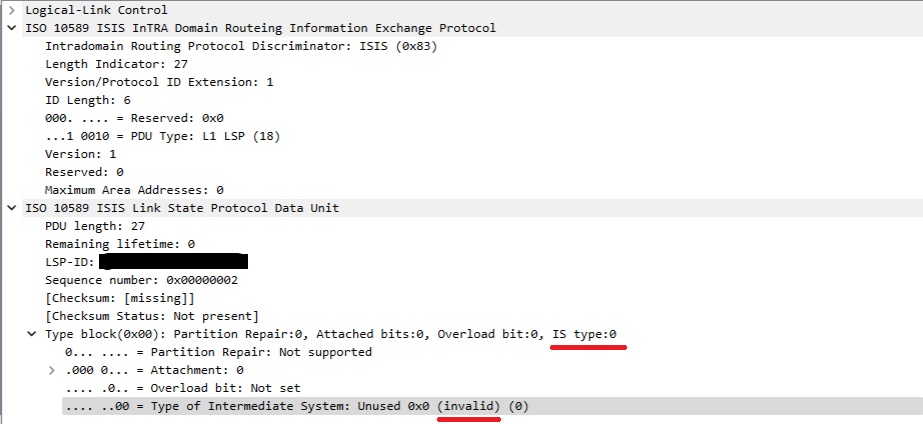
It seems that, at least starting Router OS v7.20beta2, this issue its fixed (silently, I couldn’t find any reference in the changelogs).
it is solved with this fix:
*) isis - properly validate 3-way hello handshake;
According to the overview page, Traffic Engineering for IS-IS is supposedly support? Is this actually the case? because I can’t find any documentation, no examples, and nobody has done it. So is TE actually supported over IS-IS or does it still rely on OSPF for LDP or BGP for RSVP
https://help.mikrotik.com/docs/spaces/ROS/pages/28606515/Routing+Protocol+Overview
Anyone using L2.out-filter-chains with their IS-IS yet?
I am not having great success in filtering outbound advertisemens over a L2 link - otherwise it seems to be work and fairly stable…
Typically out-filters in a link-state IGP are only for redistribution. This is the case with OSPF and I would assume the same is true for IS-IS.
Otherwise, you’re breaking the fundamental design of a link-state protocol by filtering prefixes out
Would be nice to get a confirmation from MikroTik
Was looking to use it for some kind of summarization between L1 and L2 areas, but it does makes sense I guess.
Will wait a bit more with IS-IS then until it is a bit more developed.
Summarization is different and can be supported between Level 1 and Level 2 (or redist) but I don’t think it’s been enabled yet on MikroTik’s implementation.
I’ve looked around the is-is syntax and filtering but I don’t see anything regarding summarization yet.