L3 HW Offloading RB5009

You know, I thought about ignoring such an arrogant troll post but I can't. I'll probably regret feeding the troll but here goes..

How dare you come in here and suggest such a thing? The whole purpose of a forum is to help people who don't know. And I value the help I received here. Nearly every post in one way or another could be summed up as "Help. I don't know how to do xxx."

Please stay away unless you have something solid to contribute to the community. If you would like to perhaps write a paper like I did explaining how to do something on the MikroTik router to benefit the community, great. But if you are going to come in here and take stupid pot-shots at someone, then please go away.

I was just suggesting to change the title to something that reflects the content of said topic.

You ok?

And since you were such a smart ass with your reply, let me explain why:

  • someone else that doesn’t read the docs might find this topic and say “oh wow rb5009 supports L3HW offload!”
  • searches the topic, finds your guide, yay! .. goes through it, “oh wait, this is just VLANs, wtf”

And for some reason we need another guide on how to set VLANs every 5 years or so because reasons.

Besides the docs, this topic was usualy the “go to place” for VLANs https://forum.mikrotik.com/t/using-routeros-to-vlan-your-network/

Cheers.

I do think a title like "Troubleshooting poor RB5009 performance - solved: it was triangular routing" would be better than the current title "L3 HW Offloading RB5009".

Even asking chatGPT to summarize the thread will show that it is thrown off by the "assumption" that the problem was related to the lack of L3 HW offloading on the RB5009.

Also, while you did eventually supply the information, it had to be requested multiple times, and it made the whole troubleshooting sequence take a lot longer than it should have.

Some of the things that made it take longer than it needed to.

  1. your assumption that the problem was due to the lack of L3HW acceleration on the RB5009.
  2. Not posting your export until late in the thread.
  3. Not mentioning other devices that were routing traffic.
  4. Not posting your network diagram (sketch) until late in the thread.
  5. Not mentioning IGMP until the post with your sketch (and it was well buried in lots of text).

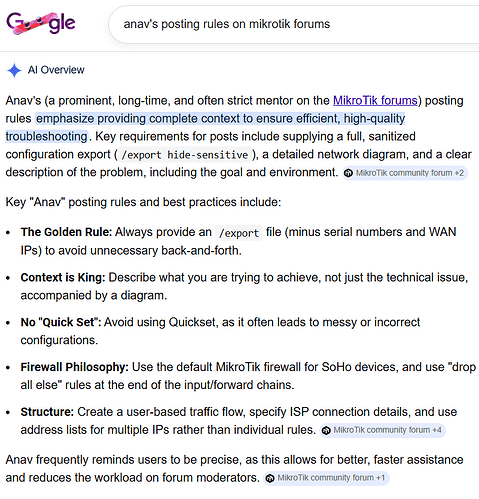
This is where following anav's posting rules would have helped shorten the time spent in solving the problem. Often just preparing the diagram will help you see the problem, just like explaining a problem to a rubber duck can be helpful.

Just some comments about the thread.

  1. The RB5009 does not have L3HW offloading, so commands related to the CRS3xx switches don't apply.
  2. This post claimed that the Ubiquiti ER-X has higher performance than the RB5009. That is incorrect. The ER-X does have the ability to enable hwnat offload, but it is limited in what it does. And the RB5009 can outperform an ER-X with hwnat enabled.
  3. In this post @rplant guesses that the issue is triangular routing, with his reasons for this hypothesis.
  4. In this post @lurker888 describes his experience with the performance of the RB5009, and questions the assumptions being made by @NA9D. He also requests that an export be posted.
  5. In this post @jaclaz requests /ip route print output
  6. in this post @NA9D provides routing table, which shows 10.0.0.0/8 being routed via 192.168.1.198
  7. in this post @anav requests more info.
  8. in this post @NA9D first mentions the L3 switch at 192.168.1.198
  9. in this post @lurker888 describes why triangular routing is bad, and how to reconfigure to avoid it.
  10. in this post @lurker888 requests a network diagram.
  11. in this post @NA9D post a photo of a sketch of the network layout (much better than nothing!) And hidden in the post is a mention of IGMP multicast traffic.
  12. In this post @NA9D confirms that the problem was triangular routing, and that @lurker888 had helped beyond the call of duty.
  13. Other changes are described in this post.

And for reference, here's Google's AI summary of anav's posting rules.

I don't think anyone really expected this thread to ever be mentioned this much later after it's creation. But, yes, the title is misleading. My first take would have been "high bandwidth inter-vlan routing with the rb5009" or something like that. "L3 hw" should be avoided, well, because the rb5009 doesn't support it at all.

Mentioning IGMP is also a bit misleading, because while the traffic is multicast, it is not limited in the "IGMP snooping" sense.

Altogether, it was a pretty specific scenario. I think the takeaway is more about the steps to take for generally setting up a Mikrotik router. I realized through this that setting up one of these routers involves a lot of "little things" that actually add up to some major frustration when someone has to perform them for the first time. Even though everything is documented individually, if one doesn't know where to look, they have basically no chance of finding everything they need.

Claiming that ER-X outperforms RB5009 is indeed stupid. Somehow I’ve missed that post.

ER-X with the official firmware is only using one of the two 1Gbit lanes between the CPU<>Switch (I’ve had the talk about this in some RB750Gr3 topic around here, same hardware), so it can only route, at best, either 1Gbps one way or 500/500 bidirectional, far from the “2Gbps” needed by the author of this topic.

RB5009 can route over 2Gbps without fasttrack enabled.

Ye…

Well the misleading title is acting like click bait. That was one of Znevna's points in this post. As of 2026-02-21, this topic has 13.7k views. I doubt it would have been that high if it wasn't a misleading title.

Looking at the config, I was surprised to see the setting of MTU for jumbo frames. That usually causes more problems than it is worth. It requires setting everything to the same value, i.e. a PC plugging is will use 1500 unless specifcally set up for the higher MTU. Jumbo frames can be more efficient, but it misconfigured (i.e. paths with different real L2MTU) where a links L2MTU is less than some host's IP MTU/L3MTU, can cause a lot more harm than the possible gains. I also like to have L2MTU always be greater than MTU. I would expect a problem between ether8 and the vlans. Specifically, I think that if non-standard MTU is used, it should be consistent on every LAN and vlan. L2MTU is a can't exceed, but L3MTU is what a host will try to negotiate in TCP, and will try to use in UDP. More info here MTU in RouterOS - RouterOS - MikroTik Documentation

I do think that someone can learn from reading the thread, because there is a lot of useful info shared, and the process of troubleshooting is highlighed. And as lurker888 suggested, it is often much easier to have an interactive session, so the questions can be answered without the delays inherent with forum posting, and everyone is working from the same current info.

Yeah, "L3HW for the rb5009" is a really catchy title. I don't understand the fascination personally, because the rb5009 really doesn't need HW offloading to be comfortable in its usual applications.

The comparisons between the ER-X and the rb750gr3 are inevitable, because they both use the same MediaTek SoC. The comparison is a bit more difficult than it would first seem. This chip has one of the better hardware offloading engines, and one of the few that are fairly properly supported on Linux. Mikrotik doesn't use it, and it's completely missing from their published block diagram.

Actually, with the ER-X software, the device can do wire-speed PPPoE, fully offloaded IPv4 NAT and ipv6 routing at under 5% CPU load, at least for the common (speed test) scenario.

If one takes a look at the threads around the development and refinement of this offloading support (mostly before the while EdgeRouter series was, sadly, deprioritized), it's quite easy to see the difficulties involved. Mikrotik basically chooses not to use these, with the exception of the much different, and more advanced Marvell ones. This is what makes the comparisons really difficult.

Regarding ER-X and the official firmware: Wirespeed, one way. You can either “wirespeed” download, or upload. Not both. Having both ways traffic will eat from that single link to the CPU.

The part "at least for the common (speed test) scenario" carries a lot of weight in my statement.

Actually dual gigabit links are available, they just have to be configured correctly.

The point I was trying to make was not really about the capabilities of the different firmwares (just as this post is not about having or not having dual links are when or with what effort they can be enabled), but rather that these configurations and the decisions leading up to them have to be made, and have to be hand-tuned. While this is realistic to do when you're making an essentially dedicated appliance for "consuming" your ISP subscription, Mikrotik's value proposition (at least for me) is that they make low power, small, cheap devices do "proper" big router things, This is by taking advantage of the versatile Linux networking stack. This is fundamentally incompatible with the model for creating the sort of single-purpose device the SoC's offloading is geared towards.

Well, I also didn’t mention the official firmware for nothing in both posts.

I’m well aware of what the hardware is capable, I own both of them, ER-X and RB750Gr3, and other MT7621 based devices.

I covered the bugs with RB750Gr3 while running RouterOS here and I know what ER-X and RB750Gr3 are capable of while running OpenWrt or something else based on recent OpenWrt versions with hwnat support and with 2Gbps routing enabled (both links to the CPU working, one link for the WAN port and one for the remaining switched ports) as mentioned here.

Even though now RouterOS has the RB750Gr3 cpu lane layout bug fixed, it doesn’t have the processing power to make use of it, sadly, since the hwnat module is not supported.

Ironically, while EdgeOS does support the hwnat module, they couldn’t figure out how to properly assign the CPU lanes and never will probably, so you can’t take advantage of the hwnat module in it’s full potential there either.

Think that covers it.

Just another example of not having a first time poster sandbox process, where a poster is guided on the basics of a decent post. Once learned, it is applicable to all future posts, as they quickly realize what needs to be created and then communicated:

  • clear succinct accurate title
  • diagram and complete set of traffic flow/user requirements ((organize one thoughts)
  • additional details needed aka more than one WAN, router services etc……..
  • current state of complete config.

However, MT doesn’t care about improving the experience of the first time poster and all of their subsequent posts, nor the time sucked up for those attempting to help. As an aside, the Zneva, fact based approach to support, is spot-on, and an actual process, would remove any friction from those expecting coddling.

So as the person who has obviously offended so many experts on this forum for posting a post as a brand new user who knew nothing about MikroTIk, let me apologize for coming in and disrupting your little club. Forgive me for not realizing that this is a place where MikroTik experts come to fluff out their plumage and strut around showing how knowledgeable they are. Forgive me for being a new user who at the time I wrote this post, knew nothing.

First off, the title was correct when I opened the post. When I first set up my RB5009, I nearly sent it back to Amazon as the performance was so bad. I don't know if that was in this post where I stated that or another. I had it boxed up. I had a return started. But I decided to give it one more try. The ER-X has some under the hood commands that do some hardware offloading and greatly improved perfomance of that router so I was trying to see if a similar capability existed on the MikroTik. What I found thanks to some people who actually helped me (again, thank you @lurker888), I was doing some things incorrectly. So the thread morphed into something completely different. Yes, out of the box with the way I had the configuration, the ER-X performed better. Now, the RB5009 is way better. So again, the thread morphed into something completely different but have you always been perfect in what you post? I doubt it no matter how perfect you think you are. The fact that you guys dredge up a post from a year ago and then start ripping some of the things I had said shows how little regard you have for people who are learning.

@anav I have appreciated your support. You've gotten on remote AnyDesk sessions with me to figure stuff out. But to say that the forum needs a "newbie sandbox" I think is really missing the point of what this forum is. MikroTik offers zero customer support (I tried) and sends you to this forum. So where else are we to go or how else are we to learn. I don't see any easily accessible places where there's a "Newbie Get Started" guide. I wrote an entire paper on my setup and it's posted but probably buried somewhere. A lot of people did download it though so maybe I helped them.

Frankly, the attitudes I have seen in this thread lately make me wonder if buying another MikroTik at some point is worth it. Why do I want to come in to a place, ask questions and be made to feel bad about those a year later! Sheesh everyone - look at yourselves!

And why did I not post my config file? First of all, I don't like posting it because it creates more questions than answers due to my very specific configuration. I get things like

  • "Wait. Your setup can't work because your router's IP address is 192.168.1.1 but you are using a 255.255.254.0 subnet."
  • "This can't work. You have no DHCP address ranges set for your VLANs."

And more. So yes, a router can be at any IP address you want it to be in your subnet. "Oh but that's not correct." Says whom? Says some architect? Did you ever think to stop and ask me WHY I have my router sitting in the middle of my subnet or do you just want to show how much knowledge you have?

And no, I don't need DHCP address ranges on my VLANs because they are for very specific devices for a specific application and all those devices have fixed addresses! Did you ever stop to think outside the box and realize that there may be perspectives and deployments different from your paradigm?

I may not know routing architectures very well and certainly I know very little about Linux routing commands and how to set up the MikroTIk. I stumble through trying to get things set up and figured out and don't like to come and post questions in the forum specifically for the reasons shown as posted in this whole thread. The fact that you guys can't give a newbie grace and actually help them without making them feel like an idiot is a problem why I stay away. I don't contribute much here because I just don't have the knowledge and don't set these up every day. But at the same time, I am very intimidated to come here and ask questions because of the attitude from people.

I've gotten to the point when posting questions in these forums that I heavily edit my config file because all the experts here like to come on and point out what they don't understand in the config file that has absolutely ZERO to do with the question and need being asked.

Again, thank you to @lurker888 for the enormous amount of time spent with me getting my routing figured out and getting me up and running. I am forever grateful.

So think before you post please. Us newbies (and I would still consider myself one a year later) have feelings too. We are ignorant and if we post something incorrectly - who cares. Why don't you help us instead of throwing up roadblocks?

No, a traffic diagram is not needed every time and in my case, it took a lot of back and forth with Lurker888 to understand my traffic and routing needs (and I don't think they still fully get it yet). Sometimes just an answer to the question is all that is needed. Sometimes, we may think the title is correct when it isn't. Oh, well. Again, so sorry to be offensive to your networking sensibilities.

Please make this a place where new users feel welcome not where they have to jump through a bunch of hoops to get simple support. MikroTik provides nothing. It's up to all of you. I'm amazed at the amount of knowledge here. But please apply some wisdom with it so those of us who aren't as smart as you can become better.
Only for the record, that is a perfectly correct /23 address, noone (in his/her right mind) would say it won't work:

Description Values
IP Address: 192.168.1.1
Network Address: 192.168.0.0
Usable Host IP Range: 192.168.0.1 - 192.168.1.254
Broadcast Address: 192.168.1.255
Total Number of Hosts: 512
Number of Usable Hosts: 510
Subnet Mask: 255.255.254.0
CIDR Notation: /23
IP Type: Private
Short: 192.168.1.1 /23

Some of us spent whole nights reading the docs or presentations from MUM trying to make stuff work ‘The MikroTik way’ with our first MikroTik device years ago when there weren’t that much useful information on the forum or in other places, and yes prior networking knowledge helped obviously, well, in my case anyway.

Setting something in WinBox, exporting configs, comparing with a previous save to see what was the clear text equivalent of what I just did in WinBox etc.

IF YOU THINK that it’s ok to have 90 posts about how to setup your VLANs with users trying to get information from you about what kind of network setup you have there and what are you trying to teach your RB5009 to do, where is it failing all this while guessing your config, then no, maybe you shouldn’t buy another MikroTik.

I didn’t even notice this was from one year ago, because there were two posts before mine from only a few days earlier and I didn’t bother reading the whole date on the ones previous to that.

So you had a whole year the chance to change the click bait title of this topic, this doesn’t make it better.

“I was wrong, I was digging in the wrong place” in the first post, edit title, done. You wouldn’t be the first, nobody cares if you didn’t got it right the first time.

But “this crappy router is crappier than my ER-X, imma return it cuz it can’t do l3 hw offload” = NO.

Cheers.

To be clear NA9D, my angst is not with any poster its with MT setting up situations that support failure or at least drawn out support issues and creating expectations that are unrealistic. So glad you noted your willingness to learn, and that is what MT should hoist in because that learning includes communicating your issues in a constructive manner.

Every activity in life is a process, we follow them and adapt them to work better learning from our history.
For an organization that is so process oriented ( coding and engineering ) it boggles my mind that they throw the user experience into the wind……………. ( its like peeing into the wind :wink: ).

Given that MT has ignored my requests for what seems like a decade and other posters have not supported the educational approach ( do they actually send their kids to school, why?, life is crapshoot seems to be acceptable ;-PP ). Then the onus is on us to rectify as best we can.

So, if I was to attribute causes to other than the organization lacking in foresight, and compassion, I would say its the ‘professionals’ here that try to answer any queries before ascertaining (what the OPs should have been taught first),

a. user/devices requirements
b. network diagram detailing equipments, vlans, ISps
c. current config.

That should be the first response to every post.
Then and only then can one realistically and consistently make sense of the usual gibberish coming from untrained posters. Typically they assume we are all inside their head, so they assume we know what they mean despite the varying quality of communication.
In this regard, we would much more quickly come to an understanding of the needs, and be able to point out the errors, or adjust the config………..
Why this happens, I can only guess, often the expertise level allows them to sort out the sparse details and get right to the nub of an issue and I see this often, and its expedient, but when it fails…... Other times they seize on part of an issue to focus on and go down rabbit holes….. It boils down to lack of discipline, not arrogance or anything negative LOL.

Secondly, I attribute issues to the posters for not taking the hints, and requests, and assuming that they or AI or some friend knows more than the experts here ( me not one of them), like the Lurkers, Sindys, CGGXs, etc……… Very often, key facts are held back by either deciding something is not relevant (purposeful), or not knowing what could be relevant (unaware). Not providing requested informed comes across as being combative if not uncooperative.

Of course it is. It's been said. I won't say who said it. Maybe it was me misunderstanding them and they were more meaning, "Why would you do it like that?" - a very valid question. But I've had support people paid by companies tell me, "Your device can't be at 192.168.0.1. That's the router's IP." I'm like, "No, don't assume. That is the correct address."

There was no intent to have a click-bait title to the post. Truthfully, I completely forgot about it and what the title even was. It was a freaking year ago. Not sure why you have such a wedgie over this. It is what it is. And I really don't feel like changing it now because you've been rather insulting about it. So why should I?

And if you insist that this is click-bait title, I just might really make it a click-bait one...

Well, thank you. You have been one of the ones who have been very helpful and I appreciate that. There are some super nice people here and very helpful, Lurker888, Sindy, CGGX, etc. just like you say.

Agreed that MT should really make a basic getting started guide or something like that. While the documentation for RouterOS is exceptionally complete and detailed it is also exceptionally complicated. Most of the time, we don't have time to read through pages to figure out the difference between pre-routing, forward chain, input chain, output chain, srcnat, dstnat, forward, input, output, etc....Still don't have all those figured out nor where to place stuff in the firewall, etc. What I like is that it is exceptionally powerful and doesn't force you into a certain way of doing things. But the flip side is that it is far more complicated.

Oh yeah and then they do try to make it "easier" by having things like Detect Internet which you and multiple others say does not work and causes problems.

And I'll give you that best practices in what should be posted with a question are important. I just don't like the idea of "sandboxing" new users which implies a restriction of what they can do or not helping them until they give just the right answers and have just the correct title.

I had no idea that the post would morph the way it did. No one ever suggested a different title until our friend did the other day.

And I really don't feel like changing it now because you've been rather insulting about it. So why should I?

And if you insist that this is click-bait title, I just might really make it a click-bait one...

That’s the spirit!

This is where I take umbrage with evidence staring you in the face, and for me, one of thousand examples of a negative if not drawn out painful example of providing support.

Agreed that MT should really make a basic getting started guide or something like that. I just don't like the idea of "sandboxing" new users which implies a restriction of what they can do or not helping them until they give just the right answers and have just the correct title.

Firstly, there is now ample documentation on this forum and on decent youtube videos, such as how to do vlans, that are more than adequate for someone willing to play/learn. Secondly, we have discovered that people selectively read or don’t read at all, or just use AI, and dont understand what they have read and instead of asking clarifying questions, go into a spiralling mess of a config.
In other words, all the documentation in the world is not going to cut it, as one has to at some point, apply the information and no one is going to document every single iteration of a potential scenario, as each scenario is unique in some way.

Lastly, the point is you and many others need guidance, for your own good, and you should be humble and accepting about it, vice thinking your above that. It would seem like many others, including the pro’s here, are allergic to the concept of education and process.

a. to learn how to communicate issues properly
b. to have your issues understood to the level required to reach config determinations
c. to have your issues solved rapidly.

No sandbox moderator would be expecting the perfect anything. It sounds like you have some sort of unrequited illogical fear of guidance. Simply a matter of presenting sufficient information in a coherent manner.