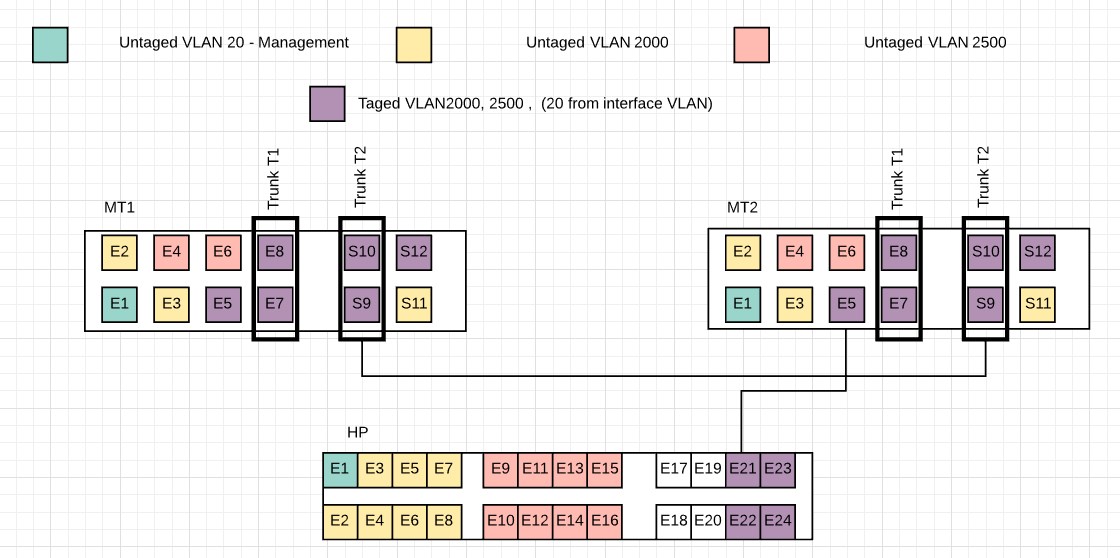
I configure my lab environment just like in the attached picture. MT are configured based on https://wiki.mikrotik.com/wiki/Manual:CRS1xx/2xx_VLANs_with_Trunks using hardware switch features.
My Management VLAN is VLAN20 created as VLAN interface under bridge.
Everything works as should be, Vlan separation etc. When my computer are connected to any untaged VLAN 20 (Management) I can connect to Mikrotik1 an Mikrotik2 via winbox on Layer3, But problem starts when i try connect to Mikrotik on layer2. When I’m connected to Mikrotik1 eth1, I can connect do MT1 and MT2 vial Layer3 but only to MT1 via Layer2. Situation is similar when I’m connected to MT2, I can connect only to MT2 via Layer2. When I’m connected to HP switch I can connect to MT1 and MT2 only via Layer3.
Every time i see MT1 and MT2 on Neighbors page in winbox .
I also attatch configuration from MT1 and MT2
Has anyone encountered such a problem and found a solution for it ? MT1.rsc (1.63 KB) MT2.rsc (1.63 KB)
Chances are that it shows allowed-interface-list=LAN, so what does command /interface list member print where list=LAN show? Quite probably it lacks appropriate vlan interface …
Hi mkx.
I attach complete configuration both MT. Its only few lines.
/tool mac-server export show
you mean /tool mac-server print . Result = allowed-interface-list: all
/interface list member are empty.
VLAN interfaces look as if they are well configured becouse properly isolating traffic between different VLANs, and passing traffic inside this same VLAN, Layer 2 traffic also looks OK inside each VLAN (I check it if client on one end (for example connected to MT1) can get proper communication with dhcp server on other end (for example connected to HP switch) ).
Problem is only with connect to Mikrotik via Layer2 in winbox (Layer3 works).
I can’t connect to mikrotik via winbox using layer2 (MAC address) like on attached screen, without being directly connected to that Mikrotik, but being in this same VLAN. .
In first post I attach 3 files. One is schematic MTLab.jpg, and two other files are configuration export form MT1 and MT2, file names MT1.rsc and MT2.rsc
And in the body of that first post i present few scenarios explaining when i can connect to Mikrotik by MAC address (layer 2) via Winbox and when i can’t, using device and port names from attached schematic for better understanding my problem.
Please read and understand the whole post, not just the Topic
mozerd why are you cluttering up a thread ?
If you do not have anything constructive to say, do not write anything
I’m known that MAC session uses network broadcasts and is not 100% reliable but is very useful tool in emergency situation and when i have possibility to use something that can help my evein if it’s not 100% reliable why i shouldyn’t ?
Apart from this, this is an interesting case how mikrotik works (also switch chip features, vlans and winbox itself)
Note: Management VLAN ID is not addedd to Egress VLAN tag table since a VLAN interface has been already created that will only send out tagged traffic either way.
And after all VLAN id=20 works well, Traffic are tagged betwen devices. Tragic is properly separated from other vlans. Even DHCP (which is based on Layer2 - MAC) works ok inside vlan20 between all devices.