I’m running v3.14 and still no luck. I’m going to reset the configs and try starting over from scratch.
please make the support output files from both routers when you move to the other ap but the ping isn’t working and send to support@mikrotik.com
Uldis,
I think the problem has to do with the wireless chipset I’m using, Intel(R) Wireless WiFi Link 4965AG on Vista. I used a linksys wireless g card and the laptop was able to roam with the layer-2 routing configured. Funny thing is the intel card will work if an RTSP bridge is used, but it fails with the layer-2 routing. I’ll try and test more cards.
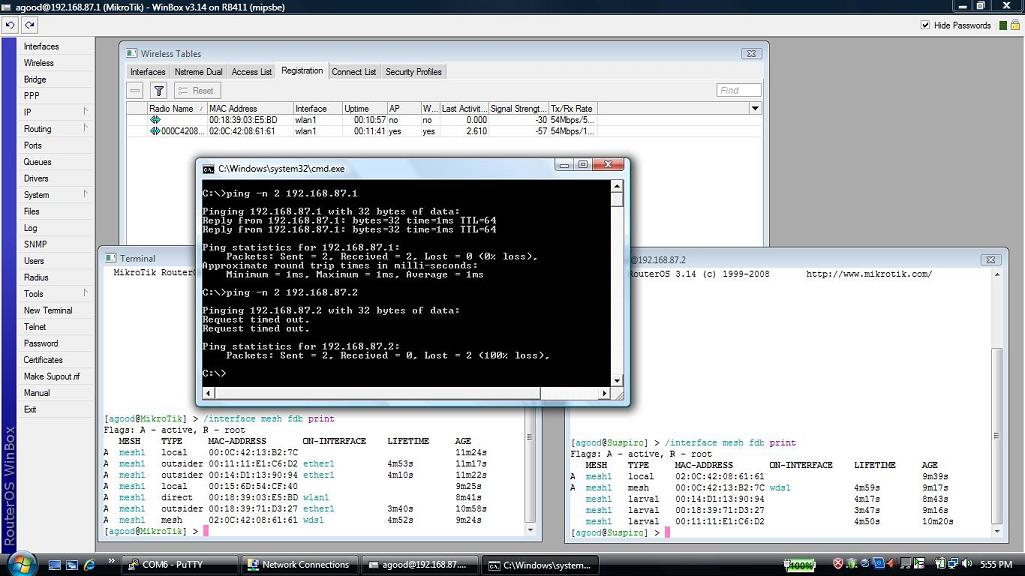
Edit: Nevermind I spoke too soon, the linksys card stop working when roaming from AP to AP. Attached is a screenshot where you can clearly see the 2nd access point will not learn the mac address 00:18:39:03:E5:BD. I’ve attached the supout files and my Ticket number is 2008091966000071.
Netrat, any news about your problem ?
If I understand AP1 is 192.168.87.1 and AP2 is 192.168.87.2
The laptop was previously connected to AP2, both was “pinging”. But laptop has roamed and now it is connected to AP1. AP1 is still pining but not AP2. It seems normal to me has AP2 don’t know about laptop MAC address as shown in AP2’s FDB.
1- Have you try arp -d 192.168.87.2 on your laptop, to force arp-request ?
2- That is just an idea, not sure about that:
AP1 knows the path to AP2 and he will answer to laptop request, so there won’t be arp brodcast and AP1 won’t receive the request. Wait till AP1’s arp table entry for AP2 MAC address expires. Broadcast will then restart and AP2 will see the MAc of laptop and will ask path to get him back data.
Give us news about any developpement,
Michael