I am pretty newbie in radio technology, are the results are ok ?
These are my results:
SXT Lite 5 distance to mANTBox 19s is 2 km
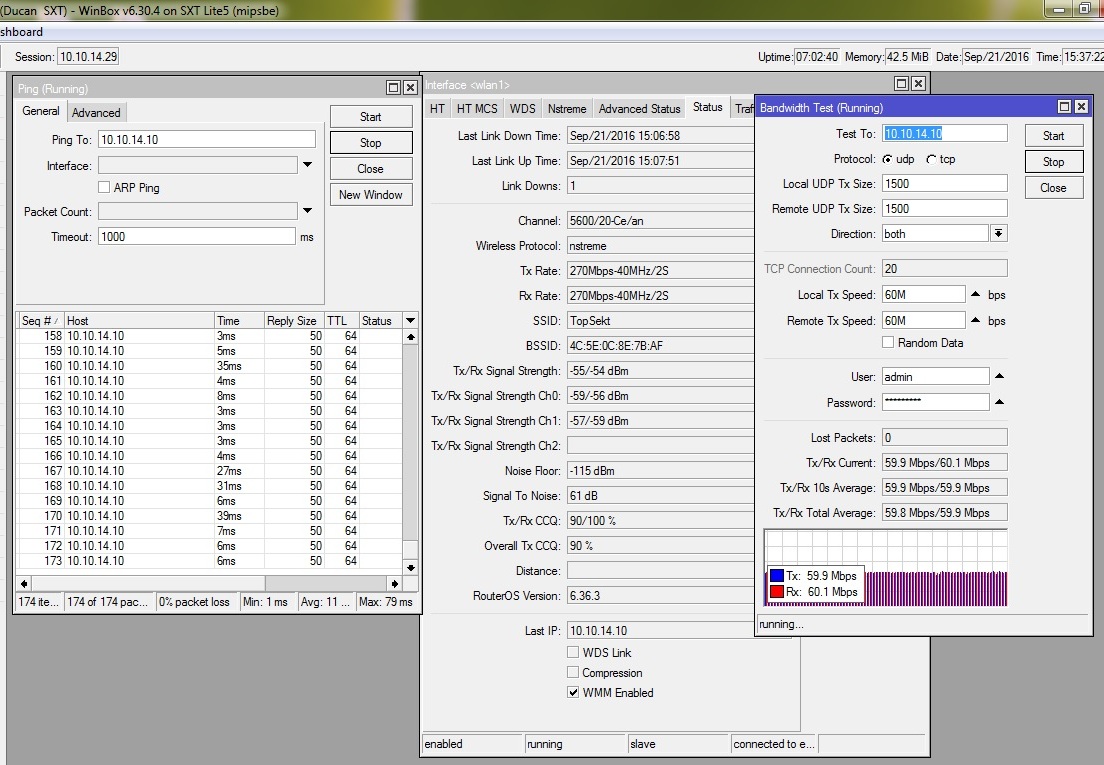
config from SXT Lite 5:
# sep/21/2016 16:47:28 by RouterOS 6.30.4
/interface bridge
add name=bridge1
/interface wireless security-profiles
set [ find default=yes ] supplicant-identity=MikroTik
add authentication-types=wpa2-psk eap-methods="" group-ciphers=tkip,aes-ccm management-protection=allowed mode=\
    dynamic-keys name=profile1 supplicant-identity="" unicast-ciphers=tkip,aes-ccm wpa-pre-shared-key=xxxxx \
    wpa2-pre-shared-key=xxxxx
/interface wireless
set [ find default-name=wlan1 ] ampdu-priorities=0,1,2,3,4,5,6,7 band=5ghz-a/n channel-width=20/40mhz-Ce country=\
    macedonia disabled=no frequency=5600 frequency-mode=superchannel guard-interval=long l2mtu=1600 mode=station-bridge \
    scan-list=5600 security-profile=profile1 ssid=Top wds-default-bridge=bridge1 wireless-protocol=nstreme
/interface wireless nstreme
set wlan1 enable-nstreme=yes
/interface bridge port
add bridge=bridge1 interface=ether1
add bridge=bridge1 interface=wlan1
/ip address
add address=10.10.14.29/24 interface=bridge1 network=10.10.14.0
/ip route
add distance=1 gateway=bridge1
/system identity
set name="Ducan  SXT"
/system leds
set 0 interface=wlan1
/system routerboard settings
set protected-routerboot=disabled
/tool romon port
add
SXT High Gain5 AC connected to mANTBox 19s distance 4 km
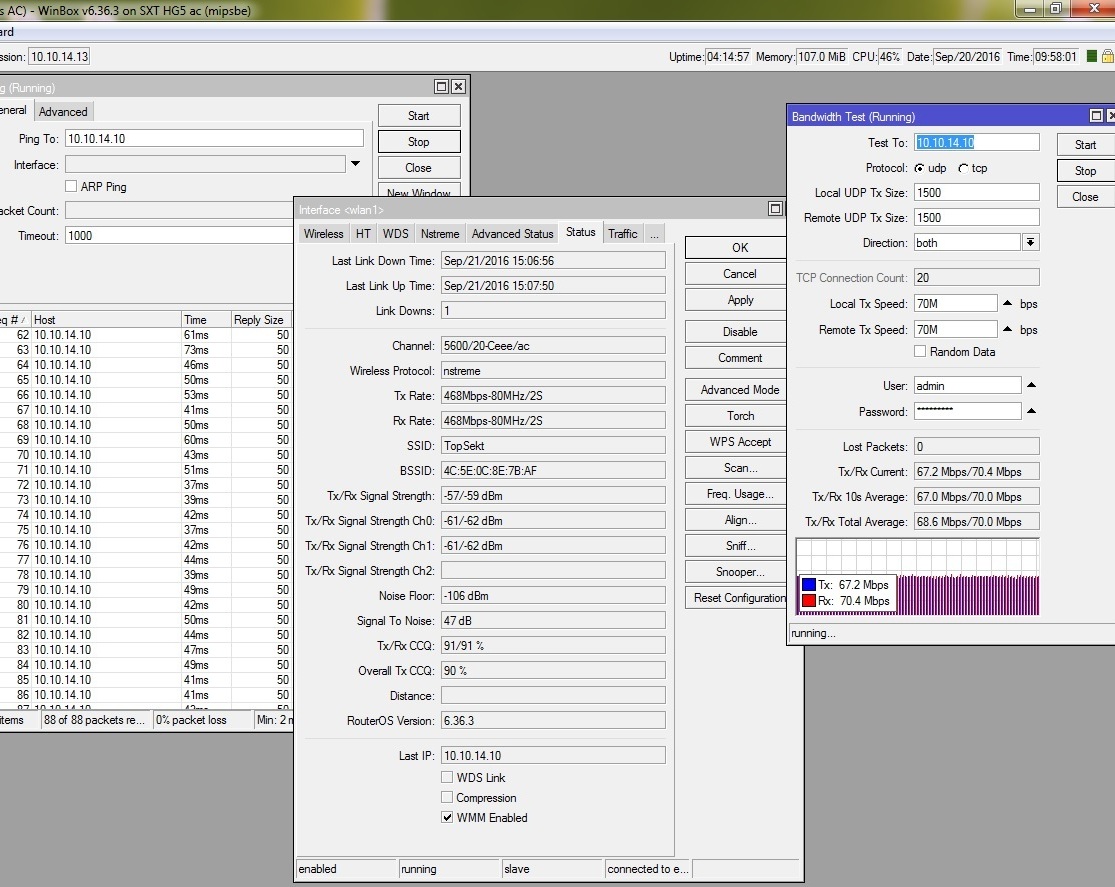
Config from SXT HG5AC:
# sep/20/2016 05:54:39 by RouterOS 6.36.3
/interface bridge
add admin-mac=6C:3B:6B:xx:xx:xx auto-mac=no name=bridgeLocal
/interface wireless security-profiles
set [ find default=yes ] supplicant-identity=MikroTik
add authentication-types=wpa2-psk eap-methods="" management-protection=allowed mode=dynamic-keys name=profile1 \
    supplicant-identity="" wpa-pre-shared-key=xxxxx wpa2-pre-shared-key=xxxxx
/interface wireless
set [ find default-name=wlan1 ] ampdu-priorities=0,1,2,3,4,5,6,7 band=5ghz-a/n/ac basic-rates-a/g="" channel-width=\
    20/40/80mhz-Ceee country=macedonia disabled=no frequency=5600 frequency-mode=superchannel guard-interval=long mode=\
    station-bridge multicast-helper=disabled scan-list=5600 security-profile=profile1 ssid=Top supported-rates-a/g=\
    6Mbps,24Mbps,36Mbps,48Mbps,54Mbps wds-default-bridge=bridgeLocal wireless-protocol=nstreme
/interface wireless nstreme
set wlan1 enable-nstreme=yes
/interface bridge port
add bridge=bridgeLocal interface=ether1
add bridge=bridgeLocal interface=wlan1
/ip firewall connection tracking
set enabled=no
/ip address
add address=10.10.14.13/24 interface=ether1 network=10.10.14.0
/ip dhcp-client
add dhcp-options=hostname,clientid disabled=no interface=ether1
/ip route
add distance=1 gateway=ether1
/system identity
set name="VarAC"
/system logging
add prefix=debug topics=wireless
/system routerboard settings
set cpu-frequency=720MHz protected-routerboot=disabled
And config from mANTBox 19s
# sep/21/2016 17:06:00 by RouterOS 6.36.3
/interface bridge
add admin-mac=4C:xx:xx:8E:xx:xx auto-mac=no name=bridge
/interface wireless security-profiles
set [ find default=yes ] supplicant-identity=MikroTik
add authentication-types=wpa2-psk eap-methods="" management-protection=allowed mode=dynamic-keys name=profile1 \
    supplicant-identity="" wpa-pre-shared-key=xxx wpa2-pre-shared-key=xxx
/interface wireless
set [ find default-name=wlan1 ] ampdu-priorities=0,1,2,3,4,5,6,7 band=5ghz-a/n/ac channel-width=20/40/80mhz-Ceee country=\
    macedonia disabled=no frequency=5600 frequency-mode=superchannel guard-interval=long mode=ap-bridge multicast-helper=\
    disabled security-profile=profile1 ssid=Top wds-default-bridge=bridge wireless-protocol=nstreme
/interface wireless nstreme
set wlan1 enable-nstreme=yes
/interface bridge port
add bridge=bridge interface=ether1
add bridge=bridge interface=sfp1
add bridge=bridge interface=wlan1
/ip firewall connection tracking
set enabled=no
/interface wireless access-list
add interface=wlan1 mac-address=6C:xx:6B:xx:xx:xx vlan-mode=no-tag
add interface=wlan1 mac-address=E4:xx:8C:xx:xx:DD vlan-mode=no-tag
/interface wireless connect-list
add interface=wlan1 mac-address=6C:xx:6B:1F:24:20 security-profile=profile1 wireless-protocol=nstreme
add interface=wlan1 mac-address=E4:xx:xx:xx:7D:xx security-profile=profile1 wireless-protocol=nstreme
/ip address
add address=192.168.88.1/24 comment=defconf disabled=yes interface=bridge network=192.168.88.0
add address=xx.214.xx.5/24 interface=ether1 network=xx.214.xx.0
add address=10.10.14.10/24 interface=ether1 network=10.10.14.0
/ip route
add distance=1 gateway=xx.214.xx.xx
add distance=1 gateway=ether1
/ip service
set telnet disabled=yes
set ftp disabled=yes
set www disabled=yes
set ssh disabled=yes
set api disabled=yes
set api-ssl disabled=yes
/system identity
set name="Top"
/system package update
set channel=development
/system routerboard settings
set cpu-frequency=720MHz init-delay=0s
I don’t know why SXT HG5 AC gives only 140Mbit transfer on Bandwidth Test , how I can get 400 Mbit transfer on AC mode ?
Thank you all.