How would that be explained ?
Apart from antenna they are HW-wise identical. Same CPU, same wifi chip, same memory, same flash, … everything the same.
Also, I read a review of them that wasn’t exactly glowing. Not sure where it was but I think they were disappointed with the radios.
Ron Touw is an expert on wifi tuning. However if you apply one of his tuning tips to the wrong environment you make things worse.
Why would one rise the basic rate above 6 Mbps?
- Because there are a lot of SSID/AP points, broadcasting at 6 Mbps and consuming 0.5% of the airtime in the channel for every SSID+AP instance. (If you have 3 SSID on 2 AP, you consume 3% of all airtime in that channel, with 18Mbps as lowest basic rate only 1%)
- Because there is a lot of multicast data to be transferred, and you did not set the Multicast Helper to Full. Lots of Multicast data, sent as multicast in wifi, will almost always fully destroy a good wifi environment.
Why NOT rise the basic rate above 6 Mbps?
- Because the environment is not fully clear field without disturbances and short range connections. Not being able to correctly receive the beacon (at basic rate) will give connection drops. With multicast and beacon transmitted there is no CRC check, no ACK, and no retransmit, as is with unicast. (Unicast is retried nx7 times before the transmission fails on disconnect)
- Because you prefer unnoticable retries above full disconnects. Setting high minimum basic rates gives self-inflicted disconnects. *
- Because you want to use the full physical range of the AP-client connections
Be carefull with tuning, and know why you are doing some setting. Just copying tips, even from the best guru, can be very contra-productive.
Just one remark: extension channel XX or XXXX is giving you what channel? It is undefined with XX and XXXX. So it can be different with every interface restart, or every CAPsMAN channel reselection (which I hope is set to OFF)
- : the same is true for high minimum supported rates.:You are not letting the wifi driver lower the inerface rate, and will get disconnected instead.
I’m pleased that disabling lower supported rates and lower basic rates is not possible anymore in 802.11ac (VHT MCS rates are 0-9 supported, and 0-7 (0 till 7) basic rates). No way to remove the lower rates!
action=reject allow-signal-out-of-range=10s comment=“Kick host off AP if signal is bad” disabled=no interface=all signal-range=-120..-86
Even with a good signal (>-86dBm) for 9.99 sec the host is still rejected !?
You’re misreading it. It’s “-86 or worse for more than ten seconds” (-120 to -86) not “-86 or better”.
This is a bit of a throwback to when I didn’t know “what was best” for which channel is the control (management) channel and which is the extension channel. It’s Ce/eC with 40Mhz channel width and (I probably don’t recall this correctly) Ceee/eCee/eeCe/eeeC with 80Mhz channels. My understanding of this is that if there is cross-channel interference from another AP, your management channel should be the same as their management channel. There’s some really good data on this from the Wireless LAN Professionals Youtube channel on how wireless performance can be crushed if there are two APs on the same “channel” but their control channels don’t overlap, compared to if you have the same management channel as the interfering AP.
According to documentation and what I’ve witnessed, the XX or XXXX setting doesn’t affect channel selection (e.g, it’s still “channel 36”) but it just affects which of the channels are the control channel. Not relevant for 20Mhz channel widths of course.
I’m deciphering that as meaning that for an already connected client even with an RSSI of -41dB that the client will miss the beacon, disconnect itself, reconnect itself, miss the beacon again, etc etc.
I turned on debug logging for each AP and did not see disconnect/reconnect entries though.
It’s been just over a day and I’ve not had any performance issues.
I’m going to let this bed in for a few days to a week, to see if it was indeed an alteration of the basic rates settings.
Channel layout is pretty much standardized, you can see the table here. Many devices tolerate “non standard” channel layouts, but some are picky and won’t use e.g. 80MHz channel width if channel layout is not correct, they will revert to 40MHz or even 20MHz.
As far as I observed, XX or XXXX setting selects correct (standard) channel layout. If one manually sets frequency (which is center frequency of control channel), then this mostly indirectly defines also channel layout used. Example: if one uses XX (40MHz) and sets frequency to 5240, then actual channel layout will be eC … if frequency is set to 5220, then actual channel layout will be Ce … and in both cases it’ll be 40MHz channel numbered 46.
The question of control channel co-existence with adjacent APs still remains though. It would be nice if somebody with more experience with equipment of different wireless vendors would write how other vendors tend to select channel layouts when left to automatic settings.
Easy to test that XX and XXXX setting, and see what you get in Status. It worked well for me at the edge (5180) of the possible range to be in line with the standard list, but it went wrong higher up in the frequencies. http://forum.mikrotik.com/t/v6-49-4-stable-is-released/156240/1
Have not found yet another brand that has the XX or XXXX option, to check if those are “smarter”.
I’m deciphering that as meaning that for an already connected client even with an RSSI of -41dB that the client will miss the beacon, disconnect itself, reconnect itself, miss the beacon again, etc etc.
I turned on debug logging for each AP and did not see disconnect/reconnect entries though.
Is was meant for the other posts where the CAP ac is called flacky or faulty.
One missed beacon does probably not drop the connection yet, but multicast (basic rate) packet data will be lost, what does not happen with unicast.
I did not express the case well. If you get out of range (signal drops < -86dBm, that is in the -120..-86 range) for a bigger time than the “signal-out-of-range” in the allow rule, you get kicked out, for at least the duration of the signal-out-of-range time in the deny rule. Here 10 sec.
Now consider a home (or bar) with 2 AP, where people are busy and travel around getting in and out of range of either of the AP at random pace. They need to be kicked out to avoid the “sticky client” and now connect to the nearby AP. But when they get back in range of the first AP, they will not be accepted for 10 sec. It’s easy to get in the case where MT roaming is said not to work, because the client is denied access when been out of range. (Happens often with indoor AP’s in separate rooms, or with indoor/outdoor AP, or when people walk in/out of range )
Well, bad news. The issue occurred again. I do have some more interesting facts however:
- During the incident, any devices connected to the secondary/slave SSID had no performance issues (200+Mbs)
- During the incident, the affected device stayed connected and reported 400/400 Tx/Rx speeds with an RSSI of -42dB
- The speed issue would happen in cycles. A few minutes of OK, followed by a few minutes of terrible speeds
At this point I’m out of ideas. I guess I’ll have to put myself through the drama of sending supout.rif files and “please do a netinstall” from support.
This looks like not a wifi (RF signal) problem as such.
400/400Mbps interface rate is excellent for 40MHz/2S/SGI connection. No connection drop-out or unexpected roaming.
The virtual WLAN (2nd SSID) keeps performing well on the same channel, you say. So airtime and co-channel interference is no problem, no channel overload. No adjacent channel interference as this would drop the interface rate after a while. (Because of Faulty transmissions : TX HW Frames >> TX Frames)
There are many other problems possible, linked to the first SSID data traffic path.
I’ve just noticed that even with the basic rates set back to “default” it’s kept the old config with the specified rates.
Very weird. I’m now resetting the WLAN configuration for the interfaces and creating them again.
The next time this happens I’m going to run a bandwidth test from the RB5009 to the AP where it’s happening and see if there are any L2 Ethernet issues on the native VLAN.
I do seem to recall that evening pinging the AP’s own IP address on the bridge (from an affected wireless client) was slow though, so the ethernet based test may not be useful.
Interesting. I did not know the client was placed in a banned list for a period of time. I didn’t see this in the documentation anywhere!
It is there but with a mental twist…
There are the following parameters for access list rules:
client matching parameters:
address - MAC address of the client
interface - optional interface to compare with the interface to which client actually connects to
time - time of day and days when rule matches
signal-range - range in which client signal must fit for the rule to match
allow-signal-out-of-range - > option which permits client’s signal to be out of the range always or for some time interval
https://help.mikrotik.com/docs/display/ROS/Wireless+Interface#WirelessInterface-AccessList
Yeah, I read that one. It doesn’t say that the client is added to a ban list though, and regardless of RSSI even if it moves back into range.
There is an important question mark in http://forum.mikrotik.com/t/master-ssid-dropping-to-kbs-speeds-on-all-cap-ac-units/161365/36
As happens more with Mikrotik, the documentation is not very specific.
All depends on how it is implemented (programmed).
If “allow-signal-out-of-range” means that the rule will remain active even if the signal is not within the specified range anymore for the set time.
Everyone understands the “authentication” case. You are still allowed to authorize, even is your signal is not in the specified range anymore. The “authentication” rules matches and is granted for the specified time.
If that logic is applied for the rule with “no-authentication”, then that rule would still apply even if the signal strength is not in that deny-range anymore for the set ‘allow-out-of-range’ time.
But then there is “Only the first matching rule is applied.” What happens if the ‘other’ range rule comes before the rule with “allow-out-of-range”. Which one is applied then?
There should be no difference in handling for the “authentication” and “no-authentication” rules, unless the programmer decided to make it different.
I think, some reverse engineering is required, by doing some tests with long “allow-out-of-range” settings.
I had it wrong. Both rules seem to be implemented differently. The client is not locked out. Not even when the no-authentication comes before the authentication in the list.
Experiment is quite confusing, with the “banned/last failure”, but the lockout is not as I expected.
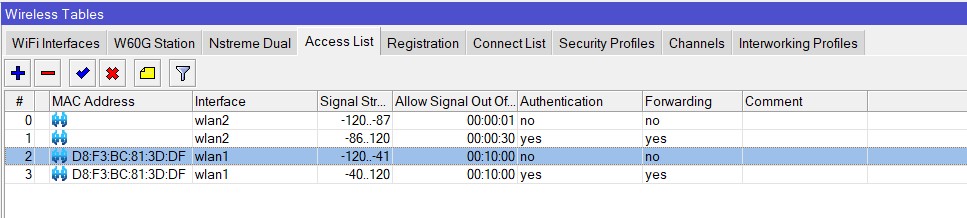
LOG start when out of range for authorize, after being in range long ago.
Reconnected to WLAN2 to check the LOG. Hope this had no influence. But if ROS maintains a MAC address based table it could have been the case.
Should have used 2 clients for the experiment.
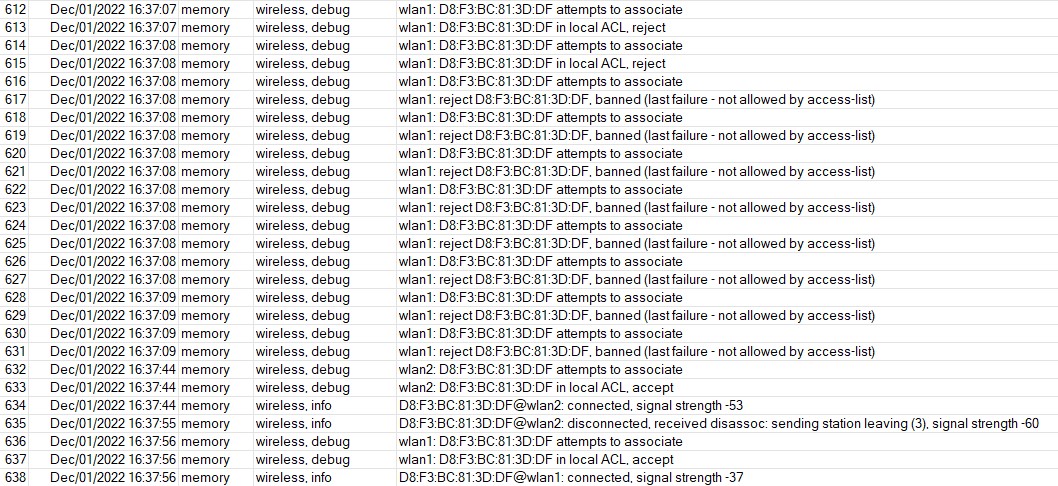
Done the test with a second client device. The WLAN2 login was not the cause to switch from denied to accepted, before the allow timer expired.
So now it seems that the “allow signal out of range” timer only applies to an established connection. When the association drops, the rule timer drops.
This answers the question how that timer would have been used with other properties (VLAN mode, VLAN id, private password) combined with signal range.
Avoiding a flapping connection for some time, with the “no authentication” rule is not possible this way. You cannot deny a client access for a defined time because it recently failed the signal range required.
A disconnect will invalidate/terminate any “allow out of range” timer. So if you lose connection while you work in the “allow signal out of range” time , and try to reconnect, this will fail because you lost the right to authenticate with signal out of range.
You have to be again in the required signal range to reconnect.
There is clearly such a thing as “banned/last failure” but that seems to be only for some non adjustable seconds, not related to the “allow signal out of range” timer.
Sorry for posting my initial confusion.
Small update - the issue is still occurring but at the moment it is less often, and only seems to last for a few seconds. So few in fact that if I reach for my laptop which is wired via Ethernet I don’t even have time to run some ethernet-level tests before the issue goes away again.