Mikrotik router - how to configure NAT and 2 VLANs on one eth port?

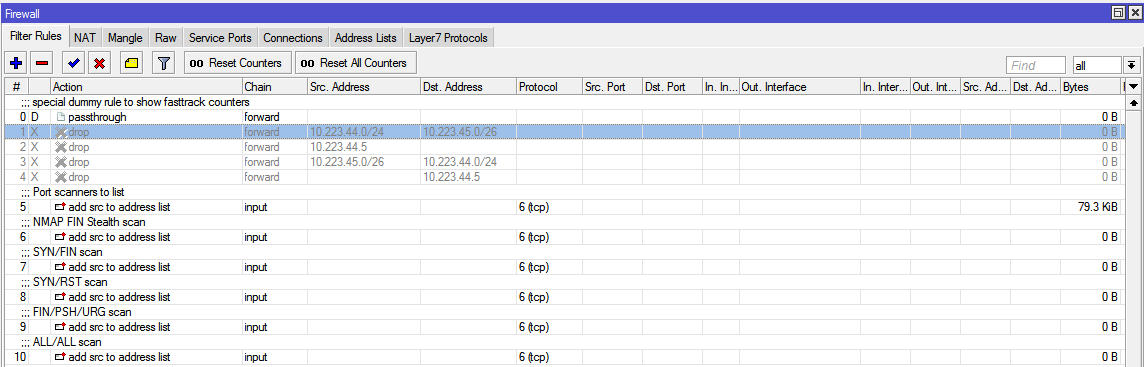
There is another subnet: 10.223.45.0/26 on ether3 port, but that one you can ignore it completely, it will be there, it doesn’t need any vlan, it’s isolated, I just disabled the drop packets rules (between subnets) at some point and forgot to re-enable them back.

So, in conclusion I only need 2 subnets for now, vlan2 and vlan3.
If I’ll ever need another vlan in the future, I’ll be able to extend the steps one more time, once I go through them one time successfully.

I’ve deleted those bridges since they were unused.
image_2022-04-18_215444103.png

@Max2: DNS in “/ip dns” is what router itself uses. DNS in “/ip dhcp-server network” is what clients get. The latter can be either router’s address, if you want clients to use its DNS cache, or any other external server.

And if you want to be sure that you don’t break anything, then definitely don’t paste commands you’re not 100% sure about. Go slow, be clever, use the separate ether3 to reconfigure the rest (use whatever you’re most comfortable with, CLI, GUI, it’s up to you), and you should be safe. Ok, it’s still possible to lock yourself out, but at least the change for it is lower than if you’d do it being connected to one of those reconfigured subnets.

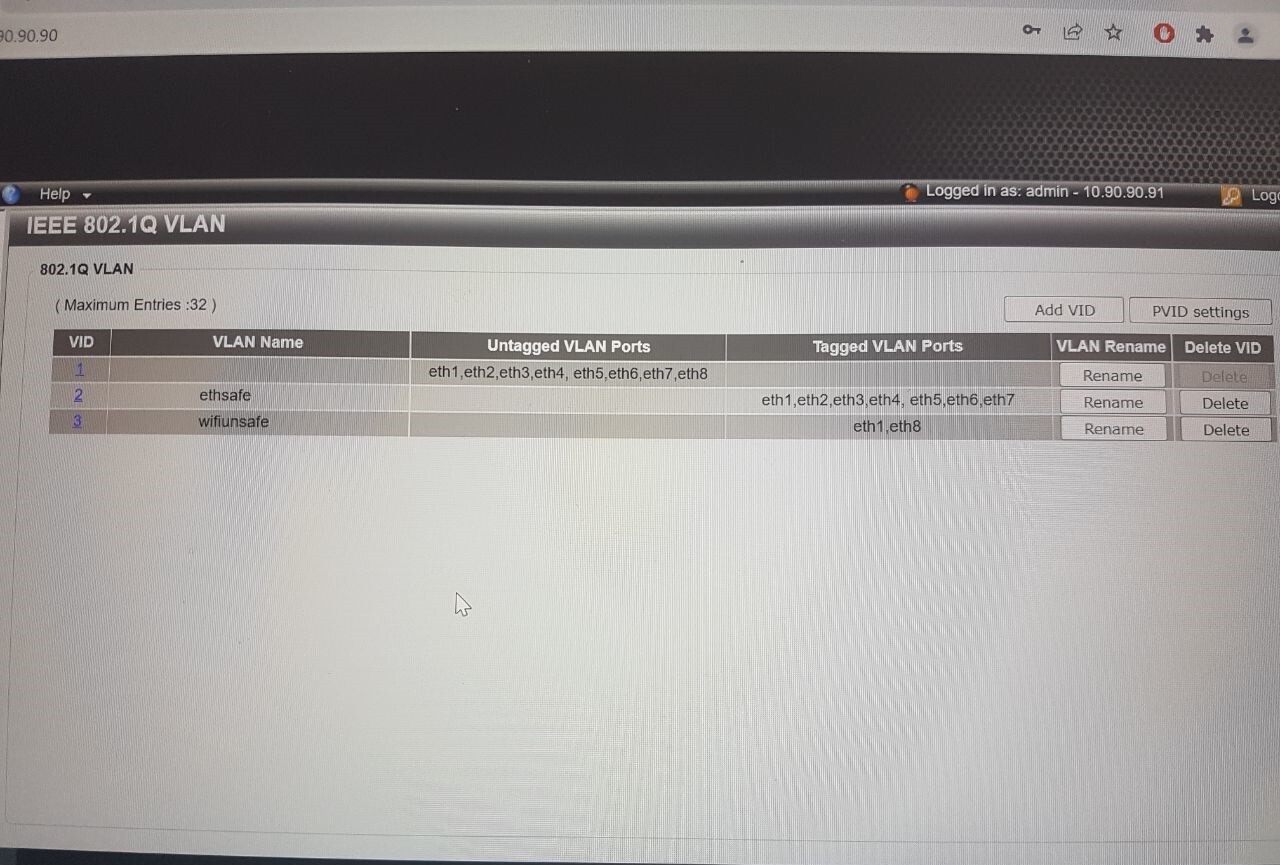
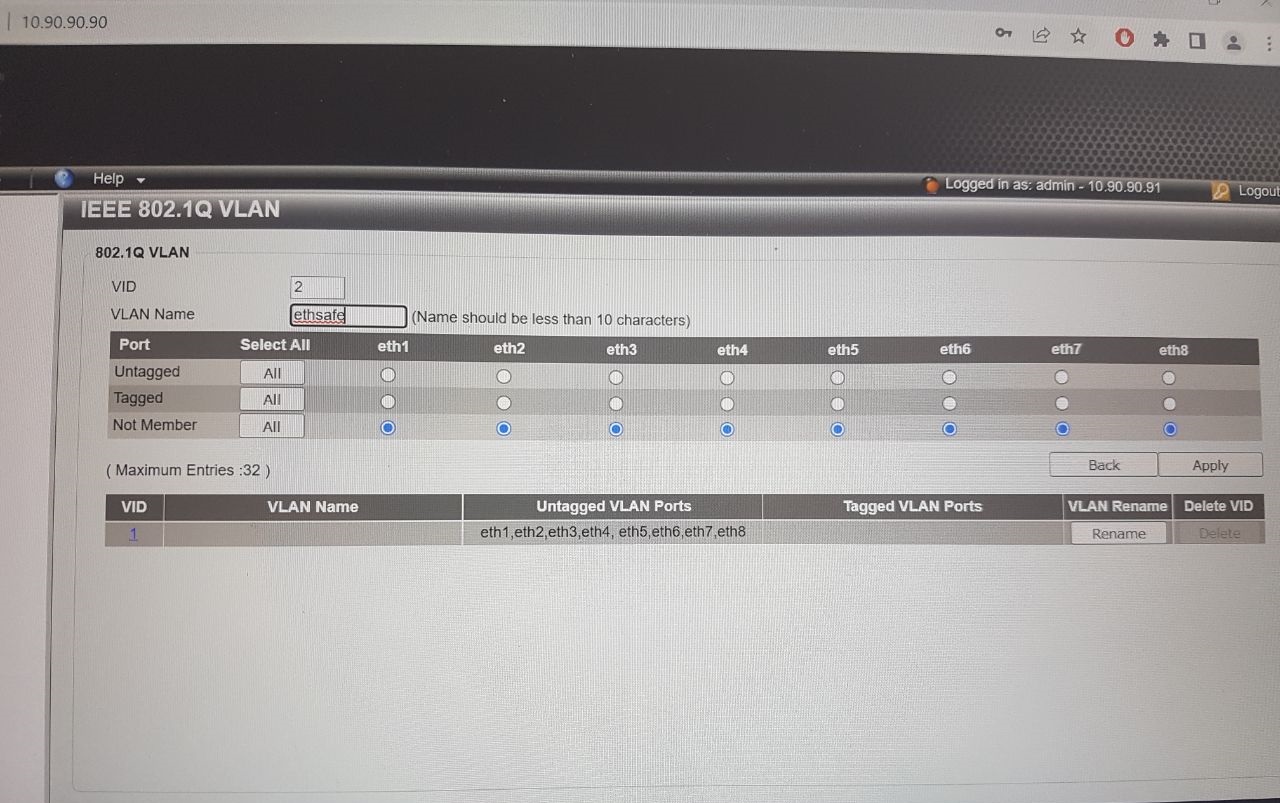
I don’t know why it doesn’t allow me to select Untagged for the ports that don’t go to the router in VLANs that I’m trying to create: VLAN 2 and VLAN 3.
I understood that I had to put tagged for port 1, and Untagged for the rest of the ports that are part of the VLAN and Not Member the for the ones that shouldn’t be in that VLAN.

So, for VLAN 2: port 1 should be tagged, ports 2-7 should be untagged, port 8 should be not member.
For VLAN 3: port 1 should be tagged, port 8 should be untagged, ports 2-7 should be not member.

But it doesn’t allow me to put the ports in untagged and I don’t know why.
2.jpg
1.jpg

When using vlans on a link between two devices, both devices should agree on what is to be carried on the trunk. And especially what the untagged vlan is, because there is no indication in the ethernet frame itself when it is untagged.

I think you are using port 1 on the switch to carry 3 vlans, 1, 2 and 3. And 1 isn’t being used (except as the default for the untagged vlan).
Your switch doesn’t appear to be a MikroTik, if it is a D-Link DGS-1100-08V2, this probably isn’t the best place to be asking about how to configure it. Doesn’t D-Link have a forum?

Some switches will allow you to configure more than a single vlan as untagged on a port, but that is not recommended unless you know what you are doing. The only time I have ever seen that done was when “asymmetric vlans” were being used to “isolate” untagged access switch-ports from other switch-ports in the same subnet. And that isn’t the case here, so your switch is probably not allowing you to have more than one vlan untagged on a specific switch-port, and that is normal. So select vlan 1, and select “not member” for all ports except port 1 (some switches won’t allow you to remove vlan 1 from all ports). Then you will be able to select one of the other vlans as untagged on ports 2-8.

You don’t ever specify, so I will assume all the devices you will be connecting to the switch are not vlan-aware, i.e. just standard ethernet. If that is the case, then each device will be a member of exactly one vlan, and the vlan they belong to will be determined by the setting on the switch-port (by specifying the PVID).

I think this is what you want.
port 1 trunk port to MikroTik ether2 untagged for vlan 1, tagged for vlan 2, tagged for vlan 3
ports 2-7 access port for vlan 2, untagged for vlan 2, not member of vlan 1 or vlan 3
port 8 access port for vlan 3, untagged for vlan 3, not member of vlan 1 or vlan 2

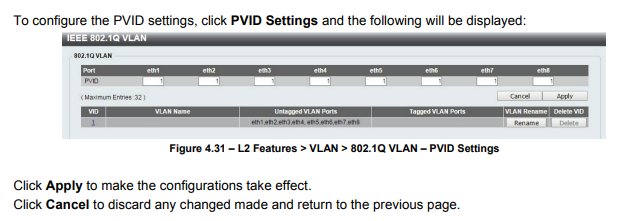
PVID settings: See page 26 of https://support.dlink.com/resource/PRODUCTS/DGS-1100-08V2/REVA/DGS-1100-08V2_REVA_MANUAL_v1.00_WW.pdf
D-Link PVID.png
port 1 : PVID 1
ports 2-7 ; PVID 2
port 8 : PVID 3

This is the extent of the spoon feeding I will be providing.

Nothing wrong with DLINK switches if configured properly, same goes with the MT.
If the OP, or in this cast the PERP being guilty of using vlan1 for data vice leaving it alone as a background native vlan just doing its thing, is gonna have problems.

So first things first, lets assume we stick with vlans 200,300, and 400.
Going from etherX (trunk port on MT router) to Dlink switch.

EtherX (at MT)

/interface bridge ports
bridge=bridge  interface=etherX  ingress-filtering=yes frame-types=admit-only-vlan-tagged
/interface bridge vlans
bridge=bridge  tagged=bridge,etherX  vlan-ids=200,300,400   { if 200,300,400 have no other assignment, otherwise as applicable }
bridge=bridge  tagged=bridge,etherX, unknown  untagged=unknown  vlan-ids=200
bridge=bridge  tagged=bridge,etherX,unknown   untagged=unknown  vlan-ids=300 
bridge=bridge  tagged=bridge,etherX,unkown   untagged=unknown   vlan-ids=400

Now we have to figure out what is the trusted subnet, lets say it vlan200…

At DLINK switch.
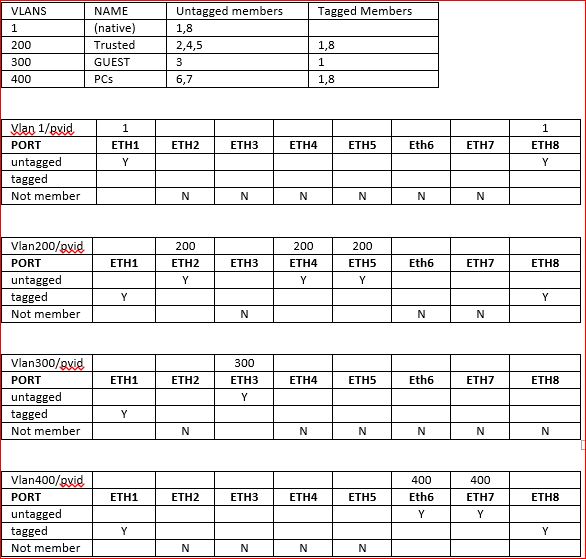
Lets assume ether1 is from the MT, ether2 is going to a dumb AP for vlan 200, ether3 is going to a dumb AP for vlan 300 and ether4,5 are going to dumb computers on the trusted network, ether6.7 are going to dumb wired media devices vlan400. and ether8 is going to another smart switch but only carrying vlan trusted and medial vlan400

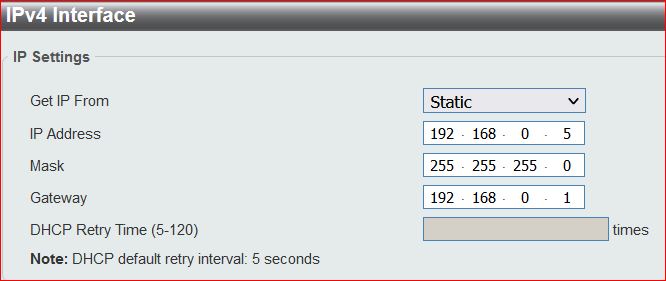
First off, the switch needs an IP address on the trusted VLAN 200.
THere should be ipv4 LAN settings somewhere on that switch!!

option1.JPG

(1) ALL ports come default untagged with native VLAN1
(2) Trunk ports should have a native untagged vlan1 and this should be left alone. All trunk ports should be tagged with all the vlans required.
(3) Access ports to dumb device should have PVID assigned to the port which removes the default untagged vlan1, and the port should be untagged for the new VLANID

Based on the above facts, your DLINK should look something like

setup2.JPG

Head over to Ed Harmoush’s Practical Networking site https://www.practicalnetworking.net Ed has recently started a Networking Fundamentals course and he is putting the first module (with multiple videos) on Youtube. It’s a good intro with very little assumptions about previous knowledge, and even if you think you already know this stuff, if you watch it, and give it your utmost attention, you will probably get a deeper understanding than you currently have. Ed has some of the best explained info about vlans Virtual Local Area Networks (VLANs) See the challenge quiz if you think you understand vlans. Ed also have a video covering the same info VLANs – the simplest explanation Here’s an index to the vlan pages on PracticalNetworking And here’s a good starting point for Networking topics in general (don’t be put off by the CCNA, this is pretty generic info that you need to know, and explained in an easy to understand way. CCNA Index

@anav Why restart from scratch?

This was his question:

He obviously has a connection to the switch, otherwise we wouldn’t see his pictures of the D-Link web interface.

I haven’t used a D-Link smart switch, but I can read manuals, and I have used Netgear and TP-Link “smart switches” that are probably similar.

Asking him to move ports being used for the access points, and introducing new vlans is just going to be more confusing for someone that is just learning vlans, and is already frustrated to the point of making the comment “I regret buying the switch, the sdcard and the camera. Now I have to sell them.” in post #14

Hahaha I just used the numbers as an example of what it would look like on the hex and the switch. For comparative purposes.
I figure the OP is smart enough to use his brain and figure out what he should do to his settings with whatever numbers he chooses.
But he can compare to the examples so that he assigns oranges to oranges (his numbers) to match the pattern of my apples to apples (my example numbers).

The example covers trunk ports and access ports (and not hybrid ports).
I also made enough examples for some different configurations to illustrate the setup methodology
The important thing is to not use VLAN1 for data and to leave it as the default vlan on the MT device.

Buckeye and anav, thank you very much for your explanations.
I realize now my mistake with the default configured VLAN, I’ll try to fix it first thing tomorrow.