Please how to make use of BTH in case i would like to connect to Local Services / servers?
Soon as I’ve setup the BTH connection on Android device and i connect (via Mobile internet), my internet connection (page loading, clients etc…) stop to work.
I can only connect to the Mikrotik router - via Mikrotik / Mikrotik Home app.
So not really sure if this is the wanted behaivor to only control Mikrotik router settings, reboots etc.
Or I should also gain access to “local services” and have internet working at the same time.
If so, do I need to configure some exceptions , rules , FW on router?
(using also other VPN WG connection from commerce provider)
Well you need to ensure LAN is allowed on bth users ( its the default setting so should be )
You may need to add a forward chain allow rule from BTH to LAN
You may need to add a forward chain rule allow from BTH to WAN
Nichky, the QR code available at the router is ONLY for the first assignment to the admins smartphon… When you use Manage Shares from that smartphone, you can create more qrcodes, links BTH app can use, or standard wireguard export files…
Coming back to my previous quote and question. Would it be possible to make the dynamic Input firewall rule more restrictive/selective?
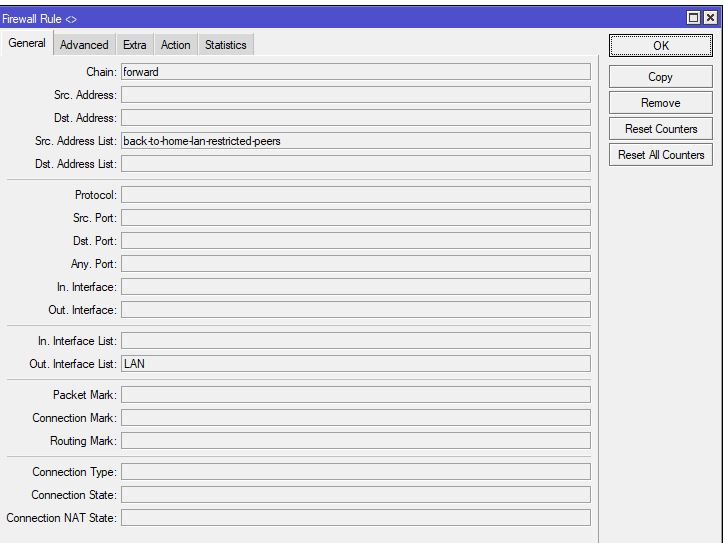
These are the BTH FW rules dynamically added.
Flags: X - disabled, I - invalid; D - dynamic
0 D ;;; back-to-home-vpn
chain=forward action=drop src-address-list=back-to-home-lan-restricted-peers out-interface-list=LAN
1 D ;;; back-to-home-vpn
chain=input action=accept protocol=udp dst-port=16453
As one can see 2nd rule opens completely port 16453 from any side (LAN/WAN) and any interface/port of the router.
If you log the traffic that needs to be accepted, you will see it comes in from the physical WAN port.
Therefore I would like Mikrotik to add to the dynamic accept rule the in-interface, closing this port for all other interfaces.
And maybe there are further means to restrict this rule further (IP address of the Mtik server)… based on the principle, only allow what you have to have, and drop all the rest.
BTH is supposed to make a dynamic input chain rule for wireguard, completely normal!
The forward chain rule you see, I have never seen when making BTH setups, so not sure why you are seeing it.
I can only guess is that you didnt select LAN availability for your peers?
In any case you can apply firewall rules as you see fit for either the BTH interface, or the subnet of wireguard, both apply
Did some more testing but still no luck.
However I have to admit the hapax3 is not setup as a router but simply an AP switch behind a CCR1009 main router, with one primary WAN.
So the management vlan is where the hapax3 gets its IP address.
When I use my iphone to start the process, I use a WLAN on the trusted subnet. From there I connect to the hapax3 by using its IP address on that subnet and of course the winboxport I have setup on the hapax3.
I have no issues creating the new BTH tunnel which can be confirmed by viewing the hapax3 via my PC and winbox.
I disconnect wifi from my iphone and attempt to reconnect via cellular.
I have no issues connecting to the tunnel via cellular, simply by selecting the tunnel name and hitting connect.
However when I go to manage shares, the same username and password are rejected in the app and thus cannot add shares.
I tried adding the bth interface and bth ips in various combinations on the input chain of the hapax3 to allow connectivity (after adding the bth to the trusted interface )
I tried taking the port noted in bTH and port forwarding that port on the CCR1009 to the hapax3
No joy.
My conclusion thus far is that if the MT device is not setup as a router perhaps BTH will not work???
If that is not true then I must be missing something obvious.
Let me repeat it again. If you find BTH confusing, it’s because you are trying to configure it from Winbox. You should not use Winbox or CLI for BTH at all.
Use the BTH app and it will be much clearer. Sure it’s technically possible, but it is not made for that. If you are in Winbox, just use Wireguard.
my private Network uses 10.0.0.0/24 as address range. When I connect via BTH my device gets a 192.168.216.0/24 address.
This implies that requests needs routing, and I need to update some firewall rules.
Would it be possible that BTH users will just get a 10.0.0.0/24 address, as if they were “truly local”?
Decided to try BTH on main router CCR1009 and using 7.17 firmware.
All good in terms of using the iphone app on trusted WLAN to create the tunnel.
All settings checked on router via winbox
Only difference from hapax3 ( acting as a switch ) is that I finally see on the CCR1009 version, the forward chain rule that blocks any entries without LAN selected for bth clients.
From cellular connection and any network WLAN, SAME Issue! I am not able to login again from the app to create new peers via manage shares.
BTH seems to be broken for me and cannot figure out why.
Just in case I created many allow input chain rules from BTH to input chain.
I tried looking through the generated interfaces and wireguard config in the admin UI, but I am still new to mikrotik and could not find it on my own. Can someone point me in the right direction?
No the address range provided is fixed, the admins smartphone will get 192.168.216.3, the router 192.168.216.1 address and 192.168.213.2 is reserved for the relay peer.
You are correct the default rule allows access to the LAN, so it depends how you have defined your LAN interface list.
Further rules will probably be necessary to permit WAN access or other access as required, if you have changed your rules from default.
thx for the clarification! if I wanted to stream some videos from my media server via BTH while being on vacation for example, my CRS-326 would need to route all packages from 10.0.0.0/24 to 192.168.216.0/24, correct? I have no experience with hardware offloading and routing so far, but would that be a perf bottleneck?
You really should be able to use your media servers IP address while connected to BTH, without doing anything. Now if your media server app does discovery to find the media server, that won’t work… you need to use the media server LAN IP address (or a DNS name defined in /ip/dns/static) in the media client app.
By default, all traffic is routed to Mikrotik router when connected to BTH (as long as your “first/app user” or a “shared/2nd user” with allow-lan=yes set). So it doesn’t matter what IP the LAN uses… unless if you have non-default firewall, in which case the WG interface or BTH IP range might have to be allowed if you have stuff like inter-VLAN/other restrictions etc.