Thank you so much @anav for looking into it, all the advices are much appreciated!
i have just updated the settings with your recommendations:
# 2024-06-10 18:03:55 by RouterOS 7.15
# software id = 63WL-9G9C
#
# model = RB2011UiAS-2HnD
# serial number = 467304B1DBAF
/caps-man channel
add control-channel-width=20mhz extension-channel=Ce frequency=2442 name=\
    channel2G tx-power=13
add extension-channel=Ce frequency=5180 name=channel5G tx-power=13
/interface bridge
add admin-mac=4C:5E:0C:43:D6:3E auto-mac=no comment=defconf name=bridge \
    port-cost-mode=short
/interface wireless
# managed by CAPsMAN
# channel: 2442/20-Ce/gn(9dBm), SSID: WiFi, CAPsMAN forwarding
set [ find default-name=wlan1 ] band=2ghz-b/g/n channel-width=20/40mhz-XX \
    country=sweden distance=indoors installation=indoor mode=ap-bridge ssid=\
    "The Apartment" station-roaming=enabled wireless-protocol=802.11
/interface wireguard
add listen-port=33333 mtu=1420 name=wireguard
/caps-man datapath
add bridge=bridge client-to-client-forwarding=yes name=datapath2G
add bridge=bridge client-to-client-forwarding=yes name=datapath5G
/caps-man security
add authentication-types=wpa-psk,wpa2-psk encryption=aes-ccm,tkip \
    group-encryption=aes-ccm name="Security config 2G"
add authentication-types=wpa-psk,wpa2-psk encryption=aes-ccm,tkip \
    group-encryption=aes-ccm name="Security config 5G"
/caps-man configuration
add channel=channel2G channel.band=2ghz-b/g/n country=sweden datapath=\
    datapath2G mode=ap name=cfg2G rx-chains=0,1,2,3 security=\
    "Security config 2G" ssid="WiFi" tx-chains=0,1,2,3
add channel=channel5G channel.band=5ghz-onlyn country=sweden datapath=\
    datapath5G mode=ap name=cfg5G rx-chains=0,1,2,3 security=\
    "Security config 5G" ssid=WiFi2 tx-chains=0,1,2,3
add channel.band=5ghz-n/ac .control-channel-width=20mhz .extension-channel=\
    XXXX country=sweden datapath.client-to-client-forwarding=yes \
    .local-forwarding=yes name=cfg-5ghz-ac security="Security config 5G"
add channel.band=5ghz-onlyn .control-channel-width=20mhz .extension-channel=\
    XX country=sweden datapath.client-to-client-forwarding=yes \
    .local-forwarding=yes name=cfg-5ghz-an security="Security config 5G"
/caps-man interface
add channel=channel5G configuration=cfg5G configuration.mode=ap datapath=\
    datapath5G disabled=no mac-address=00:00:00:00:00:00 master-interface=\
    none name=capsman radio-mac=00:00:00:00:00:00 radio-name="" security=\
    "Security config 5G"
/interface list
add comment=defconf name=WAN
add comment=defconf name=LAN
/interface lte apn
set [ find default=yes ] ip-type=ipv4 use-network-apn=no
/interface wireless security-profiles
set [ find default=yes ] authentication-types=wpa-psk,wpa2-psk mode=\
    dynamic-keys supplicant-identity=MikroTik
/ip pool
add name=dhcp ranges=192.168.88.11-192.168.88.254
/ip dhcp-server
add address-pool=dhcp interface=bridge lease-script="# DNS TTL to set for DNS \
    entries\
    \n:local dnsttl \"00:15:00\";\
    \n\
    \n###\
    \n# Script entry point\
    \n#\
    \n# Expected environment variables:\
    \n# leaseBound         1 = lease bound, 0 = lease removed\
    \n# leaseServerName    Name of DHCP server\
    \n# leaseActIP         IP address of DHCP client\
    \n#leaseActMAC      MAC address of DHCP client\
    \n###\
    \n\
    \n# \"a.b.c.d\" -> \"a-b-c-d\" for IP addresses used as replacement for mi\
    ssing host names\
    \n:local ip2Host do=\\\
    \n{\
    \n  :local outStr\
    \n  :for i from=0 to=([:len \$inStr] - 1) do=\\\
    \n  {\
    \n    :local tmp [:pick \$inStr \$i];\
    \n    :if (\$tmp =\".\") do=\\\
    \n    {\
    \n      :set tmp \"-\"\
    \n    }\
    \n    :set outStr (\$outStr . \$tmp)\
    \n  }\
    \n  :return \$outStr\
    \n}\
    \n\
    \n:local mapHostName do={\
    \n# param: name\
    \n# max length = 63\
    \n# allowed chars a-z,0-9,-\
    \n  :local allowedChars \"abcdefghijklmnopqrstuvwxyz0123456789-\";\
    \n  :local numChars [:len \$name];\
    \n  :if (\$numChars > 63) do={:set numChars 63};\
    \n  :local result \"\";\
    \n\
    \n  :for i from=0 to=(\$numChars - 1) do={\
    \n    :local char [:pick \$name \$i];\
    \n    :if ([:find \$allowedChars \$char] < 0) do={:set char \"-\"};\
    \n    :set result (\$result . \$char);\
    \n  }\
    \n  :return \$result;\
    \n}\
    \n\
    \n:local lowerCase do={\
    \n# param: entry\
    \n  :local lower \"abcdefghijklmnopqrstuvwxyz\";\
    \n  :local upper \"ABCDEFGHIJKLMNOPQRSTUVWXYZ\";\
    \n  :local result \"\";\
    \n  :for i from=0 to=([:len \$entry] - 1) do={\
    \n    :local char [:pick \$entry \$i];\
    \n    :local pos [:find \$upper \$char];\
    \n    :if (\$pos > -1) do={:set char [:pick \$lower \$pos]};\
    \n    :set result (\$result . \$char);\
    \n  }\
    \n  :return \$result;\
    \n}\
    \n\
    \n:local token \"\$leaseServerName-\$leaseActMAC\";\
    \n:local LogPrefix \"DHCP2DNS (\$leaseServerName)\"\
    \n\
    \n:if ( [ :len \$leaseActIP ] <= 0 ) do=\\\
    \n{\
    \n  :log error \"\$LogPrefix: empty lease address\"\
    \n  :error \"empty lease address\"\
    \n}\
    \n\
    \n:if ( \$leaseBound = 1 ) do=\\\
    \n{\
    \n  # new DHCP lease added\
    \n  /ip dhcp-server\
    \n  #:local dnsttl [ get [ find name=\$leaseServerName ] lease-time ]\
    \n  network\
    \n  :local domain [ get [ find \$leaseActIP in address ] domain ]\
    \n  :log info \"\$LogPrefix: DNS domain is \$domain\"\
    \n\
    \n  :local hostname [/ip dhcp-server lease get [:pick [find mac-address=\$\
    leaseActMAC and server=\$leaseServerName] 0] value-name=host-name]\
    \n  #:log info \"\$LogPrefix: DHCP hostname is \$hostname\"\
    \n\
    \n #Hostname cleanup\
    \n  :if ( [ :len \$hostname ] <= 0 ) do=\\\
    \n  {\
    \n    :set hostname [ \$ip2Host inStr=\$leaseActIP ]\
    \n    :log info \"\$LogPrefix: Empty hostname for '\$leaseActIP', using ge\
    nerated host name '\$hostname'\"\
    \n  }\
    \n  :set hostname [\$lowerCase entry=\$hostname]\
    \n  :set hostname [\$mapHostName name=\$hostname]\
    \n  #:log info \"\$LogPrefix: Clean hostname for FQDN is \$hostname\";\
    \n\
    \n  :if ( [ :len \$domain ] <= 0 ) do=\\\
    \n  {\
    \n    :log warning \"\$LogPrefix: Empty domainname for '\$leaseActIP', can\
    not create static DNS name\"\
    \n    :error \"Empty domainname for '\$leaseActIP'\"\
    \n  }\
    \n\
    \n  :local fqdn (\$hostname . \".\" .  \$domain)\
    \n  #:log info \"\$LogPrefix: FQDN for DNS is \$fqdn\"\
    \n\
    \n    :if ([/ip dhcp-server lease get [:pick [find mac-address=\$leaseActM\
    AC and server=\$leaseServerName] 0] ]) do={\
    \n      # :log info message=\"\$LogPrefix: \$leaseActMAC -> \$hostname\"\
    \n      :do {\
    \n        /ip dns static add address=\$leaseActIP name=\$fqdn ttl=\$dnsttl\
    \_comment=\$token;\
    \n      } on-error={:log error message=\"\$LogPrefix: Failure during dns r\
    egistration of \$fqdn with \$leaseActIP\"}\
    \n    }\
    \n\
    \n} else={\
    \n# DHCP lease removed\
    \n  /ip dns static remove [find comment=\$token];\
    \n}\
    \n" lease-time=10m name=DhcpWithScript
/ip smb users
set [ find default=yes ] disabled=yes
/port
set 0 name=serial0
/ppp profile
set *0 interface-list=LAN
set *FFFFFFFE interface-list=LAN
/routing bgp template
set default disabled=no output.network=bgp-networks
/routing ospf instance
add disabled=no name=default-v2
/routing ospf area
add disabled=yes instance=default-v2 name=backbone-v2
/caps-man manager
set enabled=yes upgrade-policy=suggest-same-version
/caps-man provisioning
add action=create-dynamic-enabled hw-supported-modes=gn master-configuration=\
    cfg2G
add action=create-dynamic-enabled hw-supported-modes=an,ac \
    master-configuration=cfg5G
add action=create-dynamic-enabled hw-supported-modes=ac master-configuration=\
    cfg-5ghz-ac name-format=prefix-identity name-prefix=5ghz-ac
add action=create-dynamic-enabled hw-supported-modes=an master-configuration=\
    cfg-5ghz-an name-format=prefix-identity name-prefix=5ghz-an
/interface bridge port
add bridge=bridge comment=defconf ingress-filtering=no interface=ether2 \
    internal-path-cost=10 path-cost=10
add bridge=bridge comment=defconf ingress-filtering=no interface=ether3 \
    internal-path-cost=10 path-cost=10
add bridge=bridge comment=defconf ingress-filtering=no interface=ether4 \
    internal-path-cost=10 path-cost=10
add bridge=bridge comment=defconf ingress-filtering=no interface=ether5 \
    internal-path-cost=10 path-cost=10
add bridge=bridge comment=defconf ingress-filtering=no interface=ether6 \
    internal-path-cost=10 path-cost=10
add bridge=bridge comment=defconf ingress-filtering=no interface=ether7 \
    internal-path-cost=10 path-cost=10
add bridge=bridge comment=defconf ingress-filtering=no interface=ether8 \
    internal-path-cost=10 path-cost=10
add bridge=bridge comment=defconf ingress-filtering=no interface=ether9 \
    internal-path-cost=10 path-cost=10
add bridge=bridge comment=defconf ingress-filtering=no interface=ether10 \
    internal-path-cost=10 path-cost=10
add bridge=bridge comment=defconf ingress-filtering=no interface=sfp1 \
    internal-path-cost=10 path-cost=10
add bridge=bridge comment=defconf ingress-filtering=no interface=wlan1 \
    internal-path-cost=10 path-cost=10
/ip firewall connection tracking
set udp-timeout=10s
/ip neighbor discovery-settings
set discover-interface-list=LAN
/ip settings
set max-neighbor-entries=8192
/ipv6 settings
set disable-ipv6=yes max-neighbor-entries=8192
/interface list member
add comment=defconf interface=bridge list=LAN
add comment=defconf interface=ether1 list=WAN
add interface=wireguard list=LAN
/interface ovpn-server server
set auth=sha1 certificate=server cipher=aes256-cbc default-profile=\
    default-encryption enabled=yes port=9606 require-client-certificate=yes
/interface wireguard peers
add allowed-address=192.168.87.2/24 comment="ilja macbook" interface=\
    wireguard name=peer1 public-key=\
    "snMBiNdXULctRPfQFiXq7ylrOPzsOGY6y60QUcM/tkU="
add allowed-address=192.168.87.3/24 comment="ilja iPhone 12Pro" interface=\
    wireguard name=peer2 public-key=\
    "AgfQTMgy1PDoKewb4hOE8BtiD/3xZ5DoKXYTzfGuZg8="
/interface wireless cap
#
set bridge=bridge caps-man-addresses=127.0.0.1 discovery-interfaces=bridge \
    enabled=yes interfaces=wlan1
/ip address
add address=192.168.88.1/24 comment=defconf interface=bridge network=\
    192.168.88.0
add address=87.96.165.183/25 interface=ether1 network=87.96.165.128
add address=192.168.87.1/24 comment=wireguard interface=wireguard network=\
    192.168.87.0
/ip cloud
set ddns-enabled=yes
/ip dhcp-client
add comment=defconf interface=ether1 use-peer-dns=no
/ip dhcp-server network
add address=192.168.88.0/24 comment=defconf gateway=192.168.88.1
/ip dns
set allow-remote-requests=yes servers=8.8.8.8
/ip dns static
add address=192.168.88.1 comment=defconf name=router.lan
add address=192.168.88.21 comment="manually added" name=iphone-ll
/ip firewall address-list
add address=467304b1dbaf.sn.mynetname.net comment="IP-Cloud feature" list=\
    WAN-IP
/ip firewall filter
add action=accept chain=input comment=\
    "defconf: accept established,related,untracked" connection-state=\
    established,related,untracked
add action=drop chain=input comment="defconf: drop invalid" connection-state=\
    invalid
add action=accept chain=input comment="defconf: accept ICMP" protocol=icmp
add action=accept chain=input comment=\
    "Allow WireGuard VPN to enter local network" dst-port=33333 protocol=udp
add action=accept chain=input comment="Allow OpenVPN" dst-port=9606 \
    in-interface=ether1 protocol=tcp
add action=accept chain=input comment=\
    "defconf: accept to local loopback (for CAPsMAN)" dst-address=127.0.0.1
add action=drop chain=input comment="defconf: drop all not coming from LAN" \
    in-interface-list=!LAN
add action=accept chain=forward comment="defconf: accept in ipsec policy" \
    ipsec-policy=in,ipsec
add action=accept chain=forward comment="defconf: accept out ipsec policy" \
    ipsec-policy=out,ipsec
add action=fasttrack-connection chain=forward comment="defconf: fasttrack" \
    connection-state=established,related hw-offload=yes
add action=accept chain=forward comment=\
    "defconf: accept established,related, untracked" connection-state=\
    established,related,untracked
add action=accept chain=forward comment="internet traffic" in-interface-list=\
    LAN out-interface-list=WAN
add action=accept chain=forward comment="WG to LAN" dst-address=\
    192.168.88.0/24 in-interface=wireguard
add action=accept chain=forward comment="port forwarding" \
    connection-nat-state=dstnat
add action=drop chain=forward comment="drop all else"
add action=drop chain=forward comment="defconf: drop invalid" \
    connection-state=invalid
/ip firewall nat
add action=masquerade chain=srcnat comment="HAIRPIN NAT" dst-address=\
    192.168.88.0/24 src-address=192.168.88.0/24 to-addresses=192.168.88.10
add action=masquerade chain=srcnat comment="defconf: masquerade" \
    ipsec-policy=out,none out-interface-list=WAN
add action=dst-nat chain=dstnat comment="Traefik HTTP" dst-address-list=\
    WAN-IP dst-address-type="" dst-port=80 in-interface=ether1 protocol=tcp \
    to-addresses=192.168.88.5 to-ports=9080
add action=dst-nat chain=dstnat comment="Traefik HTTPS" dst-address-list=\
    WAN-IP dst-address-type=local dst-port=443 in-interface=ether1 protocol=\
    tcp to-addresses=192.168.88.5 to-ports=9443
add action=dst-nat chain=dstnat comment="Hairpin - Traefik HTTP" \
    dst-address-list=WAN-IP dst-address-type=local dst-port=80 protocol=tcp \
    to-addresses=192.168.88.5 to-ports=9080
add action=dst-nat chain=dstnat comment="Hairpin - Traefik HTTPS" \
    dst-address-list=WAN-IP dst-address-type=local dst-port=443 protocol=tcp \
    to-addresses=192.168.88.5 to-ports=9443
/ip service
set www port=82
set www-ssl certificate=server port=4443
/ip smb shares
set [ find default=yes ] directory=/pub
/ip ssh
set always-allow-password-login=yes
/lcd interface pages
set 0 interfaces=wlan1
/ppp secret
add comment="Ilja's OpenVPN" local-address=192.168.88.1 name=leikoilja \
    profile=default-encryption remote-address=192.168.88.151 service=ovpn
add comment="Jess OpenVPN" local-address=192.168.88.1 name=jess profile=\
    default-encryption remote-address=192.168.88.152 service=ovpn
/routing bfd configuration
add disabled=no interfaces=all min-rx=200ms min-tx=200ms multiplier=5
/system clock
set time-zone-name=Europe/Stockholm
/system identity
set name="MikroTik Hub"
/system note
set show-at-login=no
/system routerboard settings
# Firmware upgraded successfully, please reboot for changes to take effect!
# Warning: cpu not running at default frequency
set auto-upgrade=yes cpu-frequency=700MHz silent-boot=yes
/system script
add comment=\
    "from https://www.ctrl.blog/entry/routeros-dhcp-lease-script.html" \
    dont-require-permissions=no name="DHCP to DNS" owner=leikoilja policy=\
    ftp,read,write,policy,test,password,sniff,sensitive,romon source="# DNS TT\
    L to set for DNS entries\
    \n:local dnsttl \"00:15:00\";\
    \n\
    \n###\
    \n# Script entry point\
    \n#\
    \n# Expected environment variables:\
    \n# leaseBound         1 = lease bound, 0 = lease removed\
    \n# leaseServerName    Name of DHCP server\
    \n# leaseActIP         IP address of DHCP client\
    \n#leaseActMAC      MAC address of DHCP client\
    \n###\
    \n\
    \n:local leaseServerName \"DhcpWithScript\"\
    \n\
    \n\
    \n# \"a.b.c.d\" -> \"a-b-c-d\" for IP addresses used as replacement for mi\
    ssing host names\
    \n:local ip2Host do=\\\
    \n{\
    \n  :local outStr\
    \n  :for i from=0 to=([:len \$inStr] - 1) do=\\\
    \n  {\
    \n    :local tmp [:pick \$inStr \$i];\
    \n    :if (\$tmp =\".\") do=\\\
    \n    {\
    \n      :set tmp \"-\"\
    \n    }\
    \n    :set outStr (\$outStr . \$tmp)\
    \n  }\
    \n  :return \$outStr\
    \n}\
    \n\
    \n:local mapHostName do={\
    \n# param: name\
    \n# max length = 63\
    \n# allowed chars a-z,0-9,-\
    \n  :local allowedChars \"abcdefghijklmnopqrstuvwxyz0123456789-\";\
    \n  :local numChars [:len \$name];\
    \n  :if (\$numChars > 63) do={:set numChars 63};\
    \n  :local result \"\";\
    \n\
    \n  :for i from=0 to=(\$numChars - 1) do={\
    \n    :local char [:pick \$name \$i];\
    \n    :if ([:find \$allowedChars \$char] < 0) do={:set char \"-\"};\
    \n    :set result (\$result . \$char);\
    \n  }\
    \n  :return \$result;\
    \n}\
    \n\
    \n:local lowerCase do={\
    \n# param: entry\
    \n  :local lower \"abcdefghijklmnopqrstuvwxyz\";\
    \n  :local upper \"ABCDEFGHIJKLMNOPQRSTUVWXYZ\";\
    \n  :local result \"\";\
    \n  :for i from=0 to=([:len \$entry] - 1) do={\
    \n    :local char [:pick \$entry \$i];\
    \n    :local pos [:find \$upper \$char];\
    \n    :if (\$pos > -1) do={:set char [:pick \$lower \$pos]};\
    \n    :set result (\$result . \$char);\
    \n  }\
    \n  :return \$result;\
    \n}\
    \n\
    \n:local token \"\$leaseServerName-\$leaseActMAC\";\
    \n:local LogPrefix \"DHCP2DNS (\$leaseServerName)\"\
    \n\
    \n:if ( [ :len \$leaseActIP ] <= 0 ) do=\\\
    \n{\
    \n  :log error \"\$LogPrefix: empty lease address\"\
    \n  :error \"empty lease address\"\
    \n}\
    \n\
    \n:if ( \$leaseBound = 1 ) do=\\\
    \n{\
    \n  # new DHCP lease added\
    \n  /ip dhcp-server\
    \n  #:local dnsttl [ get [ find name=\$leaseServerName ] lease-time ]\
    \n  network\
    \n  :local domain [ get [ find \$leaseActIP in address ] domain ]\
    \n  #:log info \"\$LogPrefix: DNS domain is \$domain\"\
    \n\
    \n  :local hostname [/ip dhcp-server lease get [:pick [find mac-address=\$\
    leaseActMAC and server=\$leaseServerName] 0] value-name=host-name]\
    \n  #:log info \"\$LogPrefix: DHCP hostname is \$hostname\"\
    \n\
    \n #Hostname cleanup\
    \n  :if ( [ :len \$hostname ] <= 0 ) do=\\\
    \n  {\
    \n    :set hostname [ \$ip2Host inStr=\$leaseActIP ]\
    \n    :log info \"\$LogPrefix: Empty hostname for '\$leaseActIP', using ge\
    nerated host name '\$hostname'\"\
    \n  }\
    \n  :set hostname [\$lowerCase entry=\$hostname]\
    \n  :set hostname [\$mapHostName name=\$hostname]\
    \n  #:log info \"\$LogPrefix: Clean hostname for FQDN is \$hostname\";\
    \n\
    \n  :if ( [ :len \$domain ] <= 0 ) do=\\\
    \n  {\
    \n    :log warning \"\$LogPrefix: Empty domainname for '\$leaseActIP', can\
    not create static DNS name\"\
    \n    :error \"Empty domainname for '\$leaseActIP'\"\
    \n  }\
    \n\
    \n  :local fqdn (\$hostname . \".\" .  \$domain)\
    \n  #:log info \"\$LogPrefix: FQDN for DNS is \$fqdn\"\
    \n\
    \n    :if ([/ip dhcp-server lease get [:pick [find mac-address=\$leaseActM\
    AC and server=\$leaseServerName] 0] ]) do={\
    \n      # :log info message=\"\$LogPrefix: \$leaseActMAC -> \$hostname\"\
    \n      :do {\
    \n        /ip dns static add address=\$leaseActIP name=\$fqdn ttl=\$dnsttl\
    \_comment=\$token;\
    \n      } on-error={:log error message=\"\$LogPrefix: Failure during dns r\
    egistration of \$fqdn with \$leaseActIP\"}\
    \n    }\
    \n\
    \n} else={\
    \n# DHCP lease removed\
    \n  /ip dns static remove [find comment=\$token];\
    \n}\
    \n\
    \n"
/tool mac-server
set allowed-interface-list=LAN
/tool mac-server mac-winbox
set allowed-interface-list=LAN
/user group
add name=homeassistant policy="read,test,api,!local,!telnet,!ssh,!ftp,!reboot,\
    !write,!policy,!winbox,!password,!web,!sniff,!sensitive,!romon,!rest-api"
However, sadly still no WAN access from iphone using wireguard 
Attached is the wireguard tunnel settings on iphone
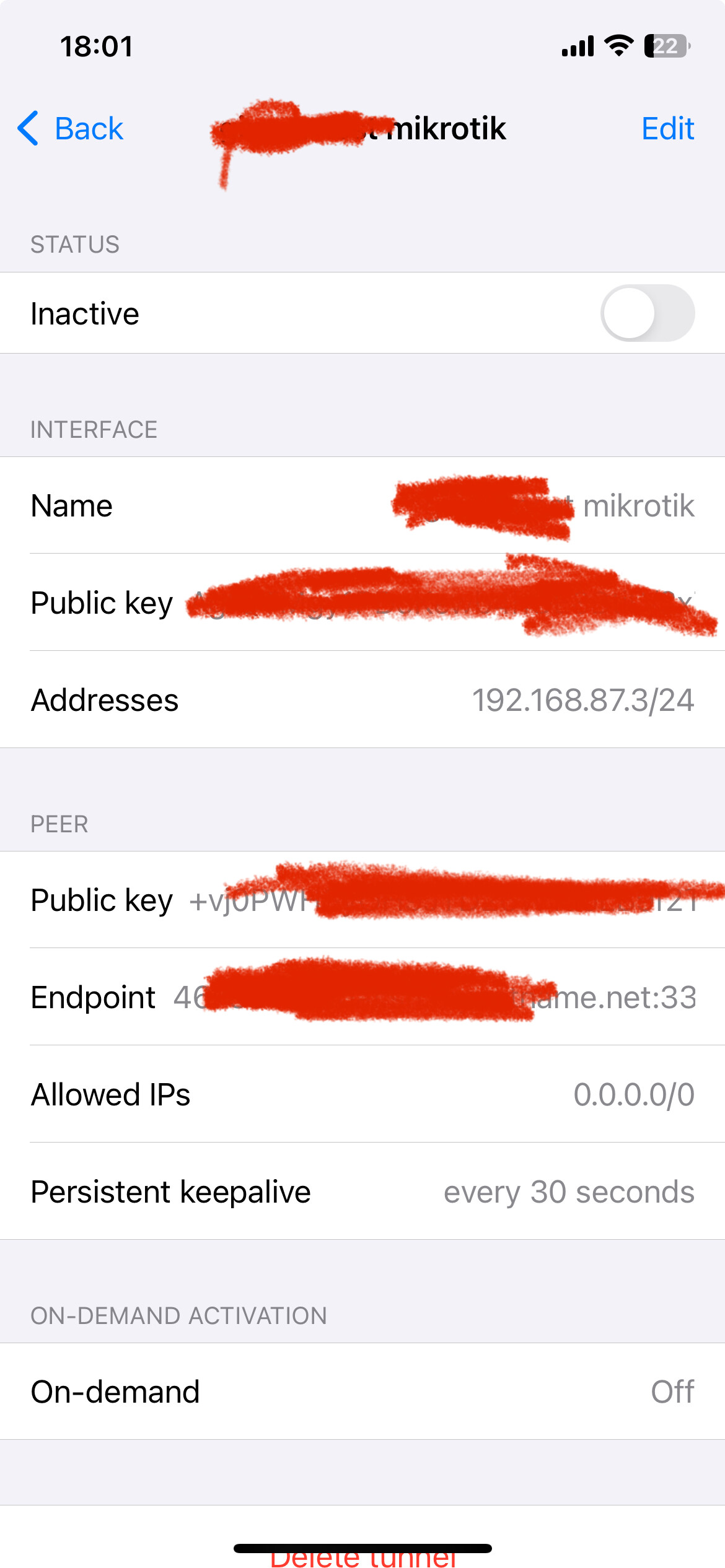
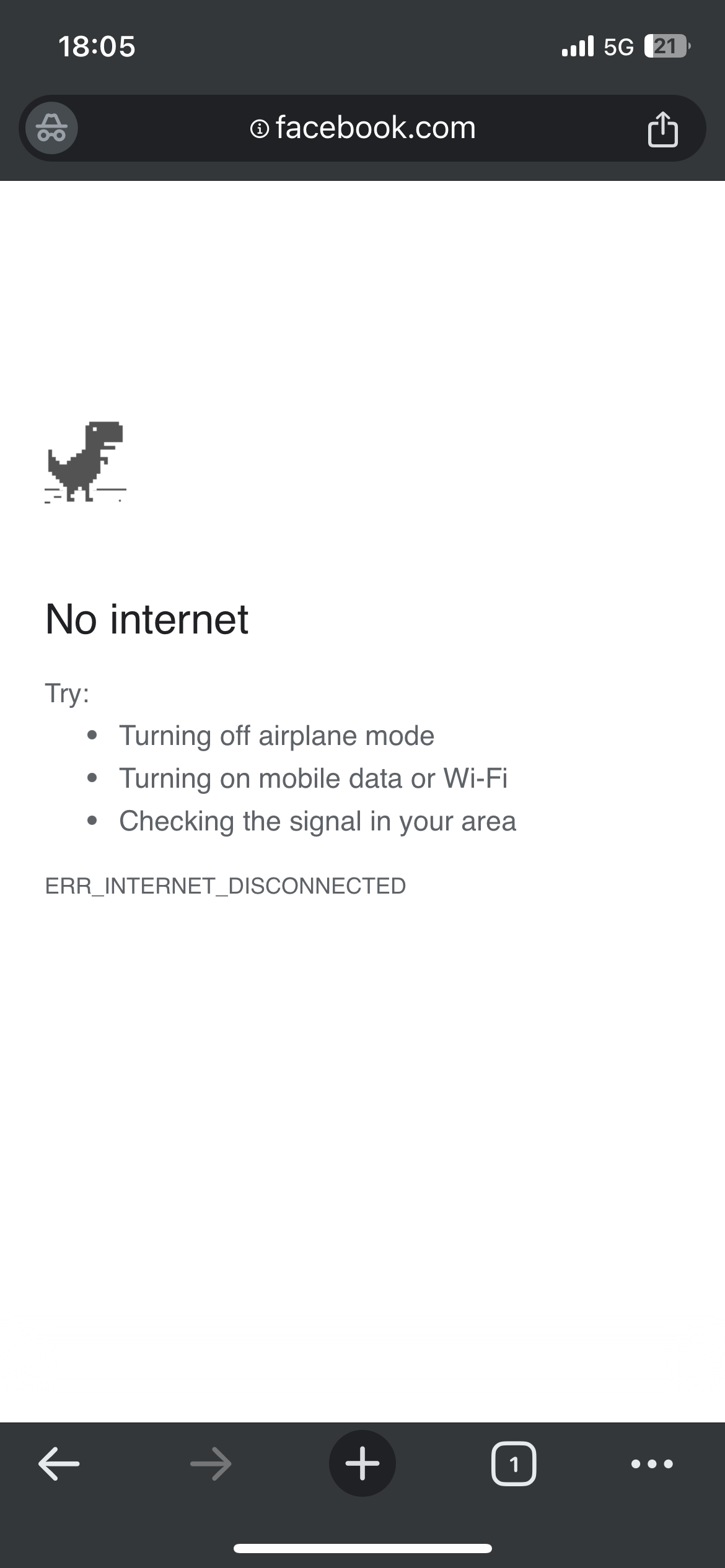
 tried changing it to 192.168.87.0/24 - unfortunately no difference at all:


