Can you reply to me when you see it? Should I add a command before what you
Hi there, I came to this thread after trying the directions on the NordVPN site, and got excited because its working for so many people, but the configuration isn’t working for me. I would like to have two devices on my network, an Apple TV and a laptop access the VPN connection, and the rest to not.
I have a set of Google Wifi Mesh devices behind a hap RB750Gr3, that uses a PPPoE connection to a CenturyLink ONT (see below for a quick diagram). I’m a tech savvy person with a basic understanding of networking. When I visit wtfismyip.com it’s my regular IP, so I tried including 192.168.88.251 in the firewall address list, but to no avail. Is there a NAT issue here? Does anyone have an idea about what I might be doing wrong? Thank you in advance for any help or ideas.
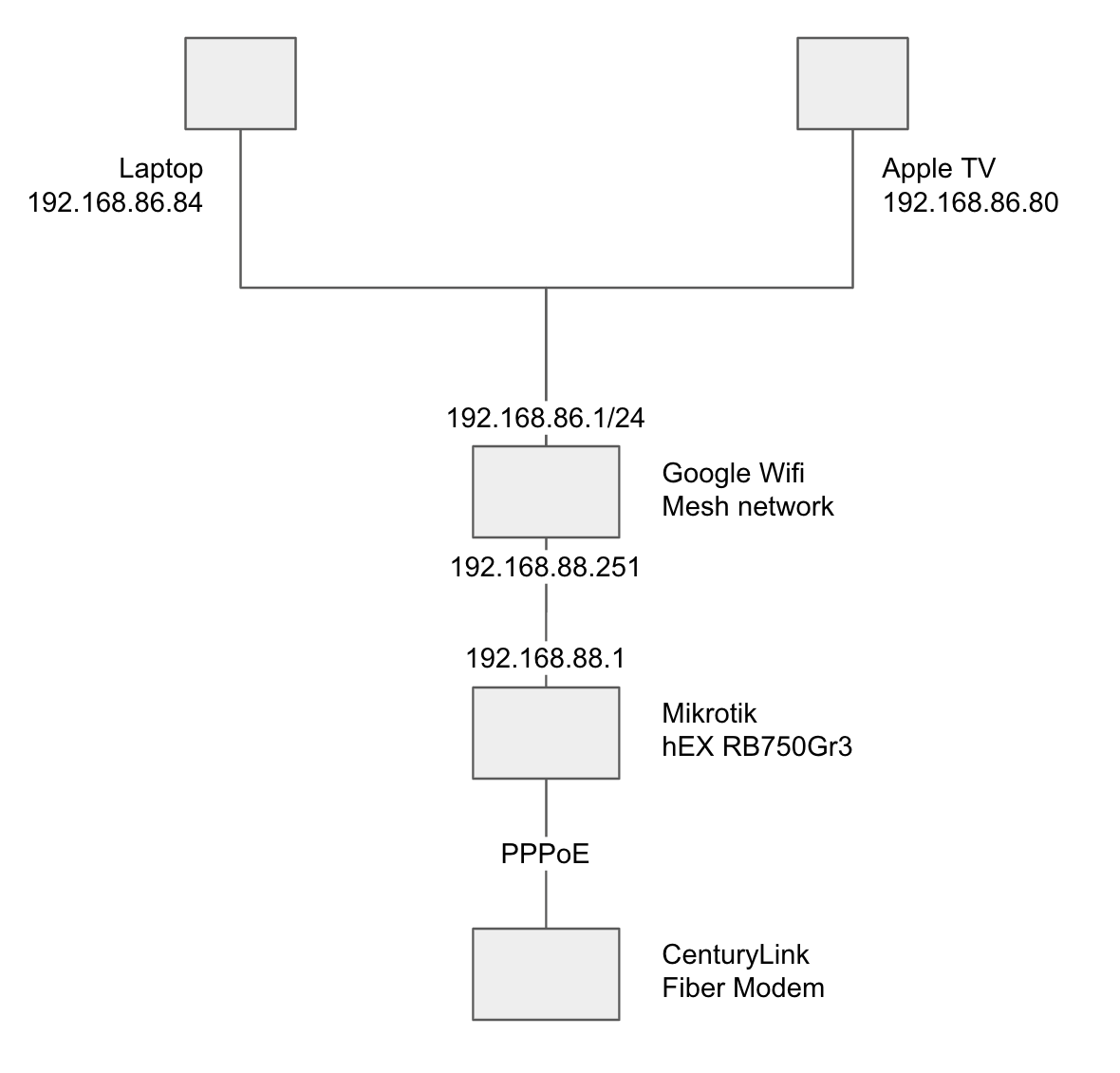
And here’s the output of /export:
# dec/12/2021 14:07:30 by RouterOS 6.47.1
# software id = Z46B-UBXL
#
# model = RB750Gr3
/interface bridge
add admin-mac=C4:AD:34:C6:1E:0A auto-mac=no comment=defconf name=bridge protocol-mode=none
/interface ethernet
set [ find default-name=ether1 ] advertise=10M-full,100M-full,1000M-full,2500M-full,5000M-full,10000M-full
set [ find default-name=ether2 ] advertise=10M-full,100M-full,1000M-full,2500M-full,5000M-full,10000M-full
/interface vlan
add interface=ether1 name=e1-v201 vlan-id=201
/interface pppoe-client
add add-default-route=yes disabled=no interface=e1-v201 max-mru=1492 max-mtu=1492 name=pppoe-out1 password=<password> user=<username>
/interface list
add comment=defconf name=WAN
add comment=defconf name=LAN
/interface wireless security-profiles
set [ find default=yes ] supplicant-identity=MikroTik
/ip hotspot profile
set [ find default=yes ] html-directory=flash/hotspot
/ip ipsec mode-config
add connection-mark=under_nordvpn name="NordVPN mode config" responder=no
/ip ipsec policy group
add name=NordVPN
/ip ipsec profile
add dh-group=modp2048 enc-algorithm=aes-256 hash-algorithm=sha512 name="NordVPN profile"
/ip ipsec peer
add address=in104.nordvpn.com exchange-mode=ike2 name="NordVPN server" profile="NordVPN profile"
/ip ipsec proposal
add auth-algorithms=sha256 enc-algorithms=aes-256-cbc lifetime=0s name="NordVPN proposal" pfs-group=none
/ip pool
add name=default-dhcp ranges=192.168.88.10-192.168.88.254
/ip dhcp-server
add address-pool=default-dhcp disabled=no interface=bridge name=defconf
/user group
set full policy=local,telnet,ssh,ftp,reboot,read,write,policy,test,winbox,password,web,sniff,sensitive,api,romon,dude,tikapp
/interface bridge port
add bridge=bridge comment=defconf interface=ether2
add bridge=bridge comment=defconf interface=ether3
add bridge=bridge comment=defconf interface=ether4
add bridge=bridge comment=defconf interface=ether5
/ip neighbor discovery-settings
set discover-interface-list=LAN
/interface list member
add comment=defconf interface=bridge list=LAN
add comment=defconf interface=ether1 list=WAN
/ip address
add address=192.168.88.1/24 comment=defconf interface=bridge network=192.168.88.0
/ip dhcp-client
add comment=defconf disabled=no interface=ether1
/ip dhcp-server network
add address=192.168.88.0/24 comment=defconf gateway=192.168.88.1
/ip dns
set allow-remote-requests=yes servers=8.8.8.8,8.8.4.4
/ip dns static
add address=192.168.88.1 name=router.lan type=A
/ip firewall address-list
add address=192.168.86.80 list=under_nordvpn
add address=192.168.86.84 list=under_nordvpn
/ip firewall filter
add action=accept chain=forward connection-mark=under_nordvpn
add action=fasttrack-connection chain=forward comment="defconf: fasttrack" connection-state=established,related
add action=accept chain=forward comment="defconf: accept established,related, untracked" connection-state=established,related,untracked
add action=accept chain=input comment="defconf: accept established,related,untracked" connection-state=established,related,untracked
add action=drop chain=input comment="defconf: drop invalid" connection-state=invalid
add action=accept chain=input comment="defconf: accept ICMP" protocol=icmp
add action=drop chain=input comment="defconf: drop all not coming from LAN" in-interface-list=!LAN
add action=drop chain=forward comment="defconf: drop invalid" connection-state=invalid
add action=accept chain=forward comment="defconf: accept in ipsec policy" ipsec-policy=in,ipsec
add action=accept chain=forward comment="defconf: accept out ipsec policy" ipsec-policy=out,ipsec
add action=drop chain=forward comment="defconf: drop all from WAN not DSTNATed" connection-nat-state=!dstnat connection-state=new in-interface-list=WAN
/ip firewall mangle
add action=mark-connection chain=prerouting new-connection-mark=under_nordvpn passthrough=yes src-address-list=under_nordvpn
add action=change-mss chain=forward connection-mark=no-mark new-mss=1452 out-interface=pppoe-out1 passthrough=yes protocol=tcp tcp-flags=syn tcp-mss=1301-65535
add action=change-mss chain=forward connection-mark=under_nordvpn new-mss=1360 passthrough=yes protocol=tcp tcp-flags=syn tcp-mss=!0-1360
/ip firewall nat
add action=masquerade chain=srcnat comment="defconf: masquerade" disabled=yes ipsec-policy=out,none out-interface-list=WAN
add action=masquerade chain=srcnat comment="defconf: masquerade" ipsec-policy=out,none out-interface=pppoe-out1
/ip ipsec identity
add auth-method=eap certificate="NordVPN CA" eap-methods=eap-mschapv2 generate-policy=port-strict mode-config="NordVPN mode config" password=<service password> peer="NordVPN server" policy-template-group=NordVPN username=<service username>
/ip ipsec policy
add dst-address=0.0.0.0/0 group=NordVPN proposal="NordVPN proposal" src-address=0.0.0.0/0 template=yes
/system clock
set time-zone-name=America/Los_Angeles
/tool mac-server
set allowed-interface-list=LAN
/tool mac-server mac-winbox
set allowed-interface-list=LAN
Thanks for your guide.
I am testing a similar setup but using the settings for keepsolidvpn as per their page https://www.vpnunlimited.com/help/manuals/mikrotik-ikev2-setup.
I have it working but I can only pass the dns test at ipleak.net by manually assigning dns to the clients. A dynamic DNS server is shown on the router in IP DNS but If I use the router address for the client DNS, requests are still sent via my normal upstream DNS.
Is this behaviour expected?
Given your setup I don’t seen how you could accomplish that. The Google Mesh device is NAT-ing all connections so by the time the packets reach the Mikrotik device, they’re all coming from the 192.168.88.251 address. There is no way for the Mikrotik device to recognize the devices behind the Google Mesh device.
I have no experience with Google Mesh devices and a quick search on the admin interface suggests to me that Google doesn’t really offer a lot of control. That being said, there might be some configuration option that would allow you to set these devices up in Access Point mode. That way you get full control back over your network traffic.
Good luck.
Yes, see the manual:
When both static and dynamic servers are set, static server entries are more preferred, however, it does not indicate that static server will always be used (for example, previously query was received from a dynamic server, but static was added later, then a dynamic entry will be preferred).
If you only want to use dynamic leave static empty.
Thanks for pointing out that DNS information.
I would much rather have a static DNS in as well, so I believe my only option is therefore to define DNS in the client.
At this point I only need one client to use the VPN - a TV streaming device. DNS is not manually configurable.
My solution for this:
All my other clients get their DNS via DHCP which point them to my local pihole.
I have found that I can create a DHCP server entry for just the client in question, with its own DNS address - e.g. VPN providers, Cloudflare etc.
This appears to work.as I guess 192.168.0.X is more specific than 192.168.0.0/24. When tested with a PC, ipleak,net is indicating that the DNS query from the PC is indeed getting sent over the VPN connection.
Edit.
I’m not sure this is going to work. I am going to use a VPN connection designed for watching TV streaming…the address is therefore very likely to change each time. Is there another way to allocate the dynamic DNS address to the DHCP client?
Edit2 No all looks good, the dynamic DNS is staying the same so must get changed at the VPN provider end.
For me the kill switch is not working. It stops all VPN users traffic no matter if the VPN is up or not. If I disable the killswitch routing rule everything works again.
Maybe because I am using VLANs on the bridge?
For now I have implemented a killswitch by excluding VPN users from the NAT masquerade rules. Works well and I still have access to LAN clients.
Thnx for all here. 

I there an easy way to find the best MTU to use ?
How do you implement the kill switch in ROS? The routing mark is missing from route in ROS7
# (OPTIONAL) Implement a killswitch
/interface bridge add name=nordvpn_blackhole protocol-mode=none
/ip route add gateway=nordvpn_blackhole routing-mark=nordvpn_blackhole
/ip firewall mangle add chain=prerouting src-address-list=under_nordvpn action=mark-routing new-routing-mark=nordvpn_blackhole passthrough=yes
Hello, i have latest stable RouterOS 7.2.1
i am using scenario #1, by source, and without killswitch.
implemented all without errors
however, it does not work, no nat rules are generated, nor ip ipsec active peers / installed SAs etc.
Mangle rule for connection tracking based on ip firewall source / address list fetches the traffic.
How to troubleshoot further? it seems that ipsec mode config is setup correct, but not applying, what should be different for RouterOS 7.2.1 ?
fast track temporary disabled also
Have the same question. The only thing that holds me on ROS6.
Any idea how to eable nordvpn interface only at one port?
/ip firewall mangle add action=mark-connection chain=input in-interface=ether2 new-connection-mark=VPN passthrough=yes
Marking connections coming on ether2 with connection mark VPN. You can set more specific filters and you have to change the name of the connection mark.
In RouterOS you first have to define the route before you can refer to it.
/routing table
add  fib name=nordvpn_blackhole
Hello,
Sorry if my question is silly, I am new to the Mikrotik world! I am trying to follow this tutorial and everything works, except the killswitch! I am on ROS 7.2.3 and here is what I tried to create the killswitch:
/routing table add fib name=nordvpn_blackhole
After that, I inserted the killswitch commands, but when I insert this command, I get an error “expected end of command (line 1 column 41)”:
/ip route add gateway=nordvpn_blackhole routing-mark=nordvpn_blackhole
Could you please inform how can I implement the killswitch in ROS7.2.3? Thanks in advance!
Routes in v7 have “routing-table” instead of “routing-mark”.
Hi, thanks for replying. So I just need to replace the “routing-mark” to “routing-table” ?
Do I need to edit this line too?
/ip firewall mangle add chain=prerouting src-address-list=under_nordvpn action=mark-routing new-routing-mark=nordvpn_blackhole passthrough=yes
Yes.
No, in the rules/lines (new-)routing-mark is still being used.
Thanks everyone, I was able to insert all killswitch commands, but after the following command, I completely lose internet connection on the IPs under the address-list.
/ip firewall mangle add chain=prerouting src-address-list=under_nordvpn action=mark-routing new-routing-mark=nordvpn_blackhole passthrough=yes
If I go to the Firewall mangle and disable it, I can access the internet again. So the killswitch is not working as it should. Any tips about this issue?
A basic way is to add a second route that takes over when when the dynamic route of the VPN is deactivated.
/ip route
add blackhole disabled=no distance=254 dst-address=0.0.0.0/0 routing-table=under_nordvpn scope=30 target-scope=10
Then why not move also to WireGuard when using NordVPN?