anyone has solution ?
It is weird that in our house, only iPhone14 pro has this “SA query timeout” issue. All other apple devices ( macbook, macbook air, ipad or iphone 12) don’t behave like this.
anyone has solution ?
It is weird that in our house, only iPhone14 pro has this “SA query timeout” issue. All other apple devices ( macbook, macbook air, ipad or iphone 12) don’t behave like this.
In my case it still doesn’t work… The only solution I can see is to give my Dad a new phone.
I also have that problem, but only with an iPhone 13, all other devices work fine
Hello,
First time here. I have upgraded my cAP ax device from v7.8 to v7.12 and one “Lenovo” laptop started disconnecting often.
Looking at the log I have determined that the problem could be that laptop changes wifi frequencies from 5Ghz to 2Ghz and therefore cAP device waits until it can no longer determine that laptop is connected. After then it lets connect to AP. The duration time offline was about 1 minute.
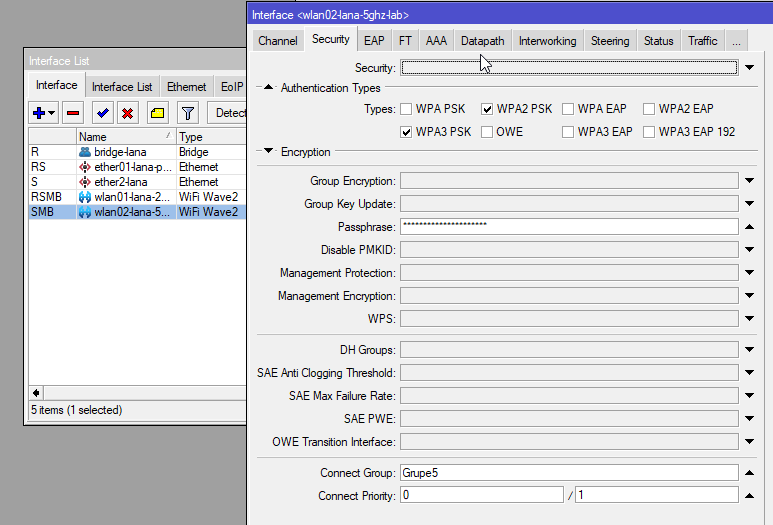
I could not find any sophisticated information, so I tried changing these 2 values on each frequency radio interface:
connect-group ( string )
APs within the same connect group do not allow more than 1 client device with the same MAC address. This is to prevent malicious authorized users from intercepting traffic intended to other users (‘MacStealer’ attack) or performing a denial of service attack by spoofing the MAC address of a victim.
Handling of new connections with duplicate MAC addresses depends on the connect-priority of AP interfaces involved.
By default, all APs are assigned the same connect-group.
connect-priority (accept-priority/hold-priority (integers))Theese parameters determine, how a connection is handled if the MAC address of the client device is the same as that of another active connection to another AP.
If (accept-priority of AP2) < (hold-priority of AP1), a connection to AP2 wil cause the client to be dropped from AP1.
If (accept-priority of AP2) = (hold-priority of AP1), a connection to AP2 will be allowed only if the MAC address can no longer be reached via AP1.
If (accept-priority of AP2) > (hold-priority of AP1), a connection to AP2 will not be accepted.If omitted, hold-priority is the same as accept-priority.
By default, APs, which perform user authentication, have higher priority (lower integer value), than open APs.
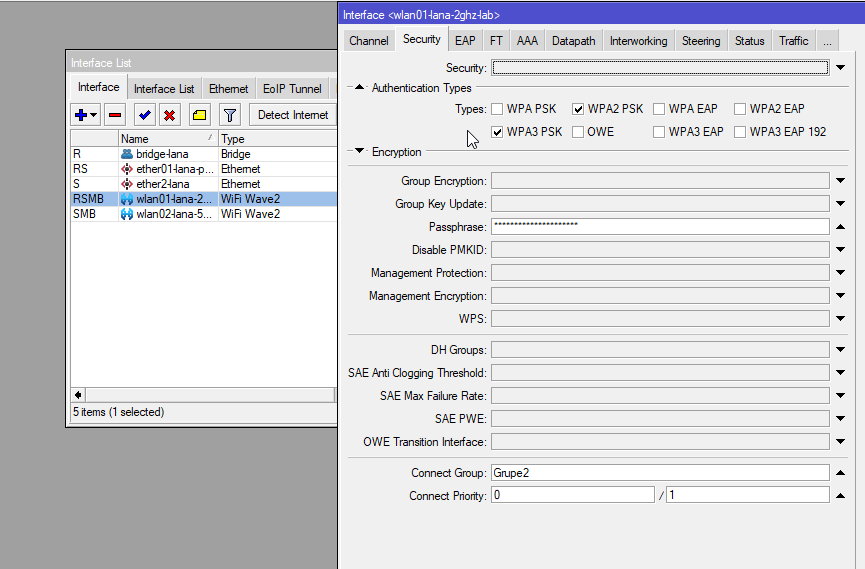
On 2Ghz - Security - Connect Group (“Grupe2”) and Connect Priority (0/1)
On 5Ghz - Security - Connect Group (“Grupe5”) and Connect Priority (0/1)
For now the laptop works ok, no long disconnections from Wifi. It would be great if someone can explain if this is right way to configure it.
Hit this problem after upgrading from 6 to 7. Was very stable with 6, now on ROS7 is frustrating with this. Happens on iPhone and Mac. Happens on cAP ax and Audience. Solutions here didn’t help  Have anyone found something else?
Hello,
Started having this problem with i don’t know which version of ROS 7.xx, now running the latest 7.13.2.
Impossible to roam from independent AX2 to AX3: simple connects/disconnects, SA timeouts, no IPv4 DHCP replies, all kinds of crap.
I have tried all the suggestions here and there, but they do not work. All smartphones are android, most of them have issues staying connected when moving from floor to floor (from one hap ax to another).
However, i have noticed a workaround which works on some phones: instead of static phone MAC address switch to randomized MAS addresses.
Is this whole issue is related to the client MAC addresses?
Do i need to configure and run capsman to overcome this critical connectivity problem?
CAPsMAN wont help, also the same on 7.14Beta7 maybe slightly worse than 7.14Beta6.
Anyway, I’m sure someone will be along soon to say it’s your config etc…
How do you know his config is correct. There are not a lot of topics where, after sharing the config, there are no improvements to make on the config.
@kurio: As far as I know the client will always use the same MAC address (per SSID), even if it is randomized. No clue why you think it is helping…
In regards to the SA Query timeout problem, it has been solved for me (using CAPsMAN) by setting the connect-priority.
Same here on Chateau 18 (7.13.2) with all my AX diveces that are trying to connect to 2Ghz, 5Ghz connections are fine though.
No CAPsMAN, just a single(dual actually) raido.
The devices namely are a couple of Google pixel (6&7) phones, and a pair of laptops with AX211 wifis’.
Also, the devices that are not capable of AX seem to de working just fine,
And it happens randomly – not all the devices at once.
Maybe the matter does deserve some comment from the staff?
edit. persuaded a part of the devices to connect to 5g only, now this happens both with 2 and 5 ghz (((
Then it might be better to create a ticket with supout right after you see it happening.
Because staff does not frequent these forums that often (they sometimes do).
Deployed... i'll let YOU Know!
2 name="wifi1" l2mtu=1560 mac-address=18:FD arp-timeout=auto radio-mac=18:FD
   configuration.mode=ap .ssid="002" .country=United Kingdom
   security.authentication-types=wpa2-psk .encryption=ccmp .passphrase=""
   .management-protection=allowed .wps=disable .connect-priority=0/1
   channel.frequency=5180 .band=5ghz-ax .width=20/40/80mhz .skip-dfs-channels=10min-cac
If that isn't correct please do share what needs to be done.
Faced the same problem
disconnected, SA Query timeout
On 5Ghz - Security - Connect Priority (0/1) It worked until firmware 7.14, but on 7.14 the network on the laptop began to fall off constantly. Connected \ Disconnected…
back to 7.13.4 (and definitely System\RouterBOARD\Upgrade firmware to 7.13.4) - good work for me
Priority does not do anything, 7.14. Log is flooded with SA Query timeouts. Clients have terrible experience using wifi. What is going on??
@Neolo,
Could you please show your configuration?
RouterOS and firmware ver <= 7.13.4 - normal work
RouterOS and firmware ver = 7.14 - clients disconnected and logs: “… disconnected, SA Query timeout …”
My config:
/interface wifi configuration

add channel.band=2ghz-ax .frequency=2412 .skip-dfs-channels=10min-cac .width=20mhz country=Russia datapath.bridge=bridge disabled=no mode=ap name=2Ghz security.authentication-types=wpa2-psk,wpa3-psk .connect-priority=0/1 .passphrase=WiFiPass124 .wps=disable ssid=WiFiName123

add channel.band=5ghz-ax .frequency=5640-5725 .skip-dfs-channels=10min-cac .width=20/40/80mhz country=Russia datapath.bridge=bridge disabled=no mode=ap name=5Ghz security.authentication-types=wpa2-psk,wpa3-psk .connect-priority=0/1 .passphrase=WiFiPass124 .wps=disable ssid=WiFiName123-5GHz

/interface wifi cap
set caps-man-addresses=127.0.0.1 enabled=yes

/interface wifi capsman
set enabled=yes package-path="" require-peer-certificate=no upgrade-policy=none

/interface wifi provisioning
add action=create-dynamic-enabled disabled=no master-configuration=2Ghz supported-bands=2ghz-ax
add action=create-dynamic-enabled disabled=no master-configuration=5Ghz supported-bands=5ghz-ax
My clients: phones, tv, ps5, smarthome devices notebooks
I didn’t see any mention of disabling Frame Protection. Did this not have any effect?
Which configuration are you asking about?
Everything is default except for it’s an open network with OWE enabled.
The only effect it makes is rendering WPA3 and OWE inoperable. And I don’t want that.
No it wasn’t. I just upgraded from 7.13.4 to 7.14, both have the same problem. Trust me, I have a public place to test with 200 people connecting, not just own laptop and a phone.