dec/24 00:33:46 system,error,critical login failure for user administrator from 190.82.77.203 via telnet
dec/24 00:33:47 system,error,critical login failure for user root from 85.11.22.132 via telnet
dec/24 00:33:48 system,error,critical login failure for user root from 190.82.77.203 via telnet
[/quote]
Hi @normis i intentionally posted the whole log to give people the chance to block those ips if they needed
This is useless. The addresses will never repeat them. Read up on how DDoS works. These are disposable victims of trojans and other bugs, cameras, infected PCs etc.
Currently with my arp and nat im hoping no random address can even access
But reading about things like shodan
Im wondering if it is worthwhile to create a gloabl attack list updated from shodan as a resource for example if it updated in real time
the one that attacked me for instance i noticed the traceroute was coming from the same 4 or 5 ips
One was traced to chile another sweden.
My theory is
If someone is attacking through series of static set ips and it doesnt work on one router the router can update a global list to prevent any other mikrotik being attacked from those address or macs within a timeframe
You will never be able to firewall each “bad” IP individually. The reverse approach is much easier - drop everything and allow only yourself and only on non-standard ports. Implement multiple layers of security if needed, but again - drop everything first.
First add rule for your own IP addresses with action accept. Add as many known IP addresses as you need (your home, office, etc). Then change your telnet and ssh ports to something other than standard, you can do this in the “system → services” menu. Disable telnet if you don’t use it.
Then add rule to drop everything (chain input, action drop). First rules will allow your access, next rules will drop everything that is not allowed in previous rules.
When even you say that, small wonder that so many users get confused about that!
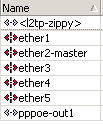
The dangerous truth is that when you have a PPPoE interface, as he has, and it is the link to the ISP, the
firewall has to be configured with the pppoe-out1 interface as the input interface that is blocked by
default, not the ether1 interface which has this rule by default.
We have discussed it before. I think this is another example of a user who was attacked and would
probably later become victim of a DNS reflection DDoS abuse, just because of this default-accept
policy in the MikroTik firewall. It should really be reversed, drop everything except from the interfaces
that are known to be trusted (LAN, WiFi, bridge-local, that kind of thing).
Potentially, yes. I agree that this is normal operation for me too. I found this when dst-nat rules were not working when I set them to ether1 but did work when set to the pppoe interface.
You can, but this shouldn’t be necessary if configured correctly.
The best thing to do is for you to try to connect to your Mikrotik from an external internet source (mobile data maybe?) and test access.
Is it? I can’t tell just from the name. It could be a local test network. Also, I can’t be sure that if his connection drops, that his router becomes open to whatever other connections that can reach his router at that moment. You should probably have some basic rules on the interface itself as well.
Yes, if PPPoE interface in that photo is actually connected to your ISP and the connection goes through it, all the rules should be configured on the PPPoE interface.