7.1.2 and 7.2rc3 – the same problem.
It’s basically unusable at this point.
Is MT doin’ something about it? They have to fix it ASAP.
Same problem here:
Random link drops on 1G Ports on RB3011 and RB5009, when connected to specific other equipment. Drops last no longer than 3-4 seconds, occurence is sporadic, a couple times per day. No distinctive pattern. All 1G ports are affected. Changing cables does not help. Several RouterOS versions in 6 and 7 series tested. Fiddling with L2 settings (Autoneg, Flow control etc.) makes no difference.
Affected devices are:
- Fritzbox 6591 Cable
- Allnet G.hn media converter
NOT affected devices:
- Several unmanaged dumb 1G switches
- 2 Mikrotik Switches
Blaming the other devices look obvious, but in case of the Fritzbox I don’t believe it. It’s just too common. What is interesting is that is happens both on the RB3011 and the new RB5009.
This is very annoying …
Same issue with direct connection between RB4011 and Fritzbox 6591. With hap ac^2 configured as switch in between everything is stable.
I definitely can blame it on the fritz for sure, as a FW-update to FritzOS FW v7.21 - which was the only thing changed in my infrastructure - caused exactly this behaviour.
Before that, the setup ran for months without a glitch…See my post above…
I have same problem with new Vodafone (DE) Modem (bridge mode) and RB4011. Solution was same, some cheap switch between.
Can we say that there are problems on MT with ARM processor (not blaming MT)?
Make sure you don’t have graphing writing to disk, and also make sure you don’t have DHCP writing leases to disk. This was the problem I ran into re: port flapping on CRS328. As soon as I’d do something like a backup save, I’d see ports flap, which is what lead me to discover this behavior. Definitely submit a bug report if this looks related to you, I’ve already submitted one but it’s had no responses since last year. SUP-68278.
Interesting idea, how bad is a standard config like this?
 > /ip/dhcp-server/config/print
  store-leases-disk: 5m
         accounting: yes
     interim-update: 0s
    radius-password: empty
I have to say the documentation seems lacking here: https://help.mikrotik.com/docs/display/ROS/DHCP#DHCP-DHCPServer. I don’t really understand if I set store-leases-disk to 0, does this mean static leases are not kept? Also what is “accounting” and interim update? Seems to be related to Radius but not mentioned anywhere.
Not sure what exactly setting value to 0 does. However there are two special values which are self descriptive: immediately and never.
And I don’t think static leases are affected by this parameter at all, static leases are part of configuration which is always stored to disk (could be it’s not if safe mode is enabled).
You’re right I set it to ‘never’. However I still get the issue, albeit it looks rarer, it didn’t happen for nearly one hour and then twice in 10mins 
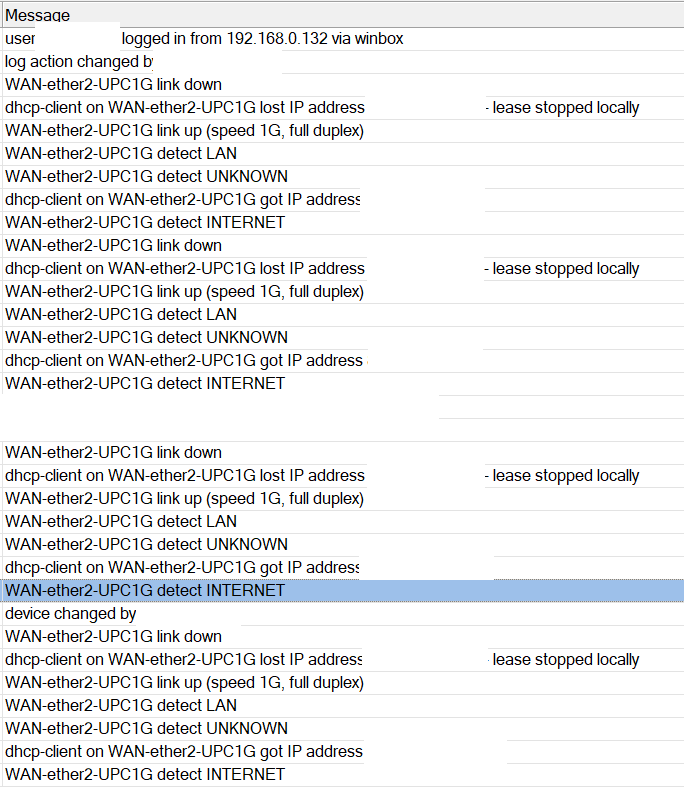
21:33:45 dhcp,info dhcp-client on ether8-wan lost IP address 188.194.xxx.xxx - lease stopped locally
21:33:48 interface,info ether8-wan link up (speed 1G, full duplex)
21:33:49 dhcp,info dhcp-client on ether8-wan got IP address 188.194.xxx.xxx
21:46:58 interface,info ether8-wan link down
21:46:58 dhcp,info dhcp-client on ether8-wan lost IP address 188.194.xxx.xxx - lease stopped locally
21:47:01 interface,info ether8-wan link up (speed 1G, full duplex)
21:47:01 dhcp,info dhcp-client on ether8-wan got IP address 188.194.xxx.xxx
The problem you’re seeing isn’t connected (directly at least) connected settings discussed in previous post … which is about DHCP server BTW. Log clearly shows port flapping (a separate, but grave, problem) and it’s only logical that DHCP client re-acquires a lease (it can’t know that link disconnect is actually a flop, not a disconnect and connect to a completely different network). AFAIK client leases are not actually written to disk, by definition they don’t make sense after device reboot (as seen from log, they even aren’t taken as sensible after a link flap). And there’s no flag or anything that would tell DHCP client that the lease is static … after all, until device obtains a DHCP lease it has no (or rather very limited) way of knowing it connected to the same network as it was moments ago.
Oh I understand, I figured you where saying that disk writes where causing port flaps, hence I figured i would try to disable the ntp server, client altogether and then disable dhcp server writing leases to disk. Unfortunately it makes no difference. And I agree the dhcp client behaves as I’d expect, its the port up/down which is problematic.
I have a very similar setup: rb5009, PPPOE on vlan on physical port for WAN and experienced flapping also.
- I was implementing bridge vlan filtering to get all-port hardware offload. I decided to switch ether1 to ether8 as my WAN port for the pppoe-client on vlan.
- I noticed flapping every 2-3 hours that’d take down my internet access until the PPPOE connection re-established.
- Re-seated cable, tried other cables, rebooted ISP GPEN box thing, nothing worked
- I figured bridge vlan filtering was the cause, so I tried some stuff there, but nothing worked
- I went back to using ether1 for WAN and turned off HW offload for bridge VLAN filtering
- I waited 24h and watched my dashboards, the drops had stopped
- I then switched HW filtering back on and it’s been fine for the last few hours
- I have pretty good monitoring with Grafana and Syslog, so I am going to watch my ether8 connected to a hexS to see if it is dropping. I bet it’ll be fine though.
So do I have a bad ether8?
Do the 1gbe ports not play nice with my ISP’s funky ethernet to PSTN sorcery box?
Does bridge vlan filtering provoke the error?
At this point it’s all questions but I bet I can reproduce this error.
Got the same configuration 1:1 and same problem - Arris TG3492LG + RB5009. Sometimes once a day, sometimes 10 times per 10 minutes… v7.8. Anybody got any fix for that port flapping? Doesn’t matter if it’s port #1 2.5G or port #2 1G stll the same, now I got in port #1 FTTH ONT 2.5Gbit so it must be there and seems working correctly, looks way more stable than this Arris connection on its 1Gbit/s link. Replaced like 10 cables → no it’s not the reason…
Hello there 
I had the same problem: mikrotik rb5009 and Arris TG 3442 cable modem. Also port was flapping off and on, and my internet connection was interrupting.
I have changed settings on mikrotik: autonegotiation off, and set 1 Gb with full duplex, but this didn’t help.
Then I called my ISP, and ask them, to do the same on arris. They have changed negotiation to off and set link speed to 1 Gb.
and… THE PROBLEM HAS GONE!! So the reason was autonegotiation also on cable modem. Now, since 3 days, I didn’t get any single port state change.
Best Regards
In 2023 2 devices cannot autonegociate and maintain a 1gbps link…..
Nice to know, I gave up and put a “dumb” switch in between those 2
Same here
Wow. Sadly Vodafone’s Frizbox I have doesn’t allow to disable auto mdi-x 