Possible to map networks per WiFi client? If so, how?

Im using a hAP AX2 to connect to multiple APs at once, each with its own SSID and credentials.
All of these AP have a DHCP server and provide an IP in theri range, however all have the same range, e.g. 192.168.1.10-254, GW 192.168.1.1

I don't want to route over these AP but just want to access their respective networks.
Is it somehow possible map things in a similar way like this

  • SSID1 / 192.168.1.0/24 => 192.168.1.0/24 (no change)
  • SSID2 / 192.168.1.0/24 => 192.168.2.0/24
  • SSID3 / 192.168.1.0/24 => 192.168.3.0/24
  • ....

It's not something which needs to be performant, it's a test setup I'd like to simplify for myself.

Otherwise I'd have to do a lot of AP-hopping with my notebook, which I'd like to avoid.

Why? It seems like we are missing half of the constraints on the requirement.

I would naturally do 1 of 2 things:

  • You could put all of the APs on the same SSID using CAPsMAN
  • You could put each AP and SSID on its own vlan with its own IP range and DHCP server

Is there a reason why you would not do one of these options?

I've never used it, and maybe wrong, but I think that's what the netmap option in NAT is for.

Sorry for my poor wording. These "AP" are NOT MikroTik devices. They are devices which make their network accessible via WiFi.

I can connect to each individual AP by using its unique SSID but this would make it more difficult for my notebook which uses the WiFi as it's main connection. I could access these devices also via cable but their network would remain the same and I'd have to switch cables.

It seems that the question concerns a highly classified system, as everything is presented in fragments and ambiguities.

:smiling_face_with_sunglasses:

Without a clear understanding of the functions and purpose of the network connections between the elements, it is impossible to give the correct answer or advice.

A more detailed description and a network diagram are needed to help you further.

Well, even THAT is likely not going to work! You can make virtual interfaces on a MikroTik device that connect to different APs, but they all share the same physical radio so they all need to be on the same RF channel. You likely cannot control the frequency of the APs you are connecting, so it would be random luck when this works (all the APs are on the same channel) and it can change any moment when an AP decides another channel is less busy.

I have tried to do this even with a single AP, and it works only when the station is the master, and when you e.g. have an AP as the slave the AP will follow the station as it tries to connect an AP. Meaning the AP will be useless when the station isn't connected. You are trying it with only station interfaces but you have the same issue: the master interface will connect the AP it is configured for, and the other 3 slave stations can only connect their AP when it happens to be on the same channel.

It would be better to use multiple devices each connecting to a different AP.

This is interesting. Guess I was to optimistic, things might just work. I might need more cables...

Not much of a mystery actually. I do firmware tests on routers. For the WAN side of the routers I created a PPPoE server using the MikroTik provided functionality, works pretty neat.

To access the UI one needs to access them from the LAN side, usually all have the same network, therefore the mapping. This seems now to be the more complicated part.

I got it. :wink:

I had a similar case a few years ago with several devices (100x) that had hardcoded, identical addresses.

The solution was simple: we connected the devices in bundles via Ethernet to a single managed switch.

A script then activated the required switch port while shutting down all the others, updated the device's firmware, and moved on to the next one.

In our case, it was the simplest and most effective solution.

Actually I do things on top of the firmware. That's the reason I have multiple of these routers running at once. There can be also different models involved. Sometimes I have to reset the devices and start anew.

Having some kind of automatic mapping would simplify the workflow.

As I learned that SSID might be not working as I hoped for, maybe it's possible to do something like:

  • Port 2 / 192.168.1.0/24 => 192.168.2.0/24
  • Port 3 / 192.168.1.0/24 => 192.168.3.0/24
  • Port 4 / 192.168.1.0/24 => 192.168.4.0/24

Connect a second Wi-Fi adapter, say via USB, to your laptop and use it to communicate with your devices.

Of course the next step after you manage to connect all the SSIDs is to use some NAT trick to be able to access the networks.

But I wanted to warn you that the first step, connecting all SSIDs from a single device, is likely not going to work. That makes the second step useless.

You probably want to buy 4 low-cost devices (something like "hAp lite") and connect them on the ethernet side and configure a different NAT in each of them. Of course that assumes you want to use 2.4GHz N WiFi. When you want to have AX, that would be "hAP AX lite" and not be really low-cost anymore.

I know they cost much more (double or so a hAP lite) , but if you want to have a chance to re-use the devices, I personally would take mAP's (not mAP lites) as they are tiny and can be PoE powered, very flexible little devices, they are very good to give (limited to 2.4 GHz) wifi access to non-wifi devices.

The mAP lites are limited because of the single ethernet port, otherwise they are also good enough for this use.

If I understood correctly, OP has decided to abandon the simultaneous multi-SSIDs solution, and is now ok with a wired connection between the hAP ax² and the APs?

Probably now ether5 of the hAP ax² is connected to an external switch, the WAN ports of the 3 APs are plugged into that switch. PPPoE server is configured to run on ether5 so that those APs can become clients.

OP will now need to remove ether2, ether3, ether4 from any existing bridge, they must be standalone ports (not slave). A cable will run from each port to one LAN port of each AP.

Three DHCP client instances will be configured on the hAP ax² on the three ether2, ether3, ether4 interfaces, but it is very important that add-default-route is turned off, and we don't want DNS or NTP from them!

/ip dhcp-client
add interface=ether2 add-default-route=no use-peer-dns=no use-peer-ntp=no
add interface=ether3 add-default-route=no use-peer-dns=no use-peer-ntp=no
add interface=ether4 add-default-route=no use-peer-dns=no use-peer-ntp=no

The router will then get IP addresses assigned by the 3 APs on the 3 interfaces (in the 192.168.1.0/24 range).

Next we'll add three routing tables:

/routing table
add fib name=out-ether2
add fib name=out-ether3
add fib name=out-ether4

And the route towards 192.168.1.0/24 in the three tables:

/ip route
add dst-address=192.168.1.0/24 gateway=ether2 routing-table=out-ether2
add dst-address=192.168.1.0/24 gateway=ether3 routing-table=out-ether3
add dst-address=192.168.1.0/24 gateway=ether4 routing-table=out-ether4

Now it's time to add the mangle rules. We assume that the laptop the OP is using is connected to the bridge interface (that has the WiFi interfaces of the hAP ax²), and that OP will use 192.168.2.x, 192.168.3.x, 192.168.4.x to reach the networks of the APs connected to ether2, ether3, ether4.

/ip firewall mangle
add action=mark-connection chain=prerouting connection-mark=no-mark connection-state=new \
    dst-address=192.168.2.0/24 in-interface=bridge new-connection-mark=use-ether2
add action=mark-connection chain=prerouting connection-mark=no-mark connection-state=new \
    dst-address=192.168.3.0/24 in-interface=bridge new-connection-mark=use-ether3
add action=mark-connection chain=prerouting connection-mark=no-mark connection-state=new \
    dst-address=192.168.4.0/24 in-interface=bridge new-connection-mark=use-ether4

And

/ip firewall mangle
add action=mark-routing chain=prerouting connection-mark=use-ether2 \
    in-interface=bridge new-routing-mark=out-ether2 passthrough=no
add action=mark-routing chain=prerouting connection-mark=use-ether3 \
    in-interface=bridge new-routing-mark=out-ether3 passthrough=no
add action=mark-routing chain=prerouting connection-mark=use-ether4 \
    in-interface=bridge new-routing-mark=out-ether4 passthrough=no

Because we make use of mangle, we have to make sure that the connections are not affected by Fasttrack. One of the way to do it is to find the fasttrack-connection rule in the filter table and add the condition connection-mark=no-mark to that Fasttrack rule!

Next, we add the DSTNAT rules that map to 192.168.1.0/24

/ip firewall nat
add action=netmap chain=dstnat dst-address=192.168.2.0/24 to-addresses=192.168.1.0/24
add action=netmap chain=dstnat dst-address=192.168.3.0/24 to-addresses=192.168.1.0/24
add action=netmap chain=dstnat dst-address=192.168.4.0/24 to-addresses=192.168.1.0/24

And finally, the SRCNAT masquerade rules:

/ip firewall nat
add action=masquerade chain=srcnat out-interface=ether2
add action=masquerade chain=srcnat out-interface=ether3
add action=masquerade chain=srcnat out-interface=ether4

I think that should do the work.


EDIT: Additional blackhole routes will be needed if the egress ports can be in non-running state. See the post below:

@CGGXANNX Thank you so much for taking the time to create this extensive setup :folded_hands:

I finally managed to apply the settings. For most parts I guess I understand somehow what it accomplishes.

However I can't get my head around:

/ip route
add dst-address=192.168.1.0/24 gateway=ether2 routing-table=out-ether2
add dst-address=192.168.1.0/24 gateway=ether3 routing-table=out-ether3
add dst-address=192.168.1.0/24 gateway=ether4 routing-table=out-ether4

If I ping say 192.168.2.1 how does the routing table direct it to 192.168.1.1 on ether2.
Or is this done in some other part of the configuration I'm missing to understand?

You ping .2, but firewall netmap makes it .1:

/ip firewall nat
add action=netmap chain=dstnat dst-address=192.168.2.0/24 to-addresses=192.168.1.0/24

the packet is marked ether2:

/ip firewall mangle
add action=mark-connection chain=prerouting connection-mark=no-mark connection-state=new \\
    dst-address=192.168.2.0/24 in-interface=bridge new-connection-mark=use-ether2
/ip firewall mangle
add action=mark-routing chain=prerouting connection-mark=use-ether2 \\
    in-interface=bridge new-routing-mark=out-ether2 passthrough=no

And the route for .1 using that table is used:

/ip route
add dst-address=192.168.1.0/24 gateway=ether2 routing-table=out-ether2

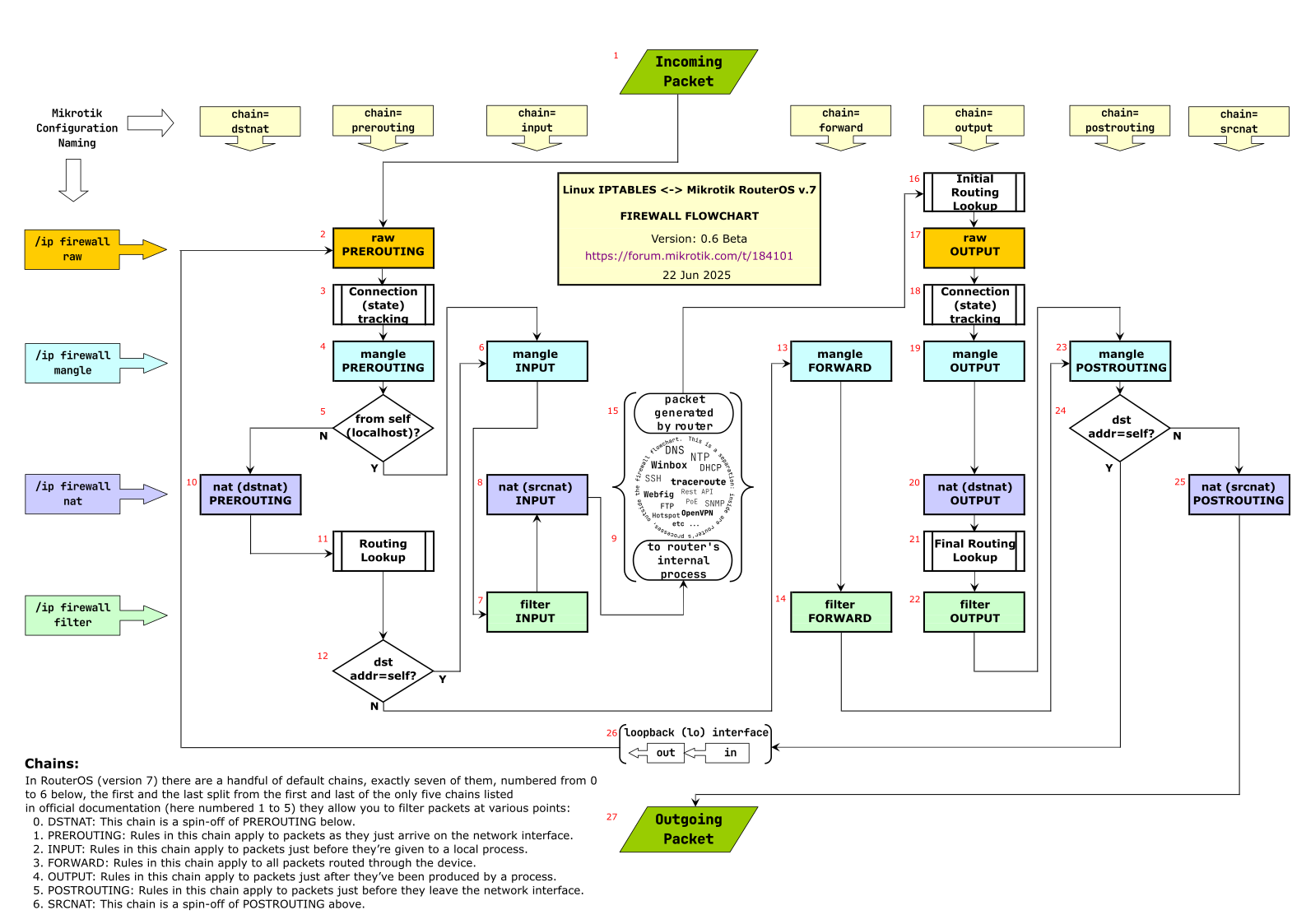
We will use the flowchart from this thread: The ultimate Mikrotik iptables flowchart - RouterOS / Useful user articles - MikroTik community forum

When a LAN client (connected to bridge) pings 192.168.2.1 (this also applies when the client makes a TCP connection to 192.168.2.1 or send UDP packets to 192.168.2.1), the first packet arrives at the router on the in-interface=bridge.

Because this is the first packet, at step #3 (connection state tracking) the packet will be classified as the initial packet of a new connection, and will have connection-state=new.

Next we have #4 mange prerouting. This is where this mangle rule will apply:

The chain is correct (prerouting) the connection mark is not yet set, the connection-state is new, and the dst-address is still 192.168.2.1, which matches 192.168.2.0/24, and the in-interface is also correctly bridge. As a result, the connection mark use-ether2 is set on this connection tracking entry.

Next, in the same mangle prerouting spot, this rule will also apply:

Because the connection-mark is now use-ether2 and in-interface=bridge is also correct. The packet will now have the routing mark out-ether2.

Next in the flowchart is #5 which will be "no" because the packet comes from a LAN client and not from the router. So now we land in #10 DSTNAT. This is where we have the netmap DSTNAT rule that will match:

This NAT action will apply and will cause the destination address of the packet to be changed from 192.168.2.1 into 192.168.1.1, because the netmap action maps 192.168.2.X into 192.168.1.X. So the packet now has dst-address=192.168.1.1.

Next step is #11 routing lookup. Because the packet has the routing mark out-ether2 set, the routing lookup process will consult the out-ether2 routing table to find out about the next hop for the destination address. And because the destination address of the packet is now 192.168.1.1, and the out-ether2 routing table has the route:

The ether2 interface will be used as egress interface, and ARP will be used to find out the correct MAC address of the 192.168.1.1 destination on this interface.


That was for the first packet of the connection. When the LAN client sends further packets to 192.168.1.1 on the same port (or the same ICMP), step #3 will match those following packets with the already existing connection tracking (conntrack) entry. As a result, those following packets will all have connection-state=established (or related when a ICMP error packet needs to be sent), they will also get the connection-mark from the conntrack entry, which is use-ether2. Also, the conntrack entry also remembers that a mapping 192.168.2.1 -> 192.168.1.1 must be applied to the destination address.

So, when these packets arrive at mangle prerouting the mark-connection rule will no longer match (because connection-state is not new and connection-mark is not no-mark. But that's ok, because it already has the correct connection mark (use-ether2).

The mark-routing rule will apply to these packets, because the conditions in-interface=bridge and connection-mark=use-ether2 are correct. As a result, these packets will get the routing mark out-ether2.

The DSTNAT rule is only checked for the first packet of the connection, so #10 will be skipped. However, that's not a problem, because the destination address change from 192.168.2.1 to 192.168.1.1 is remembered and done by the conntrack entry itself. So those packets will all also have dst-address=192.168.1.1 when #11 Routing Lookup is reached.

The routing lookup is done like with the first packets, with the routing-mark and dst-address information. and ether2 is used as egress interface.

@CGGXANNX & @jaclaz Thank you so much for taking the time to answer my questions. It really helps getting a bit of understanding how all the pieces work together in the configuration.

I have configured my setup so far and it seems to mork mostly but I still seem to be missing something or have something misconfigured due to my limited knowlegde.

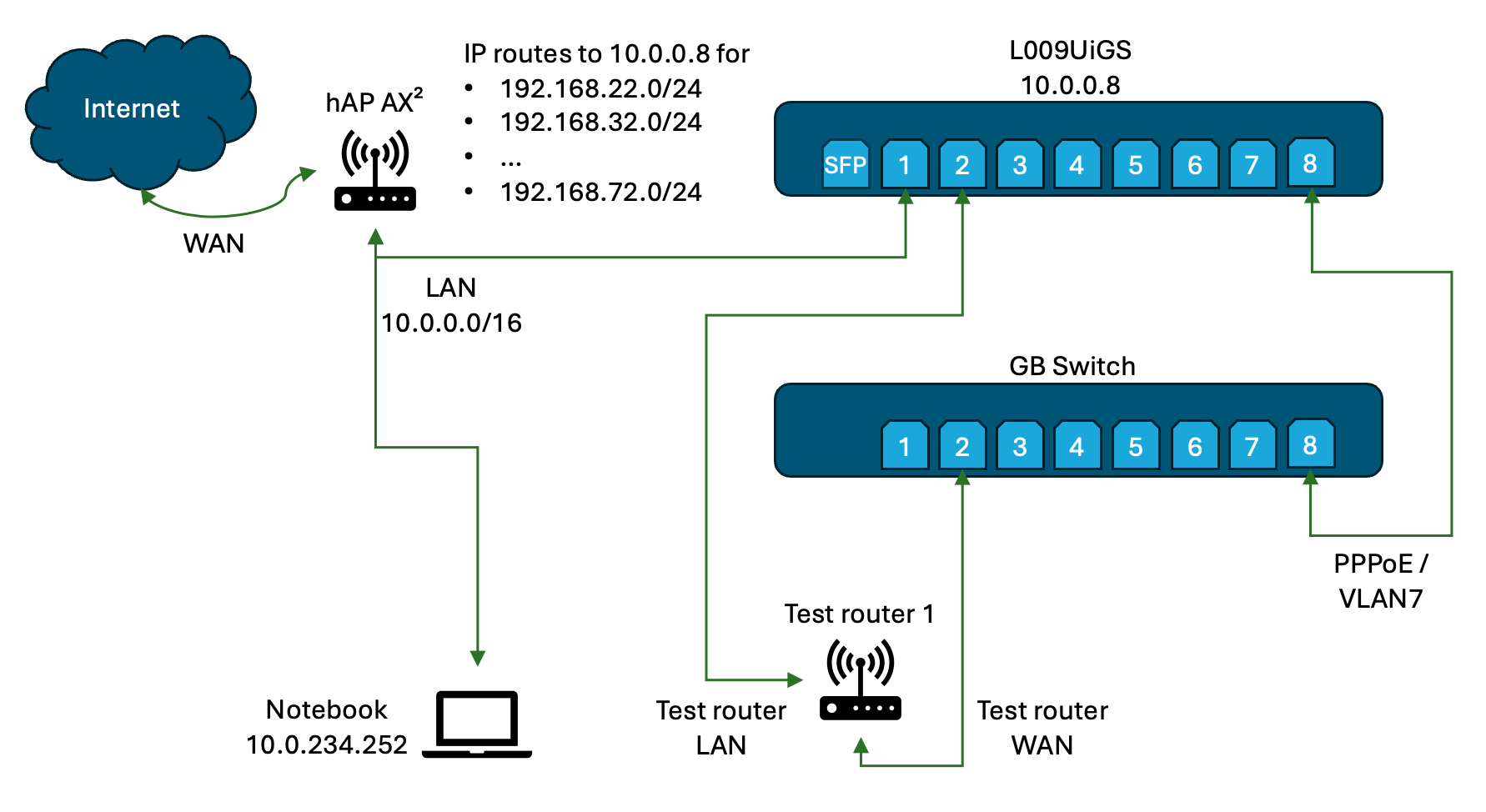
First, I had to change a few things. I'm not using the hAP AX² for the switching / PPPoE server, it's the main router and I have a L009UiGS-RM as it provides me more ports.

The routers I'm testing have the IP range of 192.168.2.0/24, so for convenience I mapped these as

  • ether2 /192.168.2.0/24 => 192.168.22.0/24
  • ether3 /192.168.2.0/24 => 192.168.32.0/24
  • ...
  • ether7 /192.168.2.0/24 => 192.168.72.0/24

allowing up to 7 devices.

This seems to work, however the issue I'm observing is that I can ping the test router's LAN (192.168.2.1) address by any of

  • 192.168.22.1
  • 192.168.32.1
  • ...
  • 192.168.72.1

so I must clearly have done something wrong (not sure though if it's the netmapping part I got wrong or maybe I've borked something by configuring the PPPoE parts in an conflicting way...)

I would really appreciate any further help. Not sure about the forum etiquitte here. Should I open a new thread or is this an okayish followup?

Below are a sketch of my network and the configuration of the L009GiS:

/interface bridge
add comment=defconf name=bridge
add arp=proxy-arp comment=PPPoE name=bridge_pppoe protocol-mode=none
/interface ethernet
set [ find default-name=ether1 ] comment=Upstream
set [ find default-name=ether2 ] comment="Router client"
set [ find default-name=ether3 ] comment="Router client"
set [ find default-name=ether4 ] comment="Router client"
set [ find default-name=ether5 ] comment="Router client"
set [ find default-name=ether6 ] comment="Router client"
set [ find default-name=ether7 ] comment="Router client"
set [ find default-name=ether8 ] comment="Switch  / PPPoE clients"
/interface vlan
add comment="PPPoE clients" interface=ether8 name=vlan7_ether8 vlan-id=7
/interface list
add comment=defconf name=WAN
add comment=defconf name=LAN
/ip pool
add name=default-dhcp ranges=192.168.88.10-192.168.88.254
add comment=PPPoE name=pppoe-clients ranges=192.168.111.2-192.168.111.254
add comment=PPPoE name=pppoe-server ranges=192.168.111.1
/ppp profile
add comment=PPPoE dns-server=192.168.111.1,10.0.0.1 local-address=\
    pppoe-server name=pppoe-profile remote-address=pppoe-clients \
    remote-ipv6-prefix-reuse=no
add comment=PPPoE dns-server=192.168.111.1,10.0.0.1 local-address=\
    pppoe-server name=test-profile remote-address=pppoe-clients
/routing table
add fib name=out-ether2
add fib name=out-ether3
add fib name=out-ether4
add fib name=out-ether5
add fib name=out-ether6
add fib name=out-ether7
/disk settings
set auto-media-interface=bridge auto-media-sharing=yes auto-smb-sharing=yes
/interface bridge port
add bridge=bridge comment=defconf interface=sfp1
add bridge=bridge comment=defconf interface=ether1
add bridge=bridge comment=defconf interface=ether8
add bridge=bridge_pppoe comment=PPPoE interface=vlan7_ether8
/ip neighbor discovery-settings
set discover-interface-list=LAN
/interface list member
add comment=defconf interface=ether1 list=LAN
add interface=ether2 list=LAN
add interface=ether3 list=LAN
add interface=ether4 list=LAN
add interface=ether5 list=LAN
add interface=ether6 list=LAN
add interface=ether7 list=LAN
add interface=ether8 list=LAN
add interface=sfp1 list=LAN
/interface pppoe-server server
add authentication=pap,chap comment="PPPoE with service name" \
    default-profile=pppoe-profile disabled=no interface=bridge_pppoe \
    service-name=tst-service-name
/ip address
add address=10.0.0.8/16 comment=defconf interface=bridge network=10.0.0.0
add address=192.168.111.1/24 comment=PPPoe interface=bridge_pppoe network=\
    192.168.111.0
/ip dhcp-client
add comment=Homebase default-route-tables=main disabled=yes interface=ether1 \
    name="Homebase client"
add add-default-route=no comment="Router client - ether2" interface=ether2 \
    name=client1 use-peer-dns=no use-peer-ntp=no
# Interface not active
add add-default-route=no comment="Router client - ether3" interface=ether3 \
    name=client2 use-peer-dns=no use-peer-ntp=no
# Interface not active
add add-default-route=no comment="Router client - ether4" interface=ether4 \
    name=client3 use-peer-dns=no use-peer-ntp=no
# Interface not active
add add-default-route=no comment="Router client - ether5" interface=ether5 \
    name=client4 use-peer-dns=no use-peer-ntp=no
# Interface not active
add add-default-route=no comment="Router client - ether6" interface=ether6 \
    name=client5 use-peer-dns=no use-peer-ntp=no
# Interface not active
add add-default-route=no comment="Router client - ether7" interface=ether7 \
    name=client6 use-peer-dns=no use-peer-ntp=no
/ip dhcp-server
add address-pool=default-dhcp disabled=yes interface=ether2 name=defconf
/ip dhcp-server network
add address=10.0.0.0/16 comment=defconf dns-server=10.0.0.9 gateway=10.0.0.9 \
    netmask=16
/ip dns
set allow-remote-requests=yes servers=10.0.0.1
/ip dns static
add address=10.0.0.9 comment=defconf name=router.lan type=A
/ip firewall filter
add action=passthrough chain=forward comment=\
    "special dummy rule to show fasttrack counters"
add action=accept chain=input comment=\
    "defconf: accept established,related,untracked" connection-state=\
    established,related,untracked
add action=drop chain=input comment="defconf: drop invalid" connection-state=\
    invalid
add action=accept chain=input comment="defconf: accept ICMP" layer7-protocol=\
    "" protocol=icmp
add action=accept chain=input dst-port=53 protocol=udp src-address-list=\
    pppoe-clients
add action=accept chain=input dst-port=53 protocol=tcp src-address-list=\
    pppoe-clients
/ip firewall mangle
add action=mark-connection chain=prerouting connection-mark=no-mark \
    connection-state=new dst-address=192.168.22.0/24 in-interface=bridge \
    new-connection-mark=use-ether2
add action=mark-connection chain=prerouting connection-mark=no-mark \
    connection-state=new dst-address=192.168.32.0/24 in-interface=bridge \
    new-connection-mark=use-ether3
add action=mark-connection chain=prerouting connection-mark=no-mark \
    connection-state=new dst-address=192.168.42.0/24 in-interface=bridge \
    new-connection-mark=use-ether4
add action=mark-connection chain=prerouting connection-mark=no-mark \
    connection-state=new dst-address=192.168.52.0/24 in-interface=bridge \
    new-connection-mark=use-ether5
add action=mark-connection chain=prerouting connection-mark=no-mark \
    connection-state=new dst-address=192.168.62.0/24 in-interface=bridge \
    new-connection-mark=use-ether6
add action=mark-connection chain=prerouting connection-mark=no-mark \
    connection-state=new dst-address=192.168.72.0/24 in-interface=bridge \
    new-connection-mark=use-ether7
add action=mark-routing chain=prerouting connection-mark=use-ether2 \
    in-interface=bridge new-routing-mark=out-ether2 passthrough=no
add action=mark-routing chain=prerouting connection-mark=use-ether3 \
    in-interface=bridge new-routing-mark=out-ether3 passthrough=no
add action=mark-routing chain=prerouting connection-mark=use-ether4 \
    in-interface=bridge new-routing-mark=out-ether4 passthrough=no
add action=mark-routing chain=prerouting connection-mark=use-ether5 \
    in-interface=bridge new-routing-mark=out-ether5 passthrough=no
add action=mark-routing chain=prerouting connection-mark=use-ether6 \
    in-interface=bridge new-routing-mark=out-ether6 passthrough=no
add action=mark-routing chain=prerouting connection-mark=use-ether7 \
    in-interface=bridge new-routing-mark=out-ether7 passthrough=no
/ip firewall nat
add action=masquerade chain=srcnat comment=PPPoE out-interface=bridge
add action=netmap chain=dstnat dst-address=192.168.22.0/24 to-addresses=\
    192.168.2.0/24
add action=netmap chain=dstnat dst-address=192.168.32.0/24 to-addresses=\
    192.168.2.0/24
add action=netmap chain=dstnat dst-address=192.168.42.0/24 to-addresses=\
    192.168.2.0/24
add action=netmap chain=dstnat dst-address=192.168.52.0/24 to-addresses=\
    192.168.2.0/24
add action=netmap chain=dstnat dst-address=192.168.62.0/24 to-addresses=\
    192.168.2.0/24
add action=netmap chain=dstnat dst-address=192.168.72.0/24 to-addresses=\
    192.168.2.0/24
add action=masquerade chain=srcnat out-interface=ether2
add action=masquerade chain=srcnat out-interface=ether3
add action=masquerade chain=srcnat out-interface=ether4
add action=masquerade chain=srcnat out-interface=ether5
add action=masquerade chain=srcnat out-interface=ether6
add action=masquerade chain=srcnat out-interface=ether7
/ip route
add disabled=no distance=1 dst-address=0.0.0.0/0 gateway=bridge \
    routing-table=main
add disabled=no distance=1 dst-address=192.168.2.0/24 gateway=ether2 \
    routing-table=out-ether2
add disabled=no distance=1 dst-address=192.168.2.0/24 gateway=ether3 \
    routing-table=out-ether3
add disabled=no distance=1 dst-address=192.168.2.0/24 gateway=ether4 \
    routing-table=out-ether4
add disabled=no distance=1 dst-address=192.168.2.0/24 gateway=ether5 \
    routing-table=out-ether5
add disabled=no distance=1 dst-address=192.168.2.0/24 gateway=ether6 \
    routing-table=out-ether6
add disabled=no distance=1 dst-address=192.168.2.0/24 gateway=ether7 \
    routing-table=out-ether7
/ipv6 firewall address-list
add address=::/128 comment="defconf: unspecified address" list=bad_ipv6
add address=::1/128 comment="defconf: lo" list=bad_ipv6
add address=fec0::/10 comment="defconf: site-local" list=bad_ipv6
add address=::ffff:0.0.0.0/96 comment="defconf: ipv4-mapped" list=bad_ipv6
add address=::/96 comment="defconf: ipv4 compat" list=bad_ipv6
add address=100::/64 comment="defconf: discard only " list=bad_ipv6
add address=2001:db8::/32 comment="defconf: documentation" list=bad_ipv6
add address=2001:10::/28 comment="defconf: ORCHID" list=bad_ipv6
add address=3ffe::/16 comment="defconf: 6bone" list=bad_ipv6
/ipv6 firewall filter
add action=accept chain=input comment=\
    "defconf: accept established,related,untracked" connection-state=\
    established,related,untracked
add action=drop chain=input comment="defconf: drop invalid" connection-state=\
    invalid
add action=accept chain=input comment="defconf: accept ICMPv6" protocol=\
    icmpv6
add action=accept chain=input comment="defconf: accept UDP traceroute" \
    dst-port=33434-33534 protocol=udp
add action=accept chain=input comment=\
    "defconf: accept DHCPv6-Client prefix delegation." dst-port=546 protocol=\
    udp src-address=fe80::/10
add action=accept chain=input comment="defconf: accept IKE" dst-port=500,4500 \
    protocol=udp
add action=accept chain=input comment="defconf: accept ipsec AH" protocol=\
    ipsec-ah
add action=accept chain=input comment="defconf: accept ipsec ESP" protocol=\
    ipsec-esp
add action=accept chain=input comment=\
    "defconf: accept all that matches ipsec policy" ipsec-policy=in,ipsec
add action=drop chain=input comment=\
    "defconf: drop everything else not coming from LAN" in-interface-list=\
    !LAN
add action=fasttrack-connection chain=forward comment="defconf: fasttrack6" \
    connection-state=established,related
add action=accept chain=forward comment=\
    "defconf: accept established,related,untracked" connection-state=\
    established,related,untracked
add action=drop chain=forward comment="defconf: drop invalid" \
    connection-state=invalid
add action=drop chain=forward comment=\
    "defconf: drop packets with bad src ipv6" src-address-list=bad_ipv6
add action=drop chain=forward comment=\
    "defconf: drop packets with bad dst ipv6" dst-address-list=bad_ipv6
add action=drop chain=forward comment="defconf: rfc4890 drop hop-limit=1" \
    hop-limit=equal:1 protocol=icmpv6
add action=accept chain=forward comment="defconf: accept ICMPv6" protocol=\
    icmpv6
add action=accept chain=forward comment="defconf: accept HIP" protocol=139
add action=accept chain=forward comment="defconf: accept IKE" dst-port=\
    500,4500 protocol=udp
add action=accept chain=forward comment="defconf: accept ipsec AH" protocol=\
    ipsec-ah
add action=accept chain=forward comment="defconf: accept ipsec ESP" protocol=\
    ipsec-esp
add action=accept chain=forward comment=\
    "defconf: accept all that matches ipsec policy" ipsec-policy=in,ipsec
add action=drop chain=forward comment=\
    "defconf: drop everything else not coming from LAN" in-interface-list=\
    !LAN
/ppp secret
add comment=PPPoE name=tst-username password=tst-password profile=\
    pppoe-profile service=pppoe
/system clock
set time-zone-name=Europe/Berlin
/system logging
add topics=pppoe,!debug
/system package update
set channel=long-term
/system routerboard settings
set enter-setup-on=delete-key preferred-architecture=arm64
/tool mac-server
set allowed-interface-list=LAN
/tool mac-server mac-winbox
set allowed-interface-list=LAN

These, summed up:

mean take 6 networks 192.168.22.0/24 - 192.168.72.0/24 and map ALL OF THEM to 192.168.2.0/24.

Any of:
192.168.22.1
192.168.32.1
192.168.42.1
192.168.52.1
192.168.62.1
192.168.72.1
will be resolved to 192.168.2.1 .

If it is not what you want, please explain what you would expect.

[quote="jaclaz, post:20, topic:273402, full:true"]

mean take 6 networks 192.168.22.0/24 - 192.168.72.0/24 and map ALL OF THEM to 192.168.2.0/24.

Any of:
192.168.22.1
192.168.32.1
192.168.42.1
192.168.52.1
192.168.62.1
192.168.72.1
will be resolved to 192.168.2.1 .

If it is not what you want, please explain what you would expect.

[/quote]

That makes sense.

I tried to apply the given hints so that I have configuration with which I'm able to accces the multiple distinct 192.168.2.0/24 networks, each on a different port :

  1. 192.168.2.0/24 on port ether2 by 192.168.22.0/24
  2. 192.168.2.0/24 on port ether3 by 192.168.32.0/24
  3. ...
  4. 192.168.2.0/24 on port ether7 by 192.168.72.0/24

So pinging 192.168.22.1 would ping the test router on ether2, and pinging 192.168.32.1 would fail, as there is no test router connected yet to ether3.

Seems I failed to do that :grimacing: