Hello my friends ..!
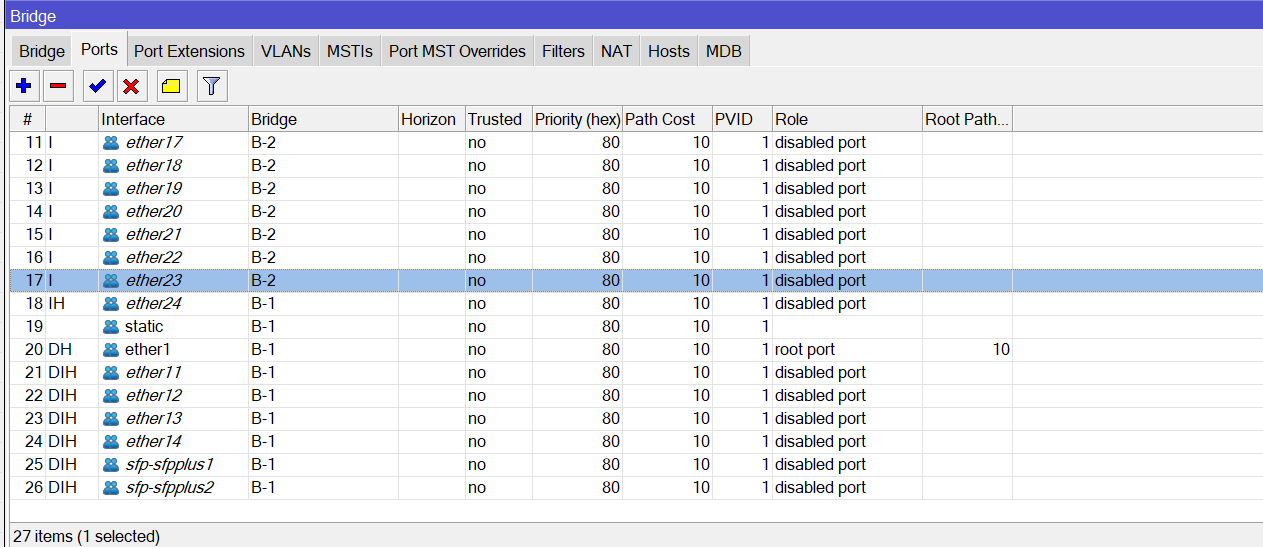
so I create two bridge interface, but when i start adding ports to each bridge i get this -(see the picture below)-
so what does this IH-I-DIH-DH.
absolutely i know that IH mean inactive HW offload and DIH mean…etc
but why B-1 get this I and B-2 get DIH..?
side note: the internet only available on B-1 and no internet on B-2. yet i create a masqurade rule
for more info this is my configuration “see the attached file”
mtconfig.cfg.rsc (6.3 KB)
Hardware offloading only works on a single bridge interface.
It’s more nuanced than that. The CRS1xx/2xx series allow up to 7 hardware-accelerated bridges. Everything else allows one per switch chip. That qualifier is important, because several of the products in MikroTik’s lineup have more than one switch chip inside. Perhaps the most notable current product is the RB4011, but there are others, both current and historical.
If you want some ideas for ways to use this extra freedom, see this article.
Hello Mr tangent ..! thanks for your replay..!
so how does this intercsect with my problem..? how can i solve my problem in current situation..?
Your device — one of the CRS326 models based on the header of your RSC file — isn’t a CRS1xx or 2xx, so you can’t have multiple bridges per switch chip. I’m going to guess it’s one of the 24G models based on details of your bridge setup. From that, we can then go to the product page and dig up the block diagram, which shows only one switch chip.

Therefore, your result is entirely expected. One switch chip = one hardware-accelerated bridge for this class of device. All I’m pointing out with my additional detail up-thread is that this isn’t true of every device in MikroTik’s lineup. Most, yes, but not all.
how can i solve my problem in current situation..?
The general pattern is to create a single hardware bridge for everything, then use other technologies to divide things up. VLANs are one popular method. Port isolation is another. You might even find use for certain VPN technologies.
What precisely are you trying to accomplish?
Two bridges are for the birds… Use one bridge and vlans… AND for the love of god, dont use the bridge to hand out dhcp.
Sounds like VLANs to me.
your always welcome Mr anav.. ..!
..!
will unfortunately i use it ..
so i have two Bridge one is B-1 =192.168.40.1/24 with DHCP on it
and the other B-2 =192.168.99.1/24 also with DHCP on it
i don’t think that i can make VLAN in my current situation ..
so the CRS3xx connected with HUAWEI router in ether1 interface. so i setup the eth1 as out interface and the other ports as a bridge as i explain above
so is there is a way that i can separate the eth12..to eth24 ports from other ports without using Bridges..?
also the eth12..to eth24 ports have to have the same IP address.
As others have said you can only have a single bridge with hardware offload on your device.
The D indicates the port is added dynamically, in this case from /interface bridge port add bridge=B-1 interface=static. This is generally not a good idea, add each port explicitly to the bridge.
The only mechanism to put multiple ethernet ports in the same layer 2 network is a bridge.
Use VLANs internally to segregate the two networks, all of the external ports can be configured as access ports providing untagged-only traffic to either one or the other of the networks.
Hello Mt tdw..! so that is the corner stone, is there is a way to setup internal VLAN in my situation..?
as i said a bove my CRS3xx connected to HUAWEI router via ether1 .