Problems with MPLS IPv4 VPN

I agree that we speak of two different issues, I have discovered those stale routes too. I have also opened a case about that, I get those when I have two routers actively redistributing the same prefix.
If this is the same as what you are experiencing. :slight_smile:

My last mail to support:

Well, i still don’t think that is the case, if you look at this, both is from
the
same router (2.2.2.2):

\

BGP


VPNv4 ROUTES
Flags: L - label-present
0 L route-distinguisher=1:1 dst-address=172.16.1.0/24 interface=ether2
in-label=18 bgp-ext-communities=“RT:1:1”


Here you only have the local route in BGP table, ok?


\

IP route


ROUTE
5
Flags: X - disabled, A - active, D - dynamic,
C - connect, S - static, r - rip, b - bgp, o - ospf, m - mme,
B - blackhole, U - unreachable, P - prohibit
0 ADC dst-address=172.16.1.0/24 pref-src=172.16.1.2 gateway=ether2
gateway-status=ether2 reachable distance=0 scope=10 routing-mark=vrf

1 Db dst-address=172.16.1.0/24 gateway=1.1.1.1
gateway-status=1.1.1.1 recursive via 10.1.1.1 ether1 distance=200
scope=40 target-scope=30 routing-mark=vrf bgp-local-pref=100
bgp-origin=incomplete bgp-ext-communities=“RT:1:1”

2 ADo dst-address=1.1.1.1/32 gateway=10.1.1.1
gateway-status=10.1.1.1 reachable via ether1 distance=110 scope=20
target-scope=10 ospf-metric=20 ospf-type=intra-area

3 ADC dst-address=2.2.2.2/32 pref-src=2.2.2.2 gateway=lo0
gateway-status=lo0 reachable distance=0 scope=10

4 ADC dst-address=10.1.1.0/24 pref-src=10.1.1.2 gateway=ether1
gateway-status=ether1 reachable distance=0 scope=10


But here you have a BGP route where 1.1.1.1 is gateway, and 1.1.1.1 has stopped
redistributing any routes.
It’s not active, but still left over in IP-tables.

My last post was regarding Crami’s issues, which could be related to what I have been troubleshooting the last couple of days.

With some reservation for misunderstanding of our issues. :wink:

Currently we can repeat two problems related to VRFs.
Please wait until we fix them, then we can make further tests and see if here mentioned problems are related.

Has anyone else had any response from Mikrotik Support on these issues ?

They seem to have gone silent on my ticket.

this has been known for a while. I first posted about this I 2012 :

http://forum.mikrotik.com/t/v6-rc6-released/62201/1

also later http://forum.mikrotik.com/t/v6rc14-released/65819/32 and http://forum.mikrotik.com/t/v6-0-released/66371/59

There is also a support ticket : Ticket#2013061066000546


The Vrf, has been unstable in all releases of 6.x

My experience is that L3VPN on RouterOS has been unusable for much longer. I tried it in 5.0rc, 5.12, 5.16 and then gave up since Mikrotik said it would be fixed in the “new routing”. I recently needed L3VPN again and started testing on 6.0 then 6.1 and now 6.2 and have encountered the same issue with stale routes on all of those releases. Maybe that is different from the problem you have, as I cannot see if you are just using VRF, or if you are using L3VPN as well.

Unfortunately I have received no response from Mikrotik on my ticket since the 4th of July.

samsung172 have you logged a ticket on this recently ?

the lastest mail, with supout from the 2 devices connected was sendt 03.07.2013. I have not recived anny answer from this. post was like this:

Finaly i was able to make a supout after the router was upgraded to 6.x. Today I was testing 6.1 to se if it differ any. I does not.

Simple setup:

R1-R2-R3
172.31.0.4-172.31.0.25-172.31.0.41 (at loopback)
Fiber-R1-licenced 400mb/s-R2-Rb800 with rocket –R3.

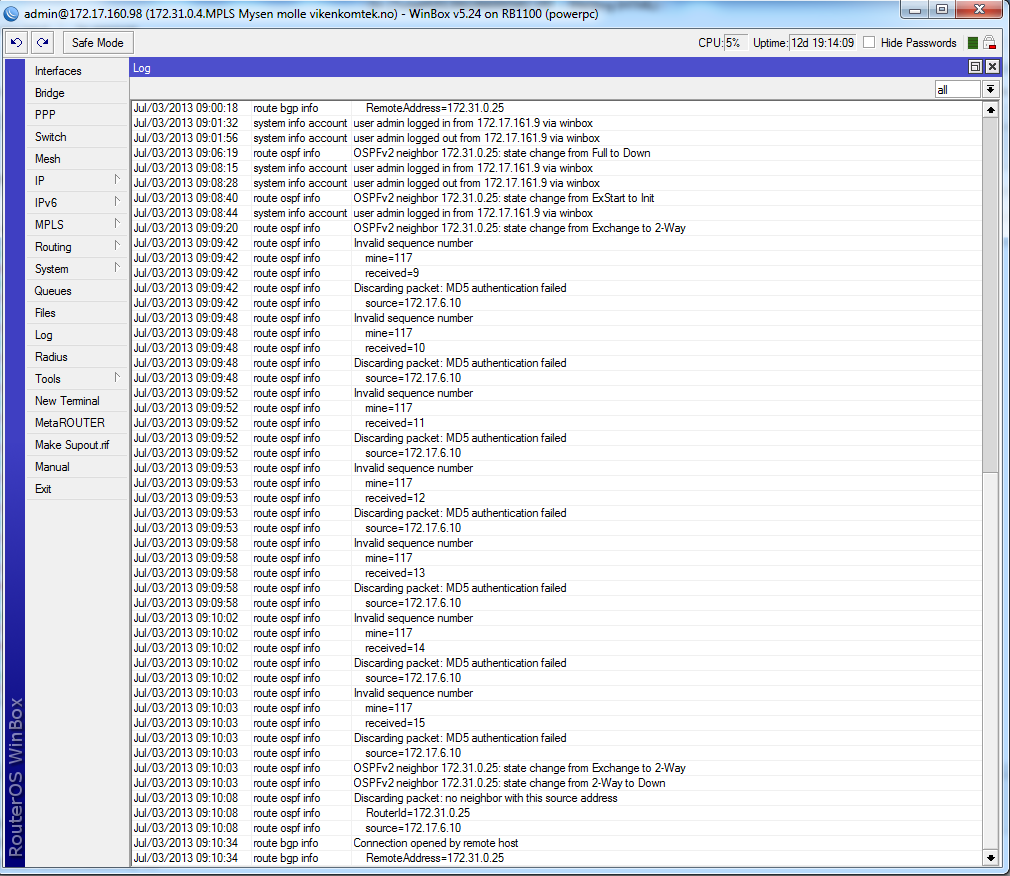
Pic1: From the router with problem,
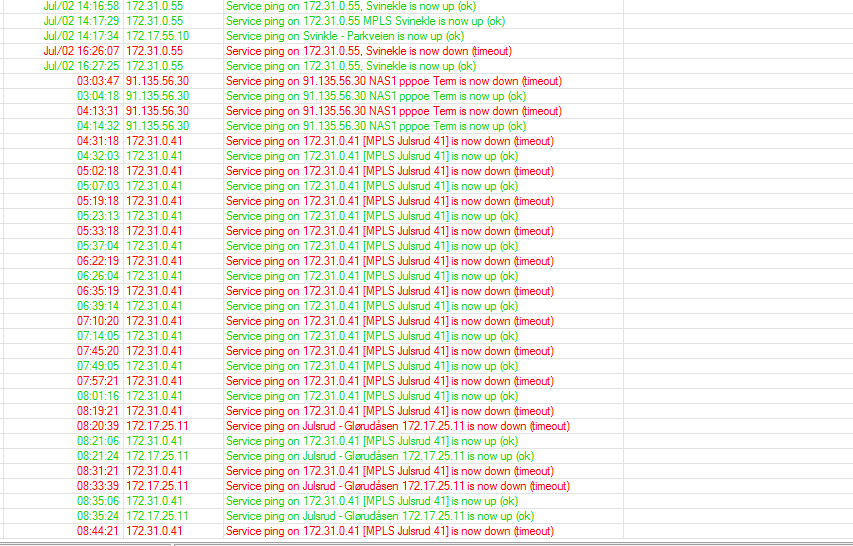
Pic2 – Log to se how ofen problem occur (r3 up down up down)
Pic3 - Log from R1. To se what “happening here”. (ospf down)
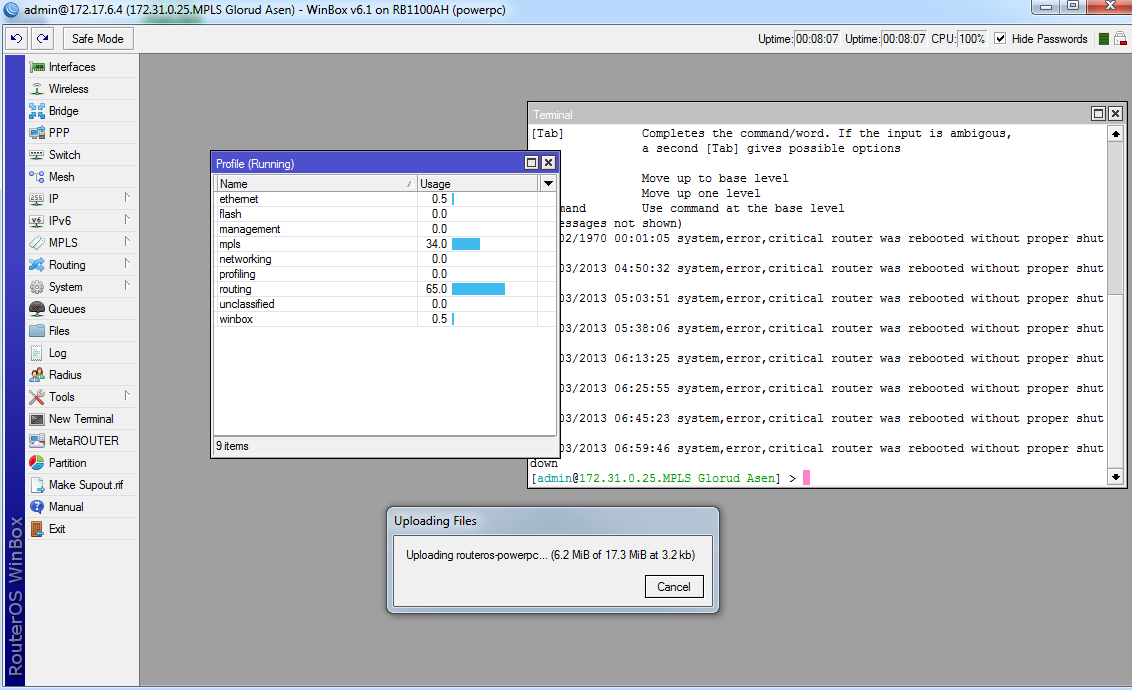
Pic4 – after router (r2) have reebooted by itself.

Suppout files:
Suppout.rif=R2 (with problem)
Suppout2.rif ) R1 (connected to the router with problem)


-----Opprinnelig melding-----
Fra: MikroTik support [Maris] [mailto:support@mikrotik.com]
Sendt: 10. juni 2013 13:41
Til: Thomas Andreassen
Emne: Re: [Ticket#2013061066000546] VRF

Hello,

Try to disable vrfs and then generate supout files. Maybe there will be some useful info.

Regards,
Maris

06/10/2013 14:35 - Thomas Andreassen wrote:

I have tested at a lot of routers, and the same bahavior to all. Only
solution
is
6.rc12.

I have tried, but even serial cable, don’t make the suppout.rif (it
start, but just hang)

At <http://forum.mikrotik.com/t/v6-rc6-released/62201/1
http://forum.mikrotik.com/t/v6-rc6-released/62201/1 i was
describing the behavior.

All is ok, until I put the vrf into /ip route. Its no

I have a backup of config. Works in 6.rc12 but not at 6.0.

I see that the route distinguisher is “unknown”. This behavior exist
in all
6.xxx
versions. Not in 5.xxx

/ip route vrf

add export-route-targets=0.0.0.0:0 import-route-targets=0.0.0.0:0 \

route-distinguisher="(unknown)" routing-mark=vrf.internet

Thomas

-----Opprinnelig melding-----
Fra: MikroTik support [Maris] [mailto:support@mikrotik.com]
Sendt: 10. juni 2013 12:18
Til: Thomas Andreassen
Emne: Re: [Ticket#2013061066000546] VRF

Hello,

There is no difference in code from rc12 to 6.0 in VRFs.

Probably in rc12 you did not trigger the same behavior.

To get supout file you can connect serial cable and generate one via
serial terminal.

Regards,

Maris

06/10/2013 13:06 - Thomas Andreassen wrote:

Hello. Earlier in 6.xx there was an vrf issue, making cpu going 100%.

In

6.rc14 it was ok, and the router did not go to 100% CPU. In 6.0 it

seems like the issue is back, and I cannot have 6.0 to any router

having MPLS,bgp,ospf and vrf.

Is this bug registrated and will be fixed? Earlier you asked me for
a

supout to this device, but its impossible since cpu is 100%, and

router just “hanging”. Its impossible to even connect to the router.
I

have to switch off ospf, bgp and pmls interface in other side, and

connect trough mac-telnet after a while, to give the router a
default

gateway. After this its possible to downgrade again.

Thomas A

pic3.png
pic2.png
pic1.png

samsung172 your issue sounds very similar to mine.

I am using OSPF, BGP (L3VPN signalling), VRF and also route leaking.

I notice that the route leaking partially works on 6.2, e.g. Static/Connected routes appear to be leaked, but if you redistribute “Other BGP” it does not work.

So the issues I have encountered so far:

  • Route leaking only partially works
  • Routes are not always withdrawn (BGP withdraw is received, but routing process crashes, cpu reads 25% and router becomes unresponsive)
  • BGP Cluster ID is not used correctly, e.g. if you have two route reflectors, set the cluster ID on both to 10.1.1.0 and then look at the packets you will see the cluster ID hash is different from each route reflector…

Hopefully Mikrotik can find the time to update my ticket soon, even if they are still researching the problem it would be nice to be kept informed.

I have not seen the problems with route leaking (I don’t leak routes), but the biggest issue, is that once I put the vrf config to /ip route, the CPU goes to 100%. Then it not even possible to make a supout. If you se my old post’s the routers goes crasy.

It’s really a pain in the ass, since its impossible to use CCR’s in places I want a vrf. (typical at CPE). I can use in core net, since the MPLS/VPLS, BGP and OSPF work, as long as I don’t want to have a IP from a vrf to a interface. It still forward the routingtable by the ibgp

It seems like rc6.12 is working. (but then with its other problem)

Some bad news.

I received an update from Mikrotik support to let me know that these problems are not a priority and that they are busy working on other problems.

This means that IPv4 / L3VPN as well as clustered BGP remain unusable in production on Mikrotik RouterOS.

Really bad info. Since we cannot start the rollout of CCR’s before the vrf issue is solved in 6.x. (works like a charm in all 5.x).

The situation is the same for us. Unfortunately L3VPN does not work on v5 either or we could run it on x86.

These features have been in RouterOS since late 3.x releases, and have never worked correctly. As mentioned earlier I have previously reported the issues and been fobbed off by support with the standard “this is fixed in new routing”.

Saying I am frustrated is an understatement. The product does not do what it says in the data sheets.

For me the last working version is rc13, with everything after that the vrf stops within minutes at most, tried latest build of v6.2 yesterday without success.

I have tried it with the new 6.2 release now, same result… As expected because the releas notes do not state anything in this direction.
Downgraded now to 6.0rc13 and it worked for s short time, but now I can’t get it to work at all…

Also noticed that VRF’s are not isolated from each other. I can ping IP’s in one VRF configured on the CCR from a laptop connected to another VRF…

This is anoying …

When can we expect a fix ?

Regards

Matthias

I’m currently experiencing the same behaviour with MPLS/IPv4 VPN’s as well.

5.25 - Mostly works. Occasionally hit 100% cpu on routing process. Frequency increases when wireless links (running this over long distance) suffer from flaps
6.0rc14 - Up to here, behaviour is consistent.
6.1 - VRF is available for 1 or 2 seconds after coming up. Then nothing.
6.2 - as 6.1

What changed?

Downgraded back to 5.25 to get life back into the network.

It’s actually quite disappointing that this “feature” is available, but is buggy and has been for a long time, and is not even considered important enough to address. It will be fixed in the “new routing”? I’m not holding my breath. It hasn’t been fixed for how many years now?

On the positive side, mpls/bgp/l2vpn works just fine. Doesn’t fix this issue though.

Pity is also that I don not have the luxury of going back to 5.x because on the CCR there is only newer releases …

I agree 100% on all points raised.

We have numerous L2VPN implementations with Mikrotik and they work flawlessly, the problems are all related to L3 functionality e.g. VRF’s, RIB/FIB mismatches, OSPF instances, route leaking, route filters, bfd.

My feeling is that there are just too many fundamental things wrong with routing in 5.x/6.x to put a band-aid on that will get this functionality to a usable point. I have logged numerous tickets that seemed to be making progress, only to have them end in “will be fixed in new routing” or in silence.

MIkrotik have a lot on their plate at the moment with the new architectures, and I am sure we will see the “new routing” as soon as it is ready (my pick is it will arrive in v7 betas) so all we can do is sit back and wait, or move to a more resilient MPLS platform.

vrf is now OK in my setup. Its fixed in 6.5rc1

I also have good results so far with 6.5rc1, but I’ll give it some more time before I go and say that it’s fixed. :slight_smile:

At least its not 100% in CPU, and the router’s have now about 2 days uptime. In pre 6.5 (exept 6.rc13) there was about 2-3 min uptime before cpu goes 100%.

Is it long enough to be considered ‘more time’ now? How’s it running?