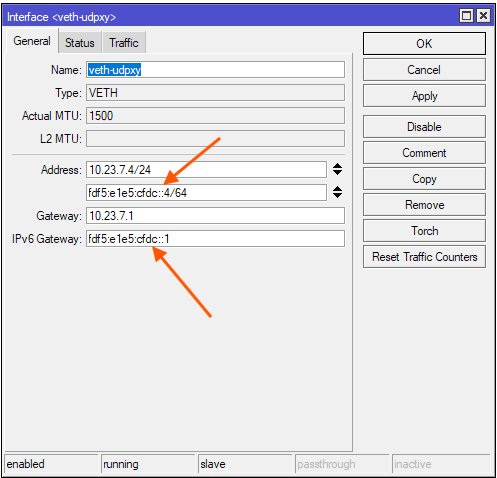
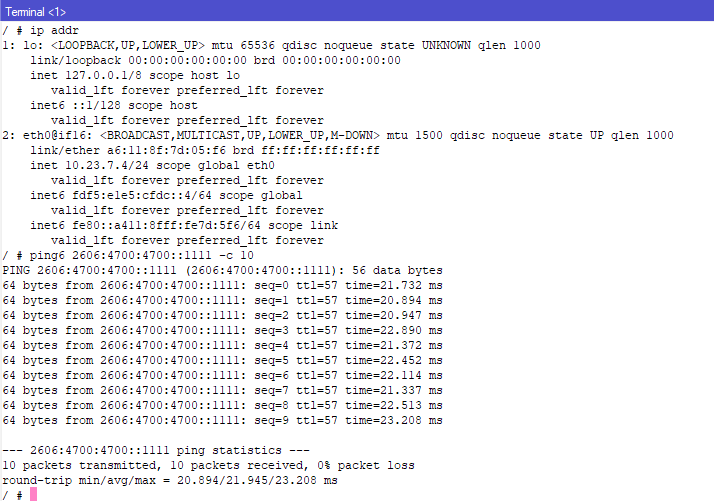
From my observations, SLAAC does not fully work inside the RouterOS containers. It seems like the container does not actively send Router Solicitation multicast messages itself. Even if you added a prefix on the bridge containing the VETH interface, with advertise turned on, you cannot expect the container to get an IPv6 address immediately after it starts. The container only picks an address for itself when it receives a Router Advertisement (RA) message from the bridge. Which means with the default setting it can take up to 10 minutes before the container has an IPv6 address from the bridge’s prefix with SLAAC (the default RA Interval is set to 200-600 seconds). Furthermore, the container does not use the gateway information from the RA, which means if you hadn’t set “gateway6” on the VETH interface then even if the container has got the RA message, it will still have no default IPv6 route.
Which means if you want the container to immediately be able to go out to the internet with IPv6 you’ll need to:
- Add a static IPv6 to the VETH interface, but not under /ipv6 address, but in the properties of the VETH interface
- Set the router’s address on the bridge as gateway6 of the VETH interface.
- If you don’t have static global prefix, you’ll have to use a random ULA prefix. In that case you’ll need NAT rule(s), I prefer a srcnat netmap rule, to map the ULA prefix to the GUA prefix of the outgoing WAN interface.
If you only want SLAAC then you can omit adding the static IPv6 address to the VETH, but “gateway6” is still required, and of course, you’ll have to accept that the container has no IPv6 connectivity for the first few minutes, until it gets the RA multicast message.